
AI Tools for Local Businesses: 10 Practical Picks
Start with five tool categories and you cover most of what slows a local business down: a content writing assistant for marketing copy and SEO, a visual design app for social and print graphics, a chatbot and lead capture tool for 24/7 customer responses, an automation layer to connect your apps without code, and a bookkeeping assistant to cut reconciliation time. These five categories handle the work that eats owner hours every week.
- Content AI (e.g., ChatGPT or a writing assistant): drafts blog posts, Google Business Profile updates, and email campaigns in minutes.
- Visual design AI (e.g., Canva with AI features): produces branded social graphics, flyers, and ads without a designer.
- Chatbot and lead capture (e.g., an AI chat widget on your website): answers FAQs and captures contact info around the clock.
- Automation platform (e.g., Zapier): moves data between your website, CRM, and email list automatically.
- Bookkeeping assistant (e.g., QuickBooks with AI categorization): reduces manual data entry and flags errors before they compound.
Quick next steps: Pick one workflow that costs you the most time this week. Sign up for the free tier of the matching tool and run a 7–14 day pilot before committing to a paid plan.
Pro Tip: Track two numbers from day one: hours saved per week and new leads captured. If neither moves after two weeks, switch tools before spending more time or money.
Key Takeaways
The most effective AI strategy for a local business starts with one workflow, one tool, and a two-week pilot before any significant investment.
| Point | Details |
|---|---|
| Start with five categories | Content AI, visual design, chatbot/lead capture, automation, and bookkeeping cover the highest-ROI workflows for most local businesses. |
| Free tiers are real entry points | ChatGPT, Canva, Zapier, HubSpot CRM, and Fireflies all offer free tiers sufficient to run a genuine 7–14 day pilot. |
| Measure before you scale | Track hours saved and leads captured from day one; many small businesses save 11–40 hours per month once tools are properly configured. |
| Compliance is non-negotiable | Healthcare and payment-processing businesses must confirm HIPAA BAAs and PCI DSS compliance before entering any customer data into an AI tool. |
| Tatemweb builds and configures | For Florida businesses that want a done-for-you stack, Tatemweb handles AI website design, chatbot setup, compliance, and local SEO as a single integrated service. |
Table of Contents
- Why AI tools for local businesses deliver real, measurable gains
- How do you choose the right AI tool for your workflow?
- Which AI tools should your local business actually use?
- What does a real AI tool stack look like for your business type?
- How do you protect customer data when using AI tools?
- Your 30-day quickstart plan for AI implementation
- Tatemweb’s experience implementing AI for local businesses
- What the agency actually starts with for every local client
- Tatemweb helps you implement AI tools without the guesswork
- Sources
- FAQ
Why AI tools for local businesses deliver real, measurable gains
The business case for artificial intelligence for small businesses is no longer theoretical. By January 2026, roughly three-quarters of small U.S. businesses were using AI regularly, with marketing (about 45%), customer service (about 37%), and bookkeeping (about 35%) leading adoption. Businesses using AI report productivity improvements and revenue increases at far higher rates than those that do not.
The gains show up in four areas almost immediately.
Content and local SEO. Writing product descriptions, weekly social posts, and Google Business Profile updates used to take hours. AI writing tools cut that to minutes, and the volume increase alone tends to lift search visibility within weeks.

24/7 customer responses. A chatbot on your website answers “Are you open Sunday?” and “Do you take insurance?” at 2 AM without you lifting a finger. That means fewer missed leads and a better first impression for every visitor who lands outside business hours.
Bookkeeping and expense automation. AI-assisted accounting tools categorize transactions, flag duplicates, and prepare draft reports. Owners who previously spent a weekend every month on the books often cut that to a few hours.
Inventory and scheduling. Retail and service businesses use machine learning for local services like demand forecasting and appointment optimization. A small café that forecasts weekend foot traffic more accurately wastes less food and schedules staff more precisely.
Adoption snapshot: Local businesses using AI report monthly savings commonly in the $500–$2,000 range and free up roughly 20+ hours of manual work per week, with the largest near-term returns concentrated in content production and automated review responses.
Salesforce research confirms that SMBs investing in AI are more likely to be growing, with marketing automation, content creation, product recommendations, and 24/7 customer support cited as the top applications. The pattern is consistent: owners who start with one high-friction workflow and automate it tend to expand from there.
How do you choose the right AI tool for your workflow?
The right tool is the one you will actually use, that connects to what you already have, and that does not put your customer data at risk. Use this six-criteria checklist before you sign up for anything.
- Cost vs. ROI potential. Does the free tier give you enough to test the core feature? Can you calculate a rough payback (hours saved × your hourly rate)?
- Integrations. Does it connect natively to your CRM, email platform, or point-of-sale system? A tool that lives in isolation creates more manual work, not less.
- No-code setup. Can a non-technical owner configure it in under an hour? If the setup requires a developer, factor that cost in.
- Data ownership. Do you own your data and can you export it at any time? This matters most for customer lists and financial records.
- Compliance needs. If you handle health information, you need HIPAA-compatible tools. If you process card payments, PCI DSS applies. Check the vendor’s compliance documentation before entering any sensitive data.
- Measurable KPIs. Define what success looks like before you start: leads captured, hours saved, revenue attributed, or reconciliation time cut.
Red flags to walk away from
- The vendor’s terms allow them to train their models on your customer data without opt-out.
- There is no data export function or it requires a support ticket.
- No native integrations and no API or Zapier connector.
- Customer support is email-only with multi-day response times.
A low-risk 7–30 day pilot plan
Practical adoption advice from implementation experience is consistent: start by automating one high-friction workflow, train staff to review outputs, and measure specific metrics rather than vague productivity claims.
- Days 1–3: Identify the single most time-consuming repeatable task (writing review responses, scheduling confirmations, invoice categorization). Set a baseline: how long does it take today?
- Days 4–7: Sign up for the free tier, complete the basic configuration, and run the tool on five real examples. Compare output quality and time spent.
- Days 8–21: Run the tool in parallel with your current process. Do not fully replace the manual step yet.
- Days 22–30: Compare your KPIs against the baseline. If the tool saves measurable time or improves a metric, expand it. If not, try a different tool in the same category.
Which AI tools should your local business actually use?
The tools below are grouped by the job they do. Every one of them offers a free tier or a low-cost entry point, and none requires a developer to get started. An affordable marketing stack pairs a generative writing assistant, an SEO tool, and a visual design app for roughly $100–$300/month at entry level, which is the right budget anchor for most local businesses starting out.
Marketing and content
ChatGPT (OpenAI) writes blog posts, email subject lines, Google Business Profile updates, and social captions. The free tier (GPT-4o access included) handles most small-business content needs. Start by pasting your top five customer FAQs and asking it to draft answers for your website. For deeper local SEO work, pair it with a dedicated SEO tool. See how AI-driven SEO compounds the content output over time.
Mailchimp handles email marketing with AI-assisted subject line suggestions, send-time optimization, and audience segmentation. The free plan covers up to 500 contacts, which suits most local businesses in their first year of email marketing. Connect it to your website form via Zapier and new leads flow into your list automatically.
Perplexity functions as an AI-powered research assistant. Use it to monitor competitor positioning, find local citation opportunities, or quickly summarize industry news before writing a newsletter. It cites its sources, which makes it more reliable than a plain chatbot for factual research.
Visual design
Canva with its AI features (Magic Design, text-to-image, background remover) lets a non-designer produce professional social graphics, flyers, menus, and ad creatives in minutes. The free tier is generous; the Pro plan at roughly $15/month unlocks brand kits and bulk-resize features that save significant time for businesses posting across multiple platforms.
Chatbots and lead capture
An AI chat widget on your website captures leads and answers FAQs 24/7. AI chatbots and lead capture tools are among the highest-ROI implementations for local service businesses because every after-hours inquiry that gets a response is a lead that would otherwise be lost. Look for tools that integrate with your CRM and support custom conversation flows without code.

Automation and integration
Zapier connects over 7,000 apps and lets you build multi-step automations without writing a line of code. Automation platforms are the connective layer that move data between your website, CRM, and email list and trigger follow-up actions automatically. A basic Zap (new form submission → add to CRM → send welcome email) takes about 15 minutes to configure. The free tier covers 100 tasks per month, enough to test two or three workflows.
Google Workspace with Gemini (Docs, Sheets, Gmail) gives small teams an AI layer across their everyday tools. Gemini in Docs and Sheets speeds up document drafting, summarizes information, and extracts structured data from text without requiring any additional software. For a business already paying for Google Workspace, this is the lowest-friction AI upgrade available.
Accounting and bookkeeping
QuickBooks (Intuit) uses AI to categorize transactions, match receipts, and flag anomalies. The Simple Start plan at roughly $35/month covers most solo-owner needs. Connect it to your bank and credit card accounts on day one and let it run for two weeks before you touch anything manually. The time savings in monthly reconciliation alone typically justify the cost.
Scheduling and operations
HubSpot CRM and Marketing Hub manages contacts, tracks deals, and automates follow-up sequences. The free CRM tier is genuinely useful for local businesses with up to a few hundred contacts. The Marketing Hub adds email automation, landing pages, and lead scoring. For a local clinic or law firm, HubSpot’s pipeline view replaces a spreadsheet and a stack of sticky notes.
E-commerce and retail
Shopify with its AI features (product description generation, demand forecasting, abandoned cart recovery) is the standard platform for local retailers adding an online store. The Starter plan at roughly $5/month lets you sell through a link or social profile; the Basic plan at roughly $39/month adds a full storefront. Shopify’s AI tools for local businesses in retail reduce the time spent on product catalog management significantly.
Productivity and meeting notes
Fireflies.ai (or Otter.ai) transcribes meetings, extracts action items, and sends summaries automatically. For an owner who runs five client calls a day, the time saved on manual note-taking and follow-up drafting adds up fast. Both tools offer free tiers that cover a reasonable number of monthly transcription minutes.
AI tool comparison at a glance
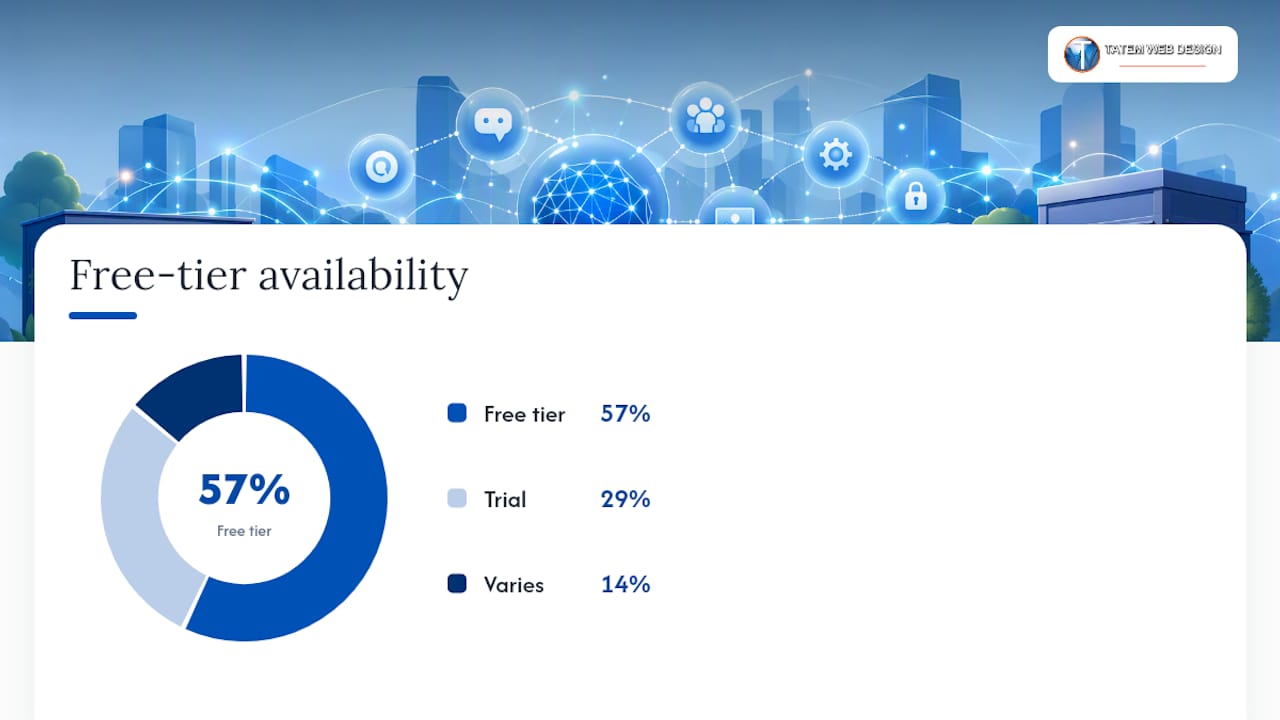
| Function | Best for | Free tier available | Ease of setup | Key integrations | Compliance note | Scale |
|---|---|---|---|---|---|---|
| Writing assistants | Content, email, FAQs | Yes (ChatGPT free tier) | Very easy | Zapier, browser plugins | Review outputs before publishing | Solo to multi-location |
| Visual design apps | Graphics, ads, print | Yes (Canva free) | Very easy | Social platforms, Google Drive | Standard data handling | Solo to team |
| Chatbot and lead capture | 24/7 responses, lead gen | Varies by provider | Moderate | CRM, email, website | HIPAA add-ons available for some | Solo to multi-location |
| Automation platforms | Workflow connections | Yes (Zapier free tier) | Easy to moderate | 7,000+ apps | Depends on connected apps | Solo to enterprise |
| Accounting tools | Bookkeeping, reconciliation | Trial available (QuickBooks) | Easy | Bank feeds, payroll | PCI-aware; consult for HIPAA | Solo to multi-location |
| CRM and marketing | Pipeline, email sequences | Yes (HubSpot free CRM) | Moderate | Email, website, Zapier | GDPR tools included | Solo to enterprise |
| E-commerce platforms | Online sales, inventory | Trial (Shopify) | Moderate | Payment, shipping, POS | PCI DSS compliant | Solo to multi-location |
| Productivity and transcription | Meeting notes, follow-ups | Yes (Fireflies/Otter free) | Very easy | Zoom, Google Meet, Teams | Review data retention policy | Solo to team |
What does a real AI tool stack look like for your business type?
Three common local business types, three concrete stacks. Each one is built around tools already listed above, with two automation recipes you can copy.
Restaurant or food service
Priority: Reduce no-shows, automate review responses, and keep social content consistent.
- Stack: Google Workspace (scheduling and internal docs), Canva (weekly social graphics), ChatGPT (menu copy and review response drafts), Zapier (connect reservation form to email confirmation), Mailchimp (weekly specials email).
- Recipe 1: New online reservation submitted → Zapier triggers → automated confirmation email sent via Mailchimp → calendar event created in Google Calendar. Expected outcome: no-show rate drops because guests receive a timely reminder.
- Recipe 2: New Google review posted → Zapier triggers → ChatGPT drafts a response → owner reviews and posts in under two minutes. Expected outcome: faster response times and higher review engagement.
Healthcare clinic or medical practice
Priority: HIPAA-compliant communication, appointment automation, and staff productivity.
- Stack: HubSpot CRM (patient pipeline, non-PHI contacts only), Fireflies.ai (internal meeting notes only, never patient sessions), QuickBooks (billing reconciliation), Google Workspace with Gemini (document drafting), a HIPAA-compliant chatbot for the website.
- Recipe 1: New appointment request form submitted → Zapier triggers → HubSpot contact created → automated confirmation SMS or email sent. Expected outcome: front-desk time on phone confirmations cut significantly.
- Recipe 2: Weekly staff meeting recorded in Fireflies → action items extracted automatically → summary emailed to team. Expected outcome: fewer dropped follow-ups between departments.
Important: For any tool handling protected health information, confirm the vendor signs a Business Associate Agreement (BAA) before use. Standard ChatGPT, Canva, and Zapier accounts are not HIPAA-covered by default.
Local retail shop
Priority: Online sales, inventory visibility, and repeat-customer marketing.
- Stack: Shopify (storefront and inventory), Mailchimp (post-purchase email sequences), Canva (product graphics and promotions), QuickBooks (synced to Shopify for bookkeeping), Zapier (connect Shopify to Mailchimp for automated post-purchase flows).
- Recipe 1: Customer completes purchase on Shopify → Zapier triggers → customer added to Mailchimp post-purchase sequence → three-email series sent over 14 days (thank you, product tips, review request). Expected outcome: repeat purchase rate increases and review count grows.
- Recipe 2: Inventory item drops below threshold in Shopify → Zapier triggers → email alert sent to owner with reorder details. Expected outcome: fewer stockouts on top-selling items.
For AI workflow examples that map to these recipes in more detail, the templates there translate directly to local business setups.
Integration best practices
- Use a dedicated business email address for all tool accounts, never a personal one.
- Store API keys and credentials in a password manager (1Password or Bitwarden), not in a spreadsheet.
- Test every new Zap or automation on a sandbox contact or test order before going live.
- Document each automation in a shared Google Doc: trigger, action, expected outcome, and who owns it.
- Set a monthly 15-minute review to check that automations are still firing correctly.
How do you protect customer data when using AI tools?
Before you enter a single customer record into any AI tool, require three things from every vendor: a clear data retention policy, a data export function, and written confirmation of their encryption standard. These three questions filter out most risky tools in under ten minutes.
Compliance checklist for U.S. local businesses
- HIPAA (healthcare). Any tool that touches patient names, appointment details, or health information must have a signed BAA with your practice. This applies to chatbots, CRMs, and transcription tools. Standard consumer AI tools do not qualify.
- PCI DSS (card payments). Never enter raw card numbers into an AI tool. Use a PCI-compliant payment processor (Stripe, Square) and keep AI tools downstream of the payment step. Confirm your e-commerce platform’s PCI compliance tier before launch.
- PII handling (all businesses). Customer names, email addresses, and phone numbers are personally identifiable information. Check whether the vendor uses your data to train their models. Most enterprise-tier plans offer a data-processing agreement that opts you out of model training.
Vendor questions to ask before you sign up
- Does your platform sign a BAA for HIPAA-covered entities?
- Can I export all my data at any time, in a standard format?
- What is your data retention period after account cancellation?
- Is data encrypted in transit and at rest? What standard (AES-256)?
- What is your breach notification timeline and process?
For businesses that process payments or handle health data, AI security enhancements and compliance consulting are worth the investment before you scale any AI workflow.
Pro Tip: Create a separate API key for each tool integration and assign it the minimum permissions needed. If one key is compromised, you revoke it without disrupting every other integration. Most platforms support this under “API keys” or “developer settings.”
Your 30-day quickstart plan for AI implementation
This 30-day plan answers one question: does this tool earn its keep? Run it once per tool, and you will have a repeatable process for every future adoption decision.
Week 1: Pick and baseline
- Choose one workflow (content writing, lead capture, bookkeeping, or scheduling).
- Measure the current state: how many hours per week does this task take? What is the error rate or missed-lead count?
- Identify the tool category that fits and sign up for the free tier.
- Complete the basic account setup and connect one integration (e.g., link QuickBooks to your bank account, or connect Zapier to your website form).
Week 2: Configure and test
- Run the tool on five real examples from your business (five blog topics, five customer inquiries, five invoices).
- Review every output manually. Note where the AI is accurate and where it needs correction.
- Adjust settings, prompts, or templates based on what you observe.
- Train any staff member who will use the tool on how to review and approve outputs.
Week 3: Run the pilot
- Use the tool for all instances of that workflow for seven consecutive days.
- Continue running your manual backup process in parallel for the first three days, then stop if outputs look reliable.
- Log any errors, edge cases, or customer complaints related to the new workflow.
Week 4: Measure and decide
- Compare time spent on the workflow against your Week 1 baseline.
- Check your KPIs: leads captured, hours saved, reconciliation time, or error rate.
- If the tool saves measurable time or improves a metric, move it to permanent use and pick the next workflow.
- If results are flat, try a different tool in the same category before abandoning the workflow entirely.
KPIs to track across all pilots:
- Hours saved per week on the automated task
- Leads captured via chatbot or form (compared to pre-AI baseline)
- Email open and click rates (for AI-assisted campaigns)
- Bookkeeping reconciliation time per month
- Customer response time (for chatbot or automated reply tools)
Many small businesses report saving 11–40 hours per month once AI tools are properly configured. The key word is “properly” — a misconfigured automation creates more work, not less.
Tatemweb’s experience implementing AI for local businesses
Tatemweb delivers end-to-end AI implementation for local and small businesses in Florida, covering everything from AI website design and chatbot setup to cybersecurity compliance and local SEO. With over 26 years of experience in web development and digital marketing, the agency has built a repeatable process for getting local businesses live with AI tools quickly and safely.
Services aligned with this article’s recommendations:
- AI website design with built-in chatbots, smart lead capture forms, and SEO-optimized content structures
- AI chatbot and lead capture implementation for 24/7 customer engagement on your website
- AI email marketing integration connecting your website, CRM, and email platform automatically
- AI cybersecurity and compliance consulting including HIPAA, PCI, and CMMC Level 2 for regulated industries
- AI agent setup using platforms like NemoClaw, Claude, and Perplexity for multi-step business automation
- AI-powered local SEO to improve search visibility for Florida businesses
For businesses in healthcare, legal, retail, or food service, the AI for Business Florida page outlines the specific implementation paths Tatemweb uses for each industry.
What the agency actually starts with for every local client
Three implementations come first, every time, because they deliver visible results within the first 30 days and build the foundation for everything else.
First: an AI-assisted content and SEO setup. Most local businesses have thin or outdated website content. Getting a writing assistant configured with your brand voice, service area, and top keywords produces a measurable lift in search impressions within weeks. It also gives the owner a repeatable process for new content going forward, rather than a one-time fix.
Second: a chatbot or AI lead capture widget on the website. The gap between business hours and customer inquiries is where most local leads are lost. A properly configured chat widget captures name, phone, and inquiry type at any hour. Owners typically see their lead volume increase within the first week simply because inquiries that previously went unanswered now get an immediate response.
Third: one core automation connecting the website to the CRM and email platform. This is usually a Zapier workflow: new lead from website → contact created in HubSpot or equivalent → welcome email sent automatically. It takes under an hour to configure and eliminates a manual step that most owners were doing inconsistently.
- Content and SEO setup: expect improved search impressions within 30–60 days and a reusable content workflow.
- Chatbot and lead capture: expect more inquiries captured after hours and faster response times.
- CRM and email automation: expect fewer dropped leads and a consistent follow-up process.
When the workflow is straightforward and the tools are well-documented, a motivated owner can handle the setup independently. When compliance requirements, custom integrations, or multi-location complexity enter the picture, that is the right moment to bring in an agency. For a clear picture of when to hire an AI consultant, the decision usually comes down to time, risk tolerance, and the cost of getting it wrong.
Tatemweb helps you implement AI tools without the guesswork
You have seen the tools, the stacks, and the 30-day plan. The next question is whether you have the time and technical confidence to set it all up correctly, especially if your business handles health data, card payments, or sensitive customer records.

Tatemweb’s approach is different from buying a software subscription and figuring it out yourself. The agency audits your current workflows, identifies the two or three highest-ROI automation opportunities, and builds a configured, tested stack that connects your website, CRM, email, and compliance layer from day one. For Florida clinics, restaurants, and retailers, that means a custom AI website with a live chatbot, integrated lead capture, and local SEO built in, not bolted on afterward. If you process payments or handle patient data, the compliance layer is included, not an afterthought.
Call Tatemweb directly at 772-224-8118 or visit the AI services page to schedule a short discovery call and find out which workflows in your business are ready to automate now.
Sources
The following resources were used in researching this article and are worth bookmarking for ongoing reference.
FAQ
What are the best AI tools for a local business just starting out?
Start with ChatGPT for content, Canva for visuals, Zapier for automation, and QuickBooks for bookkeeping. All four have free tiers or low-cost entry plans that let you test before committing.
How much does an AI tool stack cost for a small business?
An entry-level stack covering content, design, automation, and bookkeeping typically runs $100–$300 per month, based on publicly listed pricing for tools like Canva Pro, Zapier Starter, and QuickBooks Simple Start.
Do AI tools for local businesses require technical skills to set up?
Most tools covered here are designed for non-technical users. Zapier, Canva, Mailchimp, and HubSpot CRM all offer no-code configuration, and most setups take under an hour with the free onboarding guides each platform provides.
Are AI tools HIPAA-compliant for healthcare businesses?
Standard consumer plans for most AI tools are not HIPAA-compliant by default. Healthcare businesses must confirm the vendor signs a Business Associate Agreement and that the tool meets HIPAA technical safeguards before entering any patient-related data.
How do you measure ROI from AI tools in a local business?
Track two primary metrics: hours saved per week on the automated task and leads captured or converted through AI-assisted channels. Small businesses commonly report saving 11–40 hours per month once tools are properly configured, which translates directly to owner time or reduced labor costs.
Recommended
Tatem Web Design
26+ YearsWeb Design & SEO Specialist · Tatem Web Design
Matt Tatem has been designing websites professionally since 1999, making Tatem Web Design one of Florida's longest-running web agencies. Based in Stuart, FL, he specializes in WordPress, local SEO, Shopify e-commerce, and cybersecurity consulting for small businesses.
What a CMMC Level 2 Assessment Requires and How to Prepare
Prepare for your CMMC Level 2 assessment by understanding requirements, assessment paths, and mapping your Controlled Unclassified Information.
A Data Retention Policy Is Your Rulebook for Keeping and Deleting Data
Establishing a clear data retention policy helps manage data risk, ensuring compliance and effective data management for your organization.
Law Firm Local SEO: A Practical Playbook for More Local Clients
Unlock more local clients for your law firm with effective local SEO strategies. Optimize your Google Business Profile and boost your visibility!