
How to Create Landing Pages That Convert in 2026
A landing page is a standalone web page built around a single conversion goal, whether that goal is capturing a lead, selling a product, or booking a consultation. Knowing how to create landing pages that actually convert is the difference between paid traffic that pays off and ad spend that disappears. Systematic testing and best practices deliver average conversion uplifts of 30–80% within 90 days. That number reflects what happens when you treat a landing page as a conversion system built on clarity, speed, and psychology, not just a pretty design asset.
How to create landing pages: prerequisites and tools
Before you write a single headline, you need three things locked in: a clear conversion goal, a defined audience, and the right platform to build on. Skipping this step is why most landing pages underperform from day one.
Choose the right platform for your needs
Your platform choice depends on your traffic source and technical setup. WordPress with a page builder plugin works well for businesses already running a WordPress site and wanting full control. Dedicated landing page platforms offer faster setup with pre-built templates optimized for conversion. Enterprise teams often use custom-coded pages for maximum speed and flexibility. The right choice is the one your team can actually publish, test, and update quickly.

Prepare your content assets before you build
Content preparation separates fast, high-converting builds from slow, frustrating ones. Gather these assets before opening your builder:
- Headline options: Write at least three benefit-driven headline variants before choosing one.
- Social proof: Collect testimonials with named attribution and specific, measurable results. Generic quotes do not convert.
- Offer clarity: Define exactly what the visitor gets, when they get it, and what it costs them in time or money.
- Visuals: Real product photos, team photos, or demo videos outperform stock imagery in almost every test.
- Traffic source context: Know whether visitors arrive from a Google ad, an email, or organic search. Each source requires a different tone and level of awareness.
Set one conversion goal per page
A landing page with two goals converts at the rate of a page with zero goals. Pick one action: fill out a form, click a buy button, or call a phone number. Everything on the page must support that single action. Removing navigation and competing links reduces cognitive load and measurably increases conversions. That means no top menu, no footer links to other services, and no sidebar distractions.
Pro Tip: Before building, write your CTA button text first. If you cannot write a clear, specific button label like “Get My Free Quote” or “Start My 14-Day Trial,” your offer is not defined enough to build around.
What is the step-by-step process for building a high-converting page?
Building a landing page in the wrong order wastes time and produces weak results. The correct build sequence is: goal definition, headline, hero section, trust stack, body copy, CTA, then speed optimization, and design polish last.
-
Define your single goal and audience. Write one sentence describing who arrives on this page and what you want them to do. Every decision after this flows from that sentence.
-
Write a scent-matched headline. Headline scent match is the single biggest predictor of conversion. Your headline must mirror the exact language of the ad or search query that brought the visitor to the page. Visitors decide within 5 seconds whether to stay or leave, so your headline and subheadline must immediately answer what the offer is, who it is for, and why they should care.
-
Build the hero section with a strong proof element. The hero section is the area visible before scrolling. Place your headline, subheadline, and one proof element here. That proof element can be a real customer photo with a quote, a short product demo video, or a before-and-after result. Avoid stock photography. Real images build trust faster than polished but generic visuals.
-
Stack trust signals above the fold. Social proof with named testimonials and specific results placed above the fold increases conversions by 18–32%. That lift comes from reducing the visitor’s perceived risk before they even read your offer. Include client logos, review counts, certifications, or media mentions directly under your hero section.
-
Write benefit-focused body copy. Frame every feature as a benefit using “so that” constructions. “We use 256-bit encryption so that your data stays private” converts better than “256-bit encryption included.” Delete any feature that does not connect to a visitor pain point. Skimmable copy with short paragraphs and bolded key phrases works better than dense blocks of text.
-
Place one prominent CTA and minimize form fields. Multiple CTAs reduce conversions by 15–30% compared to a single primary CTA. Use one button color that contrasts with the page background. For B2B lead generation, limit form fields to 3–4. For ecommerce email captures, use 1–2 fields. Each additional form field beyond the first few reduces conversion by 4–8%. That is a measurable cost for every question you add.
-
Optimize for mobile before finalizing. More than 60% of landing page traffic arrives on mobile devices. Test your page on real phones, not just a browser preview. Check that tap targets are large enough, text is readable without zooming, and your CTA button is visible without scrolling on a standard phone screen.
-
Hit your speed targets before design polish. A fast page means Largest Contentful Paint (LCP) under 2.5 seconds, Interaction to Next Paint (INP) under 200 milliseconds, and Cumulative Layout Shift (CLS) under 0.1. A 1-second delay beyond 2.5 seconds LCP causes a 7% drop in conversions and a 32% increase in bounce rates. Speed is a conversion tactic, not a technical afterthought. Check your website speed impact before you call the page done.
Pro Tip: Use a sticky CTA button on mobile that stays visible as the visitor scrolls. This single change consistently lifts mobile conversions without requiring any copy or design changes.
How do you optimize landing pages for better conversion rates?
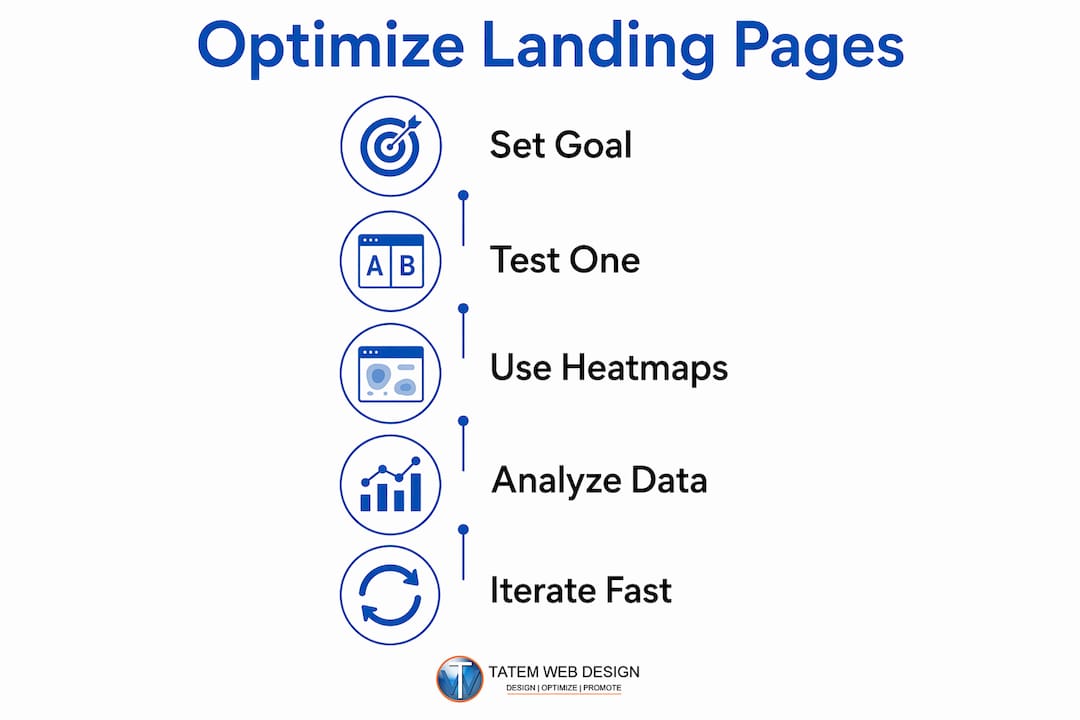
Optimization is not a one-time task. It is a repeating cycle of testing, measuring, and improving. The goal is to remove friction at every step of the visitor’s path to conversion.
Test one variable at a time
A/B testing works only when you isolate one variable per test. Run each test for a minimum of two weeks to account for traffic variation across days of the week. Testing headline scent match, hero proof element type, and offer framing first yields the clearest and fastest conversion insights. These three elements have the highest impact on whether a visitor stays or leaves in the first 10 seconds.
Use heatmaps and click tracking
Heatmap tools show you exactly where visitors click, scroll, and stop reading. If most visitors never scroll past the hero section, your headline or hero proof element is failing. If visitors click on a non-linked image expecting it to do something, add a link or CTA there. Click tracking reveals friction points that analytics dashboards alone cannot show.
Common optimization priorities, in order of impact:
- Headline and subheadline: Test outcome-driven variants against feature-focused variants.
- Hero element type: Test a real customer photo against a product demo video.
- Offer framing: Test “Get a Free Quote” against “See Your Custom Price in 60 Seconds.”
- Form length: Remove one field at a time and measure the conversion change.
- CTA button color and copy: Test action-specific copy against generic copy like “Submit.”
Analyze form drop-offs and funnel data
Form analytics tools show you which specific field causes visitors to abandon the form. Name and email fields rarely cause drop-offs. Phone number fields and company size fields frequently do. If your form analytics show a 40% drop-off at the phone number field, remove it or make it optional. The data tells you exactly where to act.
Pro Tip: Set up a rapid lead follow-up sequence the day you launch your page. A lead that receives a response within 5 minutes converts at a dramatically higher rate than one that waits hours. Your AI email automation can handle this without manual effort.
For professional services firms, the effective landing page guide for digital marketers covers how to use social proof and credibility signals to lift conversion rates specific to your industry.
What are the most common landing page mistakes to avoid?
Most landing pages fail for the same predictable reasons. Recognizing these failure modes before you build saves weeks of troubleshooting.
| Failure mode | Why it hurts | The fix |
|---|---|---|
| Feature-focused headline | Outcome-driven headlines outperform feature headlines by 30–50% | Rewrite to lead with the result the visitor gets |
| Stock hero images | Generic visuals reduce trust and perceived authenticity | Use real customer photos or product demo screenshots |
| Multiple CTAs above the fold | Splits attention and reduces conversions by 15–30% | Remove all CTAs except one primary button |
| Long forms before trust signals | Visitors abandon before they believe the offer is worth it | Place social proof above the form, then ask for information |
| Page load over 2.5 seconds LCP | Causes a 7% conversion drop and 32% bounce rate increase | Compress images, lazy-load below-fold assets, minimize JavaScript |
| No social proof above the fold | Visitors leave before trust is established | Add a named testimonial with a specific result in the hero section |
| Poor mobile experience | Over 60% of traffic is mobile; small tap targets and unreadable text kill conversions | Design mobile-first and test on real devices before launch |
Common mistakes including stock images, weak headlines, and long forms before trust signals are the top conversion killers across thousands of analyzed pages. Fixing just two or three of these issues on an existing page often produces a measurable lift within days.
One mistake that does not appear in most lists: redesigning a page for aesthetic reasons before fixing the copy and speed. Changing colors and fonts on a page with a weak headline and a 4-second load time produces no conversion improvement. Fix the message and the speed first. Then refine the visual design. This is the same principle behind the systematic build process that professional agencies follow.
For professional services businesses, marketing firms like Radka Advertising also apply landing page optimization as part of broader lead generation campaigns, which shows how these principles extend across industries and traffic sources.
Key Takeaways
A landing page converts best when it is built as a conversion system, not a design project, with one goal, fast load times, and social proof placed before the ask.
| Point | Details |
|---|---|
| One goal per page | Remove navigation, competing links, and secondary CTAs to focus visitor attention. |
| Headline scent match | Mirror the exact language of the ad or search query that brought the visitor to the page. |
| Social proof above the fold | Named testimonials with specific results placed in the hero section lift conversions by 18–32%. |
| Speed before design polish | Hit LCP under 2.5 seconds before refining colors, fonts, or layout aesthetics. |
| Test high-impact elements first | Start A/B tests with headline, hero proof type, and offer framing for the fastest conversion gains. |
What I’ve learned after years of landing page builds
After working on hundreds of landing pages across industries from real estate to healthcare to legal services, the pattern is always the same. The pages that fail are the ones where the client spent three weeks choosing a color palette and two hours on the headline. The pages that succeed are the ones where we spent the first session defining the offer and writing five headline variants before touching the design tool.
The concept of “information scent” changed how I think about every page I build. If a visitor clicks an ad that says “Free HVAC Inspection for Stuart Homeowners” and lands on a page that says “Welcome to Our Services,” they are gone in three seconds. The headline must feel like a direct continuation of whatever brought them there. This is not a copywriting trick. It is basic psychology about how people process information and decide whether to trust a source.
The other thing most guides do not say clearly enough: your page speed is your conversion rate. A beautiful page that loads in 4 seconds will always lose to an ugly page that loads in 1.5 seconds. Speed is not a technical checkbox. It is a revenue decision. Every second of delay costs you real leads and real sales.
The build order matters more than most people realize. Copy first, speed second, trust signals third, design polish last. When clients come to me wanting to “refresh the design” on a page that is not converting, the first question I ask is: what does your headline say? Nine times out of ten, that is where the problem lives. A redesign without fixing the headline is like repainting a car with a broken engine.
— Matt
Tatemweb builds landing pages that work from day one
Tatemweb has spent over 26 years building websites and digital marketing systems for Florida businesses across real estate, healthcare, legal, and professional services. The team builds AI-powered landing pages that load fast, rank well, and convert visitors into leads from the first week of launch.

Every Tatemweb landing page build includes speed optimization, mobile-first design, and AI lead capture tools including AI chatbots that follow up with new leads automatically. You get a page built to convert, not just to look good. Call Tatemweb directly at 772-224-8118 to schedule a consultation and see what a properly built landing page can do for your business.
FAQ
What is a landing page and how does it differ from a website?
A landing page is a standalone page built around one conversion goal, with no navigation or competing links. A website serves multiple purposes and audiences; a landing page serves one visitor intent.
How many form fields should a landing page have?
B2B lead generation pages perform best with 3–4 fields. Ecommerce email captures work best with 1–2 fields. Each additional field reduces conversion by 4–8%.
How do I improve landing page conversion rates quickly?
Fix your headline first, then add named social proof above the fold, then reduce form fields. These three changes produce the fastest measurable conversion lift without a full redesign.
What page speed should a landing page hit?
Largest Contentful Paint should be under 2.5 seconds. A 1-second delay beyond that threshold causes a 7% drop in conversions and a 32% increase in bounce rates.
How often should I A/B test my landing page?
Run each A/B test for a minimum of two weeks. Test one variable at a time, starting with the headline, hero element, and offer framing, since these produce the clearest and highest-impact results.
Recommended
Tatem Web Design
26+ YearsWeb Design & SEO Specialist · Tatem Web Design
Matt Tatem has been designing websites professionally since 1999, making Tatem Web Design one of Florida's longest-running web agencies. Based in Stuart, FL, he specializes in WordPress, local SEO, Shopify e-commerce, and cybersecurity consulting for small businesses.

Rank in ChatGPT in 90 Days With a Practitioner Led Checklist
Follow a practitioner led 90 day plan to get cited by ChatGPT: allow OAI-SearchBot, publish short answer capsules with schema, and track Bing AI Performance.

AI SEO Content Playbook: 16 GEO Signals for Agencies & Teams
A practical playbook mapping the GEO-16 signals to hands-on editorial workflows, review controls, and metrics. For agencies and in-house teams scaling AI...

Copy Ready Local Schema Markup for SMBs + Google Validation
Copy ready JSON-LD examples and Google validation steps for SMBs' local schema markup. Audit, implement, and verify each location page with confidence.