
Scale Multi Location Local SEO for 15–200 Locations, AI Aware Playbook
Start by verifying and standardizing every Google Business Profile and building a unique page for each location before you touch anything else. The three priorities that matter most are: clean, verified Google Business Profiles; distinct location pages with real local content; and a master data repository that keeps everything consistent. Multi location local SEO breaks down the moment any one of those three slips, and rebuilding trust with Google after that takes months.
TL;DR:
- Google prioritizes profile completeness, review recency, and unique location content over proximity, which cannot be influenced and should be deprioritized in ranking efforts.
- Managing over ten locations requires bulk verification, centralized account management, location grouping, strict NAP consistency, and careful schema implementation to prevent ranking issues.
- Unique, locally tailored location pages with at least 300 words of genuine local content, real photos, and structured data are essential to avoid being flagged as doorway pages.
- Regular citation audits and accurate, standardized NAP data across directories are critical to maintain local authority and prevent duplicate listings that harm rankings.
- Coordinating organic profiles with paid campaigns and building local backlinks from community sources contribute to higher visibility and more effective multi-location SEO.
Table of Contents
- How Google Evaluates Multiple Locations
- Managing Google Business Profiles Across Dozens of Locations
- How Do You Build Location Pages Without Creating Doorway Pages?
- Which Schema Markup Do Multi-Location Businesses Need?
- Keeping NAP Consistent Across Hundreds of Listings
- How Often Should Each Location Generate New Reviews?
- Building the Operations Layer That Makes This Scale
- Coordinating Local SEO With Paid Local Ad Campaigns
- Local Link Building Across a Multi-Location Footprint
- What Should Location-Specific Blog Content Actually Cover?
- Running Localized Social Media at Scale
- Cleaning Up Duplicate Listings Before They Cost You Rankings
- How Tatemweb Approaches a Multi-Location Rollout
- Get Multi-Location SEO Built Right the First Time
- Sources
- FAQ
How Google Evaluates Multiple Locations
Google still ranks local results on three factors: relevance, distance, and prominence. Relevance measures how well a business profile matches the search intent. Distance measures proximity to the searcher, a variable you cannot optimize away no matter how good your content is. Prominence measures how well known and well reviewed a business is, both online and off.
What’s changed is how much weight relevance now carries. AI-driven answer engines and Google’s own AI Overviews increasingly favor businesses with complete profiles and distinct local facts over businesses that just have more locations. A profile that lists real staff names, actual service specialties, and location-specific details reads as more “relevant” to an algorithm parsing entities, not just keywords.
Signals that influence prominence and relevance for a multi-location brand include:
- Profile completeness (hours, categories, attributes, Q&A activity)
- Review count, review recency, and owner response rate
- Local backlinks pointing to the specific location page, not just the homepage
- Citation consistency across directories and data aggregators
- Unique content and structured data per location
Pro Tip: Distance is the one ranking factor you cannot influence. Stop trying to “beat” proximity and focus your effort entirely on the signals you control: profile completeness, reviews, and unique content.
Chasing rankings for a location 20 miles from a searcher is a wasted effort. Chasing profile completeness and review velocity for the location that’s actually nearby is where the returns live.
Managing Google Business Profiles Across Dozens of Locations
Google Business Profile is the backbone of any regional SEO strategy, and managing it changes entirely once you cross into double digits. Businesses with 10 or more locations qualify for bulk verification, which lets you verify multiple profiles through a single request instead of one at a time. That eligibility threshold matters: below 10 locations, you’re stuck verifying each profile individually, which slows down any rollout.
Here’s how to structure the setup once you’re past that threshold:
- Consolidate under one Business Profile Manager account. Every location should live under a single organizational account, not scattered across individual owner logins.
- Build location groups. Google’s Business Profile APIs let you cluster locations by region, brand, or franchise owner, which makes bulk edits and reporting dramatically faster.
- Assign user groups with tiered permissions. Give regional managers edit access only to their own locations, and reserve full account control for a small central team.
- Use bulk upload spreadsheets for initial data entry, but treat lat/long fields carefully. Google recommends leaving coordinates blank unless the address is hard to place, since manual entry often introduces errors.
- Audit before you submit bulk edits. Mass changes to verified locations can trigger a quality review, and a batch of inconsistent NAP data across profiles is the single most common reason for verification flags.
The pitfall most franchise operators hit: someone edits one location’s hours directly on the live listing instead of through the source system, and the next bulk sync overwrites it. That’s why the next section matters as much as this one.
How Do You Build Location Pages Without Creating Doorway Pages?
Give every location a genuinely unique page on a single domain, structured under a subfolder like /locations/city-name/, and never spin up separate microsites or subdomains per branch. A single domain concentrates your authority instead of splintering it across dozens of weaker properties, and subfolders make internal linking and sitewide schema far easier to manage.
The line between a legitimate location page and a doorway page comes down to substance. A location page that swaps out a city name in an otherwise identical template is exactly what Google’s spam systems are built to catch. Practitioner guidance consistently points to a minimum of 300 to 500 words of genuinely unique content per location, built from real local specifics, not filler.
Each location page needs:
- A unique headline referencing the neighborhood or service area by name
- 300 to 500+ words of local content: staff names, community involvement, local case studies
- Real photos taken at that location, not stock imagery
- Location-specific FAQs (parking, accessibility, appointment policies that vary by branch)
- An embedded map and a unique LocalBusiness schema block
- Direct links to that location’s Google Business Profile and review page
Pro Tip: Build a content template with variable fields for the data that legitimately repeats (hours, address, phone), but write the narrative sections, FAQs, and staff bios fresh for every single location. The template should hold structure, never voice.
A restaurant chain rolling out 40 locations can’t hand-write 40 essays from scratch, and it shouldn’t try to. The efficient version pulls variable local facts (nearest landmark, specific menu items sourced regionally, a staff spotlight) into a consistent structure, the same approach Tatemweb’s Waterfront restaurant project used to keep a location page distinct without reinventing the format from scratch.

Which Schema Markup Do Multi-Location Businesses Need?
Every multi-location business needs two layers of schema working together: one Organization schema for the parent brand, and one LocalBusiness schema for every individual location. The connection between them is what makes the whole structure legible to search engines. Each location’s schema should link back to the parent Organization using the parentOrganization property, and every location block needs its own unique @id, typically formatted as the page URL plus #location.
Required LocalBusiness properties for every location:
name(the location-specific business name)address(exact-match to your citation data)telephone(the direct local line, not a corporate switchboard number)openingHoursor a fullopeningHoursSpecificationblockgeocoordinates, ideally accurate to at least five decimal places
Recommended extras worth adding once the basics are solid:
sameAslinks to that location’s social profilesdepartmentwhen a location has distinct service lines under one roofpriceRangeto help with query matching in commercial searches
Implementation gets manageable once you template the JSON-LD and swap variable fields per location, rather than hand-coding each block. A JSON-LD generator speeds this up considerably for teams without dedicated developer resources. Always run the finished markup through Google’s Rich Results Test before pushing it live, and keep the parent Organization @id identical across every single location page. Fragmenting that identifier is one of the more common ways multi-location schema silently breaks.
Keeping NAP Consistent Across Hundreds of Listings
Name, address, and phone number data has to match exactly, not approximately, across every directory, aggregator, and profile carrying your business. Google’s own guidance confirms that even single-character inconsistencies can cause it to treat branches as separate entities, splitting the authority that should belong to one location across two competing listings.
“Suite 200” versus “Ste. 200” sounds trivial. To a citation-matching algorithm, it isn’t.
Building the workflow that prevents this starts with a canonical formatting guide covering exactly how your business writes street abbreviations, suite numbers, LLC punctuation, and phone number formatting, then applying it everywhere without exception.
- Maintain one master data repository as the single source of truth for every location’s NAP data
- Push updates from that repository outward to your website, GBP, and major aggregators, never the reverse
- Run scheduled citation audits (quarterly at minimum for portfolios under 50 locations, monthly beyond that)
- Flag and correct mismatches through a dedicated citation monitoring tool rather than manual spot checks
- Document every exception (a location with a different suite number after a move) the moment it happens
A tool like DBLScanner can automate the monitoring layer, catching drift before it snowballs into dozens of mismatched listings.
How Often Should Each Location Generate New Reviews?
Recency beats volume. A location with 40 reviews averaging one every two weeks over the last year outperforms a location sitting on 200 reviews that stopped coming in 18 months ago. Google’s local algorithm reads a steady, recent stream of reviews as a signal of an active, trustworthy business.
Build the review operation around these steps:
- Set a per-location cadence target, something like 4 to 8 new reviews a month depending on foot traffic, rather than a single company-wide number.
- Trigger the request at the moment of highest satisfaction, immediately after service completion, not days later through a generic email blast.
- Respond to every review within 24 to 48 hours, using a template as a starting point but always personalizing at least one specific detail from the review itself.
- Collect reviews compliantly. Never offer incentives tied to a review, and always route the request through Google’s own review link rather than a third-party workaround.
- Embed a rotating selection of real reviews on each location page, tied to that specific branch, not a company-wide testimonial feed.
Pro Tip: A canned response (“Thank you for your feedback!”) on every review is almost as damaging as no response at all. Reference the reviewer’s specific point, even briefly, and your response rate itself becomes a trust signal for future customers reading the thread.
Building the Operations Layer That Makes This Scale
None of the tactics above hold up without an operational backbone connecting them. The foundation is a master data repository, one system that feeds your CMS, your GBP profiles, and your citation network through APIs rather than manual updates scattered across a dozen logins. This single repository is what prevents the drift that creeps in when five different regional managers are each editing their own listings by hand.
Once the repository exists, prioritize your work with a three-factor rubric: revenue potential, competition intensity, and current performance gap. Run your first pilot on a location that scores high on revenue and opportunity, prove the process works, then roll it out.
The KPIs worth tracking monthly, by location:
| KPI | What it tells you |
|---|---|
| GBP impressions and actions | Whether the profile is being seen and clicked |
| Map Pack position | Local pack ranking for core service terms |
| Organic traffic to the location page | Whether the unique content is earning visibility |
| Review velocity | Rate of new reviews per month |
| Citation accuracy percentage | How consistent NAP data is across directories |
Weaker-performing locations should get disproportionate attention, not less. A location stuck on page two of the Map Pack has the most room to improve, and often the smallest fix (a missing category, a stale phone number) accounts for most of the gap.
Coordinating Local SEO With Paid Local Ad Campaigns
Organic and paid local visibility should reinforce each other, not run as two disconnected budgets. Google Ads’ Local Campaigns and Performance Max both pull directly from your Google Business Profile data, meaning a profile with strong photos, accurate hours, and current attributes performs better in paid placements too. Fix the organic profile first, and the paid campaign inherits the improvement for free.
The more useful coordination happens at the location level. Pause or shift ad spend toward locations where organic Map Pack rankings are weakest, since that’s where paid can fill the visibility gap the fastest while the organic work catches up. Meanwhile, locations already ranking well organically often need less paid support for branded or “near me” terms, freeing budget for competitive, high-intent keywords instead.
Location extensions in Google Ads should pull from the exact same master data repository driving your organic NAP consistency. A phone number that’s correct on the website but outdated in the ad platform creates the same fragmentation problem paid and organic both suffer from separately. Track call and direction-click conversions by location in both channels side by side, and you’ll usually find one or two branches where paid is carrying weight organic should be carrying instead, a signal to redirect the SEO team’s next sprint.
Local Link Building Across a Multi-Location Footprint
Backlinks pointing to a specific location page carry more local weight than backlinks pointing only to the homepage, which makes link building for a multi-location brand fundamentally different from single-location outreach. The goal is a link portfolio distributed across your footprint, not concentrated at the top of the domain.
The most reliable sources are hyperlocal by nature: chamber of commerce memberships, local business association directories, sponsorships of community events, and partnerships with complementary local businesses that link back to the specific branch involved. A dental practice sponsoring a youth sports team in one city should get a link from that team’s page directly to the relevant location, not to the corporate homepage.
Franchise and multi-location brands often overlook a simpler source: local press coverage of individual branch openings, renovations, or community involvement, which tends to link to the specific location page when the outreach specifically asks for it. Building a repeatable outreach process for regional press and local partnerships pays off far more than a single national PR push ever will across a distributed footprint.
What Should Location-Specific Blog Content Actually Cover?
Corporate blog content and location-specific content serve different jobs, and conflating them is one of the more common mistakes in franchise SEO. Corporate content should cover brand-wide topics: industry trends, company announcements, product education. Location content should cover what’s happening in that specific market: a seasonal service push relevant to that region’s climate, a staff certification earned at that branch, a local event sponsorship.
A landscaping franchise with locations in both Florida and Minnesota shouldn’t run the same seasonal blog calendar for both. Florida content should address year-round lawn care and hurricane debris cleanup; Minnesota content should address spring thaw prep and snow mold. That’s not a stylistic choice, it’s the difference between content that ranks locally and content that reads as generic regardless of location.
Practical structure: keep one central blog on the main domain, but tag or categorize posts by region and cross-link relevant posts from the corresponding location pages. This keeps authority consolidated on a single domain while still giving each location a stream of locally relevant content Google can associate with that specific market.
Running Localized Social Media at Scale
A single corporate social account can’t carry the weight of dozens of local audiences, but a fully separate account for every location often collapses under its own maintenance burden within a year. The workable middle ground is a hub-and-spoke model: one strong corporate account handling brand-wide announcements, paired with lighter local accounts (or at minimum, local location tags and check-ins) handling community-specific content.
Each location’s social presence should mirror the specificity of its location page: local event participation, staff spotlights, customer shoutouts from that specific market. Google’s local algorithm doesn’t directly rank social posts, but active local social profiles feed engagement signals and often surface in local search results themselves, particularly through Google Business Profile’s social and photo integrations.
Assign social posting responsibility the same way you assign GBP permissions: a regional manager or local team member who actually knows the market, working from a shared content calendar built centrally so brand voice and posting cadence stay consistent. The failure mode to avoid is a corporate marketing team trying to generate hyperlocal content for 60 markets they’ve never visited. That content reads as generic the moment a local audience sees it, and local audiences notice fast.
Cleaning Up Duplicate Listings Before They Cost You Rankings
Duplicate Google Business Profile listings actively split the ranking signals, reviews, and authority that should belong to one location, and they multiply fast during any franchise expansion, ownership change, or address move. A location that changed addresses three years ago and never fully closed out the old listing is now competing against itself in search results.
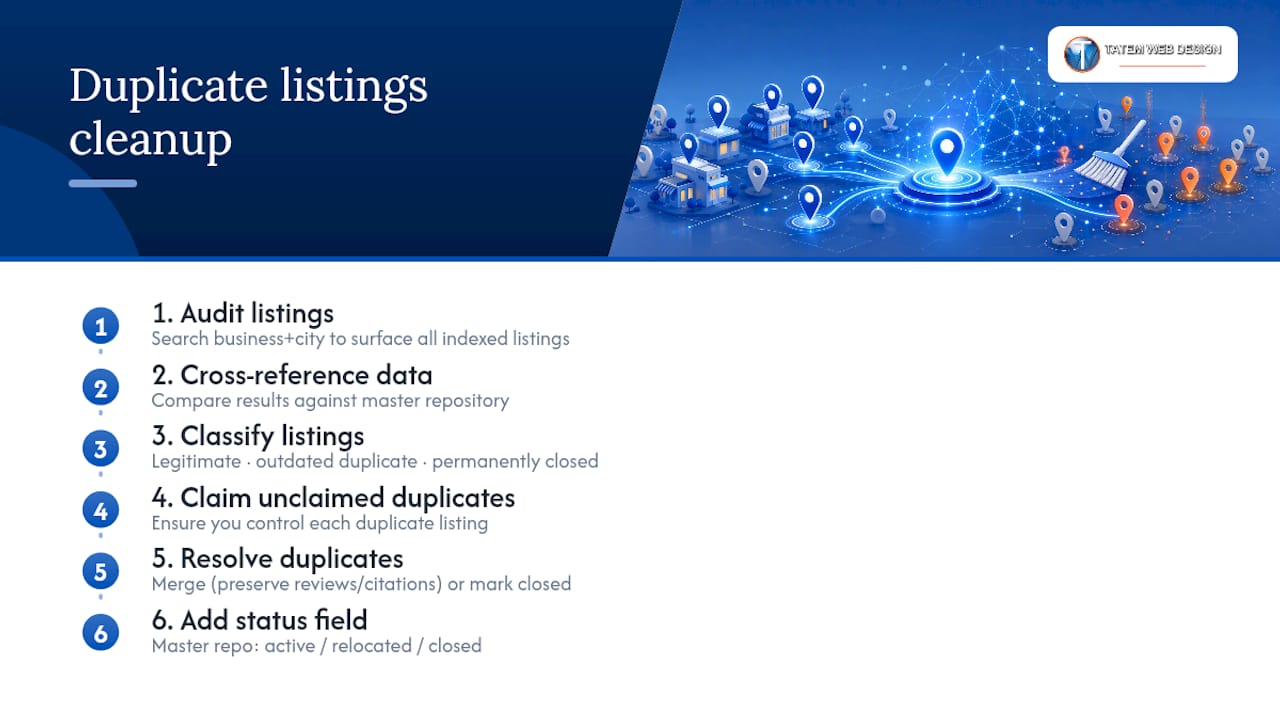
Start the cleanup with a full audit: search your business name plus each city to surface every listing Google has indexed, not just the ones you know about. Cross-reference against your master data repository to identify which listings are legitimate, which are outdated duplicates, and which belong to a location that’s closed permanently.
For each duplicate found, claim it if unclaimed, then either merge it into the correct listing through Google’s duplicate reporting process or mark it permanently closed if the location no longer exists. Never simply delete a duplicate without first checking whether it’s accumulated reviews or citations, since those signals sometimes need to be preserved through a proper merge rather than lost through a straight deletion.
Once cleaned up, the same master repository driving your NAP consistency should include a “status” field for every location (active, relocated, closed) so future team members don’t accidentally recreate a listing that was already resolved. This single field prevents most duplicate issues from recurring.
How Tatemweb Approaches a Multi-Location Rollout
A realistic rollout runs in three stages: an audit that maps every location’s current GBP status, NAP accuracy, and page quality; a pilot on two or three locations to prove the template and workflow before scaling; then a full rollout once the pilot’s KPIs hold up. AI tools scaffold the repetitive layer, pulling variable data (hours, geo, staff records) into schema and page templates automatically, while local FAQs, staff bios, and community details still get written and verified by people who know each market. That division, automate the structure, humanize the specifics, is what keeps location pages from reading as templated. Tatemweb brings over 26 years of Florida-based web development experience to that process, building AI-enabled websites designed for exactly this kind of location-page scaling.
— Matt
Get Multi-Location SEO Built Right the First Time
Running this playbook across 15, 50, or 200 locations by hand is where most in-house teams stall out, not because the strategy is unclear, but because the execution demands consistent hands on every profile, every schema block, and every location page at once. Tatemweb builds that execution layer directly into AI-powered website design for Florida businesses: templated location pages that stay unique, Google Business Profile management across full portfolios, automated schema deployment with parent-child linking done correctly from day one, and local content produced at the pace a growing footprint actually needs.

The practical starting point is a pilot: an audit of your current locations followed by a build on three test locations, enough to prove the workflow before committing to a full rollout. If you’re running multiple locations and want a team that handles the Google Business Profile side, the schema, and the page architecture together instead of piecemeal, call Tatemweb at 772-224-8118 or visit the main service page to schedule a consultation.
Sources
The Google documentation cited throughout this guide is worth keeping open while you implement. Google’s own bulk verification help page covers eligibility and NAP requirements directly. The Business Profile APIs documentation explains location groups and permission structures for developers managing large portfolios. For schema, Google’s Local Business structured data reference lists every required and recommended property, and SchemaDash’s breakdown shows the parentOrganization linking pattern in practice. Service-area businesses should also check OnLead’s guide to contractor local SEO for territory-specific considerations this article doesn’t cover in depth.
- Verify Business Profiles in bulk - Google Business Profile Help
- The Complete Guide To Local SEO For Multiple Locations
- Locations | Google Business Profile APIs | Google for Developers
- Local Business structured data - Google Search Central
FAQ
How do you do local SEO for multiple locations?
Verify and standardize every Google Business Profile, build a genuinely unique page for each location, maintain exact-match NAP data through a master repository, and add LocalBusiness schema linked to a parent Organization schema for each site.
Is SEO dead now that AI answer engines are everywhere?
No. AI Overviews and answer engines still pull from the same relevance, distance, and prominence signals Google has always used, just with more weight on profile completeness and distinct local facts, which makes structured, verified local SEO more valuable, not less.
How much should you pay for local SEO?
Costs vary widely based on portfolio size, current data cleanliness, and whether you need custom location pages built from scratch or an existing template optimized; a managed agency engagement for a multi-location rollout, like the audit-and-pilot approach Tatemweb uses, is typically scoped location by location rather than at a flat rate.
Recommended
Tatem Web Design
26+ YearsWeb Design & SEO Specialist · Tatem Web Design
Matt Tatem has been designing websites professionally since 1999, making Tatem Web Design one of Florida's longest-running web agencies. Based in Stuart, FL, he specializes in WordPress, local SEO, Shopify e-commerce, and cybersecurity consulting for small businesses.

Rank in ChatGPT in 90 Days With a Practitioner Led Checklist
Follow a practitioner led 90 day plan to get cited by ChatGPT: allow OAI-SearchBot, publish short answer capsules with schema, and track Bing AI Performance.

AI SEO Content Playbook: 16 GEO Signals for Agencies & Teams
A practical playbook mapping the GEO-16 signals to hands-on editorial workflows, review controls, and metrics. For agencies and in-house teams scaling AI...

Copy Ready Local Schema Markup for SMBs + Google Validation
Copy ready JSON-LD examples and Google validation steps for SMBs' local schema markup. Audit, implement, and verify each location page with confidence.