
1–2 Week Setup: Brokerage Real Estate Chatbot Sends Seven CRM Fields
A real estate chatbot is a 24/7 conversational front door on your website that captures a visitor’s contact information, qualifies their intent, and writes a structured summary into your CRM before an agent ever picks up the phone. Deployed well, it shortens speed-to-lead, lifts qualified-lead rates, and gives agents hours back every week. Start small: pilot it on your highest-traffic listing pages first, then expand once you see the qualification data hold up.
TL;DR:
- Chatbots that qualify and route leads, rather than just answer questions, significantly increase qualified-lead rates and booking conversion, especially when integrated with CRM and MLS systems.
- Short qualification flows with key fields, structured CRM payloads, and rapid human follow-up within 5 to 15 minutes are crucial for maximizing lead conversion and agent productivity.
- Proper integration with CRM, MLS, scheduling, and communication channels is vital, and most failures result from poor data connection and manual handling of lead information.
- Ongoing maintenance, data hygiene, and transcript reviews are essential to sustain chatbot performance and adapt to inventory or market changes.
- Smart deployment starts with high-traffic listing pages, short qualification forms, and tight SLAs, before expanding to site-wide use and advanced features.
Table of Contents
- Real Estate Chatbot Use Cases That Actually Move Leads
- What Has to Connect for a Chatbot to Actually Work
- Choosing and Rolling Out Your Chatbot Without Guesswork
- Costs and the Math Behind a Chatbot’s ROI
- The Mistakes That Quietly Kill Chatbot Performance
- Why Agency Experience Matters When You Deploy This
- Security Considerations Beyond the Compliance Checklist
- Designing a Chatbot Conversation People Actually Want to Finish
- What a Working Chatbot Deployment Looks Like in Practice
- Keeping Your Chatbot Sharp After Launch
- Why Most Chatbot Advice Undersells the CRM Payload
- Get a Chatbot Built to Fit Your Brokerage, Not a Generic Template
- Sources
- FAQ
Real Estate Chatbot Use Cases That Actually Move Leads
Most brokerages buy a chatbot expecting it to answer questions. The ones that see returns use it to qualify and route. That distinction shapes everything about how you should configure the flows.
Lead qualification is the job the chatbot has to nail first. A well-built flow asks for seven pieces of information, conversationally, without feeling like a form:
- Financing status (“Have you already spoken with a lender, or are you still exploring options?”)
- Timeline to buy, sell, or rent
- Buy, sell, or both
- Target location or neighborhood
- Budget range
- Property type
- Contact preference (call, text, email)
Vendor playbooks consistently recommend nailing down the first four of those before anything else, since financing status, timeline, transaction type, and location tell an agent whether a lead is worth a callback tonight or a drip campaign next month, according to Chatbot. The phrasing matters more than the field itself. “What’s your timeline looking like?” converts better than “Select a timeframe” because it reads like a question a human would ask.
Property Q&A pulls directly from your listing feed. A visitor asks “Does this have a pool?” or “What’s the HOA fee?” and the chatbot answers from MLS or IDX data rather than punting to “an agent will follow up.” That instant answer is often what keeps a visitor on the page long enough to convert.
Showing scheduling works best as an inline calendar embedded in the chat window, not a link that opens a separate tab. The visitor picks a time, the system checks agent availability in real time, and confirmation texts go out automatically, with a reminder 24 hours before the showing.
Mortgage pre-screening is a smaller but valuable flow: a few questions about income range and down payment readiness, then a warm handoff to a preferred lender partner if the buyer qualifies.
Virtual tour companion bots sit alongside video walkthroughs and answer questions in real time, which keeps engaged buyers from bouncing to a competitor’s listing.
Nurture and remarketing flows re-engage visitors who went cold. A message like “Still thinking about that Sarasota listing? Three similar homes just hit the market” brings dormant leads back into an active conversation rather than letting them die in a spreadsheet.
What Has to Connect for a Chatbot to Actually Work
A chatbot that lives in isolation from your other systems is a glorified FAQ widget. The integrations below are what turn it into a lead-generation engine.
- CRM connection — every conversation needs to write a structured record, not a raw transcript dump, into your CRM the moment it ends.
- MLS/IDX feed — property data has to sync in near real time so the chatbot never quotes a price or status that changed yesterday.
- Calendar and scheduling system — showing bookings need to check live agent availability, not a static time slot list.
- SMS/email gateway — confirmation and reminder messages depend on a reliable delivery channel tied to opt-in consent.
- Analytics platform — you need visibility into conversation volume, drop-off points, and conversion rates to know what to fix.
The CRM payload is where most implementations quietly fail. A production-grade bot doesn’t just log “John Smith asked about 123 Main St.” It writes a structured intent summary: name, phone, email, financing status, timeline, transaction type, target location, and a one-line conversation summary the agent can read in five seconds before calling. Brokerages running this kind of AI-first qualification report conversion-to-tour rates described as between twenty to thirty-five percent, compared with 2 to 5 percent for legacy contact-form widgets that just forward an email.
Data hygiene has to happen at ingestion, not after the fact. The chatbot should automatically deduplicate against existing CRM contacts so a returning lead doesn’t create three duplicate records, and it needs to log opt-in metadata (timestamp, exact consent language shown) for every phone number collected, which matters for TCPA compliance covered in the next section.
Architecture-wise, there’s a real difference between scripted decision-tree bots and agentic ones. A scripted bot dead-ends the moment a visitor asks something off-script, forcing a “let me connect you with an agent” bailout that kills momentum. An agentic setup probes adaptively, asks smart follow-ups, and re-engages a stalled conversation with a relevant nudge instead of abandoning it.
Pro Tip: Ask any vendor to show you an actual CRM payload from a live conversation, not a marketing screenshot. If the sample record only has a name and phone number, the qualification depth isn’t there.
Choosing and Rolling Out Your Chatbot Without Guesswork
Vendor demos are designed to impress, not to prove capability. Before you sign anything, demand evidence that goes beyond a slick chat window.
Ask for:
- Ten real conversation transcripts, not scripted demo examples
- A sample CRM payload showing all seven qualification fields written to a record
- A live scheduling test where you book a showing and confirm the calendar actually updates
- Proof of omnichannel support (web chat, SMS, and at least one social channel like Facebook Messenger)
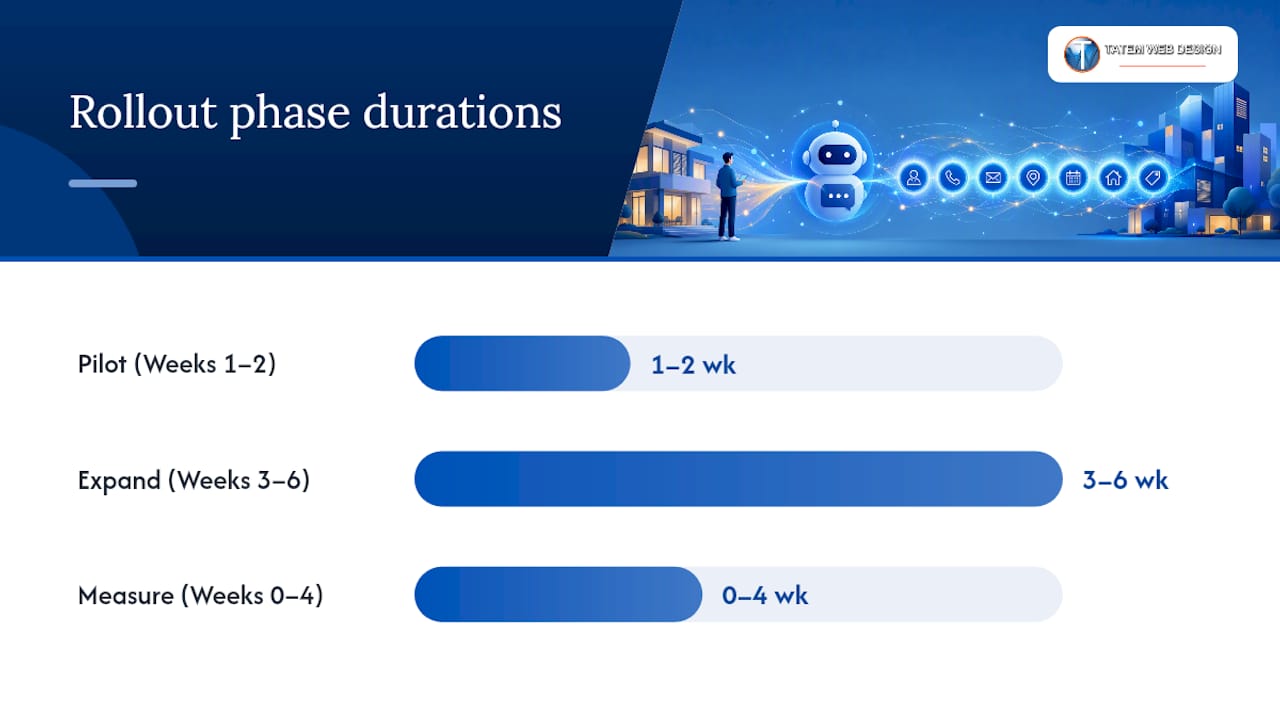
Rollout timeline. Most vendors get a basic widget live within a day or two, but a fully configured system, meaning CRM mapping, MLS sync, and calendar integration, typically takes one to two weeks. Treat that window realistically:
| Phase | Timeframe | What happens |
|---|---|---|
| Pilot | Weeks 1–2 | Deploy on top 3–5 listing pages, connect CRM and calendar, train team on handoff process |
| Expand | Weeks 3–6 | Roll out site-wide, add SMS/email nurture sequences, refine qualification scripts |
| Operate | Ongoing | Monitor transcripts weekly, adjust routing rules, retrain on seasonal questions |
Operational setup is where a lot of pilots quietly stall. Set an SLA that requires a human follow-up call within 5 to 15 minutes of a qualified lead notification. Build territory routing so leads go to the agent covering that ZIP code, not a shared inbox nobody checks. Decide notification cadence upfront, immediate push for hot leads, daily digest for cold ones, so agents aren’t drowning in alerts.
Measurement plan should follow three windows. In weeks 0 to 4, watch response rate and completion rate on the qualification flow, that tells you if the questions feel natural. In weeks 4 to 12, track qualified-lead rate and viewing-to-booking conversion, that’s where you see whether the routing and SLA actually work. By months 3 to 6, tie it back to closed transactions and cost per acquisition, the number that gets leadership’s attention.
Costs and the Math Behind a Chatbot’s ROI
Pricing generally falls into three models: a flat SaaS subscription (often tiered by conversation volume), per-conversation or per-message fees, and a one-time implementation or customization charge on top of either. Budget for the setup fee separately. CRM and MLS integration work is rarely included in the base subscription price, and most vendors charge extra for custom qualification scripts beyond their default templates.
Hidden costs show up after launch, not before. Message volume can push you into a higher pricing tier faster than expected if a listing goes viral. Ongoing script updates, retraining the bot on new inventory or seasonal messaging, and support tickets all add up. Budget for a maintenance line item, not just the sticker price.
Here’s a worked example. A brokerage running 2,000 monthly listing-page visitors, with a baseline 3 percent viewing-to-booking rate, books 60 showings a month. A chatbot that lifts that rate by 25 percent (within the 25 to 45 percent capture increase range many brokerages report) pushes bookings to roughly 75 a month, 15 additional showings without a dollar more in ad spend. At even a conservative 10 percent showing-to-close rate, that’s an extra closed deal or two per month, which typically dwarfs the monthly subscription cost.
Report three KPIs to leadership: speed-to-lead (minutes from inquiry to first human contact), qualified-lead rate (percentage of chatbot conversations that meet your qualification bar), and viewing-to-booking conversion. Those three numbers tell the whole ROI story without needing a spreadsheet full of vanity metrics.
The Mistakes That Quietly Kill Chatbot Performance
Three failure patterns show up again and again. Scripted, decision-tree-only bots dead-end the moment a visitor goes off-script, and the visitor leaves instead of waiting for a human. Lead data sits siloed inside the chatbot’s own dashboard instead of flowing into the CRM, which is one of the top operational mistakes brokerages make. And slow handoffs, no SLA, no routing rule, mean a hot lead sits untouched for hours while a competitor’s agent calls first.
Fixes for each are fast:
- Cut the qualification flow to five or six fields max; every extra field increases drop-off.
- Wire the CRM payload before launch, not as a phase-two project.
- Enforce a 5 to 15 minute human-contact SLA and route by territory automatically.
- Set up automated re-engagement for conversations that stall mid-flow, a nudge after 24 hours often revives a third of them.
Ongoing maintenance matters as much as the initial build. Review a sample of transcripts monthly to catch where the bot is confusing visitors. A/B test question phrasing, “What’s your budget range?” versus “How much are you looking to spend?”, performs differently depending on your market. Schedule quarterly data hygiene passes to clear duplicate contacts and stale opt-ins.
Pro Tip: If your qualified-lead rate drops suddenly, check the transcript log before touching the script. Often the MLS feed went stale and the bot started giving wrong answers, which tanks trust mid-conversation.
Compliance deserves a permanent line in your launch checklist. Log express written consent before sending any SMS to stay TCPA compliant, and check your state’s privacy rules, CCPA/CPRA obligations around data access and deletion apply in several states beyond California, directly into your opt-in forms rather than treating them as an afterthought.
Why Agency Experience Matters When You Deploy This
Matt has spent extensive time working alongside an agency with more than 26 years building digital systems for Florida businesses, including real estate brokerages that need chatbots wired into real CRM and MLS infrastructure, not just a chat bubble bolted onto a homepage.
The agency’s capabilities span AI website design, AI chatbot and AI agent setup, and cybersecurity and compliance consulting, the kind of background that matters when a chatbot is handling personally identifiable information and SMS opt-ins.
Typical engagements start with a discovery phase to map your existing CRM and MLS setup, move into integration and configuration, include agent training on handoff procedures, and continue with ongoing support after launch. That structure exists because a chatbot that works on day one can drift out of sync with your listing feed or CRM fields by month three without someone watching it.
Security Considerations Beyond the Compliance Checklist
Compliance covers what the law requires. Security covers what actually keeps a breach from happening, and the two aren’t the same conversation.
Every message a chatbot handles, especially in a mortgage pre-screening flow, may include income figures, phone numbers, and financial readiness details. That data should be encrypted both in transit and at rest, not just when it’s sitting in the CRM. Ask any vendor directly whether conversation data is encrypted end to end or only while it’s moving between servers; the answer isn’t always the same thing.
Access controls matter just as much as encryption. Not every team member needs to see every lead’s full conversation history. Role-based access, where an agent sees leads assigned to their territory and a broker sees the full pipeline, limits how much damage a single compromised login can do. Audit logs that track who accessed which record and when give you a paper trail if something does go wrong.
Third-party integrations expand the attack surface. Every connection point, your CRM, your MLS feed, your SMS gateway, is a potential entry point if the credentials are weak or the API keys are stored carelessly. Rotate API keys periodically and never hardcode them into scripts that multiple team members can access. A chatbot vendor should be able to explain their own data retention policy in plain language: how long conversation logs are kept, where they’re stored, and what happens to that data if you cancel the service.
Designing a Chatbot Conversation People Actually Want to Finish
The best-performing real estate chatbots read like a helpful colleague, not a form with a chat bubble skin. That distinction shows up in three places: flow, tone, and language support.
Conversational flow should feel adaptive, not linear. If a visitor mentions they’re relocating for a job, the bot should pick up on that and ask about timeline urgency next, rather than marching through a fixed question order that ignores what the visitor just said. Rigid scripts are exactly what causes the drop-off problem covered earlier.
Tone needs to match your brand without drifting into forced friendliness. A luxury waterfront listing calls for a more polished voice than a starter-home listing aimed at first-time buyers. Avoid exclamation points stacked on every line; one enthusiastic sentence reads as warm, five reads as a sales script.
Multilingual support matters more in real estate than most other industries, especially in markets with large Spanish-speaking or multicultural buyer pools. A chatbot that detects browser language settings or lets a visitor type “hablo español” and switches instantly keeps a lead engaged instead of losing them to a competitor’s site that offers the same courtesy.
Keep response length short. Chat is not email. A three-sentence answer to “what’s the square footage” feels bloated; one sentence with the number and a follow-up question feels natural.
What a Working Chatbot Deployment Looks Like in Practice
The brokerages seeing real returns share a pattern: they didn’t try to automate everything at once. They picked the highest-traffic listing pages, wired the qualification flow to their CRM, and measured results before expanding site-wide.
One pattern shows up repeatedly in vendor case studies: brokerages that replaced a static contact form with a conversational qualification flow on their top listing pages saw capture increases in the 25 to 45 percent range within the first few months, largely because visitors who would have bounced off a blank form instead answered a few quick questions in chat.
The common thread across successful deployments isn’t the specific vendor or platform. It’s discipline about three things: qualification fields kept short enough that visitors finish them, a CRM payload structured enough that agents can act on it immediately, and a follow-up SLA tight enough that a qualified lead doesn’t go cold. Brokerages that skip any one of those three tend to end up with a chatbot that generates conversation volume but not closed deals.
Keeping Your Chatbot Sharp After Launch
Launch day is the easy part. The bots that keep performing six months later are the ones someone actually watches.
Set a recurring monthly review of a transcript sample, even just twenty or thirty conversations. Look for where visitors got confused, where the bot gave an answer that didn’t match current listing data, and where conversations stalled without a clear reason. Patterns emerge fast once you’re looking for them.
Run A/B tests on question phrasing every few months. Small wording changes, “What’s bringing you to the market?” versus “Why are you looking to move?”, can shift completion rates more than people expect. Track which version keeps more visitors moving through the qualification flow.
Schedule data hygiene passes quarterly at minimum. Duplicate contacts creep back in even with automatic deduplication running, especially when a lead engages through multiple channels. Stale opt-in records should be reviewed against your state’s current privacy requirements, since those rules shift more often than most teams track.
Update scripts whenever your inventory mix changes meaningfully. A bot trained heavily on single-family qualification questions will handle a condo or new-construction inquiry poorly unless someone updates the flow to reflect the new property types you’re actively listing.
Why Most Chatbot Advice Undersells the CRM Payload
The conventional advice on real estate chatbots spends too much time on the chat widget itself, the design, the greeting message, the button color, and not nearly enough on what happens the second a conversation ends. That’s backwards. A beautifully designed chat window that dumps a raw transcript into an inbox nobody checks generates activity, not deals.
The evidence throughout this guide points to one priority above the rest: get the structured CRM payload right before you touch anything else. Seven qualification fields, written cleanly into a record an agent can act on in seconds, is worth more than a clever greeting or a slick animation. Most brokerages that struggle with a chatbot aren’t dealing with a bad bot. They’re dealing with a bot that has nowhere useful to send what it learns.
If you’re deciding where to spend your limited setup time, spend it on the integration, not the personality. Get the CRM mapping right, set a real SLA for human follow-up, and let the conversation design stay simple. The fancier features can wait until the fundamentals are actually converting leads into showings.
— Matt
Get a Chatbot Built to Fit Your Brokerage, Not a Generic Template
Tatemweb builds real estate chatbots wired directly into the CRM, MLS feed, and scheduling tools your team already uses, so leads land as structured, agent-ready records instead of raw transcripts nobody reads. That’s the gap most off-the-shelf chatbot platforms leave open: they hand you a chat widget and leave the integration work, the part that actually drives conversion, on your plate.

With more than 26 years serving Florida businesses across real estate, healthcare, and professional services, Tatemweb pairs AI chatbot and lead capture setup with compliance-aware implementation, covering TCPA opt-in logging and state privacy considerations from day one rather than bolting them on as an afterthought. The team also handles broader AI website design work when your listing pages themselves need rebuilding to support the chatbot properly, and agencies exploring the productivity upside of AI-driven workflows can see comparable ROI patterns across other service industries adopting similar tools.
Call 772-224-8118 to schedule a discovery call and find out what a working CRM payload and a real rollout timeline would look like for your brokerage.
Sources
- AI Chatbots for Real Estate: Why Most Fail and What Actually Works in 2026 | Blog | Perspective AI
- AI Chatbots for Real Estate: Use Cases, ROI & Setup | Chatsy
- AI Chatbot Real Estate Lead Capture: Complete Guide — Arivana
FAQ
What Is the 3-3-3 Rule in Real Estate?
The 3-3-3 rule is a lead follow-up guideline: contact a new lead within 3 minutes, follow up 3 times in the first 3 days, and keep it in a nurture sequence for 3 weeks. A chatbot supports the first and hardest part, since it responds within seconds instead of hours.
Which AI Is Best for Realtors?
There’s no single best AI for every brokerage. The right choice depends on whether you need a full agentic chatbot that writes structured CRM payloads, like the integration-first setups Tatemweb builds, or a simpler tool for scheduling and Q&A alone.
What Is the 80/20 Rule for Realtors?
The Pareto principle suggests that a large portion of an agent’s business tends to come from a small portion of their leads or activities. A chatbot’s qualification data helps identify which leads fall into that high-value segment faster than manual screening.
Is There an AI Realtor?
AI hasn’t replaced licensed real estate agents, but AI chatbots now handle much of the repetitive front-end work, answering listing questions, qualifying buyers, and booking showings, so human agents spend their time on negotiation and closing instead of initial screening.
Recommended
Tatem Web Design
26+ YearsWeb Design & SEO Specialist · Tatem Web Design
Matt Tatem has been designing websites professionally since 1999, making Tatem Web Design one of Florida's longest-running web agencies. Based in Stuart, FL, he specializes in WordPress, local SEO, Shopify e-commerce, and cybersecurity consulting for small businesses.

CMMC Level 2 vs Level 1: Which One Applies to You?
CMMC Level 1 vs Level 2 compared: data types, 15 vs 110 requirements, self-assessment vs third-party audits, POA&M rules and how to pick your level.

Phishing Awareness Training for Small Business: A Practical Guide
How to build phishing awareness training for a small business: what to teach, how to run simulations, which numbers to track, and what to pair it with.

AI Content Pricing: What Florida Businesses Really Pay in 2026
What AI content costs in 2026: per-post ranges, tool subscriptions, editing time and agency retainers, plus how to budget and avoid hidden costs.