
How Hosting Shapes Website Speed and SEO Performance
Your hosting provider is the single biggest infrastructure variable controlling how fast your website responds. Before a browser renders one pixel, your server must receive the request, process it, and return a response. That sequence, measured as Time to First Byte (TTFB), sits at the foundation of every speed and SEO metric that follows. A median TTFB of 812ms across 951 measured providers tells you that most sites are already starting behind, and server processing alone accounts for 46.1% of that delay.
The role of hosting in website speed goes well beyond raw response time:
- Server resources (CPU, RAM, and storage type) determine how quickly your server assembles and delivers a page.
- Server location controls the physical distance a data packet travels before reaching your visitor.
- Hosting type (shared, VPS, dedicated, or cloud) dictates whether your resources are guaranteed or shared with hundreds of other sites.
- Server software and configuration govern how many simultaneous requests your server handles without slowing down.
- Bandwidth and traffic limits set the ceiling on data throughput before bottlenecks appear.
- Uptime and reliability determine whether search engines and visitors can reach your site consistently.
Every one of these factors cascades into Google’s Core Web Vitals scores, your crawl budget, and ultimately your search rankings.
How hosting factors directly control your site’s speed
Server hardware and storage
Modern NVMe solid-state drives reduce disk I/O wait to near zero compared to older spinning hard drives or even standard SSDs. When your web root and database sit on NVMe storage, the server retrieves files and query results faster under load, keeping response times consistent even during traffic spikes.

Hosting types and resource allocation
The type of hosting you choose determines whether your server resources are shared or dedicated.

| Hosting Type | Resources | TTFB Consistency | Best For |
|---|---|---|---|
| Shared hosting | Shared CPU/RAM | Variable, can spike | Low-traffic or starter sites |
| VPS hosting | Dedicated virtual resources | Consistent under moderate load | Growing business sites |
| Dedicated server | Full hardware allocation | Highly consistent | High-traffic or resource-intensive sites |
| Cloud hosting | Scalable, distributed | Consistent with auto-scaling | Variable or unpredictable traffic |
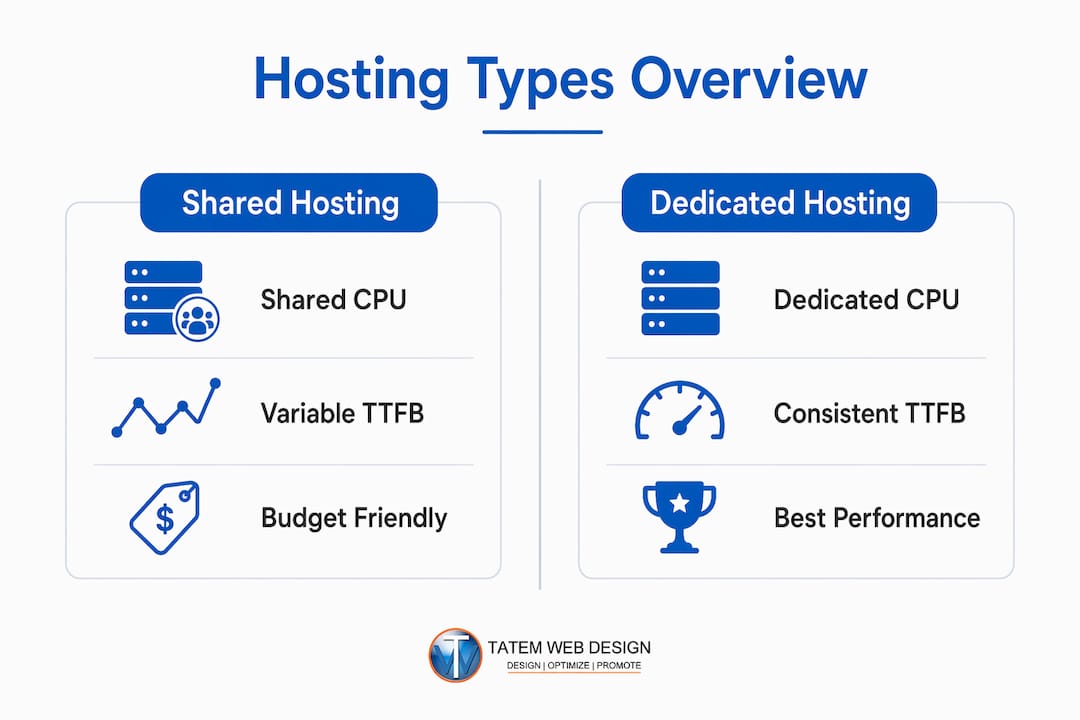
Budget shared hosting serves only about 31% of page loads with a “good” LCP score, putting shared-hosted sites at a measurable competitive disadvantage in search.
Server location and CDN use
Geographic proximity between your server and your visitors reduces network latency directly. A server located far from users adds noticeable network round-trip time before any processing begins. A content delivery network (CDN) eliminates this penalty for cached static assets by serving them from the nearest edge location, but dynamic content delivery still depends on the origin server’s location and speed. CDNs complement a fast origin server; they do not replace it.
Server software architecture
Event-driven web servers like Nginx handle over 10,000 concurrent connections efficiently by processing requests without spawning a new thread per connection. Legacy thread-per-connection models struggle under load because context-switching overhead compounds as concurrent users grow. LiteSpeed operates on a similar event-driven model and delivers comparable concurrency benefits.
Protocol support and caching layers
TLS 1.3 cuts handshake latency compared to older TLS versions. HTTP/2 and HTTP/3 enable multiplexed requests, reducing connection overhead. Caching at multiple layers, including Nginx microcaching, Redis, and Memcached, means the server returns a pre-built response instead of executing PHP and querying a database on every request. A properly cached page can be served in under 100ms. Despite these gains, HTTP/3 adoption sits at only 33.3% among measured providers, and Brotli compression at 38.4%.
Uptime and reliability
A server that goes down or times out frequently does more than frustrate visitors. Google’s Googlebot reduces crawl rates when it encounters repeated server timeouts, which limits how often your pages get indexed regardless of content quality.
Why hosting performance directly affects your SEO rankings
Hosting speed is a primary SEO lever, not a backend detail. The connection runs through Core Web Vitals, the set of metrics Google uses as a direct ranking signal.
“Hosting accounts for a foundational performance layer that can limit or enable a site’s ability to meet Core Web Vitals benchmarks, independent of front-end code optimizations.” — Nginx Web Server and Core Web Vitals Impact
TTFB and LCP: Your server’s TTFB directly delays Largest Contentful Paint (LCP), because the browser cannot begin rendering the main content until the server responds. Sites with high TTFB are significantly more likely to fail Google’s “good” threshold for LCP compared to sites with low TTFB. That gap translates directly to ranking disadvantage.
TTFB and CLS: Slow or variable TTFB also delays CSS delivery, causing layout shifts during page render and pushing up Cumulative Layout Shift (CLS) scores. Poor CLS signals a visually unstable page to both visitors and Google.
INP: Interaction to Next Paint depends more on front-end JavaScript execution than on server response time. Hosting improvements benefit INP indirectly through faster server-side rendering, but client-side code quality drives this metric.
Crawl budget: Google adapts its crawl behavior to server reliability. Frequent timeouts reduce how many of your pages Googlebot visits per day, which slows down indexing of new or updated content. For large sites or those publishing frequently, this is a real ranking constraint. Reliable search engine visibility starts with a server that stays up and responds quickly every time Googlebot calls.
Bounce rates follow the same pattern. Visitors who wait more than a few seconds for a page to load leave before converting, and high bounce rates signal low-quality user experience to Google’s ranking systems.
How to choose the best hosting plan for your site’s speed needs
Picking the right hosting plan comes down to matching your server resources to your actual traffic patterns and site complexity.
- Audit your current TTFB using Google Search Console or PageSpeed Insights before upgrading. If TTFB consistently exceeds 600ms on uncached pages, your hosting is the bottleneck.
- Prioritize NVMe storage on any VPS or dedicated plan. Placing your web root and database on NVMe reduces I/O wait under load.
- Choose a server location near your core audience. If most of your visitors are in Florida or the Southeast US, a data center in that region cuts latency before any other optimization applies.
- Verify protocol support. Confirm your host supports TLS 1.3, HTTP/2, and ideally HTTP/3 before signing up.
- Check caching options. Server-level caching (not just plugin-based) bypasses PHP execution entirely for cached pages.
- Review uptime guarantees and support response times. A 99.9% uptime guarantee still allows nearly 9 hours of downtime per year. Look for 99.99% or better with documented response SLAs.
- Match bandwidth allowances to your traffic. Throttled bandwidth creates bottlenecks that no server upgrade can fix.
- Know when to move off shared hosting. If your site runs WooCommerce, handles logged-in users, or serves dynamic content, shared hosting’s variable CPU allocation will hurt TTFB during peak hours. Upgrading to a managed VPS or cloud plan stabilizes response times. Understanding the benefits of professional hosting for your business makes that decision easier to justify.
Pro Tip: Before upgrading your hosting plan, enable server-level caching and test TTFB again. Many sites see TTFB drop below 200ms on cached pages without any hardware change. Upgrade only when uncached dynamic requests remain consistently slow.
What hosting performance experts say about speed and Core Web Vitals
The technical picture gets sharper when you look at what actually happens inside the server during a page request.
Server processing is the largest latency component
Of the four phases that make up TTFB (DNS lookup, TCP connection, TLS handshake, and server processing), server processing is the largest single contributor at 46.1% of total delay. Front-end optimizations cannot reduce this component. Only faster server hardware, better software configuration, or more efficient application code can.
Why outdated server architectures fail under load
Thread-per-connection server models allocate one thread per visitor. Under heavy traffic, context-switching overhead between threads compounds, and response times degrade. Research comparing web server architectures from Berkeley’s EECS department confirms that event-driven models outperform thread-per-connection servers on in-memory workloads, and match or exceed them on disk-bound workloads. Nginx’s event-driven architecture applies this principle at scale.
The real limits of CDNs for dynamic content
CDNs excel at serving static assets (images, CSS, JavaScript) from edge locations close to visitors. For database-driven pages, product listings, or personalized content, the request must travel to the origin server regardless of CDN coverage. Geographic server proximity reduces this latency for dynamic responses in ways a CDN cannot replicate.
“CDNs dramatically improve static asset delivery speed but do not replace the need for a fast origin server for dynamic content.” — CDN Latency Impact Analysis
Hosting upgrades produce measurable results
Upgrading from budget shared hosting to a managed NVMe VPS can reduce TTFB by hundreds of milliseconds and stabilize load times under real-world traffic. That improvement flows directly into LCP scores, which affects search engine rankings and brand growth in ways that compound over time. Tuning Linux TCP buffer sizes and queue parameters on dedicated servers further reduces latency under heavy load, improving TTFB stability beyond what hardware alone delivers.
| Hosting Scenario | Typical TTFB (Uncached) | Core Web Vitals Risk |
|---|---|---|
| Budget shared hosting | 500ms–2,000ms | High |
| Managed VPS with NVMe | — | Moderate |
| Cloud/dedicated with caching | Under 200ms | Low |
Key Takeaways
Your hosting infrastructure sets the speed ceiling your site can ever reach, and no amount of front-end optimization overcomes a slow origin server.
| Point | Details |
|---|---|
| TTFB is the core metric | Median TTFB across providers is 812ms; server processing accounts for 46.1% of that delay. |
| Shared hosting limits LCP | Budget shared hosting serves only about 31% of page loads with a “good” LCP score. |
| High TTFB multiplies LCP risk | Sites with high TTFB are significantly more likely to fail Google’s “good” LCP threshold. |
| CDNs don’t replace fast origins | CDNs speed up static assets but cannot reduce latency for dynamic, database-driven content. |
| Hosting upgrades move rankings | Moving to managed NVMe VPS hosting can cut TTFB by hundreds of milliseconds and improve Core Web Vitals scores. |
FAQ
Does hosting affect website speed?
Yes, directly. Your hosting provider controls TTFB, server processing time, and resource availability, all of which determine how fast your pages load for every visitor.
What does hosting do for your website?
Hosting provides the server infrastructure that stores your files, processes requests, and delivers content to browsers. The quality of that infrastructure sets the upper limit on your site’s speed and reliability.
What is the role of hosting in SEO?
Hosting affects SEO through Core Web Vitals scores (especially LCP), crawl budget, and uptime. Slow or unreliable hosting reduces how often Google indexes your pages and lowers your rankings even when your content is strong.
Can I run my website without hosting?
No. Every website requires a server to store files and respond to browser requests. Without hosting, your site has no place to live on the internet and cannot be accessed by visitors or search engines.
When should I upgrade from shared to VPS hosting?
Upgrade when your uncached TTFB consistently exceeds 600ms, when you run WooCommerce or dynamic content, or when traffic spikes cause noticeable slowdowns. A fast, reliable hosting plan built for business performance resolves these issues at the infrastructure level.
Tatemweb builds and hosts websites for Florida businesses with speed, security, and SEO performance built in from day one. If your site’s load times are costing you rankings and customers, call 772-224-8118 or explore AI-built website design options that put performance at the center of every decision.

Recommended
Tatem Web Design
26+ YearsWeb Design & SEO Specialist · Tatem Web Design
Matt Tatem has been designing websites professionally since 1999, making Tatem Web Design one of Florida's longest-running web agencies. Based in Stuart, FL, he specializes in WordPress, local SEO, Shopify e-commerce, and cybersecurity consulting for small businesses.

Rank in ChatGPT in 90 Days With a Practitioner Led Checklist
Follow a practitioner led 90 day plan to get cited by ChatGPT: allow OAI-SearchBot, publish short answer capsules with schema, and track Bing AI Performance.

AI SEO Content Playbook: 16 GEO Signals for Agencies & Teams
A practical playbook mapping the GEO-16 signals to hands-on editorial workflows, review controls, and metrics. For agencies and in-house teams scaling AI...

Copy Ready Local Schema Markup for SMBs + Google Validation
Copy ready JSON-LD examples and Google validation steps for SMBs' local schema markup. Audit, implement, and verify each location page with confidence.