
Secure Website Hosting: What Business Owners Must Know
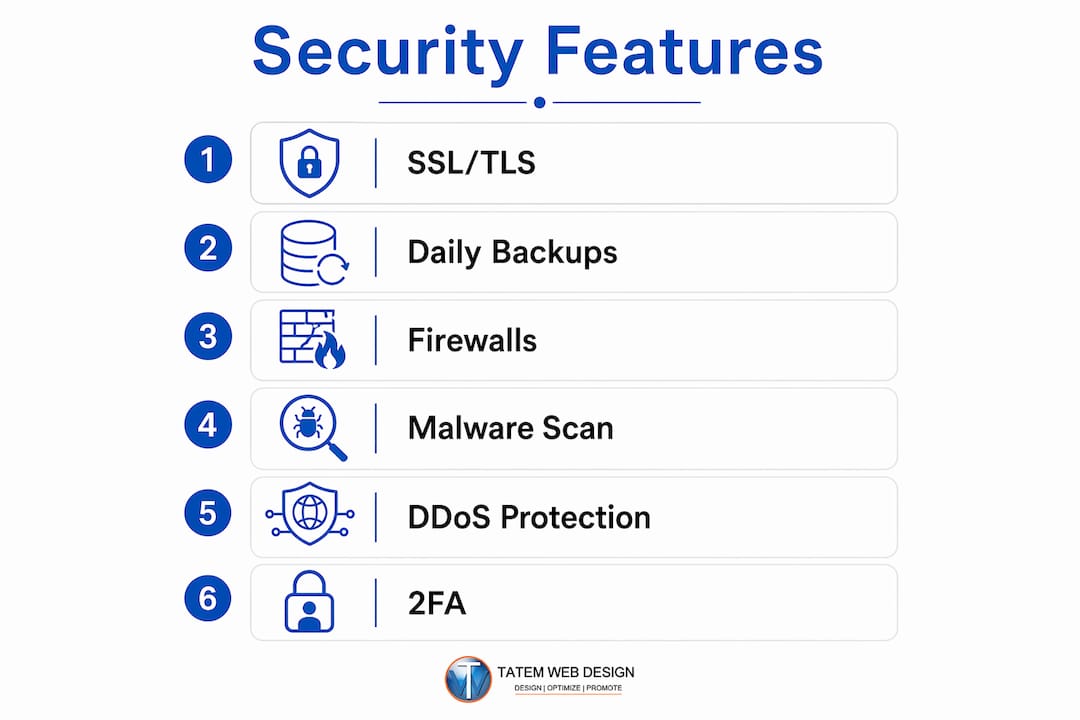
Secure website hosting is the service that keeps your website, data, and users protected from unauthorized access, attacks, and downtime by implementing multiple layers of security at the server, network, and account levels. The industry term for this practice is “secure web hosting,” and it covers far more than a padlock icon in the browser bar. A properly secured host includes SSL/TLS encryption, hardware and software firewalls, daily automated backups, malware scanning, DDoS protection, and two-factor authentication working together as a system. For business owners in Florida and across the country, understanding what is secure website hosting is the first step toward protecting your online presence, your customers, and your revenue.
What are the key security features of secure website hosting?
A secure web host must include a specific set of protections as standard features, not optional upgrades. Missing two or more of these features puts your website at measurable risk from attacks and extended downtime. Each feature addresses a different attack surface, so they work together rather than substituting for one another.

SSL/TLS certificates
SSL/TLS certificates encrypt data moving between your server and your visitors’ browsers. Every business website needs one, and reputable hosts provide automatic renewal so certificates never expire silently. Without SSL/TLS, browsers flag your site as “Not Secure,” which drives visitors away before they read a single word.
Hardware and software firewalls
A network-level firewall blocks malicious traffic before it reaches your server. A Web Application Firewall, or WAF, goes a step further by inspecting individual HTTP requests. The OWASP Top 10 identifies the most dangerous web application vulnerabilities, including SQL injection and cross-site scripting. A WAF blocks these attacks at the request level, which a standard network firewall cannot do.
Daily automated backups
SSL certificates protect data in transit, but only daily automated backups protect your entire site from permanent loss. No other feature compensates for missing backups. Backups stored off-site, separate from your primary server, are the only reliable recovery option after a ransomware attack or catastrophic hardware failure.
Malware scanning and removal
Continuous malware scanning detects infections before they spread or get flagged by search engines. Hosts that scan daily catch threats within hours. Hosts that scan weekly leave your site exposed for days, which is long enough for attackers to steal customer data or redirect your traffic.
DDoS protection
DDoS attacks overwhelm servers with flood traffic, causing extended downtime and direct revenue loss. DDoS protection filters malicious traffic at the network edge before it reaches your server. Without it, even a modest attack can take your site offline for hours.
Two-factor authentication
Two-factor authentication on hosting accounts is one of the easiest and most effective defenses against unauthorized access. Stolen credentials are a leading cause of hosting account breaches. Requiring a second verification step makes stolen passwords nearly useless on their own.
Pro Tip: Ask your hosting provider to confirm in writing which security features are included in your base plan. If WAFs, backups, or malware scanning appear as paid add-ons, that is a clear signal the provider prioritizes cost-cutting over genuine protection.
How does secure hosting impact website performance and SEO?
Security and performance are not separate concerns. They are directly connected, and a weakness in one damages the other.
Business-grade hosting providers in 2026 maintain uptime SLAs of 99.95% to 99.99% with clear compensation clauses. That level of commitment reflects genuine confidence in the infrastructure. A provider offering 99.9% uptime with no compensation clause is making a promise with no consequence for breaking it.
Search engines prioritize websites secured with HTTPS and hosting-level security updates to avoid blacklisting from malware. Google confirmed HTTPS as a ranking factor years ago, and that signal has only grown stronger. A site flagged for malware gets removed from search results entirely, which means zero organic traffic until the issue is resolved and the site is reviewed.
A hacked or offline site severely harms traffic, rankings, and user trust. Recovery from a blacklisting event typically takes weeks, even after the malware is removed. The SEO damage compounds because inbound links lose value when they point to a flagged domain.
DDoS protection also plays a direct role in availability. A site that goes down during peak hours loses sales, damages customer confidence, and signals instability to search engines that crawl it during the outage. Availability is not just an IT metric. It is a revenue metric.
Pro Tip: Check your hosting provider’s SLA for a specific uptime percentage and a defined compensation structure. A vague “best effort” uptime promise offers no real protection for your business.
What practical steps should you take when choosing secure hosting?
Choosing a secure hosting provider requires evaluating specific criteria, not just comparing price points. The features of secure website hosting should be standard inclusions, not line items you negotiate separately.
-
Verify that security features are included by default. Request a written list of what is included in your base plan. SSL/TLS, a WAF, daily backups, malware scanning, and DDoS protection should all appear without additional charges.
-
Read the SLA carefully. Look for a specific uptime percentage, a clear definition of “downtime,” and a compensation structure. A provider that offers 99.95% uptime with credit-based compensation takes reliability seriously.
-
Confirm daily automated backups with off-site storage. Weekly backups are not adequate for any business website. Ask where backups are stored and how quickly you can restore from one.
-
Check for continuous monitoring and fast patching. A reliable hosting provider offers continuous monitoring, regular security updates, and account isolation to prevent cross-site contamination in shared environments. Ask how quickly the provider applies critical security patches after a vulnerability is disclosed.
-
Require two-factor authentication on all account access. This applies to your hosting control panel, FTP access, and any administrative interfaces. If a provider does not support 2FA, move on.
-
Look for recognized certifications. Providers holding ISO 27001 or SOC 2 certifications have submitted their security practices to independent audits. These certifications are not guarantees, but they indicate a provider that takes security governance seriously.
-
Avoid providers that treat security as optional. A hosting provider that treats critical security features like WAFs or backups as paid add-ons signals possible cost-cutting at the expense of your protection. The cheapest plan is rarely the most secure one.
Pro Tip: Before signing any hosting contract, ask for a sample incident response report. Providers with mature security operations can show you how they handled a past security event. Providers without that documentation have likely never been tested.
What are common misconceptions about secure hosting?
Several widespread misunderstandings lead business owners to believe their sites are protected when they are not. Recognizing these gaps is as important as knowing what good hosting looks like.
-
SSL alone is not enough. An SSL certificate encrypts data in transit, but it does nothing to stop malware already on your server, block brute-force login attempts, or recover your site after a ransomware attack. SSL is the starting point, not the finish line. For a fuller picture of what protection actually requires, the website security best practices framework for small businesses covers the full stack clearly.
-
Weekly backups leave you exposed. A site infected on a Monday and backed up the previous Sunday loses six days of data at minimum. Daily automated backups are the 2026 standard for any business operating online.
-
Shared hosting without account isolation is a shared risk. On shared servers without proper isolation, a compromised neighboring account can affect yours. This is not theoretical. It is a documented attack vector that reputable providers address through containerization and strict account separation.
-
CMS security does not replace hosting security. WordPress plugins, Joomla extensions, and Drupal modules add application-level protection. They do not protect the server, the network, or the account credentials that control your entire hosting environment. Both layers must be active.
-
“Managed” hosting does not automatically mean “secure” hosting. Managed hosting means the provider handles server administration. It does not guarantee that every security feature is enabled or that your specific configuration is hardened. Always verify the security checklist regardless of the hosting type.
-
Ignoring network-level threats is a costly mistake. Firewalls and DDoS protection operate at the network level, below the application. Skipping them because your CMS is updated leaves the foundation of your site unprotected. Building a secure website for SMBs requires addressing both layers from the start.
Key Takeaways
Secure website hosting requires SSL/TLS, daily automated backups, a WAF, DDoS protection, and two-factor authentication as standard features, not optional add-ons, to reliably protect business data, uptime, and search rankings.
| Point | Details |
|---|---|
| Security features must be standard | SSL, WAF, daily backups, malware scanning, and DDoS protection should be included in every base plan. |
| Uptime SLAs signal real reliability | Look for 99.95% or higher with a defined compensation clause, not a vague best-effort promise. |
| HTTPS directly affects SEO | Google treats HTTPS as a ranking signal; a malware-flagged site can be removed from search results entirely. |
| Daily backups are non-negotiable | Weekly backups leave days of data at risk; off-site daily backups are the 2026 business standard. |
| Provider certifications matter | ISO 27001 or SOC 2 certification indicates independently audited security practices, not just marketing claims. |
What I have learned after 26 years of building and hosting business websites
After more than two decades of building and hosting websites for businesses across Florida, the pattern I see most often is this: business owners discover their hosting was insecure only after something goes wrong. A dentist’s patient portal gets flagged for malware. A law firm’s site goes offline during a DDoS event the day before a major filing deadline. A real estate agency loses three weeks of contact form submissions because their host’s “backup” was actually a weekly snapshot stored on the same server that crashed.
The uncomfortable truth is that most entry-level hosting plans are priced to attract, not to protect. The security features that actually matter, such as WAFs, daily off-site backups, and continuous monitoring, cost the provider real money to operate. When a plan is priced at a few dollars per month, those features are either absent or disabled by default.
What I tell every business owner I work with is this: treat your hosting decision the same way you treat your business insurance. You do not buy the cheapest policy and hope nothing happens. You verify what is covered, what the response time is, and what happens when you need to make a claim. Hosting security works the same way.
The businesses that come to us after a breach almost always had the same two things missing: daily automated backups and a WAF. Those two features, more than any other, determine whether a security incident is a minor inconvenience or a catastrophic loss. The complete guide to website security we published covers this in detail, and the pattern holds across every industry we serve.
Secure hosting is not a luxury for large enterprises. For a small business in Stuart, Florida, or anywhere else, it is the foundation that everything else sits on. Get that foundation right, and your site, your customers, and your reputation are protected. Get it wrong, and no amount of great content or marketing spend will save you when the breach happens.
— Matt
How Tatemweb protects your business with secure hosting
Tatemweb has spent over 26 years building websites that perform and stay protected. Every hosting plan includes SSL/TLS, daily automated backups, malware scanning, and DDoS protection as standard features, with no security features hidden behind upgrade tiers.

Tatemweb’s AI security enhancements layer AI-driven threat detection on top of traditional hosting security, catching anomalies that rule-based systems miss. For Florida businesses in healthcare, legal, real estate, and professional services, that combination of proven infrastructure and AI-powered monitoring means your site stays online, stays clean, and stays ranked. Explore Tatemweb’s full AI services for business or call 772-224-8118 to schedule a consultation.
FAQ
What is secure website hosting in simple terms?
Secure website hosting is a hosting service that protects your website, data, and visitors through multiple security layers including SSL/TLS encryption, firewalls, daily backups, malware scanning, and DDoS protection. It keeps your site online, clean, and safe from attacks.
Is an SSL certificate enough to make my hosting secure?
No. SSL encrypts data in transit but does not stop malware, block application-level attacks, or recover your site after a breach. A fully secure host also requires a WAF, daily backups, and continuous monitoring.
How do I know if my current hosting is secure?
Ask your provider for a written list of included security features. If WAFs, daily backups, or malware scanning appear as paid add-ons rather than standard inclusions, your current plan likely has significant gaps.
Does secure hosting improve my Google rankings?
Yes. Google uses HTTPS as a ranking signal, and a site flagged for malware can be removed from search results entirely. Hosting-level security keeps your site clean and available, which directly supports your SEO performance.
What uptime guarantee should I expect from a secure host?
Business-grade providers in 2026 offer SLA uptime guarantees of 99.95% to 99.99% with defined compensation clauses. Any provider offering less than 99.9% with no compensation structure is not operating at a business-grade level.
Recommended
Tatem Web Design
26+ YearsWeb Design & SEO Specialist · Tatem Web Design
Matt Tatem has been designing websites professionally since 1999, making Tatem Web Design one of Florida's longest-running web agencies. Based in Stuart, FL, he specializes in WordPress, local SEO, Shopify e-commerce, and cybersecurity consulting for small businesses.

Rank in ChatGPT in 90 Days With a Practitioner Led Checklist
Follow a practitioner led 90 day plan to get cited by ChatGPT: allow OAI-SearchBot, publish short answer capsules with schema, and track Bing AI Performance.

AI SEO Content Playbook: 16 GEO Signals for Agencies & Teams
A practical playbook mapping the GEO-16 signals to hands-on editorial workflows, review controls, and metrics. For agencies and in-house teams scaling AI...

Copy Ready Local Schema Markup for SMBs + Google Validation
Copy ready JSON-LD examples and Google validation steps for SMBs' local schema markup. Audit, implement, and verify each location page with confidence.