
SEO Optimization for Beginners: A Practical Guide
SEO optimization is the practice of improving your website so it appears when people search for what you offer. It covers everything from fixing technical issues that block Google from reading your pages, to writing content that matches what your audience actually types into a search bar. If you are starting from zero, here are three things to do first:
- Set up tracking: Connect your site to Google Search Console and Google Analytics (GA4) so you can see what is working.
- Run a technical check: Use a crawler like Screaming Frog to find broken pages, missing titles, and crawl errors before you write a single word of new content.
- Publish one well-optimized page: Pick your most important service or product page, apply the on-page basics (title tag, meta description, clear headings), and measure the result.
Google Search Central’s SEO Starter Guide is the official reference for all of this, and it is free.
Table of Contents
- What is SEO optimization and why does it matter?
- How do search engines actually find and rank your pages?
- What are the four core pillars of SEO?
- How do you start improving SEO step by step?
- What technical SEO issues should you fix first?
- How do you optimize individual pages for search?
- Why do backlinks and off-page signals matter?
- When should you prioritize local SEO?
- How do you measure SEO success and how long does it take?
- What mistakes do beginners most often make?
- Which tools and resources should beginners use?
- How is SEO changing in 2026 and what should you prioritize now?
- Key Takeaways
- The part most SEO guides skip
- Ready to get your site ranking? Tatemweb can help.
- Useful sources for further learning
- FAQ
What is SEO optimization and why does it matter?
SEO optimization is the process of making your website easier for search engines to find, understand, and recommend to users. Search engines like Google want to serve the most relevant, trustworthy result for every query. Your job is to make sure your site qualifies.
The practical payoff is straightforward: more organic (unpaid) traffic, more leads, and lower long-term customer acquisition costs compared to paid advertising. A page that ranks on page one of Google keeps working for you around the clock without a recurring ad budget.

What makes SEO different from most marketing channels is that the results compound. A well-optimized page earns clicks today, builds authority over months, and attracts links that push it higher over time. That compounding effect is why small business SEO typically requires 3–5 hours per week and produces measurable traffic within 4–12 months when executed consistently.
How do search engines actually find and rank your pages?
The process runs in three stages: crawl, index, rank.
- Crawl: A search engine bot (Googlebot, for example) follows links across the web to discover pages. If your site blocks the bot or has no inbound links, it may never be found.
- Index: Once a page is crawled, Google stores a copy in its index. Pages with thin content, duplicate text, or a “noindex” tag may be excluded.
- Rank: When someone searches, Google pulls relevant indexed pages and scores them against hundreds of signals to decide the order.
The major ranking signal categories are:
- Relevance: Does your page match the user’s search intent? Title tags, headings, and body copy all contribute.
- Quality and trust: Is the content accurate, original, and written by someone with real expertise? Backlinks from credible sites signal trust.
- User experience: Does the page load fast, work on mobile, and keep visitors engaged? Core Web Vitals and bounce behavior factor in here.
Google’s SEO Starter Guide describes crawlability and indexability as the foundational steps every site must get right before anything else. Think of it this way: ranking signals only matter if Google can read your page in the first place.
What are the four core pillars of SEO?
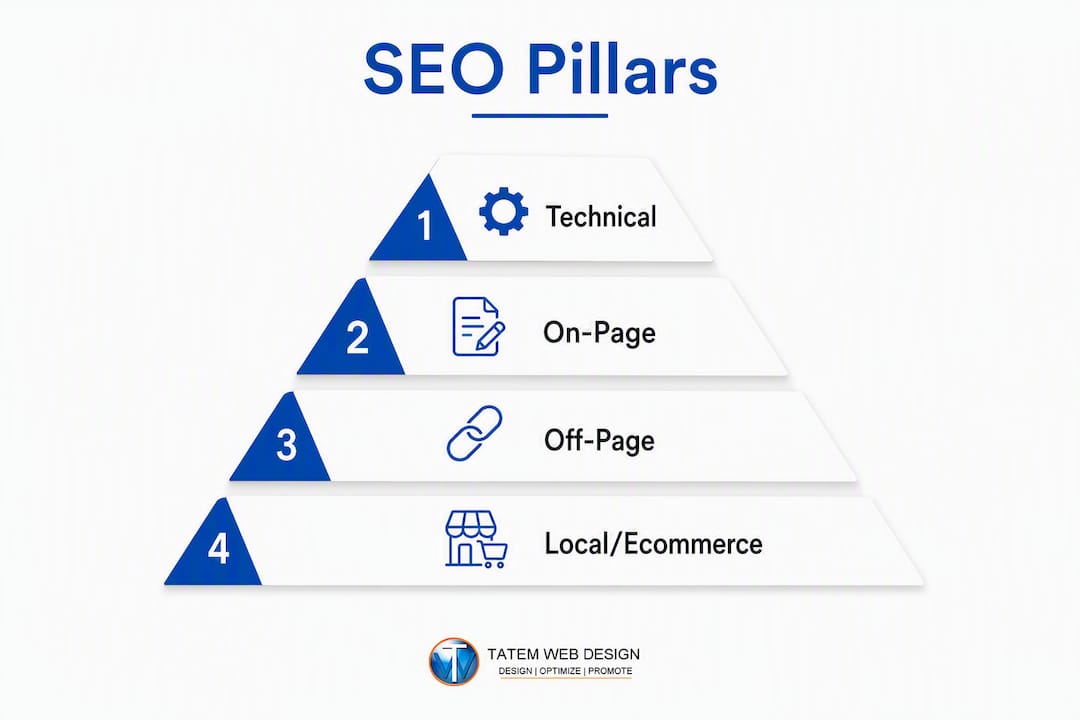
SEO is organized into four primary pillars, and understanding each one helps you prioritize your work rather than doing everything at once.
- Technical SEO: The infrastructure layer. HTTPS, site speed, mobile responsiveness, XML sitemaps, and clean crawl paths. For most small sites, fixing technical issues produces the fastest measurable improvement because errors here block every other effort.
- On-Page SEO: The content and HTML layer. Title tags, meta descriptions, heading structure, body copy, image alt text, and internal links. This is where you signal relevance to Google and value to the reader.
- Off-Page SEO: The authority layer. Backlinks from other websites, brand mentions, and reviews tell Google that other people trust your content. You cannot fully control this, but you can earn it.
- Local SEO: The geography layer. If you serve customers in a specific area, Google Business Profile, local citations, and location-specific pages help you appear in “near me” searches and the local map pack.
Yoast’s SEO guide notes that technical, on-page, and off-page are the three classic types, with local and ecommerce as specialized subtypes. For a small business website, start with technical SEO. Broken crawl paths and slow load times undermine every other improvement you make.
Pro Tip: Before writing new content, spend one hour in Google Search Console’s Coverage report. Fix any “Excluded” or “Error” pages first. Those are pages Google is already trying to index but cannot.
How do you start improving SEO step by step?
A practical beginner sequence moves from tracking to technical to content to authority. Here is the order that produces results fastest:
- Set up Google Search Console and GA4 (Week 1, 2–3 hours): You cannot improve what you cannot measure. GSC shows which queries bring traffic; GA4 shows what visitors do after they arrive. Both are free.
- Run a technical audit (Week 1–2, 3–5 hours): Use Screaming Frog to crawl your site and flag broken links, missing title tags, duplicate content, and redirect chains. Fix critical errors before anything else.
- Do focused keyword research (Week 2–3, 2–4 hours): Use local SEO keyword research principles to map one clear primary keyword intent per page. Avoid high-difficulty terms you cannot realistically compete for yet.
- Fix critical on-page elements (Weeks 3–4, 3–5 hours): Update title tags, meta descriptions, and H1 headings on your five most important pages. These changes can improve click-through rates within weeks.
- Publish a prioritized content plan (Weeks 4–5, 2–3 hours planning): Identify three to five topics your audience searches for that you do not yet have pages for. Schedule them by business priority, not just search volume.
- Begin basic link and authority work (Weeks 5–8, ongoing): Submit your site to relevant local directories, reach out to partners for links, and claim your Google Business Profile if you have not already.
The order matters because technical errors waste every other effort. A beautifully written page that Google cannot crawl will never rank, no matter how good the content is.
What technical SEO issues should you fix first?
Fix crawlability and mobile speed before anything else. Those two factors determine whether Google can access your site and whether users stay once they arrive.
The core technical checklist:
- HTTPS: Your site must use a valid SSL certificate. Google flags non-HTTPS sites as “Not Secure,” which damages both rankings and user trust.
- robots.txt: Check that you are not accidentally blocking Googlebot from crawling important pages.
- XML sitemap: Submit a sitemap in Google Search Console so Google knows which pages to prioritize.
- Canonical tags: Use canonical tags to prevent duplicate content from splitting your ranking potential across multiple URLs.
- Mobile friendliness: Google indexes the mobile version of your site first. Test with Google’s Mobile-Friendly Test tool.
- Core Web Vitals: Page speed, visual stability, and interactivity scores affect rankings. Check them in PageSpeed Insights.
- Structured data: Schema markup helps Google understand your content type (business, article, FAQ) and can trigger rich results in search.
- Server response codes: Fix any 404 errors and unnecessary redirect chains that slow crawl efficiency.
Validation tools to use: Google Search Console (Coverage and Core Web Vitals reports), PageSpeed Insights, and Screaming Frog for a full site crawl. The technical SEO foundation guide from Tatemweb walks through the full diagnostic process if you want a deeper reference.
Pro Tip: If your Core Web Vitals scores are failing and your site runs on WordPress, start with image compression and a caching plugin before touching code. Most speed issues on small sites come from unoptimized images.

When technical problems are complex (persistent indexing failures, JavaScript rendering issues, server-level redirects), that is the right time to bring in an agency rather than spending weeks troubleshooting alone.
How do you optimize individual pages for search?
Each page should target a single primary user intent and one main keyword. Trying to rank one page for ten different topics dilutes its relevance signal and confuses both Google and your reader.
The core on-page elements to optimize:
- Title tag: Appears as the blue headline in search results. Keep it under 60 characters and include your primary keyword near the front.
- Meta description: The short summary under the title. It does not directly affect rankings, but a well-written meta description improves click-through rates. Aim for 150–160 characters.
- H1 heading: One per page, clearly stating the topic. Your primary keyword should appear here naturally.
- Body content: Write for the reader first. Cover the topic thoroughly, use subheadings (H2, H3) to organize sections, and include your keyword and related terms where they fit naturally.
- Image alt text: Describe each image accurately. This helps Google understand the image and improves accessibility.
- URL structure: Keep URLs short, descriptive, and keyword-relevant (e.g.,
/services/local-seorather than/page?id=47). - Internal links: Link to related pages on your own site to distribute authority and help visitors find more content.
Here is a quick comparison of strong versus weak title and meta description writing:
| Element | Poor Example | Strong Example |
|---|---|---|
| Title tag | “Home Page — My Business” | “Local Plumber in Stuart, FL — Fast Same-Day Service” |
| Meta description | “We offer plumbing services.” | “Licensed plumber serving Stuart, FL. Same-day repairs, free estimates. Call 772-555-0100.” |
Optimizing a blog post title and meta description for a targeted query is the simplest and most common on-page tactic, and it often produces visible click-through improvements within a few weeks. For WordPress users, the Yoast SEO plugin gives you a live preview of how your title and meta description will appear in search results, along with readability and keyword checks.
Why do backlinks and off-page signals matter?
Off-page SEO is about external signals of trust. When other websites link to yours, they are effectively vouching for your content. Google treats those votes as evidence that your site is worth recommending.
Dos and don’ts for link building:
- Do earn links by publishing content other sites want to reference (guides, data, local resources).
- Do pursue local citations (your business name, address, and phone number listed consistently across directories like Yelp, the Better Business Bureau, and industry-specific sites).
- Do reach out to partners, suppliers, and local organizations for natural link exchanges.
- Don’t buy bulk links from link farms or private blog networks. Google’s algorithms detect these patterns and can penalize your site.
- Don’t use exact-match anchor text in every link. Natural link profiles include varied anchor text.
Three beginner tactics that work:
- Local citations: Claim and complete your listing on Google Business Profile, Yelp, and relevant local directories. Consistent NAP (name, address, phone) data across all listings strengthens local authority.
- Guest posting: Write a useful article for a relevant industry blog in exchange for a link back to your site. Guest posting and other link-building tactics remain one of the most reliable ways to earn quality backlinks.
- Resource page outreach: Find pages that list helpful tools or guides in your niche and ask to be included if your content genuinely fits.
The metrics to watch are referring domains (the number of unique sites linking to you) and link quality (the authority and relevance of those sites). A handful of links from credible, relevant sites outperforms hundreds of links from low-quality sources.
When should you prioritize local SEO?
Local SEO is worth prioritizing if you serve customers in a specific geographic area. A dentist in Stuart, Florida, a marine contractor in Fort Lauderdale, or a law firm in Miami all have more to gain from local search visibility than from ranking nationally for broad terms.
The local SEO checklist:
- Claim and optimize your Google Business Profile (GBP): Add accurate business hours, categories, photos, and a description. A complete GBP profile is the single highest-leverage local SEO action for most small businesses.
- NAP consistency: Your business name, address, and phone number must be identical across your website, GBP, and every directory listing. Even small differences (e.g., “St.” vs. “Street”) can weaken your local authority signal.
- Collect and respond to reviews: Google weighs review quantity, recency, and your response rate. Ask satisfied customers to leave a review and reply to every one, positive or negative.
- Local citations: List your business on Yelp, the Chamber of Commerce, industry directories, and any local business associations.
- Location pages: If you serve multiple cities or neighborhoods, create a dedicated page for each location with unique, relevant content.
A common NAP inconsistency example: your website lists “Tatem Web Design, 2840 SE Monroe St, Stuart, FL” but your Yelp listing says “Tatem Web, Monroe Street, Stuart.” Google sees these as potentially different businesses, which dilutes your local ranking signal. The Google Business Profile optimization guide from Tatemweb covers the full setup process for Florida businesses.
How do you measure SEO success and how long does it take?
Expect initial signals (keyword movement, impression growth) within the first few weeks of making changes. Measurable organic growth typically takes 4–12 months with consistent weekly effort, depending on your market’s competition and execution.
KPIs to track from day one:
- Impressions: How often your pages appear in search results (Google Search Console).
- Clicks and click-through rate (CTR): How many people click through and at what percentage. A rising CTR on a stable impression count means your titles and meta descriptions are improving.
- Average position: Your average ranking across all queries. Watch for upward movement on your target keywords.
- Organic sessions: Total visits from organic search (GA4). This is the bottom-line traffic number.
- Pages gaining impressions: New pages entering the index and attracting queries, a leading indicator of content momentum.
- Conversion rate from organic traffic: Are organic visitors taking the action you want (calling, booking, buying)?
A recommended reporting cadence: check Google Search Console regularly for quick wins (CTR improvements, new queries appearing), and review GA4 periodically for trend analysis. Consistent weekly effort over many months is what produces compound organic growth.
The most common mistake is abandoning SEO after two months because “nothing happened.” The first 90 days are mostly about fixing errors and building the foundation. The growth comes after that.
What mistakes do beginners most often make?
| Mistake | Why It Hurts | Quick Fix |
|---|---|---|
| Targeting only high-volume keywords | High competition means you will not rank for months or years | Focus on specific, lower-competition phrases your audience actually uses |
| Ignoring technical issues | Crawl errors and slow pages block all other progress | Run a Screaming Frog audit and fix errors before creating new content |
| Publishing duplicate or thin content | Google may exclude these pages from the index | Consolidate similar pages; add depth and original insight to thin ones |
| Writing weak title tags and meta descriptions | Low CTR wastes existing rankings | Rewrite titles to include the keyword and a clear benefit; keep them under 60 characters |
| Broken internal links | Wastes crawl budget and frustrates visitors | Audit internal links monthly with Screaming Frog or Google Search Console |
When technical problems persist despite your fixes (pages stuck in “Excluded” status, Core Web Vitals failing after optimization attempts, or a site-wide traffic drop after a Google algorithm update), that is the right time to consult an SEO professional rather than continuing to troubleshoot alone.
Which tools and resources should beginners use?
The tools below cover every stage of SEO work, from initial setup to ongoing monitoring. Start with the free ones and add paid tools as your needs grow.
- Google Search Console (free): The most important SEO tool for any site. Shows which queries bring traffic, flags indexing errors, and reports Core Web Vitals. Set this up before anything else.
- Google Analytics / GA4 (free): Tracks user behavior after they land on your site. Pairs with GSC to give you the full picture from search query to conversion.
- PageSpeed Insights (free): Diagnoses Core Web Vitals and page speed issues with specific, actionable recommendations.
- Screaming Frog SEO Spider (free up to 500 URLs): Crawls your site the way Google does and surfaces broken links, duplicate content, missing tags, and redirect issues. The go-to tool for technical audits.
- Yoast SEO (free WordPress plugin): Guides on-page optimization for each page and post, including title tag and meta description previews, readability scoring, and XML sitemap generation.
- SEMrush (paid, with limited free tier): Keyword research, competitive analysis, backlink auditing, and site health tracking in one platform. Useful once you are past the basics.
- Ahrefs (paid): Deep backlink analysis and keyword research. Particularly strong for understanding your competitors’ link profiles and finding content gap opportunities.
- Google Search Central (free): Google’s own documentation and SEO Starter Guide. The authoritative reference for how Google recommends you structure and optimize your site.
For beginners, the priority order is: GSC and GA4 first (free, essential), then Screaming Frog for your first technical audit, then Yoast if you are on WordPress. Add SEMrush or Ahrefs when you are ready to do serious keyword and competitive research.
How is SEO changing in 2026 and what should you prioritize now?
The most important shift in SEO right now is that visibility no longer means only a blue link on page one. Modern SEO is about total search visibility across search engines and AI discovery surfaces, including AI-generated answers, knowledge panels, and voice results. A brand that appears in a ChatGPT or Perplexity answer has achieved a form of SEO success that did not exist three years ago.
What this means practically:
- Content accuracy and structure matter more than ever. AI systems cite content that is clearly written, factually accurate, and well-organized. Structured data (schema markup) helps AI and search engines understand your content type and context.
- E-E-A-T signals are the foundation. Experience, Expertise, Authoritativeness, and Trustworthiness are the signals Google (and AI systems) use to decide whose content to surface. Author credentials, real business information, and consistent brand presence across the web all contribute.
- Technical health comes first, then content breadth, then advanced signals. A site with crawl errors and slow load times will not benefit from schema markup or AI-optimized content. Fix the foundation before layering on advanced tactics.
- Brand visibility across platforms: Consistent mentions, reviews, and citations across Google, Yelp, industry directories, and social platforms reinforce your entity in Google’s knowledge graph.
At Tatemweb, when we audit a client’s SEO roadmap today, we typically find that the biggest gap is not content volume. It is that the site’s technical health and E-E-A-T signals are too weak for Google to trust the content that already exists. Fixing those two things first, before publishing more pages, consistently produces faster results. For businesses ready to go further, AI-powered SEO services can automate content optimization, structured data generation, and competitive monitoring at a scale that manual work cannot match.
Pro Tip: Add structured data (schema) to your homepage, service pages, and any FAQ content. Google’s Rich Results Test tool shows you exactly what it reads. This is one of the fastest ways to improve your visibility in both traditional search and AI-generated answers.
Key Takeaways
SEO optimization works when you fix the technical foundation first, align every page to a single user intent, and build authority consistently over several months.
| Point | Details |
|---|---|
| Fix technical issues first | Crawl errors and slow load times block all other SEO progress; audit with Screaming Frog and Google Search Console. |
| One intent per page | Map one primary keyword and user intent to each page to concentrate ranking potential and improve relevance signals. |
| Track from day one | Set up Google Search Console and GA4 before making changes so you can measure what actually moves. |
| Expect a several-month timeline | Measurable organic growth typically takes several months with consistent weekly effort. |
| Tatemweb accelerates the process | Tatemweb’s AI-powered SEO and web design services handle technical audits, on-page optimization, and local SEO for Florida businesses. |
The part most SEO guides skip
The conventional SEO advice is to “create great content.” That is not wrong, but it is incomplete in a way that wastes a lot of time for small business owners. Content quality only matters after Google can find and trust your site. A beautifully written page on a technically broken site is invisible.
What actually moves the needle, especially in the first six months, is fixing the infrastructure: getting your pages indexed, your site loading fast on mobile, your NAP data consistent across directories, and your Google Business Profile fully built out. Those are not glamorous tasks, but they are the ones that produce the first measurable ranking improvements.
The second thing most guides understate is the role of patience and consistency. SEO is not a campaign with a start and end date. It is a system that compounds. The businesses that win in organic search are the ones that show up every week, fix what is broken, publish what their audience needs, and earn links over time. There is no shortcut that replaces that.
What has changed in 2026 is the definition of “visibility.” Ranking on page one is still valuable, but appearing in an AI-generated answer, a knowledge panel, or a voice result is equally real traffic. That means E-E-A-T signals, structured data, and brand consistency across the web are no longer advanced tactics. They are table stakes.
Ready to get your site ranking? Tatemweb can help.
If you would rather have an expert handle the technical audit, on-page fixes, and local SEO strategy than spend months learning it yourself, Tatemweb is built for exactly that. With over 26 years of experience serving Florida businesses across industries including healthcare, legal, real estate, and marine, Tatemweb delivers AI-powered website design and SEO services that are built for speed, security, and search performance from day one.

The process starts with a consultation where we review your current site, identify the highest-impact fixes, and map a realistic roadmap for organic growth. You get a clear plan, not a generic report. Call Tatemweb directly at 772-224-8118 or visit Tatemweb’s AI services page to schedule your consultation and see what AI-driven SEO can do for your Florida business.
Useful sources for further learning
- Google Search Central: SEO Starter Guide: The official Google reference for technical and on-page SEO basics. Start here before reading anything else.
- Google Search Console: Google’s free tool for monitoring your site’s search performance, indexing status, and Core Web Vitals. Required reading for any site owner.
- Moz Beginner’s Guide to SEO: A thorough, well-organized introduction to SEO concepts, user intent, and trust signals. Useful for building a solid conceptual foundation.
- Yoast SEO Learning Center: Practical guides for WordPress users on on-page optimization, structured data, and content strategy.
- SEMrush Blog: What Is SEO: Covers modern SEO including AI discovery and total search visibility, useful for understanding where the discipline is heading.
- Groundwork: Small Business SEO Guide: Realistic time and effort estimates for small business owners, including the 3–5 hours per week framework and the 4–12 month timeline.
- Tatemweb: AI SEO Optimization Services: Tatemweb’s service page for Florida businesses that want professional, AI-assisted SEO without managing it in-house.
FAQ
What is meant by SEO optimization?
SEO optimization is the process of improving a website’s content, structure, and authority so search engines rank it higher for relevant queries. The goal is to attract more organic (unpaid) traffic from people already searching for what you offer.
How do you do SEO for beginners?
Start by setting up Google Search Console and GA4, then run a technical audit with Screaming Frog to fix crawl errors. After that, optimize your most important pages’ title tags and meta descriptions, and publish content that matches what your audience searches for.
How long does SEO take to show results?
Initial signals like keyword movement and impression growth often appear within a few weeks of making changes. Measurable organic traffic growth typically takes 4–12 months with consistent weekly effort.
What are some examples of SEO optimization?
Common examples include rewriting a page’s title tag to include a target keyword, fixing broken internal links, submitting an XML sitemap to Google Search Console, claiming and completing a Google Business Profile, and earning a backlink from a relevant local directory.
What tools do beginners need for SEO?
The essential free tools are Google Search Console (indexing and query data), GA4 (traffic behavior), PageSpeed Insights (speed and Core Web Vitals), and Screaming Frog (technical site crawl). WordPress users should add the Yoast SEO plugin for on-page guidance.
Recommended
Tatem Web Design
26+ YearsWeb Design & SEO Specialist · Tatem Web Design
Matt Tatem has been designing websites professionally since 1999, making Tatem Web Design one of Florida's longest-running web agencies. Based in Stuart, FL, he specializes in WordPress, local SEO, Shopify e-commerce, and cybersecurity consulting for small businesses.

CMMC Level 2 vs Level 1: Which One Applies to You?
CMMC Level 1 vs Level 2 compared: data types, 15 vs 110 requirements, self-assessment vs third-party audits, POA&M rules and how to pick your level.

Phishing Awareness Training for Small Business: A Practical Guide
How to build phishing awareness training for a small business: what to teach, how to run simulations, which numbers to track, and what to pair it with.

AI Content Pricing: What Florida Businesses Really Pay in 2026
What AI content costs in 2026: per-post ranges, tool subscriptions, editing time and agency retainers, plus how to budget and avoid hidden costs.