
The Small Business Digital Marketing Checklist for 2026
Your first three moves this week: fix conversion friction on your website, define your goals and KPIs, and turn on GA4 plus Google Search Console so every campaign you run is measurable from day one. Everything else in this digital marketing checklist builds on those three foundations. Skip them and you are spending money on traffic that disappears without a trace.
Here is the high-level checklist to orient you before we go deep on each channel:
- Conversion-ready homepage/landing page — clear value proposition above the fold, one primary CTA
- Goal and KPI mapping — 1–2 business goals tied to measurable metrics (leads/month, revenue, bookings)
- GA4 and Google Search Console — verified, events firing, at least one conversion goal active
- Basic on-page SEO — title tags, meta descriptions, and one target keyword per page
- Email capture — a lead magnet or opt-in form live on your highest-traffic pages
- One social channel — consistent posting schedule before you add a second platform
- First paid retargeting test — a small Google Ads or social remarketing campaign targeting site visitors
This week: fix your top landing page, verify GA4 is recording conversions, and set up a three-email welcome sequence. Those three actions compound faster than anything else on this list.
Pro Tip: Download a one-page marketing checklist template and pin it where your team sees it daily. Practitioners who use channel-specific, downloadable templates complete setup tasks faster and with fewer errors than those working from memory.
Key Takeaways
A complete digital marketing checklist starts with website conversion, goal mapping, and GA4 tracking — those three foundations determine whether every other channel investment pays off.
| Point | Details |
|---|---|
| Fix conversion first | Audit your top landing pages before spending on traffic — forms, CTAs, and load speed come first. |
| Measure before you spend | GA4 and Google Search Console must be verified and tracking conversions before any paid campaign launches. |
| Email compounds fast | A three-email welcome sequence plus a weekly value cadence is the fastest path to repeat revenue from your list. |
| Compliance is not optional | Healthcare, legal, and government businesses must audit tracking pixels and sign BAAs before running any campaign. |
| Tatemweb handles the implementation | Tatemweb’s 26-year agency team sets up, runs, and optimizes the full checklist so you can focus on your business. |
Table of Contents
- How should you prioritize this digital marketing checklist?
- Set clear goals and audience before running any campaign
- Does your website actually convert the traffic you send it?
- What does a complete SEO checklist look like for small businesses?
- How do you build a content marketing plan that actually drives leads?
- Paid advertising checklist — how to launch without wasting budget
- Email marketing checklist — from first signup to repeat revenue
- Social media checklist — profiles, cadence, and community
- Analytics and measurement checklist — what to track and when
- CRO checklist — how to improve conversions without more traffic
- Security and compliance checklist — what small businesses cannot skip
- What tools and templates should you use to run this checklist?
- How Tatemweb uses this checklist with real clients
- Tatemweb can implement this checklist for you
- Sources
- FAQ
How should you prioritize this digital marketing checklist?
Not every checklist item carries equal weight. A 2x2 priority matrix — impact on the vertical axis, effort on the horizontal — cuts through the noise fast.
High impact, low effort (do this week):
- Fix broken contact forms and add a thank-you page with a next-step CTA
- Verify GA4 and enable at least one conversion event
- Set up a three-email welcome sequence in Mailchimp or HubSpot
- Claim and complete your Google Business Profile
High impact, higher effort (month 1): 5. Rewrite your top three service pages with a clear headline, one CTA, and target keyword 6. Build a basic editorial calendar covering eight weeks of content 7. Launch a small Google Ads retargeting campaign with a modest test budget
Medium impact, lower effort (quarterly): 8. Run a technical SEO crawl and fix crawl errors 9. Audit social profiles for consistent branding and updated CTAs 10. Review and refresh top-performing blog posts
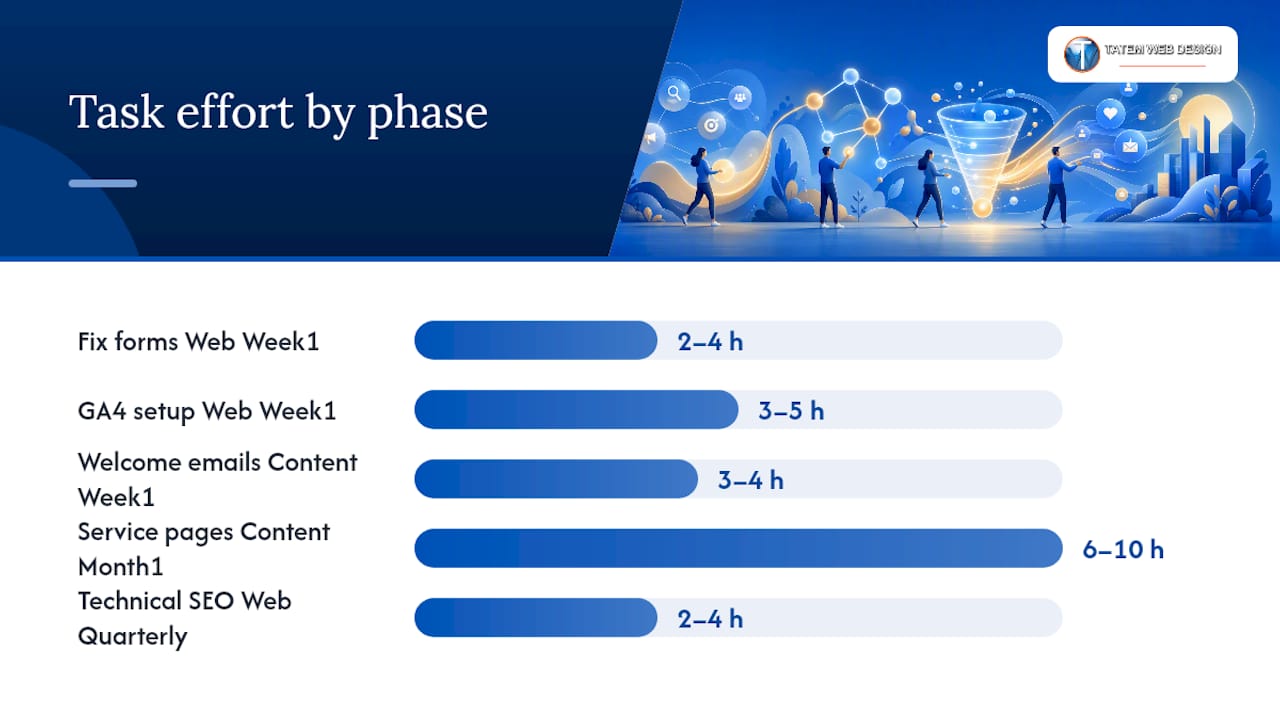
| Task | Time Estimate | Owner Role | Phase |
|---|---|---|---|
| Fix forms + thank-you pages | 2–4 hours | Web lead | Week 1 |
| GA4 + Search Console setup | 3–5 hours | Web lead | Week 1 |
| Welcome email sequence | 3–4 hours | Content lead | Week 1 |
| Google Business Profile | 1–2 hours | Owner | Week 1 |
| Service page rewrites | 6–10 hours | Content lead | Month 1 |
| Editorial calendar | 2–3 hours | Content lead | Month 1 |
| Google Ads test campaign | 4–6 hours | Paid-media owner | Month 1 |
| Technical SEO crawl | 2–4 hours | Web lead | Quarterly |
Pro Tip: The three quick wins that compound fastest are fixing forms, enabling GA4 conversion goals, and launching a welcome email sequence. Each one feeds the next: better forms fill your list, GA4 tells you which pages drive signups, and the welcome sequence converts those signups into paying clients.
Set clear goals and audience before running any campaign
Every checklist item downstream depends on two decisions you make here: what you are trying to achieve and who you are trying to reach. A data-driven strategy that connects objectives, audience personas, and measurement to clear business outcomes is the right foundation, and it takes less time to build than most owners expect.
Start with one or two primary business goals. Common examples for small businesses:
- Leads per month — target number of qualified form fills or calls
- Revenue from web — dollar amount attributed to online channels
- Bookings or appointments — specific service-line volume targets
- Email list growth — subscribers added per month
Map each goal to a channel-specific KPI so your team knows exactly what to measure:
| Business Goal | Primary KPI | Channel | Review Cadence |
|---|---|---|---|
| leads per month | Form submissions | Website + paid | Weekly |
| $10K revenue from web | Attributed revenue | All channels | Monthly |
| 50 new bookings | Appointment completions | Website + email | Weekly |
| 500 new subscribers | Email opt-in rate | Website + social | Monthly |
For audience personas, keep it practical. Each persona needs three fields: the problem they are trying to solve, the buying trigger that makes them search now, and the channels where they spend time. Pull evidence from your CRM, past client interviews, and GA4 audience reports rather than guessing. A buyer persona template built from real data will sharpen every content and ad decision you make.

Assign a weekly dashboard review to whoever owns each goal, and schedule a monthly deep-dive to check whether the KPIs are moving in the right direction.
Does your website actually convert the traffic you send it?
Traffic without conversion is just noise. Before you spend a dollar on ads or an hour on content, run a quick conversion audit on your top five pages. The website launch checklist covers the full scope; here are the items that move the needle fastest.
Conversion checklist:
- Clear value proposition in the first viewport — visitors should know what you do and who you serve within three seconds
- One primary CTA per page (not three competing buttons)
- Mobile-first layout tested on an actual phone, not just a browser resize
- Page load time under 2.5 seconds LCP (Largest Contentful Paint) and CLS below 0.1
- SSL certificate active and visible (https://)
- Trust signals visible: reviews, credentials, client logos, or certifications
- Short forms — three fields maximum for a first-touch lead form
- Chat or AI lead capture active on high-intent pages
- Thank-you page with a clear next step and a GA4 conversion event firing
Technical tasks to complete in month 1:
- Submit XML sitemap to Google Search Console
- Check robots.txt to confirm key pages are not accidentally blocked
- Add LocalBusiness or Service schema markup
- Confirm CMS (WordPress or otherwise) is updated and backups are running
| Performance Metric | Target | Tool to Check |
|---|---|---|
| LCP (page load) | Under 2.5 seconds | Google PageSpeed Insights |
| CLS (layout shift) | Below 0.1 | Google PageSpeed Insights |
| Bounce rate | Under 60% for service pages | GA4 |
| Form conversion rate | 2%–5% for cold traffic | GA4 + form analytics |
Pro Tip: Run your conversion audit on your top-performing pages first, not the entire site. The pages already getting traffic are where conversion fixes pay off immediately.
What does a complete SEO checklist look like for small businesses?
SEO breaks into three layers: technical health, on-page content, and local visibility. Work through them in that order because technical problems block everything else.
Technical SEO (week 1–2):
- Verify your site in Google Search Console and confirm GA4 is linked
- Fix any crawl errors shown in the Coverage report
- Resolve duplicate content with canonical tags
- Confirm all pages are mobile-indexable (use the Mobile Usability report)
- Compress images and enable browser caching to hit LCP targets
On-page SEO (month 1): 6. Write a unique title tag (50–60 characters) and meta description (150–160 characters) for every service page 7. Use one H1 per page that includes the primary keyword 8. Build internal links between related service pages and blog posts 9. Answer the specific questions your customers type into Google — check Search Console’s Queries report for real phrasing 10. Optimize for AI-era search (AEO/AEE): structure answers clearly so machine learning systems can surface your content in AI-generated responses
Keyword research tools and approach:
- Google Search Console (free, shows what you already rank for)
- Google Keyword Planner (free with a Google Ads account)
- Google’s “People also ask” and autocomplete for question-based keywords
- Focus on service + location combinations (“web design Stuart FL”) and intent-specific questions
Local SEO basics:
- Complete every field in your Google Business Profile: hours, services, photos, and a keyword-rich description
- Build consistent NAP (name, address, phone) citations across directories
- Respond to every Google review within 48 hours
- Create a dedicated location page for each city or service area you serve
The seven-step small-business checklist that starts with website conversion and local SEO as foundations is a proven, repeatable structure, and the sequencing here follows that same logic.
How do you build a content marketing plan that actually drives leads?
Content works when it maps to buyer intent, not when it fills a blog for its own sake. Start with three to five content pillars that connect directly to your service lines and the questions your buyers ask before they hire someone.
Content pillar examples for a professional services firm:
- How-to guides that answer pre-purchase questions
- Service pages optimized for specific keywords
- Case study formats (problem, approach, result) for credibility
- Local content targeting your service area
- FAQ content that captures voice and AI search queries
For your editorial calendar, a biweekly publishing cadence is sustainable for most small teams. Assign a content lead who owns briefs, drafts, and publishing. Use Canva for graphics so the content lead does not need a designer for every post. Each piece of content should have a target keyword, a meta description, an internal link to a service page, and a CTA before it goes live.
Content distribution checklist:
- Share every new post to your email list within 48 hours of publishing
- Post to your primary social channel with a native caption (not just a link)
- Tag UTM parameters on every link you share so GA4 can attribute traffic correctly
- Repurpose top-performing posts: one long-form article becomes a social carousel, an email section, and a short video script
The repurposing model is where most small businesses leave value on the table. One well-researched 1,200-word post can generate three to five smaller assets without writing anything new. For deeper guidance on building your content engine, the content marketing strategies guide covers pillar planning and editorial calendar setup in detail.
| Long-Form Asset | Repurposed Formats |
|---|---|
| 1,200-word blog post | Email newsletter section, 3 social posts, short video script |
| Case study | LinkedIn post, testimonial pull quote, service page proof point |
| FAQ page | Voice search content, chatbot response library, social Q&A posts |
Paid advertising checklist — how to launch without wasting budget
Paid campaigns fail most often because of poor tracking, not poor creative. Fix the measurement layer before you spend a dollar.
Campaign setup steps:
- Create a Google Ads account and link it to GA4
- Define one conversion action per campaign (form fill, call, purchase)
- Build remarketing audiences from site visitors (minimum 100 users before activating)
- Set geographic targeting to your actual service area — not the entire country
- Write three headline variations and two description variations per ad group
- Match every ad to a dedicated landing page, not your homepage
Tracking checklist:
- Install the Google Ads conversion tag or import conversions from GA4
- Add UTM parameters to every ad URL using a consistent naming convention
- Test conversions in GA4 DebugView before launching
Budget and scaling rules:
- Start with a modest test budget per month for Google Ads
- Set a target ROAS (return on ad spend) before scaling — know your number before you increase spend
- Review performance weekly during the first 30 days; make scaling decisions monthly
Optimization cadence:
| Period | Action |
|---|---|
| Daily (first 2 weeks) | Check spend pacing, click-through rate, and conversion volume |
| Weekly | Pause underperforming ad variations, add negative keywords |
| Monthly | Evaluate ROAS, adjust bids, and decide whether to scale or reallocate |
For a step-by-step walkthrough of campaign structure and bidding strategy, the PPC guide for beginners covers account setup through first optimization.
Email marketing checklist — from first signup to repeat revenue
Email consistently delivers among the highest ROI of any digital channel, which makes list hygiene and automation setup worth prioritizing early. The checklist below covers the full lifecycle.
List growth:
- Place opt-in forms on your homepage, blog sidebar, and exit-intent popup
- Offer a lead magnet (checklist, guide, or free consultation) to increase opt-in rates
- Use double opt-in to protect list quality and comply with CAN-SPAM
- Add a privacy disclosure near every form explaining how you use subscriber data
For practical list-building tactics tied to your website, the email list building guide covers placement, copy, and lead magnet ideas.
Automation sequences:
- Welcome sequence (days 1, 3, 7): introduce your business, deliver the lead magnet, and make a soft offer
- Lead nurture (weekly value emails): one tip, case study, or resource per week for 4–6 weeks
- Re-engagement (90-day inactive): a single “still interested?” email with an easy opt-out option
- Cart abandonment (e-commerce only): three-email sequence at 1 hour, 24 hours, and 72 hours post-abandonment
Deliverability checklist:
- Configure SPF, DKIM, and DMARC records for your sending domain
- Remove hard bounces and unengaged subscribers every 90 days
- Segment by engagement level before sending promotional emails
- Never purchase email lists — they destroy sender reputation
Platform guidance: Mailchimp works well for businesses under 2,000 subscribers who need simple automation. HubSpot adds CRM integration and more advanced segmentation when your list and sales process grow. For AI-driven email automation that connects directly to your website and CRM, AI email marketing integration handles the technical setup so your sequences run without manual intervention.
Social media checklist — profiles, cadence, and community
Pick one platform and do it well before spreading across four. For most small businesses, that means the platform where your buyers already spend time — often Facebook, LinkedIn, or Instagram depending on your industry.
Profile audit (run quarterly):
- Consistent logo, cover image, and brand colors across all active profiles
- Complete business info: address, phone, website, and hours
- Bio or “About” section with a keyword-rich description and a CTA
- Link to a conversion-focused landing page, not just your homepage
Publishing cadence:
- Build a weekly content calendar with three post types: brand/authority, value/education, and promotion (roughly a 60/30/10 split)
- Schedule posts in advance using a tool like Buffer or Meta Business Suite
- Repurpose your best-performing blog content as native social posts
- Post at least three times per week on your primary platform
Engagement checklist:
- Respond to every comment and direct message within 24 hours
- Engage with local community accounts and relevant hashtags weekly
- Flag high-engagement organic posts and boost them as paid ads with UTM tracking
For a ready-to-use posting schedule and content mix template, the social media calendar guide covers cadence planning by platform.
Analytics and measurement checklist — what to track and when
Measurement is not a final step. Set it up before any campaign goes live so you are never making decisions from incomplete data.
GA4 instrumentation:
UTM naming convention (copy this template):
utm_source=google / utm_medium=cpc / utm_campaign=service-name-2026 / utm_content=ad-variation-a
Keep source, medium, campaign, and content consistent across your whole team. One person deviating from the convention breaks attribution for everyone.
KPI dashboard — recommended widgets:
- Traffic by source/medium (weekly trend)
- Conversion rate by landing page
- Cost per lead by paid channel
- Email open and click rates
- Organic keyword position changes (from Search Console)
QA steps:
- Test every conversion event in GA4 DebugView before launch
- Document known measurement gaps (cross-domain tracking, offline conversions, phone calls)
- Run a monthly data audit to catch tag fires that stopped working
CRO checklist — how to improve conversions without more traffic
More traffic is expensive. Better conversion rates are free. Start with the pages that already get visitors and run structured tests before touching anything else.
Landing page checklist:
- Headline states the specific outcome the visitor gets, not a generic welcome message
- Single CTA above the fold — no competing links or navigation distractions
- Social proof within the first scroll: a review, a client logo, or a specific result
- Form with three fields or fewer for first-touch offers
- Page loads in under 2.5 seconds on mobile
Testing plan:
- Write every test as a hypothesis: “Changing [element] from [A] to [B] will increase [metric] because [reason]”
- Run one test at a time per page
- Use the ICE framework to prioritize: Impact (how much will it move the needle?), Confidence (how sure are you?), Ease (how fast can you build it?)
- Run each test until you reach statistical significance or 2–4 weeks, whichever comes first
Form analytics:
- Use a tool like Hotjar or Microsoft Clarity to see where users drop off in forms
- Set up form abandonment capture to follow up with incomplete submissions
- Test form length: removing one field often increases completions more than any headline change
Pro Tip: Start A/B testing with headline copy, CTA button color or placement, and one trust-signal variation. These three elements have the highest probability of moving conversion rate with the least development effort.
Security and compliance checklist — what small businesses cannot skip
Compliance is not optional once you handle customer data, run tracking pixels, or operate in a regulated industry. These are the baseline items every small business needs, plus the triggers that require a specialist.
Core compliance items:
- Privacy policy published and linked in the footer, covering what data you collect and how you use it
- Cookie consent banner active if you use tracking pixels or analytics
- Data retention policy documented internally (how long you keep form submissions, email records, and CRM data)
- CAN-SPAM compliance for all marketing emails: physical address, unsubscribe link, and honest subject lines
Security basics:
- SSL certificate active on all pages
- CMS (WordPress or otherwise) updated within 72 hours of security patches
- Multi-factor authentication (MFA) enabled for all admin accounts
- Automated daily or weekly backups stored off-server
- Basic monitoring or intrusion detection active on your hosting environment
When to hire a specialist:
SMBs face rising compliance expectations, and the documentation burden is real. Bring in a compliance consultant when you handle any of the following:
- Protected Health Information (PHI) — HIPAA applies, and marketing tracking pixels on authenticated pages fall inside HIPAA scope
- Controlled Unclassified Information (CUI) — CMMC Level 2 applies
- Payment card data — PCI DSS applies
- Any third-party vendor who touches patient or client data — a Business Associate Agreement (BAA) is required
Pro Tip: Marketing teams in healthcare must audit every tracking pixel and tag manager script on authenticated pages. OCR guidance places these inside HIPAA scope, so a standard Google Analytics setup on a patient portal page can create a compliance violation. Run a pixel audit before any campaign touches a healthcare client’s site.
| Compliance Area | Trigger | Action |
|---|---|---|
| HIPAA | Handling PHI or healthcare marketing | Hire specialist, sign BAAs, audit pixels |
| CMMC Level 2 | Government contracts involving CUI | Engage a C3PAO for assessment |
| PCI DSS | Accepting card payments | Use a compliant payment gateway, annual scan |
| CAN-SPAM | Any marketing email | Add physical address + unsubscribe to every send |

What tools and templates should you use to run this checklist?
The right tools reduce setup time and eliminate the errors that come from building processes from scratch. Here is a compact list with one-line use cases:
Tools:
- GA4 — free analytics platform; tracks traffic, conversions, and user behavior across your site
- Google Search Console — shows which keywords drive clicks and flags crawl errors before they hurt rankings
- Google Ads — paid search and display campaigns with conversion tracking tied directly to GA4
- Mailchimp — email list management, automation sequences, and basic segmentation for lists under 2,000 subscribers
- HubSpot — CRM-integrated email marketing and lead tracking when your sales process needs more structure
- WordPress — open-source CMS with the largest plugin ecosystem for SEO, forms, and e-commerce
- Canva — drag-and-drop graphics for social posts, email headers, and ad creatives without a designer
- Screaming Frog (free up to 500 URLs) — site crawler for technical SEO audits
- Buffer or Meta Business Suite — social post scheduling and basic performance reporting
Templates to use first (based on the priority matrix):
| Template | Use It When | Week |
|---|---|---|
| One-page checklist PDF | Onboarding your team or starting a new campaign | Week 1 |
| GA4 event map | Setting up conversion tracking | Week 1 |
| UTM naming convention sheet | Before any paid or email campaign | Week 1 |
| Editorial calendar | Planning 8 weeks of content | Month 1 |
| Landing-page brief | Before writing any new service or ad page | Month 1 |
For early-stage businesses building their marketing foundation, the startup brand launch checklist is a useful complement to the templates above, covering brand identity and channel selection decisions that precede most of the tasks in this guide.
How Tatemweb uses this checklist with real clients
When a new client comes to Tatemweb, this checklist is not a document we hand over — it is the actual onboarding workflow. The first session covers goals and KPIs, the second session is a live website and analytics audit, and by the end of week two, GA4 is tracking conversions and the top landing page has been revised. That sequence is deliberate: you cannot make good decisions about content or paid spend until you know what is actually happening on the site.
Three patterns show up consistently across client engagements:
-
Tracking gaps cost more than bad creative. Businesses running Google Ads without proper GA4 conversion events are optimizing toward the wrong signal. Fixing the measurement layer alone has improved reported lead volume for clients who were already spending on ads.
-
Email is underused. Most small businesses have a list and no automation. A three-email welcome sequence and a weekly value email are often the fastest path to repeat revenue from existing contacts.
-
Security and compliance are discovered late. Healthcare and legal clients frequently arrive with tracking pixels on authenticated pages or no BAAs with their marketing vendors. Catching these issues early avoids both legal exposure and the cost of retroactive remediation.
Roles in a typical agency delivery engagement: the business owner sets goals and approves strategy, the web lead owns technical setup and site performance, the content lead owns the editorial calendar and copy, and the paid-media owner manages ad accounts and reporting. When a small team wears multiple hats, the priority matrix in section two tells you which hat to put on first.
Tatemweb can implement this checklist for you
Running a complete digital marketing program alongside your actual business is a real time commitment. Tatemweb’s full-service digital marketing team handles the implementation so you get the results without the setup hours.

With over 26 years of experience in web development, digital marketing, and cybersecurity compliance, Tatemweb builds AI-powered websites that are conversion-ready from day one, configures GA4 and Search Console so your data is clean, manages SEO and paid media campaigns, and handles compliance consulting for healthcare, legal, and government clients who cannot afford a misstep. The difference from a generic agency: Tatemweb integrates AI automation into the workflow, so your site, email sequences, and lead capture run autonomously between campaigns.
The concrete next step: call Tatemweb at 772-224-8118 or visit the AI services page to schedule a free digital audit. You will leave the call with a prioritized action list specific to your business, not a generic proposal.
Sources
- 29 Marketing Checklists & Cheat Sheets to Make Life Easier - Mention
- 8 Digital Marketing Checklists To Simplify Tasks + Free Templates
FAQ
What should I do first on a digital marketing checklist?
Fix your website’s conversion paths, verify GA4 is tracking at least one conversion event, and set up Google Search Console. These three steps ensure every subsequent campaign is measurable and your site is ready to convert the traffic you send it.
How long does it take to complete a full digital marketing checklist?
Week 1 covers the high-impact, low-effort items: forms, GA4, Search Console, and a welcome email sequence. Month 1 handles service page rewrites, an editorial calendar, and a first paid campaign. Ongoing maintenance runs quarterly.
Do small businesses need a compliance checklist for digital marketing?
Yes, especially if you operate in healthcare, legal, or government sectors. Tracking pixels on authenticated pages fall inside HIPAA scope, and any vendor touching patient data requires a signed Business Associate Agreement before your campaign goes live.
Which email platform should a small business use?
Mailchimp works well for lists under 2,000 subscribers who need basic automation. HubSpot adds CRM integration and advanced segmentation as your list and sales process grow. AI-driven email automation can connect both platforms directly to your website for hands-free sequence management.
How do I measure whether my digital marketing checklist is working?
Build a GA4 dashboard tracking traffic by source, conversion rate by landing page, and cost per lead by paid channel. Review it weekly during active campaigns and monthly for trend analysis. If your conversion rate is not improving after 60 days, run a CRO audit on your top landing pages before increasing ad spend.
Recommended
Tatem Web Design
26+ YearsWeb Design & SEO Specialist · Tatem Web Design
Matt Tatem has been designing websites professionally since 1999, making Tatem Web Design one of Florida's longest-running web agencies. Based in Stuart, FL, he specializes in WordPress, local SEO, Shopify e-commerce, and cybersecurity consulting for small businesses.

Rank in ChatGPT in 90 Days With a Practitioner Led Checklist
Follow a practitioner led 90 day plan to get cited by ChatGPT: allow OAI-SearchBot, publish short answer capsules with schema, and track Bing AI Performance.

AI SEO Content Playbook: 16 GEO Signals for Agencies & Teams
A practical playbook mapping the GEO-16 signals to hands-on editorial workflows, review controls, and metrics. For agencies and in-house teams scaling AI...

Copy Ready Local Schema Markup for SMBs + Google Validation
Copy ready JSON-LD examples and Google validation steps for SMBs' local schema markup. Audit, implement, and verify each location page with confidence.