
Small Business Website Guide: Build Yours Right in 2026

A small business website is a goal-driven digital presence designed to attract visitors, communicate your value, and convert browsers into paying customers. This small business website guide walks you through every decision you need to make, from choosing the right platform to publishing a site that ranks on Google and works flawlessly on mobile. Whether you run a dental practice in Stuart, Florida, a local law firm, or a retail shop, the process follows the same proven sequence: define your goals, build with purpose, optimize for search, and maintain for growth. Platforms like WordPress, Shopify, and Wix each serve different needs, and picking the wrong one costs you time and money you cannot afford to waste.
What key elements should every small business website include?
Every effective small business site is built around meaningful objectives, not just pages. Before you design a single layout, you need to know what action you want each visitor to take. Selling a product, booking an appointment, or capturing a lead are three completely different goals, and each one demands a different page structure.
The core pages every site needs are non-negotiable:
- Home page: Your first impression. It must communicate who you are, what you do, and what the visitor should do next, all within five seconds of landing.
- About page: Builds trust. Customers buy from people they know. A photo, a short story, and your credentials go further than a generic mission statement.
- Services or products page: Describes exactly what you offer, with clear pricing or a clear path to getting a quote.
- Contact page: Phone number, email, physical address if applicable, and a simple form. Make it impossible to miss.
- Blog or resources section: Optional but powerful for SEO. Fresh content signals to Google that your site is active and authoritative.
Beyond the core pages, your business type may require additional features. A restaurant needs an online menu and reservation tool. A healthcare provider needs HIPAA-compliant appointment booking. A retailer needs an ecommerce store with secure checkout. A service business benefits from a lead capture form with an automated follow-up sequence.
Pro Tip: Place your most important call-to-action, whether that is “Book a Free Consultation” or “Shop Now,” in the top navigation and again above the fold on your home page. Visitors who have to scroll to find out what to do next will leave before they act.

The goal is alignment. Every page, button, and form on your site should serve one of your primary business objectives. Pages that exist without a clear purpose dilute your message and confuse visitors.
How to choose the right website platform for your small business
Platform choice determines how easily you can manage, update, and scale your site over time. The wrong platform traps you in a system that fights your growth. The right one becomes an asset you build on for years.
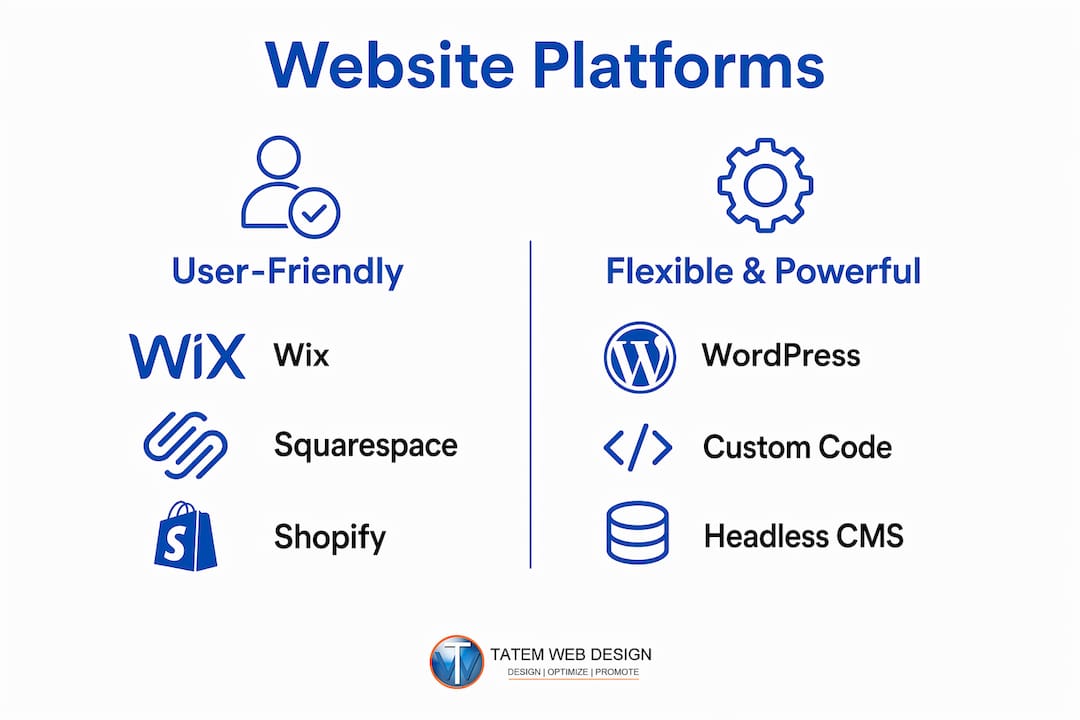
Here is how the four most popular platforms compare across the criteria that matter most to small business owners:
| Platform | Best For | Ease of Use | Ecommerce | SEO Tools | Starting Cost |
|---|---|---|---|---|---|
| WordPress | Flexibility, blogging, custom builds | Moderate | Via WooCommerce plugin | Yoast, Rank Math, full control | Free (hosting extra) |
| Shopify | Product-based retail, online stores | Easy | Built-in, best-in-class | Good, limited structural control | ~$39/month |
| Wix | Beginners, simple service sites | Very easy | Basic to moderate | Adequate for local SEO | Free to ~$36/month |
| Squarespace | Design-focused, portfolios, services | Easy | Moderate | Adequate, less flexible | ~$23/month |
WordPress powers over 40% of all websites globally, which reflects its flexibility rather than its simplicity. It requires more setup than Wix or Squarespace, but it gives you full control over SEO configuration, page speed, and custom functionality. For a Florida law firm or medical practice that needs custom forms, compliance features, and deep SEO control, WordPress is the stronger long-term choice.
Shopify is the clear winner for product-based businesses. Its ecommerce capabilities include inventory management, payment processing, abandoned cart recovery, and built-in analytics. If more than 50% of your revenue comes from selling physical or digital products, Shopify justifies its monthly cost quickly.
Wix and Squarespace suit businesses that need a clean, presentable site without technical complexity. A local accountant or real estate agent who wants a professional online presence without hiring a developer will find both platforms approachable. The trade-off is less flexibility as the business grows.
Pro Tip: Before committing to any platform, test its mobile editor. A site that looks great on desktop but breaks on a phone will cost you customers. Google’s mobile-first indexing means your mobile experience directly affects your search rankings.
How to plan and design your site for optimal user experience
Effective site design starts with purpose, not aesthetics. Map out every page before you touch a template. Write down the primary action you want a visitor to take on each page, then design the layout to make that action obvious and easy.
The planning phase should answer three questions. Who is visiting this page? What do they need to know? What should they do next? A service page for a dentist in Stuart, Florida should answer “What does this procedure cost and how do I book it?” not just describe the procedure in clinical terms.
Design principles that separate high-performing small business sites from forgettable ones:
- Clarity over creativity: A clever design that confuses visitors is a failed design. Use clear headings, short paragraphs, and obvious buttons.
- Brand consistency: Use the same two to three colors, one or two fonts, and consistent logo placement across every page. Inconsistency signals unprofessionalism.
- White space: Crowded pages overwhelm visitors. Space between elements gives the eye a place to rest and directs attention to what matters.
- Navigation simplicity: Limit your main navigation to five to seven items. Every additional menu item reduces the chance a visitor clicks the one you want them to click.
Mobile users behave differently than desktop users. They spend less time, scroll faster, and tap rather than click. Your mobile layout must prioritize scannable headlines, large tap targets, and fast-loading images. A phone number that is not clickable on mobile is a missed call every time.
Common design mistakes to avoid include using auto-playing video or audio, hiding your contact information in the footer only, using stock photos that look generic, and building pages with no clear call-to-action. Each of these mistakes reduces trust and increases the chance a visitor leaves without taking action.
How to optimize your site for search engines and mobile users
SEO for small businesses is not about gaming algorithms. It is about making your site the clearest, fastest, and most relevant answer to the questions your customers are already searching. The practical build process for a well-optimized site follows a clear sequence: research your keywords, apply them on-page, fix your technical foundation, and build local signals.
Start with keyword research focused on local and niche intent. A plumber in Stuart, Florida should target “emergency plumber Stuart FL” and “water heater repair Martin County” rather than just “plumber.” Tools like Google Search Console and Google Keyword Planner are free and give you real search volume data for your area.
On-page SEO checklist for every page you publish:
- Title tag: Include your primary keyword and location. Keep it under 60 characters.
- Meta description: Write a 150 to 160 character summary that includes the keyword and a reason to click.
- H1 heading: One per page, includes the primary keyword naturally.
- Image alt text: Describe every image with a short phrase that includes relevant keywords where natural.
- Internal links: Link related pages together so Google and visitors can navigate your site logically.
A one-second delay in mobile page load time reduces conversions by up to 20%. That single statistic should make page speed a top priority, not an afterthought. Compress images using tools like TinyPNG or ShortPixel, use a content delivery network (CDN), and choose a hosting provider with servers close to your audience.
Structured data, also called schema markup, gives Google additional context about your business. Applying schema selectively per page type produces better results than applying it everywhere. Use LocalBusiness schema on your home page and contact page, FAQ schema only on pages that contain actual Q&A content, and Service schema on your individual service pages. Multiple schema types combined on local business sites improve how your listing appears in Google search results, including star ratings, expandable FAQ answers, and service details.
Pro Tip: Connect your site to Google Search Console on day one. It shows you exactly which search queries bring visitors to your site, which pages have errors, and whether Google can index your content. It is free and takes ten minutes to set up.
For local SEO, your Google Business Profile works alongside your website. Optimizing your Google Business listing with accurate hours, photos, and service categories directly improves your visibility in local map results, which often appear above organic search results.
What are the final steps to launch and maintain your site?
Shopify’s nine-step launch sequence ends with monitoring, not publishing. That distinction matters. Launching is not the finish line. It is the starting point for ongoing improvement. Follow these steps to get your site live and keep it performing.
- Register your domain. Choose a domain that matches your business name as closely as possible. Use a .com extension when available. Register through Namecheap, Google Domains, or directly through your hosting provider. Avoid hyphens and numbers in your domain name.
- Set up hosting. If you use WordPress, choose a managed hosting provider like WP Engine or SiteGround. Shopify, Wix, and Squarespace include hosting in their monthly fees.
- Review before you publish. Test every link, form, and button. View the site on an iPhone, an Android device, and a desktop browser. Check that your contact form sends emails to the right address. Read every page for typos.
- Install an SSL certificate. Every site needs HTTPS. Most hosting providers include a free SSL certificate through Let’s Encrypt. A site without HTTPS displays a “Not Secure” warning in Chrome, which kills trust immediately.
- Submit your sitemap to Google. Use Google Search Console to submit your XML sitemap. This tells Google your site exists and speeds up indexing.
- Announce your launch. Post on your social media profiles, send an email to your existing customer list, and update your Google Business Profile with your website URL.
- Schedule monthly maintenance. Update your CMS, plugins, and themes every month. Run a backup before every update. Check your analytics in Google Analytics 4 to see which pages get traffic and which ones visitors leave quickly.
Ongoing maintenance is where most small business owners fall short. A site that was excellent at launch becomes a liability if it is not updated. Outdated plugins create security vulnerabilities. Stale content signals to Google that your site is inactive. Set a recurring calendar reminder to review your site every 30 days.
Key takeaways
A successful small business website requires goal-driven planning, the right platform, mobile-first design, on-page SEO, and consistent maintenance to attract and convert customers.
| Point | Details |
|---|---|
| Define goals before building | Every page and feature should serve a specific business objective like selling, booking, or lead capture. |
| Match platform to your needs | WordPress suits custom and SEO-heavy builds; Shopify leads for ecommerce; Wix works for simple service sites. |
| Mobile-first is non-negotiable | A one-second load delay cuts mobile conversions by up to 20%, making speed a direct revenue factor. |
| Apply schema selectively | Use LocalBusiness, FAQ, and Service schema on the right pages to improve Google search appearance. |
| Maintenance drives long-term growth | Monthly updates, backups, and analytics reviews keep your site secure, current, and improving. |
What most small business owners get wrong about websites
After working with businesses across real estate, healthcare, legal, and marine industries, I have seen the same pattern repeat. Owners spend weeks agonizing over logo colors and font choices, then launch a site with no clear call-to-action, no mobile testing, and no plan for SEO. The design looks polished. The site does nothing.
The most expensive mistake is treating a website as a one-time project. A site you build and forget is a site that stops working within 12 months. Google rewards freshness. Customers expect current information. Security vulnerabilities accumulate in outdated software. The businesses that win online treat their website the way they treat their best employee: they invest in it, update it, and hold it accountable for results.
The second mistake is skipping mobile-first thinking. I have reviewed mobile-first design principles with dozens of Florida business owners who were shocked to discover their site was nearly unusable on a phone. Over 60% of web traffic now comes from mobile devices. If your site is not built for mobile first, you are building for the minority.
My honest recommendation: start with your three most important pages, get them right, and launch. A focused three-page site that loads fast, ranks locally, and converts visitors beats a 20-page site that does none of those things. Grow from there. Your website should evolve as your business evolves, not sit static while your competitors improve theirs.
— Matt
Ready to build a site that actually works for your business?
Tatemweb builds AI-powered websites for Florida small businesses across healthcare, legal, real estate, marine, and professional services. Every site is built with mobile-first design, on-page SEO, and fast load times from day one, not as add-ons after the fact.

Whether you need a clean service site, a full AI-designed website with lead capture and chatbot integration, or a custom ecommerce store, Tatemweb delivers it faster and smarter using advanced AI tools. The team at Tatem Web Design has over 26 years of experience and serves businesses throughout Stuart, Florida and beyond. Call 772-224-8118 to schedule your consultation and find out exactly what your business needs to dominate local search in 2026.
FAQ
What is a small business website?
A small business website is a goal-driven online presence that communicates your services, builds trust with potential customers, and guides visitors toward a specific action like booking, buying, or contacting you. It acts as a 24/7 digital storefront that works for your business around the clock.
How much does it cost to build a small business website?
Costs range from roughly $23 per month on Squarespace to several thousand dollars for a custom WordPress or AI-built site. Platform fees, domain registration, hosting, and professional design services all factor into the total investment.
Which platform is best for a small business website?
WordPress is best for businesses that need SEO flexibility and custom functionality. Shopify leads for product-based retailers. Wix suits beginners who need a simple, presentable site without technical complexity. Platform selection should match your technical comfort level and business growth goals.
How do I make my small business website rank on Google?
Focus on local keyword research, complete on-page SEO for every page including title tags, meta descriptions, and image alt text, and submit your sitemap to Google Search Console. Adding structured data schema to the right pages also improves how your site appears in search results.
How often should I update my small business website?
Update your CMS, plugins, and content at least once per month. Review your Google Analytics 4 data monthly to identify underperforming pages. Run a full backup before every update to protect against data loss.
Recommended
Tatem Web Design
26+ YearsWeb Design & SEO Specialist · Tatem Web Design
Matt Tatem has been designing websites professionally since 1999, making Tatem Web Design one of Florida's longest-running web agencies. Based in Stuart, FL, he specializes in WordPress, local SEO, Shopify e-commerce, and cybersecurity consulting for small businesses.

Rank in ChatGPT in 90 Days With a Practitioner Led Checklist
Follow a practitioner led 90 day plan to get cited by ChatGPT: allow OAI-SearchBot, publish short answer capsules with schema, and track Bing AI Performance.

AI SEO Content Playbook: 16 GEO Signals for Agencies & Teams
A practical playbook mapping the GEO-16 signals to hands-on editorial workflows, review controls, and metrics. For agencies and in-house teams scaling AI...

Copy Ready Local Schema Markup for SMBs + Google Validation
Copy ready JSON-LD examples and Google validation steps for SMBs' local schema markup. Audit, implement, and verify each location page with confidence.