
Avoid a QSA Audit: Prove PCI SAQ A for U.S. Ecommerce (FAQ 1588)
Yes, your online store has to be PCI compliant if it accepts card payments, no exceptions for size or sales volume. The single factor that decides how hard that is: how you process payments. A hosted checkout page validates in hours with an SAQ A; a server that touches raw card numbers can trigger a QSA audit that takes months. Start by identifying your payment integration, then pull the SAQ, ASV scan report, or TPSP attestation that matches it.
TL;DR:
- Merchants processing more than 6 million transactions annually typically require a Qualified Security Assessor audit, while those under 20,000 can usually self-validate with an SAQ A or A-EP.
- Fully hosted checkout or iframe-based payment forms keep your scope small, but any server-side handling of raw card data significantly increases PCI compliance complexity.
- Ensuring your TPSP provides written attestations confirming their hosted elements meet PCI controls is crucial if you rely on embedded or iframe checkout solutions.
- Regularly updating and testing your security controls, including firewalls, MFA, and plugin management, is essential to stay compliant between annual reviews.
- Small merchants often mistakenly assume hosted checkout pipelines eliminate PCI scope but must still verify script integrity and vendor attestations to avoid vulnerabilities like card-skimming.
Table of Contents
- Merchant Levels and SAQ Types: Which One Applies to Your Store
- How Do Payment Integrations Change Your PCI Scope?
- The 12 PCI DSS Requirements, Translated for Online Stores
- What Changed With SAQ A Eligibility in 2026?
- How Do You Actually Validate and Submit PCI Compliance?
- Staying Compliant Between Annual Reviews
- Field Notes: Where Ecommerce Merchants Actually Go Wrong
- How a full-service ecommerce web design team helps you reach and keep PCI Compliance
- Authoritative PCI Resources for Ecommerce Merchants
- Sources
- FAQ
Merchant Levels and SAQ Types: Which One Applies to Your Store
Your card brand acquirer, not you and not PCI Security Standards Council directly, decides which merchant level you fall into. Levels run 1 through 4, based on annual transaction volume, and that number determines how rigorous your validation has to be. Level 1 merchants, typically processing more than 6 million transactions a year, usually need a Qualified Security Assessor (QSA) audit. Level 4 merchants, often under 20,000 ecommerce transactions annually, can usually self-validate with a Self-Assessment Questionnaire. The thresholds vary slightly by card brand, so confirm your exact number with your processor rather than assuming.
Once you know your level, the next question is which SAQ type fits your setup. This depends almost entirely on how card data touches your systems:
- Fully hosted redirect (Shopify Payments, PayPal Checkout, or similar): usually SAQ A, the shortest questionnaire.
- Embedded iframe or hosted fields (Stripe Elements, Braintree hosted fields): typically SAQ A, sometimes SAQ A-EP depending on script control.
- Tokenization with some server-side logic: often SAQ A-EP, a much longer document.
- Direct processing where your server sees raw card numbers: SAQ D, the most demanding self-assessment, or a full QSA audit.
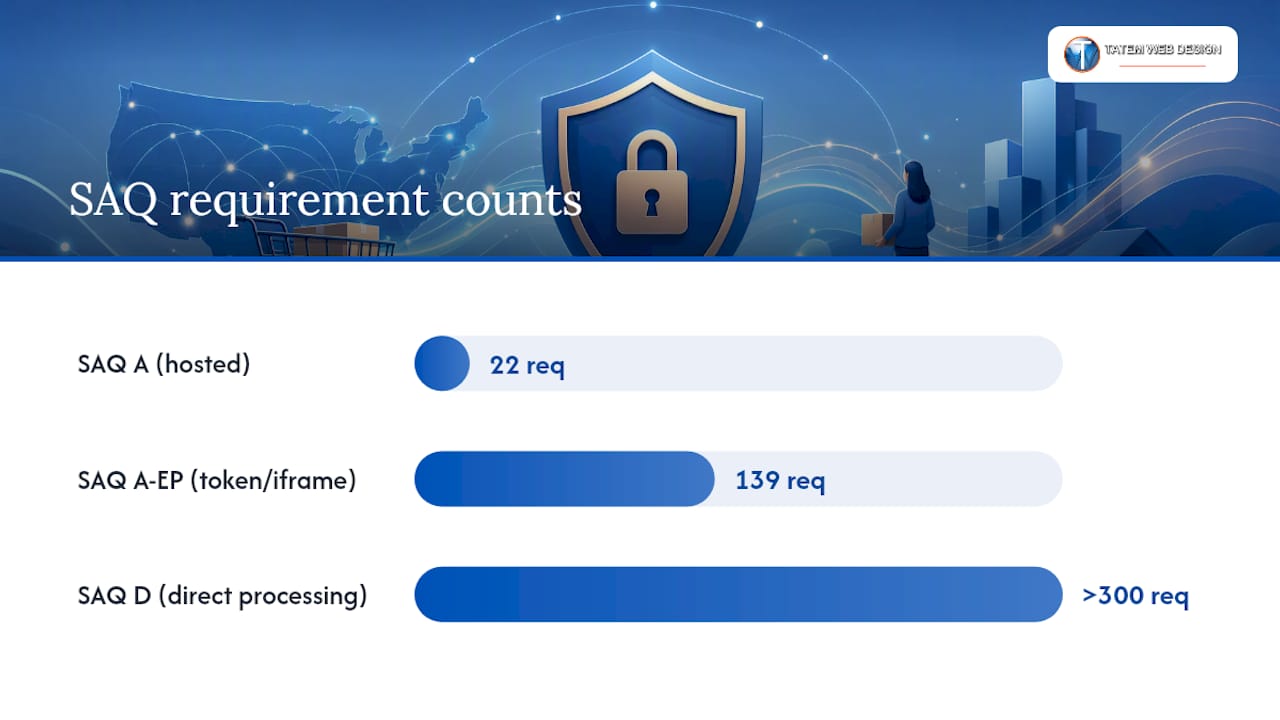
Time and cost expectations differ wildly across these paths. A small merchant completing SAQ A can usually finish in a few hours to a couple of days, since it runs about 22 questions. SAQ A-EP jumps to roughly 139 requirements, and SAQ D exceeds 300. A Level 1 QSA engagement can stretch several months and cost thousands of dollars in consulting fees.
Your action item this week: pull your processor’s most recent compliance notice and check your trailing 12-month transaction count. Screenshot your payment gateway dashboard showing volume by channel. That single document usually answers the “which SAQ” question before you’ve read a single PCI Security Standards Council page.
How Do Payment Integrations Change Your PCI Scope?
The cardholder data environment, or CDE, is every system, script, and process that stores, processes, or transmits card data, and every integration choice you make either shrinks or balloons it. A fully hosted checkout keeps your servers out of the CDE entirely. A direct-post form where your own code submits card numbers to a processor pulls your entire web server, its plugins, and every script running on that page into scope.
Three integration patterns dominate ecommerce, and each carries different consequences:
- Redirect checkout. The customer leaves your site to pay on the processor’s domain. Your CDE shrinks to almost nothing, but you still need to confirm the redirect itself isn’t tampered with.
- Embedded iframe or hosted fields. The payment form appears to live on your page but is actually rendered by the processor inside an iframe. Your scope stays small as long as your own JavaScript can’t intercept what’s typed into that frame.
- Direct-post or server-side processing. Your server or your own front-end code handles the raw card number before sending it anywhere. This is the widest possible scope and usually forces SAQ A-EP or SAQ D.
If you’re comparing gateway options, a payment gateway comparison that breaks down redirect versus embedded versus API-based integration is worth reading before you commit to a platform migration.
The fastest way to cut scope is to move to a fully hosted or iframe-based checkout and stop touching card data on your own servers at all. When you outsource that processing to a third-party service provider (TPSP), request their Attestation of Compliance (AOC) and a written statement confirming their hosted elements protect your page as intended.
Pro Tip: When emailing a payment vendor for evidence, ask specifically: “Can you provide your current AOC, confirmation that your hosted payment fields meet PCI DSS requirement 6.4.3 script controls, and a statement that card data never touches our servers?” Vague requests get vague answers. Specific requests get documents you can actually submit.
The 12 PCI DSS Requirements, Translated for Online Stores
The PCI Security Standards Council organizes PCI DSS into 12 requirements, and most were written with data centers and point-of-sale terminals in mind. Here’s what each one actually means once you translate it for a website running WooCommerce, Shopify, or a custom cart.
1. Install and maintain network security controls. For most ecommerce merchants, this means your hosting provider’s firewall configuration and your own web application firewall rules. Evidence: firewall rule export or your host’s compliance statement.
2. Apply secure configurations to all system components. Default admin passwords on your CMS or plugin panel are the single most common failure point here. Evidence: a screenshot of enforced password policy in your admin settings.
3. Protect stored account data. If you’re on SAQ A or A-EP, the honest answer is you shouldn’t be storing card data at all. Evidence: a data flow diagram showing card numbers never land in your database.
4. Protect cardholder data with strong cryptography during transmission. TLS 1.2 or higher on every payment page, no exceptions. Evidence: SSL certificate details from your ASV scan.
5. Protect all systems and networks from malicious software. Malware scanning on servers that touch card data, less relevant if you’re fully hosted. Evidence: antivirus or endpoint protection logs.
6. Develop and maintain secure systems and software. This is where third-party scripts live, and it’s the requirement most ecommerce breaches trace back to. Outdated plugins, unvetted marketing pixels, and abandoned checkout widgets all fall here. Evidence: a patch log and a script inventory.
7. Restrict access to system components by business need to know. Your admin panel shouldn’t be accessible to every employee. Evidence: a role-based access list.
8. Identify users and authenticate access. Multi-factor authentication on your CMS admin and payment gateway dashboard, full stop. Evidence: MFA enrollment screenshots.
9. Restrict physical access to cardholder data. Largely inapplicable if you’re cloud-hosted with no on-premise servers holding card data.
10. Log and monitor all access to system components. Evidence: retained access logs, typically 90 days minimum.
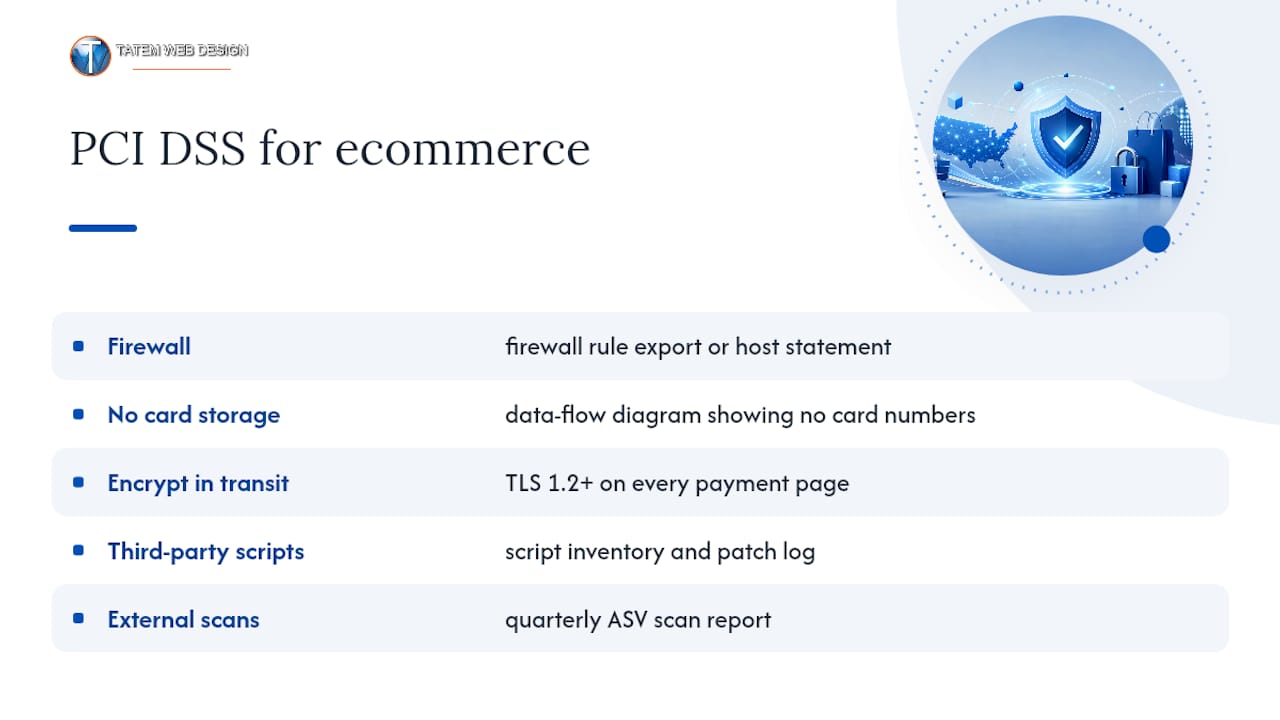
11. Test security of systems and networks regularly. This is where Approved Scanning Vendor scans come in, required quarterly for any internet-facing system in scope. Evidence: your ASV scan report.
12. Support information security with organizational policies and programs. A written security policy, even a short one, signed off by whoever owns compliance.
Where merchants get caught: third-party checkout scripts and abandoned plugins account for a disproportionate share of ecommerce card-skimming incidents. A script you installed for a marketing pixel two years ago and forgot about is exactly the kind of gap requirement 6 exists to close.
Admin portals without MFA and plugins nobody’s updated in a year are the two fastest ways to fail a scan. Fix both before you touch anything else on this list. For a broader primer on how these controls fit into your overall security posture, ecommerce security fundamentals covers the adjacent risks PCI DSS doesn’t directly address, like account takeover and bot traffic.
What Changed With SAQ A Eligibility in 2026?
PCI Security Standards Council published FAQ 1588 to close a gap that had been quietly putting merchants at risk for years: hosted checkout pages that looked safe but were still vulnerable to script-based card-skimming attacks like Magecart. Under PCI DSS v4.0.1, staying eligible for the short SAQ A now requires proving your payment page isn’t susceptible to malicious script injection, not just proving you outsourced the processing.
There are two accepted ways to meet this. First, you can implement the technical controls described in requirements 6.4.3 and 11.6.1 yourself, meaning script inventories, integrity checks, and change-detection monitoring on your payment page. Second, and far more common for small merchants, you can get your TPSP to confirm in writing that their hosted or embedded payment elements already satisfy those controls when implemented correctly.
The distinction that trips people up: a page fully delivered from the TPSP’s domain (true redirect) is treated differently than a page where your own site loads and renders the TPSP’s iframe alongside your own code. In the second case, your own scripts still have to be accounted for, even though the card data itself never touches your server.
| Situation | Likely SAQ path | What to gather |
|---|---|---|
| Full redirect to processor’s payment page | SAQ A | TPSP AOC, redirect confirmation |
| Iframe/hosted fields with vetted, minimal scripts | SAQ A | TPSP script-safety attestation |
| Iframe with multiple unmanaged third-party scripts | SAQ A-EP | Script inventory, integrity monitoring logs |
| Server-side card handling | SAQ D | Full internal assessment, QSA input likely |
Your action checklist: ask your TPSP directly whether they can attest their embedded elements meet requirement 6.4.3 and 11.6.1 script controls. Request that attestation in writing, not a verbal assurance from a support rep. If they can’t or won’t provide it, treat that as a red flag pushing you toward SAQ A-EP.
How Do You Actually Validate and Submit PCI Compliance?
Validation follows a fixed sequence, and skipping steps is what turns a two-day project into a two-month scramble.
- Identify your SAQ type based on your integration pattern from the section above.
- Scope your CDE by mapping exactly which systems, scripts, and vendors touch card data.
- Run required ASV scans on every internet-facing system in scope, typically costing $50 to $150 per quarter through an approved vendor.
- Remediate critical findings the scan turns up before moving forward. Scans that come back clean the first time are the exception, not the rule.
- Complete your SAQ, answering each control honestly against your actual environment.
- Produce your Attestation of Compliance (AOC), the signed document confirming your SAQ results.
- Submit everything to your acquirer through whatever portal or process they specify. Requirements differ by processor, so check their compliance notice for the exact submission method.
Keep your ASV reports, AOC, vendor attestations, and any change-control records in one folder. Acquirers frequently ask for these on short notice, and scrambling to find a six-month-old scan report is a bad use of anyone’s time.
If your scoping exercise lands you on SAQ D, or your transaction volume pushes you into Level 1 or 2, budget for a QSA. Full audits commonly run into five figures and take one to three months depending on how much remediation your first assessment uncovers.
Staying Compliant Between Annual Reviews
Compliance isn’t a once-a-year task, it’s a set of habits that either hold up under a breach investigation or don’t. Quarterly ASV scans catch new vulnerabilities before an attacker does. Patch schedules for your CMS, plugins, and server software need to run on a calendar, not “whenever someone remembers.” Log retention and periodic review, access audits, and confirming MFA is still enforced on every admin account round out the recurring checklist.
- Run ASV scans every quarter, not just before your annual SAQ.
- Review vendor and TPSP attestation status at least once a year, since providers change their infrastructure.
- Use staged deployments and code review for any change to your payment pages, no direct-to-production edits.
- Retain access logs long enough to support an investigation if something goes wrong.
Pro Tip: Treat every plugin update on your checkout page like a deployment to a bank’s front door. Test it in staging first, even if it’s “just a minor version bump.”
A breach doesn’t just cost you money and customer trust, it can also bump your merchant level and force a stricter validation method on your next review cycle.
Field Notes: Where Ecommerce Merchants Actually Go Wrong
The mistake I see most often isn’t a missing firewall rule, it’s a merchant assuming that switching to a hosted checkout means PCI compliance is someone else’s problem now. It reduces your scope. It doesn’t eliminate it, and the 2025 SAQ A script-attack clarification exists precisely because too many stores learned that the hard way after a Magecart-style skimmer sat on their checkout page for months.
Prioritize in this order: confirm your TPSP attestation exists in writing, audit every script running on your payment page, then turn on MFA everywhere. Everything else can wait a week. If your scoping exercise keeps landing you in SAQ A-EP territory because of scripts you can’t fully account for, that’s usually the moment to bring in outside help rather than keep guessing.
— Matt
How a full-service ecommerce web design team helps you reach and keep PCI Compliance
A paired development and compliance advisory team can reduce remediation time, because the people fixing your script inventory are the same people who wrote the checkout code in the first place.

Our team handles secure ecommerce builds on WooCommerce and custom platforms, PCI advisory work to determine your correct SAQ path, TPSP attestation review, and ASV scan coordination so you’re not chasing three vendors for one compliance folder. If you’re rebuilding your store anyway, doing it with PCI scope reduction built in from day one costs far less than retrofitting compliance onto a site that wasn’t designed for it. For a broader look at how compliance documentation fits into your overall security program, our cybersecurity compliance guide for small businesses is a useful next read. And if your current checkout relies on browser extensions or plugins for protection, a resource like this Shopify security plugin roundup is worth comparing against a proper hosted rebuild.
Call 772-224-8118 or visit our ecommerce web design services page to schedule a consultation and get a scoped plan for your store’s PCI path.
Authoritative PCI Resources for Ecommerce Merchants
For direct reference: the SAQ A eligibility FAQ explains script-attack rules, the SAQ A document lists eligibility criteria, the PCI DSS standard page hosts the full requirement set, and the SAQ A r1 questionnaire gives the exact questions merchants answer.
FAQ
Do Small Businesses Need to Be PCI Compliant?
Yes. PCI DSS applies to any business that accepts, processes, stores, or transmits payment card data, regardless of size, though small merchants usually validate through a short SAQ instead of a full audit.
Does Shopify Require PCI Compliance?
Shopify’s hosted payment infrastructure handles much of the technical burden, but you still must complete an SAQ, typically SAQ A, and confirm your theme and installed apps don’t introduce unmanaged scripts on your checkout page.
Can I Do PCI Compliance Myself?
Merchants on SAQ A or SAQ A-EP commonly self-validate without a QSA, but stores with server-side card handling or Level 1/2 transaction volume usually need professional help to scope correctly and avoid missing critical script or access controls.
Is It Mandatory to Be PCI Compliant?
It’s mandatory in practice: PCI DSS is enforced through your merchant agreement with your acquirer, not federal law, and failing to validate can result in fines, higher processing fees, or loss of your ability to accept cards.
Recommended
Tatem Web Design
26+ YearsWeb Design & SEO Specialist · Tatem Web Design
Matt Tatem has been designing websites professionally since 1999, making Tatem Web Design one of Florida's longest-running web agencies. Based in Stuart, FL, he specializes in WordPress, local SEO, Shopify e-commerce, and cybersecurity consulting for small businesses.

Rank in ChatGPT in 90 Days With a Practitioner Led Checklist
Follow a practitioner led 90 day plan to get cited by ChatGPT: allow OAI-SearchBot, publish short answer capsules with schema, and track Bing AI Performance.

AI SEO Content Playbook: 16 GEO Signals for Agencies & Teams
A practical playbook mapping the GEO-16 signals to hands-on editorial workflows, review controls, and metrics. For agencies and in-house teams scaling AI...

Copy Ready Local Schema Markup for SMBs + Google Validation
Copy ready JSON-LD examples and Google validation steps for SMBs' local schema markup. Audit, implement, and verify each location page with confidence.