
Step-by-Step Website Maintenance for Florida Businesses
Your business website is working for you around the clock, and every hour it runs poorly, loads slowly, or sits vulnerable to a cyberattack, you are losing potential customers, revenue, and credibility. Florida’s competitive small business market leaves very little margin for a neglected website. Outdated plugins get exploited, stale content tanks your search rankings, and a single major breach can cost thousands to recover from. This guide delivers a practical, AI-powered roadmap with clear steps to keep your site secure, fast, and optimized, so you stay ahead of competitors and keep customers coming through your digital front door.
Table of Contents
- What you need to start: Tools, essentials, and AI platforms
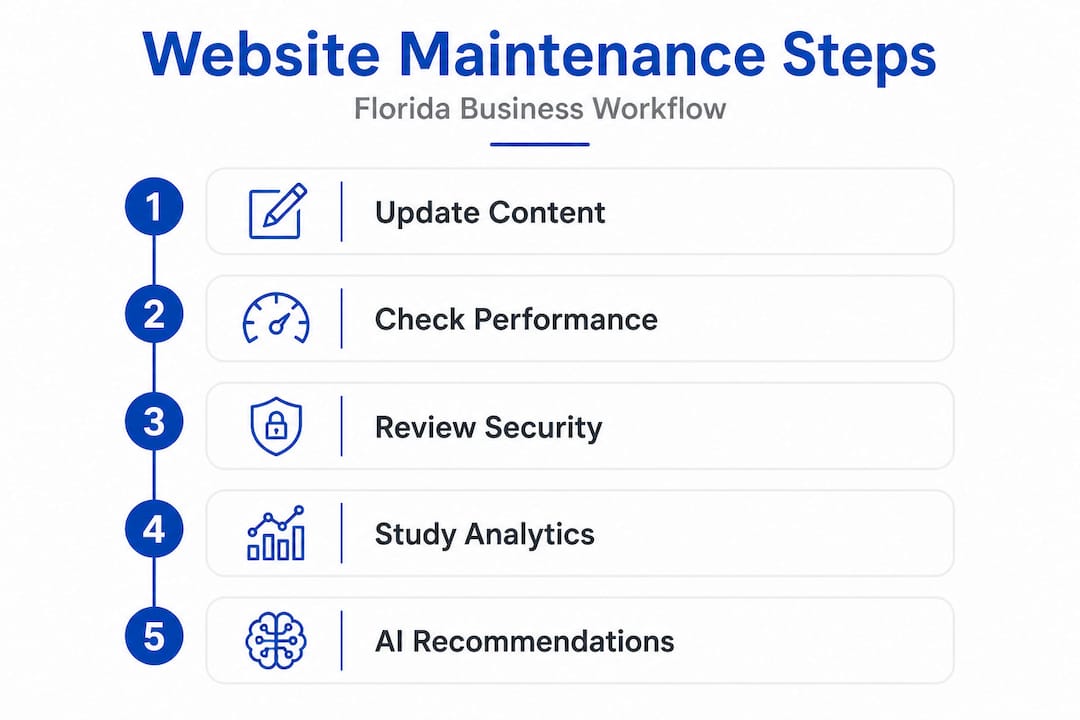
- Step 1: Update content, plugins, and core systems regularly
- Step 2: Perform site speed, uptime, and performance checks
- Step 3: Audit security and data backups
- Step 4: Review analytics, user engagement, and AI recommendations
- Why website maintenance is no longer a ‘set and forget’ task
- Next steps: Upgrade your website maintenance with expert solutions
- Frequently asked questions
Key Takeaways
| Point | Details |
|---|---|
| AI streamlines maintenance | Leveraging AI platforms makes regular updates, monitoring, and security easier for Florida business owners. |
| Consistency is critical | Scheduled updates and checks prevent major problems and keep your site competitive in search results. |
| Speed and security impact success | Fixing performance and security issues quickly boosts trust, engagement, and conversions online. |
| Professional help adds value | Partnering with experts using AI ensures your website is always protected and running smoothly. |
What you need to start: Tools, essentials, and AI platforms
Now that you see what’s at stake, let’s get ready by gathering everything you need for successful website maintenance. Preparing the right tools upfront saves hours of scrambling later and prevents the kind of oversight that causes real damage to your site’s health, rankings, and security.
The foundation starts with reliable hosting access. You need your hosting control panel credentials, your domain registrar login, and full administrative access to your content management system (CMS), whether that’s WordPress, Joomla, or Drupal. Without these, you cannot perform even the most basic updates. Make sure two-factor authentication is enabled on every account before you do anything else.
From there, you need a layered stack of tools designed to handle monitoring, backups, analytics, and security. AI tools can streamline and safeguard routine site management tasks, reducing the manual workload significantly and catching problems you might miss on your own. Modern AI monitoring platforms, for example, can watch hundreds of performance indicators simultaneously, something no human administrator can do manually at scale.
Here is a quick overview of the tool categories you should have in place:
| Tool Category | Purpose | Example Solutions |
|---|---|---|
| Hosting & CMS Access | Admin control of your site environment | cPanel, WP Admin, Plesk |
| Backup Platform | Automated, offsite copies of your full site | UpdraftPlus, Jetpack, BlogVault |
| Security Scanner | Vulnerability and malware detection | Wordfence, Sucuri, AI security tools |
| Performance Monitor | Speed, uptime, and error tracking | GTmetrix, UptimeRobot, AI monitors |
| Analytics Platform | Traffic, behavior, and conversion data | Google Analytics 4, Google Search Console |
| AI Website Assistant | Automated content, SEO, and maintenance | AI chatbot tools, AI monitoring platforms |
Before your first maintenance session, confirm the following items are ready to go:
- Hosting credentials saved securely in a password manager
- CMS admin login with two-factor authentication active
- Backup plugin configured to run automatically at least daily
- Security plugin or AI scanner installed and updated
- Analytics account connected and verified with your site
- AI monitoring tool set up and linked to your domain
- Contact info for your web developer or support team accessible
- Staging environment available for testing updates safely
Monitoring website performance with AI gives you a real-time window into problems as they develop rather than after they damage your rankings or drive away customers. Tools like AI chatbot solutions can even be integrated into your maintenance workflow to handle customer inquiries during downtime events, keeping your engagement intact while you resolve issues in the background.
Step 1: Update content, plugins, and core systems regularly
With your tools in place, the first and most crucial maintenance task is keeping your website updated. This is not just about keeping things looking fresh. Updates directly protect you from security vulnerabilities, ensure compatibility between software components, and signal to search engines that your site is active and relevant.

Maintaining up-to-date information and software ensures your site stays relevant, secure, and optimized for search engines. Google’s crawlers actively favor sites with fresh, current content, and outdated plugins are consistently among the top entry points exploited by hackers worldwide.
Here is the correct order to perform updates safely:
- Back up your entire site first. Always create a fresh backup before making any changes. If an update breaks something, you need a clean restore point.
- Update your CMS core. For WordPress users, this means updating to the latest stable WordPress version. Apply major updates in your staging environment first.
- Update plugins and extensions. Review the changelog for each plugin update before applying it. Avoid updating plugins that have not been tested with your current CMS version.
- Update your active theme. If you use a third-party theme, check that it is compatible with your new plugin and CMS versions before updating.
- Review and refresh page content. Identify outdated statistics, old service descriptions, or expired promotions and update them with accurate, current information.
- Test all critical site functions. After updates, test your contact forms, checkout process, booking systems, and navigation menus to confirm everything works correctly.
- Clear your cache. After any update, flush your caching plugin or server-side cache to ensure visitors see the updated version of your site.
Statistic callout: Studies show that nearly 56% of all CMS-based website hacks involve outdated plugins or themes, making regular updates one of the single most impactful security actions you can take.
AI tools make this process dramatically more manageable. Platforms with AI-driven update management can scan your entire plugin library, flag outdated versions, identify security risks, and even generate rollback plans before you apply changes. This means you are not just updating blindly. You are updating with data.
Pro Tip: Use your WordPress maintenance checklist as a monthly reference document so no update task gets skipped under the pressure of daily business operations.
If you are not consistently producing fresh copy for your site pages, consider using professional website content writing services backed by AI tools to keep your content calendar running without draining your internal team. Fresh, keyword-rich content tied to updating website content for SEO is one of the most effective long-term strategies for building organic traffic from Florida customers searching for your services.
Step 2: Perform site speed, uptime, and performance checks
After updates, ensure your website is running smoothly and remains fast for all visitors. Speed is not a luxury anymore. It is a direct ranking signal in Google’s algorithm and a make-or-break factor in whether a visitor stays on your page or leaves within seconds.
Website performance impacts both search rankings and customer satisfaction in ways most business owners underestimate. A one-second delay in page load time can reduce conversions by up to 7%. For a service business generating $10,000 per month through its website, that is $700 in monthly revenue lost to a performance problem you may not even know exists.
Here is what you should check during every performance review:
- Page load time on both desktop and mobile using tools like GTmetrix or Google PageSpeed Insights
- Time to First Byte (TTFB), which measures how fast your server responds to a browser request
- Core Web Vitals, including Largest Contentful Paint (LCP), Cumulative Layout Shift (CLS), and Interaction to Next Paint (INP)
- Uptime records to confirm your site is not experiencing unexpected outages during peak business hours
- Broken links and 404 errors that frustrate users and signal poor site quality to search engines
- Image file sizes and whether they are properly compressed and formatted in next-gen formats like WebP
- Server resource usage to spot CPU or memory spikes that could be dragging performance down
The difference between manual and AI-automated performance checks is significant. Here is a direct comparison:
| Task | Manual Check | AI-Automated Check |
|---|---|---|
| Page speed testing | Run tests manually and interpret results | Continuous monitoring with automatic alerts |
| Uptime monitoring | Periodic logins to check dashboard | 24/7 real-time alerts via SMS or email |
| Broken link detection | Manual crawl tools run on schedule | Automated crawl with instant flagging |
| Core Web Vitals tracking | Pull reports weekly or monthly | Real-time scoring with fix recommendations |
| Performance trend analysis | Requires manual data comparison over time | AI identifies trends and predicts issues |
Pro Tip: Schedule automated WordPress performance optimization reviews at least once per month, and set up uptime monitoring alerts to notify you immediately if your site goes down for more than two minutes.
AI-powered website performance monitoring platforms can correlate slow pages with specific plugins, images, or server configurations, giving you actionable fixes rather than raw data you have to interpret yourself. This is particularly valuable for Florida business owners managing a site without a full-time IT department. The AI does the interpretation work so you can focus on running your business.
Common performance bottlenecks to troubleshoot first include unoptimized images, poorly configured caching, too many HTTP requests from third-party scripts, and cheap shared hosting that cannot handle your traffic volume. Addressing these four areas alone typically yields the largest speed improvements.
Step 3: Audit security and data backups
With speed and uptime handled, safeguarding data and security should be your next focus. Florida businesses are targeted by cybercriminals at a growing rate, and small to medium businesses are often preferred targets because attackers assume they have weaker defenses than large corporations.
AI-driven security tools catch threats in real-time, dramatically reducing breach risk by identifying malicious activity before it escalates into a full compromise. Here is how to conduct a thorough security and backup audit:
- Run a full malware scan. Use your security plugin or AI-powered scanner to check every file, database entry, and user account for signs of infection or unauthorized changes.
- Review user accounts and permissions. Delete any accounts that are no longer active and confirm no unfamiliar administrator accounts exist. This is a common indicator of prior compromise.
- Check your SSL certificate. Verify it is valid, has not expired, and is properly applied to all pages, including any subdomains your business uses.
- Test your firewall configuration. Your web application firewall (WAF) should be actively blocking suspicious traffic patterns. Review its logs for unusual activity.
- Verify your backup files. Do not assume your backups are working. Download and test-restore a recent backup to confirm the files are complete and not corrupted.
- Confirm backup storage locations. Backups stored only on the same server as your live site offer no real protection. Store copies in at least two separate locations, such as cloud storage and an external drive.
- Review your login security. Confirm that login attempt limits are active, two-factor authentication is enforced for all admin accounts, and default admin usernames have been changed.
“A website without current security checks is like leaving your business’s front door unlocked at night. You may go weeks without a problem, and then one morning everything valuable is gone.”
The AI security enhancements available today are genuinely impressive in their ability to act autonomously. They can identify a brute force attack in progress and automatically block the attacking IP ranges within seconds, long before a human administrator would even see the alert. For businesses handling sensitive customer data, including healthcare, legal, or financial services, this level of protection is not just useful. It is required for compliance.
Florida businesses should also be aware of state-level data breach notification laws, which require notifying affected customers within 30 days of discovering a breach involving personal data. AI-powered website security and updates systems help you stay ahead of these risks by preventing breaches rather than reacting to them after the damage is done.
Step 4: Review analytics, user engagement, and AI recommendations
Once security is checked, drive lasting results by using analytics and AI recommendations. Raw traffic numbers tell you very little on their own. What matters is understanding how visitors behave on your site, where they lose interest, and what actions they take before leaving or converting.
Analyzing AI-driven performance metrics reveals improvements and areas that need attention, giving you the kind of insight that used to require hiring a data analyst to obtain. Modern AI analytics tools summarize this data in plain language and suggest specific actions, removing the guesswork from your decisions.
Here are the key metrics to review during every maintenance cycle:
- Bounce rate by page: High bounce rates on key landing pages signal a mismatch between what visitors expect and what they find
- Session duration: Short average sessions may indicate poor content quality, slow load times, or confusing navigation
- Conversion rate: Track form submissions, calls, purchases, or appointment bookings as a percentage of total visitors
- Traffic sources: Know whether visitors arrive from organic search, social media, paid ads, or referrals, and whether those ratios are shifting
- Top exit pages: Identify which pages visitors leave from most often and investigate why
- Mobile vs. desktop performance: Many Florida service businesses see the majority of their traffic from mobile devices, and mobile-specific issues can tank conversions silently
- Search query data from Google Search Console: See exactly which terms your site ranks for and identify opportunities to create or update content
Pro Tip: Set up a monthly AI analytics review appointment in your calendar the same way you would a financial review. Treat your AI monitoring guide as a living document you update based on what the data reveals each month.
When AI tools surface engagement issues, act on them promptly. If a service page shows a high exit rate combined with low session time, that page likely needs clearer calls to action, stronger supporting content, or better formatting for mobile readers. Pair your analytics findings with ongoing website updates to ensure every improvement gets implemented, tested, and tracked before the next review cycle.
Why website maintenance is no longer a ‘set and forget’ task
Here is the truth most guides overlook: the companies that treat website maintenance as an occasional task, something they do when they notice a problem, are the same companies that call us in crisis mode after a breach, a ranking collapse, or a months-long traffic drop they never saw coming.
We have been working with Florida businesses for over 26 years, and the pattern is consistent. A business invests in a beautiful new website, then largely leaves it alone for 12, 18, or 24 months. During that time, plugins become dangerously outdated. Content grows stale relative to competitors who are publishing regularly. Core Web Vital scores drift downward as Google’s standards evolve. And then one morning, the phone stops ringing.
The uncomfortable reality is that your website exists in a dynamic environment. Google updates its algorithm hundreds of times per year. Hackers actively probe sites daily looking for known vulnerabilities in outdated software. Your competitors are publishing content, earning backlinks, and improving their technical SEO while you are focused on other parts of the business. A static website is not a neutral position. It is an actively deteriorating one.
This is exactly why updating website content boosts SEO and security simultaneously. Keeping content current signals relevance to search engines, and keeping software updated closes the security gaps that attackers exploit. These are not separate tasks. They are two sides of the same coin.
The rise of AI tools changes the equation significantly for small and medium businesses. You no longer need a large in-house IT team to maintain a competitive, secure, and fast website. AI platforms can monitor, flag, and in many cases automatically resolve issues that previously required hours of human attention. The business owners who recognize this shift and embrace AI-assisted maintenance are the ones pulling ahead in their local markets. The ones who do not are increasingly vulnerable to the ones who do.
Our recommendation is to stop thinking about maintenance as a cost and start treating it as the business function it actually is: the ongoing protection and optimization of your primary digital sales channel.
Next steps: Upgrade your website maintenance with expert solutions
You now have a clear, step-by-step framework to keep your Florida business website secure, fast, and consistently visible in search results. The next move is deciding how much of this you want to manage yourself and where expert, AI-powered support can give you results faster and more reliably.

At Tatem Web Design, we specialize in precisely this. Our team delivers custom AI website design built from the ground up with maintenance, SEO, and security in mind. Our AI cybersecurity solutions protect Florida businesses from real threats with real-time intelligence, and our complete website services cover everything from performance optimization to content strategy. Whether you are a healthcare provider in Stuart, a law firm in Palm Beach, or a marine contractor along Florida’s coast, we have the industry expertise and AI tools to keep your site performing at its best. Call us today at 772-224-8118 to schedule your consultation.
Frequently asked questions
How often should a business website be maintained?
You should check for updates, performance, and security at least monthly, but weekly checks are ideal for busy sites. AI tools enable regular monitoring and maintenance cycles that catch problems before they cause real damage.
Can AI really automate most website maintenance tasks?
Yes, AI platforms can update content, monitor performance, run security checks, and provide smart alerts to reduce manual work and risk. AI can automate content updates, performance checks, and security monitoring at a level of consistency no manual process can match.
What are key signs a site needs urgent maintenance?
Slow load times, broken pages, security warnings, or outdated content all indicate immediate attention is needed. Website speed, uptime, and content relevance all impact both SEO and customer satisfaction directly.
Is professional website maintenance support necessary for small businesses?
While DIY is possible, professional teams with AI tools often catch issues sooner and optimize more effectively, saving time and revenue. Professional services using AI tools deliver more effective website maintenance than most small businesses can achieve independently.
Which metrics should be checked during ongoing maintenance?
Key metrics include site speed, uptime, error rates, security scan results, and engagement analytics. Analyzing website performance metrics on a consistent schedule reveals what needs improvement before small issues become costly problems.
Recommended
Tatem Web Design
26+ YearsWeb Design & SEO Specialist · Tatem Web Design
Matt Tatem has been designing websites professionally since 1999, making Tatem Web Design one of Florida's longest-running web agencies. Based in Stuart, FL, he specializes in WordPress, local SEO, Shopify e-commerce, and cybersecurity consulting for small businesses.

CMMC Level 2 vs Level 1: Which One Applies to You?
CMMC Level 1 vs Level 2 compared: data types, 15 vs 110 requirements, self-assessment vs third-party audits, POA&M rules and how to pick your level.

Phishing Awareness Training for Small Business: A Practical Guide
How to build phishing awareness training for a small business: what to teach, how to run simulations, which numbers to track, and what to pair it with.

AI Content Pricing: What Florida Businesses Really Pay in 2026
What AI content costs in 2026: per-post ranges, tool subscriptions, editing time and agency retainers, plus how to budget and avoid hidden costs.