
What Is Website Maintenance? A Business Owner’s Guide
Website maintenance is the ongoing process of updating, monitoring, securing, and repairing a website to keep it fast, safe, and fully functional for every visitor. The industry term for this practice is “web operations” or “site upkeep,” though most business owners and agencies simply call it website maintenance. Unlike a one-time build, your site requires continuous active care throughout its entire lifecycle. Neglect it for even a few months and you risk broken pages, security breaches, and a slow site that drives customers straight to a competitor. For Florida businesses in healthcare, legal, real estate, and professional services, a poorly maintained site is not just a technical problem. It is a direct threat to your revenue and reputation.
What is website maintenance and what does it include?
Website maintenance is defined as the full set of recurring tasks required to keep a site secure, current, and performing at its best. It is distinct from hosting, which only provides server space. Hosting keeps your site online. Maintenance keeps it healthy. Think of hosting as renting office space and maintenance as cleaning, repairing, and upgrading that space every week.
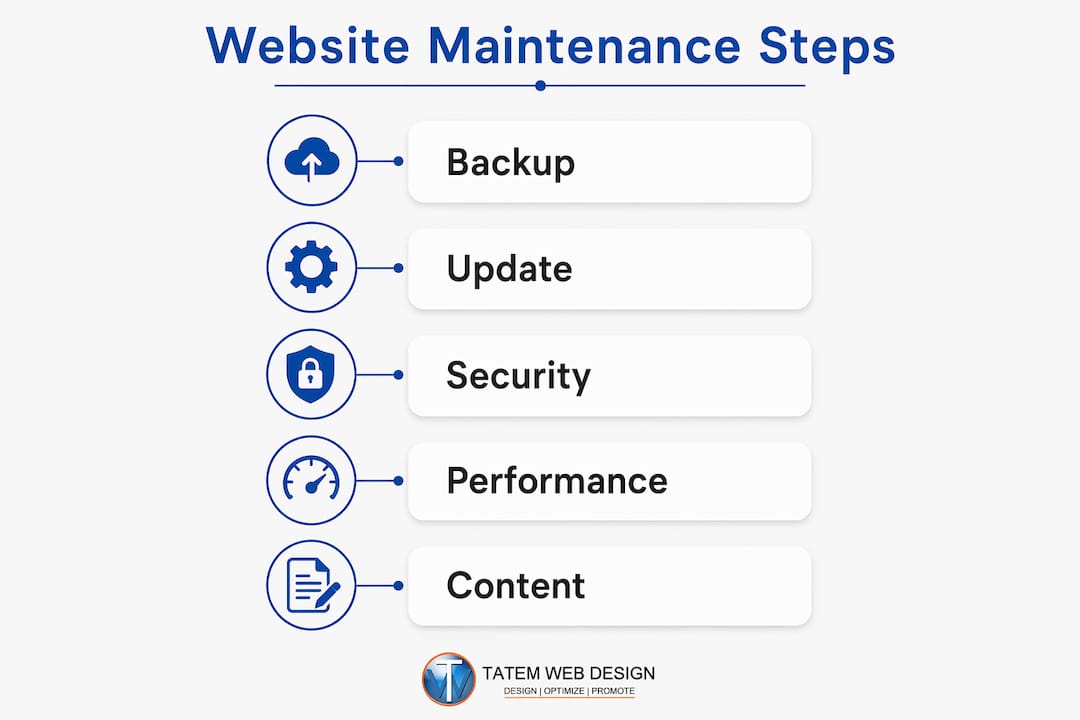
The scope of website maintenance covers five core areas:
- Software updates: Your content management system (CMS), plugins, and themes all require regular updates. WordPress, for example, releases core updates to patch security holes and improve performance. Outdated plugins are the most common entry point for hackers, making this the single highest-priority maintenance task.
- Security monitoring: This includes SSL certificate management, malware scanning, firewall configuration, and login protection. An expired SSL certificate will trigger browser warnings that instantly destroy visitor trust.
- Backups: A reliable backup strategy follows the 3-2-1 rule: three copies of your data, stored on two different media types, with one copy held off-site. Both your website files and your database must be included.
- Performance optimization: Speed tests, broken link checks, image compression, and database cleanup all fall here. Fast load times directly affect user confidence and conversion rates.
- Content updates: Outdated pricing, expired promotions, and stale blog posts signal to both visitors and search engines that your business is not paying attention.
Pro Tip: Before applying any WordPress core or plugin update, create a full backup first. A single incompatible plugin update can take your entire site offline in seconds.
How often should you update and maintain your website?
The right maintenance frequency depends on your site’s complexity, traffic volume, and industry. A healthcare practice with a patient portal needs more frequent attention than a five-page brochure site. That said, every business website benefits from a structured schedule.
Here is a practical maintenance schedule built around real operational needs:
- Weekly tasks: Check for WordPress core, plugin, and theme updates. Review automated backup logs to confirm backups completed successfully. Scan for malware using tools like Wordfence or Sucuri. Test your contact forms and any lead capture tools to confirm they are working.
- Monthly tasks: Run a full site speed test using Google PageSpeed Insights or GTmetrix. Audit broken links with a tool like Screaming Frog or Broken Link Checker. Review Google Search Console for crawl errors or manual penalties. Confirm your SSL certificate is valid and not approaching expiration.
- Quarterly tasks: Conduct a full content audit. Update pricing pages, team bios, service descriptions, and any time-sensitive information. Review your site’s mobile responsiveness against current device standards. Test your backup restore process to confirm you can actually recover your site.
- Annual tasks: Reassess your overall site design and user experience. Check domain and hosting renewal dates. Review your privacy policy and terms of service for compliance with current regulations like HIPAA or PCI DSS if applicable.
Regular content updates affect both customer trust and search performance. Google rewards sites that publish fresh, accurate content. A dental practice that updates its service pages quarterly will consistently outrank a competitor whose site has not changed in two years.
Pro Tip: Set calendar reminders for your monthly and quarterly maintenance tasks. Treat them like a business obligation, not an optional chore. Consistency matters far more than occasional major overhauls.
What are the most common website maintenance mistakes?
Most business owners do not ignore their websites on purpose. They simply get busy and let maintenance slip. These are the mistakes that cause the most damage.
- Skipping backup verification: Many businesses set up automated backups and assume they are working. The real failure point is never testing a restore. A backup that cannot be restored is worthless. Confirm that your backup includes both your website files and your database, and test a full restore at least once per quarter.
- Delaying security patches: Keeping all software layers updated reduces your attack surface. Every day you run an outdated plugin is a day a known vulnerability sits open on your site. Hackers use automated tools to scan thousands of sites for these exact weaknesses.
- Ignoring slow load times: A site that loads in four seconds loses a significant portion of its visitors before they ever see your content. Technical maintenance directly improves conversion by keeping load times fast and fixing broken links that erode visitor trust.
- Letting content go stale: Outdated team pages, old phone numbers, and expired service listings signal to visitors that your business is unreliable. Poorly maintained websites lose customers to competitors who project professionalism and attention to detail.
- Missing domain and certificate renewals: An expired domain takes your entire site offline. An expired SSL certificate triggers security warnings in Chrome and Firefox that most visitors will not click past. Monitoring uptime, domain expiration, and DNS changes are critical tasks that most business owners never think about until something breaks.
The pattern behind all of these mistakes is the same. Business owners treat their website as a finished product rather than a living asset. A website that was built well two years ago but never maintained is now a liability, not an asset.
What tools and services help businesses maintain their websites?
The right combination of tools and professional services can reduce the maintenance burden significantly. Below is a comparison of the main categories and what each one covers.

| Tool or Service Category | What It Does | Example Tools or Providers |
|---|---|---|
| CMS Update Management | Automates or schedules WordPress core, plugin, and theme updates with pre-update backups | WP Remote, ManageWP, MainWP |
| Security and Malware Scanning | Scans for malware, monitors login attempts, manages SSL certificates, and alerts on threats | Wordfence, Sucuri, iThemes Security |
| Backup Automation | Creates scheduled backups of files and databases, stores copies off-site or in the cloud | UpdraftPlus, BackupBuddy, Jetpack Backup |
| Performance Monitoring | Tracks page speed, uptime, broken links, and Core Web Vitals scores | Google PageSpeed Insights, GTmetrix, UptimeRobot |
| Professional Maintenance Plans | Full-service monthly plans covering updates, backups, security, and reporting | Tatemweb, WP Buffs, Maintainn |
Automated maintenance tools improve reliability and reduce the risk of human error. They also free your team to focus on running your business instead of managing server logs.
One area where many businesses underinvest is AI-enhanced monitoring. AI-powered security tools can detect unusual traffic patterns and potential intrusions in real time, responding faster than any manual process. For businesses in regulated industries like healthcare or legal services, this level of continuous monitoring is not optional. It is a compliance requirement.
For WordPress sites specifically, layered updates require judgment. The CMS core, each theme, and each plugin all update on different schedules. Applying all updates simultaneously without testing can break functionality. A professional maintenance plan handles this sequencing correctly, applying updates in a staging environment before pushing them live.
Pro Tip: Use a maintenance mode page during major updates. This temporarily replaces your live site with a clean “We’ll be right back” message, preventing visitors from seeing a broken page mid-update.
Key takeaways
Effective website maintenance is the difference between a site that builds your business and one that quietly costs you customers every day.
| Point | Details |
|---|---|
| Maintenance is ongoing, not one-time | Treat your site as a living asset requiring weekly, monthly, and quarterly attention. |
| Security updates are the top priority | Outdated plugins and delayed patches are the leading cause of website hacking incidents. |
| Follow the 3-2-1 backup rule | Store three copies of your data across two media types with one copy held off-site. |
| Performance directly drives revenue | Slow load times and broken links reduce visitor trust and lower your conversion rate. |
| Professional plans reduce risk | Automated tools and managed services handle update sequencing, backups, and monitoring reliably. |
Why consistent maintenance beats the annual overhaul
I have worked with hundreds of business owners over the years, and the conversation is almost always the same. They built a site, it looked great at launch, and then life got busy. Twelve months later, they call because something broke or their Google rankings dropped. The instinct is to rebuild. The real fix is a maintenance habit.
Here is what I have learned: consistent small improvements sustain search rankings, user trust, and conversion potential far better than infrequent major rebuilds. A site that gets monthly attention stays competitive. A site that gets a full redesign every three years spends most of that time slowly degrading.
The security argument is even stronger. Security maintenance is a continuous rhythm, not a crisis response. Businesses that patch proactively almost never experience a serious breach. Businesses that patch reactively, meaning after something goes wrong, pay far more in recovery costs, lost data, and damaged client relationships.
My honest advice: stop thinking about your website as a project with a finish line. Start thinking about it the way you think about your business insurance or your accounting. You do not skip those because you are busy. Your website deserves the same discipline. If you are a Florida business in healthcare, legal, or any client-facing industry, your site is often the first impression a prospect gets. Make sure it reflects the quality of your actual work.
For a practical starting point, the Florida business maintenance guide from Tatemweb walks through exactly how to structure your upkeep schedule by business type.
— Matt
How Tatemweb helps florida businesses stay ahead
Keeping your website secure, fast, and current is a full-time responsibility. Tatemweb has spent over 26 years helping Florida businesses in healthcare, legal, real estate, and professional services maintain strong, reliable online presences.

Tatemweb’s AI website design services deliver sites built for performance and long-term maintainability from day one. Their AI security enhancements provide continuous, automated protection that monitors threats in real time, far beyond what a manual monthly check can catch. Whether you need a full maintenance plan, a security audit, or a modern site that is easier to maintain, Tatemweb has the team and the tools to make it happen. Call 772-224-8118 to schedule a consultation today.
FAQ
What is website maintenance in simple terms?
Website maintenance is the ongoing process of updating software, monitoring security, creating backups, and fixing issues to keep a site secure and functional. It is a continuous practice, not a one-time task.
Is website maintenance the same as web hosting?
No. Hosting provides the server space where your site lives, while maintenance covers active upkeep like software updates, security monitoring, and performance fixes. Both are required, but they serve entirely different functions.
How often should a business update its website?
Most businesses benefit from weekly security and update checks, monthly performance and content reviews, and quarterly backup restore tests. High-traffic or regulated sites may require more frequent attention.
What happens if you skip website maintenance?
Neglected sites accumulate outdated software, unpatched security vulnerabilities, broken links, and stale content. This leads to hacking incidents, lower search rankings, and lost customer trust.
What does a website maintenance plan typically cost?
Costs vary based on site complexity and the scope of services included. Basic plans covering updates and backups start around $50–$150 per month, while comprehensive plans with security monitoring, performance optimization, and content updates range from $200–$500 or more per month.
Recommended
Tatem Web Design
26+ YearsWeb Design & SEO Specialist · Tatem Web Design
Matt Tatem has been designing websites professionally since 1999, making Tatem Web Design one of Florida's longest-running web agencies. Based in Stuart, FL, he specializes in WordPress, local SEO, Shopify e-commerce, and cybersecurity consulting for small businesses.

CMMC Level 2 vs Level 1: Which One Applies to You?
CMMC Level 1 vs Level 2 compared: data types, 15 vs 110 requirements, self-assessment vs third-party audits, POA&M rules and how to pick your level.

Phishing Awareness Training for Small Business: A Practical Guide
How to build phishing awareness training for a small business: what to teach, how to run simulations, which numbers to track, and what to pair it with.

AI Content Pricing: What Florida Businesses Really Pay in 2026
What AI content costs in 2026: per-post ranges, tool subscriptions, editing time and agency retainers, plus how to budget and avoid hidden costs.