
Why Use WordPress for Your Business Website
WordPress is the right choice for most small businesses that want long-term ownership, SEO control, e-commerce flexibility, and a platform that grows alongside them. If you need a maintenance-free, three-page brochure site with no plans to scale, a hosted builder will serve you better. But if organic traffic, content marketing, or online sales are part of your growth strategy, WordPress for business is hard to beat.
The platform runs a dominant share of websites worldwide, and that market depth is self-reinforcing: more developers, more plugins, more tutorials, and a larger talent pool than any competing content management system. WordPress.org (the self-hosted, open-source version) gives you full ownership of your code and data. WooCommerce, its e-commerce extension, powers roughly 36% of all online stores and supports subscriptions, digital downloads, bookings, and complex shipping scenarios. The Gutenberg block editor, introduced in WordPress 5.0, lets non-technical staff build and edit pages without touching code.
TL;DR: Choose WordPress when you want long-term control, SEO leverage, and room to grow. Choose a managed hosted builder when you want zero maintenance and a site that never needs updating.
Tatemweb, based in Stuart, Florida, has spent over 26 years building and maintaining WordPress sites for small businesses across healthcare, legal, real estate, and professional services. The guidance below reflects that hands-on experience.

Table of Contents
- Why use WordPress for business: pros and cons at a glance
- What does WordPress actually cost to run?
- Security, updates, and maintenance: what you’re responsible for
- What can you actually build and connect with WordPress?
- How does WordPress help you rank and grow organically?
- Doing e-commerce on WordPress: WooCommerce strengths and limits
- How easy is WordPress for non-technical staff to use?
- When is WordPress probably the wrong choice?
- Is WordPress right for your business? A practical decision checklist
- How Tatemweb implements WordPress for small businesses
- Key takeaways
- The part most WordPress guides won’t tell you
- Tatemweb’s WordPress services for small businesses in Florida
- Useful sources and further reading
- FAQ
Why use WordPress for business: pros and cons at a glance
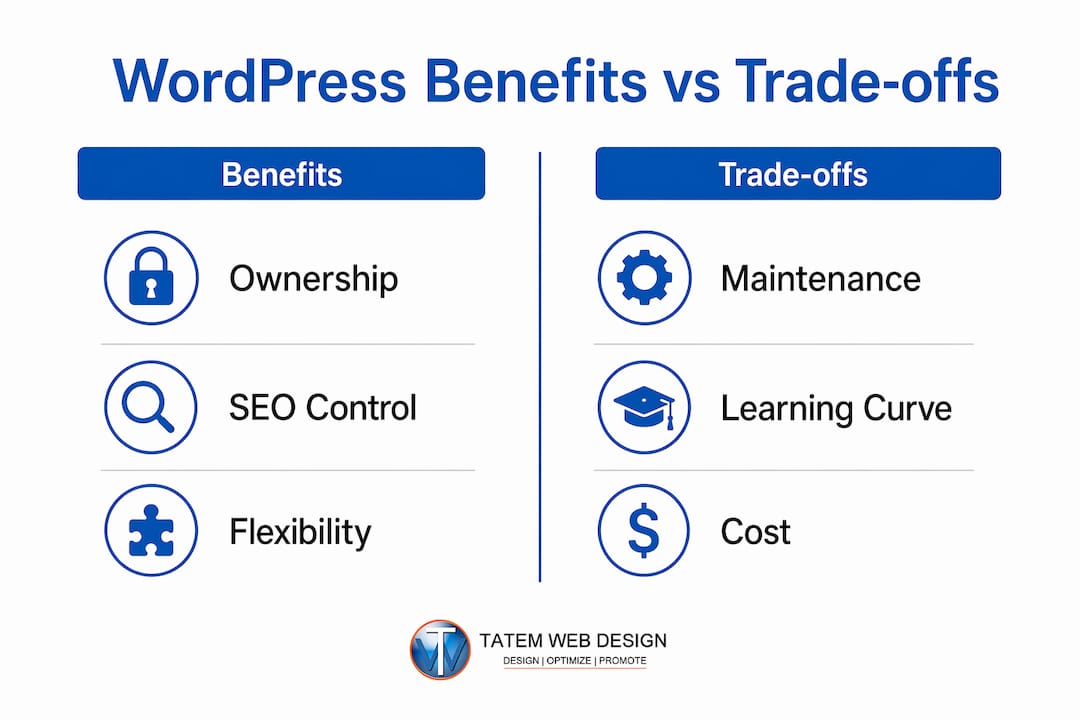
The strongest reasons to choose WordPress
- Full ownership. You own the code, the database, and the content. No vendor can shut down your site or change pricing on you.
- SEO control. Granular metadata, XML sitemaps, schema markup, canonical URLs, and redirect management are all accessible through plugins like Yoast SEO or Rank Math.
- Plugin ecosystem. With tens of thousands of plugins available, you can add booking systems, CRM integrations, membership portals, or payment gateways without custom development.
- E-commerce flexibility. WooCommerce handles everything from simple product catalogs to subscription billing and B2B ordering.
- Scalability. WordPress scales from a five-page service site to a multi-language, multi-location platform without a platform migration.
- Cost-effectiveness. The core software is free; you control where you spend on hosting, themes, and plugins.
The trade-offs you need to plan for
- Maintenance burden. Core, theme, and plugin updates require regular attention. Neglect is the primary cause of WordPress site failures.
- Plugin conflicts. Too many plugins, or poorly coded ones, create compatibility issues and slow load times.
- Performance tuning. Speed requires active management: caching, image optimization, and a capable hosting environment.
- Hidden recurring costs. Premium plugins, managed hosting, and professional maintenance add up beyond the free core software.
Who benefits most: Service businesses, content-driven companies, local businesses targeting organic search, and any SMB planning to add e-commerce or expand features over time.
Who should look elsewhere: Businesses that need a static, rarely-updated brochure site with no growth plans, or those building app-like experiences with complex operational logic.
What does WordPress actually cost to run?
The base WordPress.org software is free, but realistic budget planning requires accounting for several recurring line items. Here is how the numbers typically break down.
| Cost Category | DIY / Low End | Agency-Managed Mid-Range | Enterprise / High End |
|---|---|---|---|
| Hosting | $5–$15/mo | $30–$100/mo | — |
| Premium theme | $0–$100 one-time | — | Custom |
| Development/setup | $0 (DIY) | — | — |
| Ongoing maintenance | $0 (DIY time) | $100–$500/mo | — |
Hosting tiers explained
Shared hosting is the cheapest entry point, typically $5–$15 per month. Resources are shared across many sites, which means performance can suffer during traffic spikes. Fine for a brand-new site with minimal traffic, but not a long-term foundation for a growing business.
Managed WordPress hosting (providers like WP Engine or Kinsta) runs $30–$100 per month for most SMBs. You get automatic updates, daily backups, staging environments, and performance optimization built in. The higher cost pays for itself quickly when you factor in avoided downtime and developer time.

VPS and cloud hosting gives you dedicated resources and more configuration control. Appropriate when you need custom server environments or handle significant traffic volumes.
Managed enterprise platforms (WP VIP-style services) reduce operational risk substantially with SLAs, monitoring, and dedicated support, but carry a price point that makes sense only for larger organizations.
Pro Tip: Spend more on hosting before you spend on a premium theme. A fast, reliable host with daily backups and a staging environment will save you far more money than a beautiful theme on a slow shared server.
What drives costs up
- WooCommerce stores add SSL certificates, payment gateway fees (typically 2.9% + $0.30 per transaction for Stripe), and premium shipping/tax extensions.
- Multi-language sites require translation plugins and potentially additional hosting resources.
- Custom integrations with CRM or ERP systems require developer time that is not captured in plugin costs.
Security, updates, and maintenance: what you’re responsible for
WordPress’s security record at the core level is strong. Most vulnerabilities come from third-party plugins and outdated components, not the platform itself. That distinction matters because it means security is largely a management problem, not a platform problem.
Recurring maintenance responsibilities
- Core WordPress updates (major and minor releases)
- Theme updates
- Plugin updates, tested in a staging environment before pushing live
- Daily or weekly automated backups stored off-site
- Uptime monitoring and error log review
- User access audits and password hygiene
- SSL certificate renewal
Primary security risks and mitigations
The three most common attack vectors are outdated plugins, weak administrator credentials, and misconfigured hosting environments. Each is preventable.
- Web Application Firewall (WAF). Services like Cloudflare or Sucuri block malicious traffic before it reaches your server.
- Automated backups. Daily backups stored off-site mean a compromised site can be restored in hours, not days.
- Least-privilege user roles. Editors should not have administrator access. WordPress’s built-in role system makes this straightforward.
- Staging environment. Test every update on a copy of the live site before applying it. This single practice prevents the majority of update-related outages.
- AI security monitoring. Tools that continuously scan for anomalies catch threats that scheduled scans miss. Tatemweb’s AI security enhancements layer this kind of monitoring onto WordPress builds.
Pro Tip: Treat your plugin list like a whitelist, not a wishlist. Every plugin you install is a potential attack surface and a future maintenance obligation. If a plugin hasn’t been updated by its developer in 12 months, replace it.
Checklist: questions to ask your host or agency
- What is the backup frequency, and where are backups stored?
- Is there a staging environment for testing updates before they go live?
- What is the uptime SLA, and what is the response time for critical issues?
- How are plugin updates handled, and who is responsible for testing?
- Is a WAF included, or is it an add-on?
The WordPress maintenance checklist Tatemweb publishes covers each of these in detail and is worth bookmarking before you sign any hosting or agency agreement.
What can you actually build and connect with WordPress?
WordPress’s flexibility is its most underrated quality. Most business owners think of it as a blogging platform. In practice, it supports a much wider range of use cases.
Common small-business use cases
- Content marketing and blogging. The editorial workflow is mature, supports multiple authors, and integrates with editorial calendar plugins.
- Lead generation sites. Landing pages, contact forms, and CRM integrations are straightforward to configure.
- Service pages and local SEO. Location-specific pages, schema markup for local businesses, and Google Business Profile integration are all achievable.
- Booking and scheduling. Plugins handle appointment booking, class scheduling, and resource reservation without custom code.
- Membership areas. Gated content, paid subscriptions, and tiered access are supported through membership plugins.
- Multi-language sites. Plugins like WPML or Polylang handle translation workflows and hreflang tags. For businesses managing multiple domains, WordPress Multisite can centralize administration.
Integration patterns
WordPress connects to the tools most small businesses already use. CRM platforms like HubSpot and Salesforce have official WordPress plugins. Email marketing platforms (Mailchimp, Klaviyo, ActiveCampaign) integrate via plugin or API. Payment gateways, analytics platforms, and digital asset management systems all have established integration paths.
Enterprise organizations are increasingly choosing WordPress as part of composable stacks precisely because of this integration depth and the large available talent pool. For a small business, that means your WordPress site can grow into a more sophisticated marketing platform without a full rebuild.
Gutenberg vs. visual page builders
The Gutenberg block editor is WordPress’s native approach to page building. It is fast, well-maintained, and increasingly capable. Governed block systems let marketing teams build pages safely while preventing design drift, which is a real operational advantage when multiple people edit the site.
Visual builders like Elementor and Divi offer more drag-and-drop flexibility but can introduce performance overhead and make the site harder to maintain when the original developer is no longer involved. For most small businesses, a well-configured Gutenberg setup with a curated block library is the more maintainable choice.
Plugin governance checklist before installing any extension:
- Is the plugin actively maintained (updated within the last 6 months)?
- Does it have a strong rating and a large install base?
- Does it duplicate functionality already provided by another plugin?
- Has it been tested on a staging copy of your site?
How does WordPress help you rank and grow organically?
WordPress is one of the strongest platforms for organic search, and the advantage compounds over time. Clean URL structures, fast load times (when properly configured), and a rich plugin ecosystem for technical SEO give you tools that most hosted builders simply do not offer at the same depth.
SEO capabilities that matter for small businesses
- Granular metadata control. Title tags and meta descriptions are editable per page and post, not locked to templates.
- Schema markup. Structured data for local businesses, products, reviews, and FAQs is achievable through plugins like Rank Math or Schema Pro.
- XML sitemaps. Auto-generated and submitted to Google Search Console with minimal setup.
- Canonical URLs and redirects. Essential for avoiding duplicate content penalties, both manageable without developer involvement.
- Content workflows. The blogging engine is mature. Publishing frequency and internal linking, two of the highest-leverage SEO activities, are easy to maintain.
Marketing integrations that extend reach
WordPress connects to AI email marketing automation platforms, retargeting pixels, and conversion tracking tools. This means your website is not just a brochure but an active part of your marketing funnel.
The performance caveat
SEO gains from WordPress are real, but they depend on performance. A slow site loses rankings regardless of how well the content is optimized. Caching plugins (WP Rocket, W3 Total Cache), image compression, and a capable hosting environment are not optional extras. They are prerequisites for realizing the SEO advantage WordPress offers.
Core SEO best practices WordPress makes achievable:
- Mobile-first responsive design (standard in modern themes)
- Core Web Vitals optimization through caching and image tools
- Structured data for rich results in Google Search
- Internal linking at scale through related-post plugins
- Regular content publishing through a managed editorial workflow
Doing e-commerce on WordPress: WooCommerce strengths and limits
WooCommerce powers roughly 36% of all online stores, making it one of the most widely deployed e-commerce platforms globally. For small businesses, that market depth means abundant developer talent, extensive documentation, and a plugin ecosystem that covers almost every retail scenario.
What WooCommerce handles well
- Physical and digital product catalogs
- Subscription billing and recurring payments
- Appointment and service bookings
- Flexible tax and shipping rules (including US state-level sales tax)
- Payment gateways: Stripe, PayPal, Square, and dozens of others
- B2B ordering with tiered pricing via extensions
| Factor | WooCommerce on WordPress | Simple hosted cart |
|---|---|---|
| Ownership | Full — you own the data | Platform-dependent |
| Customization | Extensive via plugins/code | Limited to platform features |
| Maintenance | Owner/agency responsibility | Handled by platform |
| Cost at scale | Predictable, plugin-based | Often percentage-based fees |
| Lock-in risk | Low | High |
| Setup complexity | Moderate to high | Low |
Cost considerations for online stores
Beyond hosting, a WooCommerce store typically requires an SSL certificate, payment processing fees, and premium extensions for advanced shipping, subscriptions, or tax automation. Budget these as ongoing operating costs, not one-time setup expenses. For a managed WooCommerce build, Tatemweb’s e-commerce web design services cover the full stack from product setup to payment configuration.
When WooCommerce is not the right tool
Very large product catalogs (tens of thousands of SKUs), complex B2B pricing engines, or deep ERP integration typically push businesses toward purpose-built enterprise e-commerce platforms. WooCommerce can technically support these scenarios, but the engineering cost often exceeds what a dedicated platform would require. For most small businesses selling under a few thousand products, WooCommerce is more than capable.
How easy is WordPress for non-technical staff to use?
The honest answer: easier than it used to be, but not effortless. The Gutenberg editor has made page editing significantly more accessible. A staff member who can use Google Docs can learn to publish blog posts and update text content within a few hours.
Where non-technical editors run into trouble is layout changes, plugin settings, and anything that touches the theme. Without guardrails, a well-intentioned edit can break a page’s design or, worse, expose a configuration setting that should not be changed.
How to prepare your team for WordPress editing
- Set up a staging environment. Let editors practice on a copy of the site before touching the live version.
- Assign appropriate user roles. Editors get the Editor role; only your developer or agency administrator gets Administrator access.
- Create reusable block templates. Pre-built Gutenberg patterns for common page layouts prevent editors from improvising and breaking the design.
- Document your content workflow. A one-page guide covering how to publish a post, update a service page, and add an image saves hours of support calls.
- Schedule a short training session. Two hours of hands-on training with real tasks is worth more than any written manual.
Pro Tip: Build a curated block library with only the patterns your editors actually need. A library of five well-designed blocks is more useful than access to every block WordPress offers, and it dramatically reduces accidental layout breakage.
Visual builders like Elementor can make the editing experience more intuitive for some users, but they add a layer of complexity to the codebase. For teams where content editing is the primary need, a governed Gutenberg setup with properly customized themes is usually the cleaner long-term choice.
When is WordPress probably the wrong choice?
WordPress is not the right answer for every business. Recognizing the scenarios where its trade-offs outweigh its benefits will save you time, money, and frustration.
Scenarios where a hosted builder makes more sense
- You need a three-to-five page brochure site with no plans to add content, e-commerce, or new features
- No one on your team has time or budget for ongoing maintenance.
- Your site will rarely be updated after launch.
- You want a predictable, all-in monthly cost with no surprise plugin renewals or security incidents.
In these cases, a hosted platform handles updates, security, and backups automatically. You trade ownership and flexibility for simplicity and peace of mind. That is a legitimate trade-off, not a compromise.
Scenarios where a custom application or enterprise platform is the right tool
- Your site needs to function as a business application: complex user workflows, real-time data processing, or deep operational logic.
- You are managing tens of thousands of product SKUs with complex pricing rules and ERP integration.
- Your organization requires built-in audit trails, advanced content governance, and personalization at scale.
Early architectural decisions determine whether a WordPress implementation scales or becomes a migration liability. Businesses that build only for today’s needs often face expensive rebuilds within three to five years. If your growth trajectory points toward app-like complexity, plan for that from day one, either by building WordPress with that architecture in mind or by choosing a platform designed for it.
The ownership trade-off in plain terms
Hosted builders give you simplicity now at the cost of control later. WordPress gives you control now at the cost of ongoing responsibility. Neither is wrong. The question is which failure mode your business can better absorb: the occasional maintenance burden of WordPress, or the platform dependency and feature limits of a hosted solution. For a deeper comparison, WordPress vs. custom development breaks down when each approach makes financial sense.
Is WordPress right for your business? A practical decision checklist
Work through these questions before committing to any platform.
Decision checklist
- Do you want to own your website’s code and data outright, with no platform dependency?
- Is organic search traffic a meaningful part of your growth strategy now or within the next two years?
- Do you plan to add e-commerce, booking, membership, or other functional features after launch?
- Do you have access to a developer, agency, or managed hosting service for ongoing maintenance?
- Is your content strategy active enough to justify a platform built for publishing?
- Are you planning to expand to multiple locations, languages, or service lines?
If you answered yes to three or more of these, WordPress is likely the right long-term investment.
Questions to ask any agency or host before signing
- What is your uptime SLA, and what happens if you miss it?
- How often are backups taken, and where are they stored?
- Do you test plugin updates in a staging environment before applying them to the live site?
- What is your response time for a security incident?
- Do you maintain a plugin whitelist, or do you install whatever the client requests?
- Is performance monitoring included, or is it an add-on?
Red flags to watch for
- Opaque or bundled pricing with no line-item breakdown
- No staging environment offered
- No documented update or testing policy
- Proposals that include 30 or more plugins for a simple business site
- Agencies that cannot explain their backup and recovery process in plain terms
How Tatemweb implements WordPress for small businesses
Tatemweb brings over 26 years of web development experience to every WordPress project, with a governance model built around the principle that disciplined maintenance prevents most performance and security problems. That means every build starts with a plugin whitelist, a staging environment, and a performance budget, not as optional add-ons but as standard deliverables.
What Tatemweb delivers on WordPress projects
- AI-enhanced design. Tatemweb uses AI tools to accelerate content creation, SEO configuration, and design iteration, producing sites faster without sacrificing quality.
- WooCommerce store builds. From product setup and payment gateway configuration to tax automation and subscription billing.
- Managed maintenance. Scheduled updates tested in staging, daily backups, uptime monitoring, and security scanning.
- AI security enhancements. Continuous threat monitoring layered onto the WordPress stack, beyond what standard security plugins provide.
- Cybersecurity compliance. For businesses in healthcare, legal, or government sectors, Tatemweb’s compliance experience (HIPAA, PCI, CMMC Level 2) extends to the web platform.
Pro Tip: Ask any agency you’re evaluating to walk you through their update testing process. If they can’t describe a staging-to-production workflow in two minutes, they’re probably pushing updates directly to your live site.
Tatemweb serves businesses across Florida and beyond, with particular depth in healthcare, legal, real estate, marine, and professional services. For businesses that want a WordPress site built to last, not rebuilt in three years, the starting point is a conversation about architecture and governance before a single line of code is written. Call Tatemweb directly at 772-224-8118 to schedule a consultation.
Key takeaways
WordPress is the right platform for most small businesses that prioritize ownership, SEO, and long-term flexibility, provided they plan for ongoing maintenance from day one.
| Point | Details |
|---|---|
| WordPress fits growth-focused businesses | Choose it when SEO, e-commerce, or content marketing are part of your strategy. |
| Maintenance is non-negotiable | Neglected updates and plugin bloat cause most WordPress failures, not the platform itself. |
| WooCommerce leads e-commerce | It powers roughly 36% of all online stores and handles most SMB retail scenarios. |
| Hosted builders suit static sites | If your site won’t grow or be updated regularly, a managed hosted builder reduces burden. |
| Tatemweb builds WordPress right | With 26+ years of experience, Tatemweb delivers governed, AI-enhanced WordPress builds for Florida SMBs. |
The part most WordPress guides won’t tell you
The debate over whether WordPress is “still worth it” misses the real question. The platform is not the variable. The governance is.
Every WordPress site that fails, whether it’s slow, hacked, or abandoned, failed for the same reason: it was treated as a one-time project instead of an ongoing system. The business launched, moved on, and let the site accumulate plugin debt, outdated components, and deferred maintenance until the cost of fixing it exceeded the cost of rebuilding. That is not a WordPress problem. That is a management problem.
What I find more interesting is the inverse: businesses that treat WordPress as infrastructure, with scheduled updates, performance budgets, and a plugin whitelist, rarely have the horror stories you read about. Their sites get faster over time, not slower. Their security incidents are caught early, not discovered after a breach. The platform rewards discipline in a way that most hosted alternatives simply do not, because hosted alternatives remove the discipline requirement entirely.
The honest recommendation is this: if you are willing to manage WordPress properly, or hire someone who will, it is one of the most capable platforms available to a small business at any price point. If you are not, a hosted builder is not a lesser choice. It is the right choice for your situation. The mistake is choosing WordPress for its capabilities and then running it like a set-and-forget tool. That gap between what WordPress can do and what most implementations actually do is where most of the frustration lives.
Tatemweb’s WordPress services for small businesses in Florida
Most small businesses that come to Tatemweb have the same problem: they launched a WordPress site, it worked for a while, and then it quietly became a liability. Slow load times, missed updates, a plugin stack nobody fully understands. The fix is rarely a full rebuild. It’s usually a governance reset: a clean plugin audit, a staging environment, a maintenance schedule, and a site architecture that was designed to grow.

Tatemweb builds WordPress and WooCommerce sites that are fast, secure, and SEO-ready from launch, not as aspirational goals but as measurable deliverables. Every project includes AI-enhanced design, managed maintenance, and the kind of plugin discipline that prevents the technical debt most agencies leave behind. For businesses in healthcare, legal, or government sectors, that extends to HIPAA, PCI, and CMMC compliance built into the web platform from the start.
If you want a WordPress site that performs three years from now as well as it does on launch day, get a quote from Tatemweb or call 772-224-8118 to talk through your project. For businesses ready to add online sales, the AI-enhanced e-commerce builds cover the full WooCommerce stack from day one.
Useful sources and further reading
- WordPress Review: Features, Pros & Cons — Forbes Advisor’s breakdown of WordPress costs and trade-offs, useful for budget planning.
- Is WordPress Still the Right Choice for Business Websites in 2026? — Covers SEO capabilities, WooCommerce market share, and architectural planning.
- WordPress 2026: Business CMS — Governance-focused analysis of plugin discipline and maintenance practices.
- Is WordPress Good Enough for Enterprise? — Examines security risk surface and enterprise governance requirements.
- Why Fortune 500s Are Choosing WordPress in 2025 — Enterprise adoption patterns and integration flexibility.
- Is WordPress a Good Choice for Enterprise? — Managed hosting tiers, SLA expectations, and operational risk reduction.
- Is WordPress Still Worth It for Your Corporate Website? — Balanced assessment of WordPress’s strengths and governance requirements in 2026.
- Is WordPress Still Good for Businesses in 2026? — Practical guidance on performance, plugin strategy, and when to consider alternatives.
FAQ
Why don’t big companies use WordPress?
Many large companies do use WordPress, including Fortune 500 organizations that value its integration flexibility and large talent pool. Those that avoid it typically need built-in audit trails, advanced personalization at scale, or deeply custom operational workflows that require purpose-built enterprise platforms.
What is the biggest downside of using WordPress?
The maintenance burden is the primary trade-off. Core updates, plugin updates, backups, and security monitoring require ongoing attention. Businesses that treat WordPress as a set-and-forget platform accumulate technical debt that eventually forces an expensive rebuild.
Why are businesses moving away from WordPress?
Most migrations are a symptom of early architecture choices rather than platform failure. Businesses that built their sites without planning for growth often find their implementation can’t scale, not because WordPress lacks capability, but because the original build wasn’t designed to grow with them.
What will replace WordPress?
No single platform is positioned to displace WordPress in the near term. Hosted builders handle simple sites, headless CMS platforms serve complex multichannel needs, and purpose-built e-commerce platforms cover high-volume retail. WordPress remains the dominant choice for content-driven business websites because of its ecosystem depth and ownership model.
Is WordPress good for small business SEO?
Yes. WordPress gives small businesses granular control over metadata, schema markup, XML sitemaps, and canonical URLs through plugins like Yoast SEO and Rank Math. Search performance depends more on content quality and site speed than on the CMS, and WordPress supports both when properly configured.
Recommended
Tatem Web Design
26+ YearsWeb Design & SEO Specialist · Tatem Web Design
Matt Tatem has been designing websites professionally since 1999, making Tatem Web Design one of Florida's longest-running web agencies. Based in Stuart, FL, he specializes in WordPress, local SEO, Shopify e-commerce, and cybersecurity consulting for small businesses.

CMMC Level 2 vs Level 1: Which One Applies to You?
CMMC Level 1 vs Level 2 compared: data types, 15 vs 110 requirements, self-assessment vs third-party audits, POA&M rules and how to pick your level.

Phishing Awareness Training for Small Business: A Practical Guide
How to build phishing awareness training for a small business: what to teach, how to run simulations, which numbers to track, and what to pair it with.

AI Content Pricing: What Florida Businesses Really Pay in 2026
What AI content costs in 2026: per-post ranges, tool subscriptions, editing time and agency retainers, plus how to budget and avoid hidden costs.