
The Fastest Way for Small Businesses to Deploy AI Cybersecurity
The fastest effective path to AI cybersecurity for small business is a prioritized “No-IT” stack: AI-driven EDR/NGAV, AI email filtering, Zero Trust Identity, and no-code automation for alerts. You can deploy all four in 30 to 90 days without hiring a dedicated security team, and managed or hybrid options make this budget-friendly for firms with 10 to 50 employees.
TL;DR:
- Small businesses can deploy a complete AI cybersecurity stack within 30 to 90 days without a dedicated security team, using a prioritized four-control approach.
- AI-driven EDR/NGAV, email filtering, Zero Trust identity, and alert automation must be implemented sequentially, with milestones at 30, 60, and 90 days.
- Managed or hybrid models are recommended to balance control and operational burden, with a target response time under 15 minutes for critical alerts.
- Costs range from $4 to $35 per user per month, depending on the tier, with full managed solutions averaging $1,800 to $3,200 annually for a 15-person team.
- Prioritizing identity controls like MFA is essential before adopting more advanced detection tools to prevent common attacks through stolen credentials.
Table of Contents
- Why AI Matters for Small-Business Cyber Defense Now
- The Practical 4-Step No-IT Roadmap for Small Teams
- In-House vs. Managed: Which Model Fits Your Budget?
- What Questions Should You Ask an AI Security Vendor?
- What Do AI Cybersecurity Tools Cost for a Small Team?
- Building an AI-Enabled Incident Response Plan
- Who Is Behind This Roadmap?
- How Do You Train Employees to Spot AI-Driven Threats?
- What Compliance Rules Apply to AI Cybersecurity for Small Business?
- Where AI Cybersecurity Still Falls Short for Small Businesses
- How Do You Fit AI Security Into Your Existing Business Systems?
- The Real Gap in Most Small Business Security Advice
- How Tatemweb Turns This Roadmap Into a Working Security Stack
- Sources
- FAQ
Why AI Matters for Small-Business Cyber Defense Now
Attackers moved faster than most small businesses budgeted for. A large share of small and mid-sized companies experienced a data breach, and legacy signature-based antivirus simply cannot keep pace with threats that change their code every time they spread, according to Tripwire’s business impact report.
AI has changed what an attack looks like. Automated reconnaissance tools scan thousands of small business networks overnight looking for exposed ports and outdated software. Deepfake vishing calls, where a cloned voice impersonates your CFO requesting a wire transfer, and AI-generated phishing emails that mimic a vendor’s exact writing style have become standard attack vectors rather than novelties, according to CyberSafetyZone’s overview of AI-driven threats.
Defensive AI works differently than the antivirus you may remember from a decade ago. Next-generation antivirus (NGAV) and endpoint detection and response (EDR) tools use machine learning and behavioral analysis to flag activity that looks wrong, even when no one has ever seen that exact malware before. Instead of checking a file against a list of known threats, the system watches how a process behaves: does it try to encrypt hundreds of files in seconds, or reach out to an unfamiliar server at 3 a.m.? That behavioral approach is why NGAV/EDR has effectively replaced signature-based tools as the baseline expectation for artificial intelligence security solutions.
A retail bookkeeper clicking what looks like a routine invoice PDF, a dental office receptionist getting a “vendor” email requesting updated banking details, a marina’s front desk answering a spoofed call from “corporate.” These are the everyday entry points AI-enabled attackers now automate at scale, not just headline-grabbing ransomware gangs targeting hospitals.
The Practical 4-Step No-IT Roadmap for Small Teams
You do not need an internal security operations center to run a credible defense. A practical, vendor-neutral framework built around four controls lets small businesses assemble something close to enterprise-grade protection, according to the No-IT guide from UpstandingHackers.
- Deploy AI-driven EDR/NGAV first. Confirm during onboarding that the tool can isolate an infected device automatically, and ask the vendor to show you a sample alert in plain English, not just a risk score.
- Add AI/NLP email filtering second. This layer parses language patterns and sender behavior to catch business email compromise and phishing attempts that dodge traditional spam filters. Pair this with your email monitoring services if you handle sensitive client communications.
- Implement Zero Trust identity controls third. Multi-factor authentication, passkeys where supported, and least-privilege access mean a stolen password alone can’t unlock your systems.
- Connect alerts to no-code automation fourth. Route EDR and email alerts into Slack, Teams, or a ticketing system so someone sees a threat within minutes, not when they check email the next morning.
Rollout milestones matter more than raw speed. By day 30, EDR/NGAV should be installed on every endpoint and email filtering active. By day 60, MFA should be enforced company-wide with legacy password-only logins disabled. By day 90, alert automation should be routing to a named person, and you should have run at least one test isolation to confirm it works as expected.
Pro Tip: Start with a small set of high-value detections, like account takeover and impossible-travel logins, rather than trying to monitor everything at once. A “detect everything” rollout creates so much noise that real threats get lost in it.

In-House vs. Managed: Which Model Fits Your Budget?
Licensing your own EDR and email filtering tools costs less per month on paper, but someone has to tune detection rules, review alerts, and respond at 2 a.m. when the system flags something real. That someone is either you, an employee pulled off their actual job, or nobody, which is the most common and most dangerous outcome for small firms.
A managed detection and response (MSSP) model shifts that operational burden to a provider for a monthly per-seat fee. You get 24/7 coverage and faster escalation, but you give up some direct control over tuning and response timing. Hidden costs cut both ways: in-house setups often underbudget for the hours spent chasing false positives, while managed contracts sometimes charge extra for incident response beyond a baseline number of hours.
A hybrid model works well for many small businesses: you keep policy control (who gets access, what data matters most, breach notification decisions) while outsourcing 24/7 monitoring and initial triage.
- Keep in-house: final say on isolating critical systems, breach notification timing, and vendor contract terms.
- Outsource comfortably: 24/7 alert monitoring, routine malware containment, and email quarantine decisions.
- Negotiate explicitly: after-hours response SLAs, and whether incident response hours are capped.
Pro Tip: Ask any managed provider to show you, not just tell you, their average time from alert to human response. A number under 15 minutes for critical alerts is a reasonable benchmark to hold them to.
What Questions Should You Ask an AI Security Vendor?
Selecting cybersecurity tools for SMEs comes down to trust, and trust starts with data practices most vendors would rather you not ask about. Before signing anything, get clear answers on these points.
- What minimum telemetry does the tool need? A credible setup typically wants identity provider logs, endpoint events, cloud/SaaS audit logs, and DNS or proxy data, according to the SME playbook from describe.cloud.
- Where is your data stored, and for how long is it retained after you cancel?
- Does the vendor train its models on your company’s data, and can you opt out?
- Can automated actions be explained in plain language, not just a numeric risk score?
- Can you export your own logs at any time, without a support ticket?
- What happens to your data and access if you switch providers?
Red flags show up fast in a sales call: a vendor who hedges on log export, dodges questions about model training data, or can’t state a concrete incident response SLA in writing. Run a 30-day sandbox trial before committing, and specifically test whether you can pull a full log export and whether a triggered alert comes with a human-readable explanation.
| Checklist Area | What to Verify | Red Flag |
|---|---|---|
| Data handling | Storage location, retention after cancellation | Vendor won’t specify in writing |
| Explainability | Plain-English alert descriptions | Only a numeric score, no context |
| Log ownership | Self-service export anytime | Export requires a support ticket |
| SLA clarity | Written response time by severity | Vague “as soon as possible” language |
What Do AI Cybersecurity Tools Cost for a Small Team?
Budgets vary by how much automation and coverage you want, but three tiers cover most small businesses. Entry-level AI-enhanced EDR and email filtering bundles run roughly $4 to $8 per user per month. Mid-tier packages that add managed monitoring and Zero Trust identity land around $10 to $18 per user per month. Full managed detection and response with 24/7 human escalation typically runs $20 to $35 per user per month.
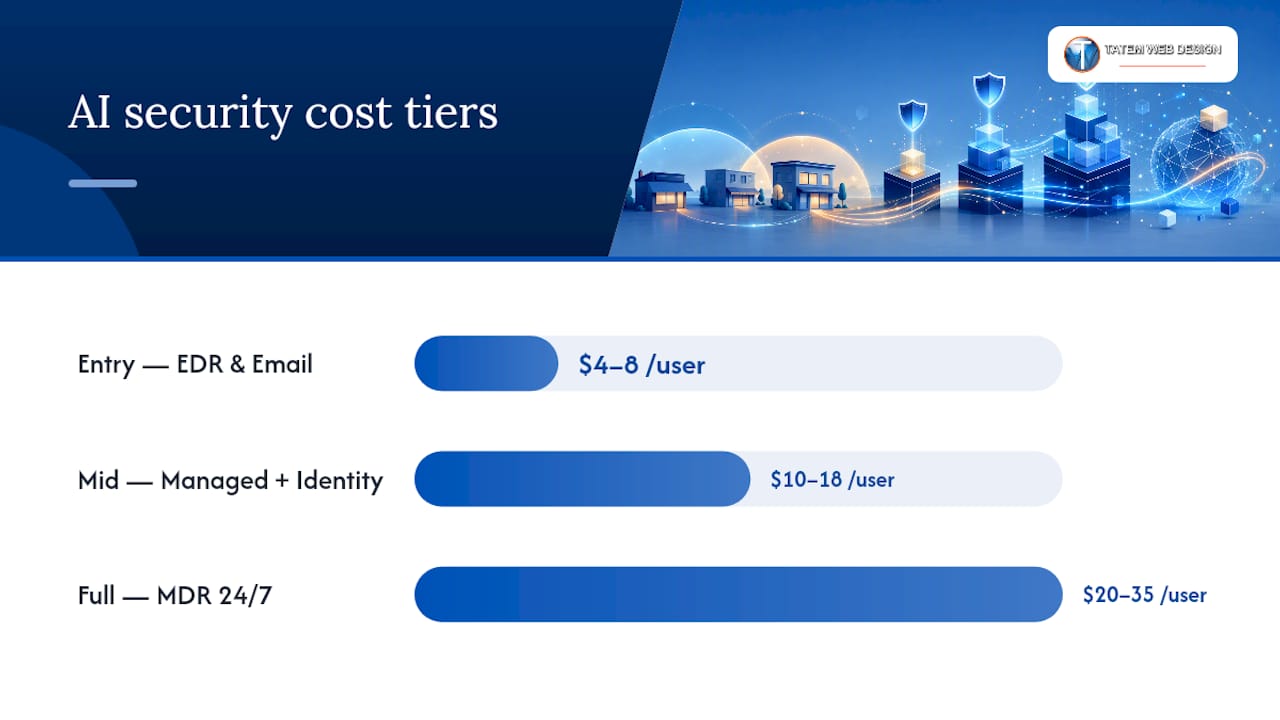
A 15-person firm choosing the mid tier lands around $1,800 to $3,200 a year, a modest line item next to the cost of even one serious breach. Rollout milestones typically mirror the roadmap above: EDR and email filtering live by day 30, identity controls enforced by day 60, and full alert automation with a documented response owner by day 90.
Insurance carriers increasingly ask about MFA enforcement and endpoint detection during underwriting. Businesses that can answer yes to both often see friction drop during the application process, and some see lower premiums as a direct result.
Building an AI-Enabled Incident Response Plan
An incident response plan does not need to be a fifty-page document. It needs to work at 6 a.m. when someone finds ransomware notes on a shared drive.
- List your emergency contacts. Include your MSSP or IT provider, cyber insurance carrier, and legal counsel, all in one place your team can reach without logging into the compromised system.
- Define isolation steps. Know exactly which device or account gets disconnected first and who has authority to pull that trigger.
- Verify backups regularly, not just after an incident. A backup you have never tested restoring is a backup you don’t actually have.
- Prepare communication templates in advance. Customers and employees deserve a clear, calm update, not something drafted under panic three hours into an outage.
Automation should handle reversible, low-risk containment: quarantining a suspicious email, isolating an endpoint showing ransomware behavior, disabling a single compromised login. Anything with broader business impact, like shutting down a shared server or disabling a company-wide system, should require a human to approve it first.
Testing cadence matters as much as the plan itself. CISA’s guidance on continuous security practices stresses ongoing vigilance and rapid patching because AI has shrunk the gap between a vulnerability being discovered and being exploited. Run vulnerability scans continuously, patch critical systems within days rather than weeks, and hold a tabletop exercise at least twice a year.
Pro Tip: During your next tabletop exercise, simulate the ransom note showing up on a Friday afternoon before a holiday weekend. That’s when real attacks happen, and it’s the scenario most plans quietly skip.
Who Is Behind This Roadmap?
This roadmap was built by Matt for Tatemweb, drawing on more than 26 years of Tatem Web Design’s experience helping Florida small businesses with compliance-driven security work, including CMMC Level 2 and HIPAA compliance consulting. That background matters here: compliance frameworks force a level of documentation and testing rigor that most AI security vendors never ask you to meet on your own, which is exactly the gap this No-IT roadmap tries to close.
For a deeper look at how the four-control stack applies specifically to smaller teams, see Tatemweb’s breakdown of AI security strategy for SMEs. Real client case studies from Florida real estate, healthcare, and legal practices that have deployed this exact stack are available on request, and specific results vary by industry and starting security posture.
How Do You Train Employees to Spot AI-Driven Threats?
Your EDR and email filters will catch most automated threats, but employees remain the entry point for the ones that slip through. Training needs to reflect what modern phishing actually looks like now, not the “obvious typo” scams from a decade ago.
Run short, frequent sessions rather than one annual seminar nobody remembers by March. A 15-minute session every quarter covering one real recent example, an AI-generated invoice scam, a deepfake voice call, a fake vendor portal, sticks far better than a dense annual training deck.
Teach staff to verify unusual requests through a second channel. If “the CEO” emails asking for an urgent wire transfer, a phone call to a known number takes thirty seconds and stops most business email compromise attempts cold. Make that verification step a written policy, not just a suggestion, so employees feel authorized to slow down and check.
Address shadow AI directly: employees pasting client data into public AI chatbots to draft emails or summarize documents is now a real data leak risk, and staff need clear guidance on which tools are approved and what data should never go into them, according to StaySafeOnline’s guidance on responsible AI use. Reward employees who report a suspicious email, even a false alarm, instead of only correcting the ones who click. That single shift in tone gets more real threats reported.
What Compliance Rules Apply to AI Cybersecurity for Small Business?
Regulatory obligations depend heavily on your industry, and small businesses often assume rules that apply to large enterprises don’t apply to them. That assumption gets expensive fast.
Healthcare practices, including dental and medical offices, fall under HIPAA regardless of size, which means any AI tool touching patient data needs a signed business associate agreement and documented safeguards. Businesses working with federal defense contracts face CMMC Level 2 requirements that mandate specific access controls and incident logging. Any business processing card payments needs PCI compliance covering how that data is stored, transmitted, and protected, AI-enhanced tools included.
The compliance angle that catches small businesses off guard with AI specifically: if your AI vendor trains its models on data that includes customer records, that may trigger additional data handling obligations depending on your industry and state privacy laws. Ask vendors directly whether your data feeds their model training, and get the answer in writing before you sign. Documentation matters as much as the tools themselves. Regulators and insurers alike want to see that you tested your backups, ran your incident response plan, and can show a paper trail of who approved what.
Where AI Cybersecurity Still Falls Short for Small Businesses
AI-driven tools are a major upgrade over legacy antivirus, but they are not infallible, and treating them as a “set it and forget it” solution creates a false sense of safety.
False positives remain a real operational cost. An AI system tuned too aggressively will isolate a legitimate employee device during a busy sales push, costing you productivity and trust in the tool itself. Tune thresholds deliberately rather than accepting factory defaults.
There’s also a genuine trust gap: automated isolation without a clear, human-readable explanation leads owners to either ignore alerts or disable automation entirely out of frustration, undermining the whole point of deploying it. Choose tools that let you adjust automation thresholds and always show a plain-language reason for any action taken.
AI models can be fooled, too. Adversarial attackers specifically probe defensive AI systems looking for blind spots, and a model trained mostly on large-enterprise attack patterns may miss threats unique to a ten-person marina services company. No AI tool replaces basic hygiene: patching, backups, and MFA still do most of the heavy lifting, with AI adding speed and coverage on top rather than replacing those fundamentals.
Vendor dependency is a quieter risk. If your provider goes out of business or gets acquired, you need a documented exit plan and confirmed log export capability before that day arrives, not after.
How Do You Fit AI Security Into Your Existing Business Systems?
The tools you already run, your accounting software, your CRM, your point-of-sale system, your practice management platform, all generate data your security stack needs to see. Integration is where a lot of small business security plans quietly fail.
Start by mapping which systems handle sensitive data (customer records, payment information, patient files) and confirm your EDR and email filtering tools actually monitor the devices and accounts connected to those systems. A security stack that ignores your point-of-sale terminal because “it’s not really a computer” leaves a wide-open door.
No-code automation platforms are worth a serious look here, since they let you connect security alerts to the business tools your team already uses daily, a ticketing system, a shared Teams channel, even a simple SMS alert, without writing custom code or hiring a developer. Tatemweb’s guide to business AI agents for SMBs covers how these automations connect to existing workflows in more technical detail.
Test integrations before rolling them out company-wide. Run a two-week pilot with one department, confirm alerts route correctly and nobody gets flooded with false positives, then expand. A security stack that annoys your staff into ignoring it has failed regardless of how sophisticated its AI actually is.
The Real Gap in Most Small Business Security Advice
Most cybersecurity advice aimed at small businesses either assumes you have an IT department you don’t have, or oversells AI as a magic layer that fixes everything once installed. Neither is true, and the businesses that get burned tend to fall into one of those two traps.
The conventional wisdom treats “buy better software” as the finish line. It isn’t. The playbook that actually works pairs automation with a small number of deliberate human checkpoints, isolating a laptop automatically, but requiring a person to sign off before disabling a shared finance account. Skip that balance in either direction and you either drown in false positives or leave a real threat unattended overnight.
If you take one thing from this roadmap, prioritize identity controls before anything flashy. MFA and least-privilege access cost the least and block the most common entry point attackers still rely on: a reused or stolen password. Everything else, the EDR, the email filtering, the automation, works better once that foundation is in place. Businesses that skip straight to expensive detection tools while leaving passwords as the only gate are protecting the wrong layer first.
— Matt
How Tatemweb Turns This Roadmap Into a Working Security Stack
Building this stack yourself means researching vendors, testing integrations, and hoping you configured Zero Trust correctly on the first try. Tatemweb’s AI Security Enhancements service maps directly to all four roadmap steps, EDR/NGAV deployment, AI email filtering, identity controls, and alert automation, and handles the configuration work for you.
What sets this apart for Florida small businesses specifically is compliance experience most AI security vendors simply don’t have. Over 26 years of consulting on CMMC Level 2 and HIPAA compliance means the security stack gets built with your regulatory obligations already baked in, not bolted on afterward when an auditor asks questions. Turnkey deployments typically go live within the 30 to 90-day window outlined above, backed by local support rather than an offshore call center reading from a script.
Pair the security build with company cybersecurity training to close the human side of the gap this article covers above. Call 772-224-8118 or visit the AI Security Enhancements page to schedule a consultation and get a specific timeline for your team size and industry.
Sources
- Tripwire — State of Security: Business impact report — small businesses and cyberattacks
- AI Cybersecurity for Small Business: The 2026 ‘No-IT’ Guide — UpstandingHackers
FAQ
Can I Use AI for Cybersecurity in My Small Business?
Yes. AI-driven tools like NGAV/EDR, email filtering, and identity monitoring are specifically designed for businesses without a dedicated security team, and most can be deployed within 30 to 90 days.
Can You Make $500,000 a Year in Cybersecurity?
Senior cybersecurity roles, particularly in leadership, consulting, or specialized fields like penetration testing, can reach that range, though it depends heavily on experience, certifications, and location rather than being typical for entry-level roles.
What Is the Best Cybersecurity Software for Small Businesses?
The best approach isn’t a single tool but a stack: AI-driven EDR/NGAV, AI email filtering, and Zero Trust identity controls, ideally deployed and configured by a provider like Tatemweb with compliance experience relevant to your industry.
How Much Should a Small Business Budget for AI Cybersecurity?
Most small teams should expect $4 to $35 per user per month depending on the tier, with a mid-tier managed stack for a 15-person firm typically running $1,800 to $3,200 annually.
Recommended
Tatem Web Design
26+ YearsWeb Design & SEO Specialist · Tatem Web Design
Matt Tatem has been designing websites professionally since 1999, making Tatem Web Design one of Florida's longest-running web agencies. Based in Stuart, FL, he specializes in WordPress, local SEO, Shopify e-commerce, and cybersecurity consulting for small businesses.

Rank in ChatGPT in 90 Days With a Practitioner Led Checklist
Follow a practitioner led 90 day plan to get cited by ChatGPT: allow OAI-SearchBot, publish short answer capsules with schema, and track Bing AI Performance.

AI SEO Content Playbook: 16 GEO Signals for Agencies & Teams
A practical playbook mapping the GEO-16 signals to hands-on editorial workflows, review controls, and metrics. For agencies and in-house teams scaling AI...

Copy Ready Local Schema Markup for SMBs + Google Validation
Copy ready JSON-LD examples and Google validation steps for SMBs' local schema markup. Audit, implement, and verify each location page with confidence.