
Business AI Agents for SMBs: 2026 Implementation Guide
Most small business owners assume AI agents are just fancier chatbots with a better script. That assumption is costing them real money. Business AI agents are autonomous systems that reason, plan, and execute multi-step tasks across your tools and workflows without waiting for you to click “send.” They handle customer service tickets, qualify leads, generate reports, and coordinate approvals, all while your team focuses on work that actually requires human judgment. This guide breaks down how these agents work, how to deploy them safely, and how to start seeing results without a dedicated IT department.
Table of Contents
- Key takeaways
- What business AI agents actually do
- Designing AI agents: a practical setup guide
- Security and compliance for AI agent deployment
- Real-world applications that drive SMB results
- How to start small and scale with confidence
- My perspective on AI agents for small businesses
- How Tatemweb helps Florida SMBs deploy AI agents
- FAQ
Key takeaways
| Point | Details |
|---|---|
| Agents go beyond chatbots | Business AI agents execute multi-step workflows autonomously, not just answer questions. |
| Security must come first | Prompt injection and over-scoped permissions are the top risks to address before deployment. |
| Start with one bottleneck | Map a single painful workflow before building or buying any agent. |
| Human oversight is non-negotiable | Approval gates and stop triggers prevent agents from acting unchecked on edge cases. |
| Scaling requires change management | Treating agents like new team members, not software, determines long-term adoption success. |
What business AI agents actually do
The clearest way to understand business AI agents is to contrast them with what you already know. A traditional chatbot follows a script. It answers FAQ questions, collects a name and email, and hands off to a human when things get complicated. An AI agent does something fundamentally different. It perceives context, reasons about what needs to happen next, selects the right tool, executes an action, and then evaluates the result before deciding its next move.
Agentic AI automates entire workflows and enables multiple agents to collaborate across tasks, which is a significant leap beyond traditional robotic process automation. The distinction matters for SMB owners because it changes what you can actually delegate. You are not just automating a button click. You are delegating a judgment-based process.

There are three broad categories of agents relevant to most small and medium-sized businesses.
| Agent Type | Primary Function | Common SMB Application |
|---|---|---|
| Workspace agents | Multi-step task execution within shared organizational tools | Drafting reports, managing calendars, coordinating approvals |
| Autonomous customer service agents | End-to-end case resolution across multiple channels | Ticket management, refund processing, escalation routing |
| Workflow automation agents | Connecting disparate tools and triggering actions by rules | Lead capture, CRM updates, financial reconciliation |
OpenAI’s workspace agents represent one practical example of this evolution. They allow teams to build shared agents that run long, multi-step workflows with organizational permission controls built in. For an SMB, that means your sales team could deploy an agent that researches inbound leads, checks your CRM, drafts a personalized outreach email, and logs the activity automatically. No developer required.
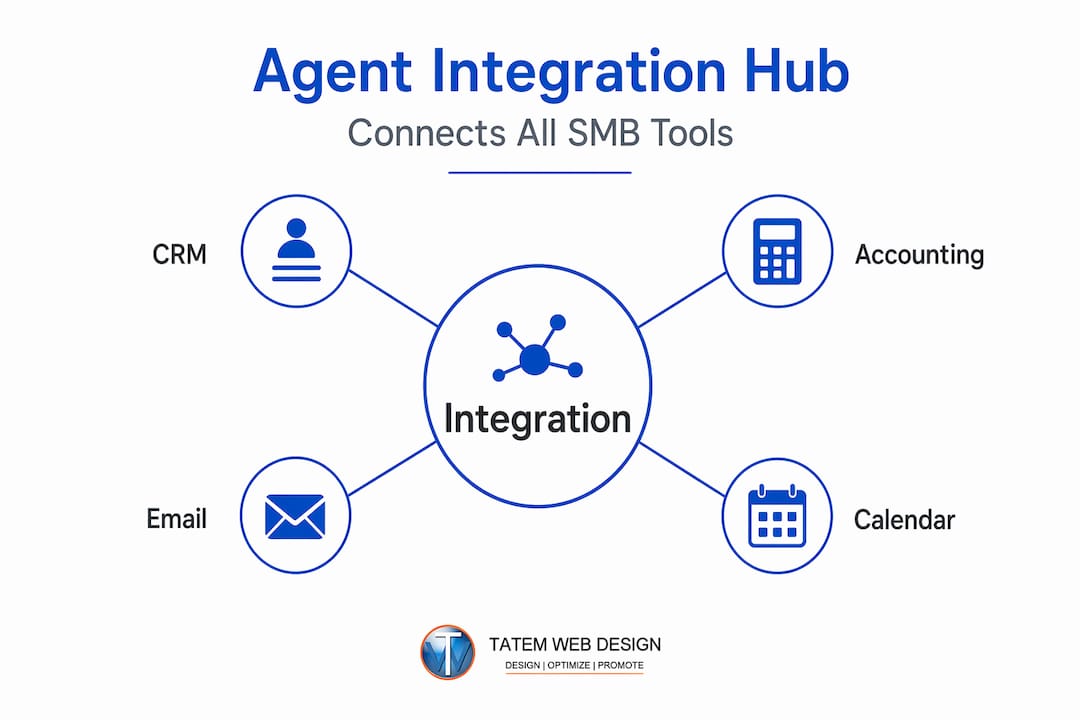
The real power of AI business solutions at this level is integration. These agents connect to the tools you already use: email, CRM, project management software, accounting platforms. They do not replace your stack. They work across it.
Designing AI agents: a practical setup guide
The biggest mistake SMB owners make is treating agent setup as a software installation. It is not. Designing a business AI agent is closer to writing a job description and onboarding a new employee. You need to define exactly what the agent is responsible for, what it is allowed to touch, and when it should stop and ask a human.
Here is a practical framework for building your first agent:
-
Define the agent’s responsibility clearly. Write out the specific task or workflow the agent will own. “Handle customer refund requests under $50” is a deployable responsibility. “Improve customer service” is not.
-
Map the workflow from start to finish. List every step the agent needs to take, including the tools it will access and the data it will read or write. Designing agents requires specifying start and stop triggers, allowed tools, and human approval checkpoints before you write a single line of configuration.
-
Set explicit start, pause, and stop triggers. An agent should know when to begin a task, when to wait for input, and when to halt entirely. Pause and stop rules are fundamental requirements that prevent agents from acting indefinitely on edge cases without human review.
-
Assign only the permissions the agent needs. If your customer service agent needs to read order history and issue refunds, give it exactly those permissions. Nothing more. This is the least-privilege principle, and it is non-negotiable.
-
Build human approval gates into the workflow. Certain actions, such as sending a legal document, issuing a credit over a certain threshold, or updating pricing, should always require a human to approve before execution.
-
Test in a controlled environment first. Run the agent on a small sample of real scenarios before giving it live access. Document what it gets wrong. Adjust the workflow definition before scaling.
Pro Tip: When assigning tool permissions to an agent, list every tool access you are considering, then cut the list by at least 30 percent. Agents with write access to too many systems create compounding risk if something goes wrong. Start narrow and expand permissions only after the agent demonstrates reliability.
Anthropic’s approach with Claude for Small Business illustrates this well. Their platform offers 15 pre-built agentic skills tailored to repeatable SMB tasks across finance, sales, and operations, each with human approval controls built in. Starting with pre-built skills like these lets you learn how agents behave in your specific context before you build anything custom.
Security and compliance for AI agent deployment
Security is where most SMB owners underinvest, and it is the area with the highest cost of failure. When you deploy an agent with access to your email, your CRM, or your payment systems, you are creating a new attack surface. Understanding that surface is not optional.
The most significant technical threat is prompt injection: an attack where malicious content in the environment, such as a customer email or a web page the agent reads, tricks the agent into taking unauthorized actions. Microsoft’s FIDES system addresses this by using deterministic labeling to prevent unauthorized tool use, tracking integrity and confidentiality before executing any sensitive tool call and blocking actions when policy is violated, with human approval as the fallback.
For SMB owners, here is what that means practically:
- Do not give agents access to external content without filtering. If your agent reads incoming emails or web pages, those sources can carry injection payloads. Apply content filtering before the agent processes external input.
- Use middleware-enforced policy, not just model instructions. Telling the agent “do not access financial data” in a prompt is not a security control. Security failures in tool-using agents most often come from weak controller layer design, not model behavior alone.
- Audit agent actions regularly. Log everything the agent does and review those logs weekly during initial deployment. Anomalies are easier to catch and correct early.
- Know your compliance obligations. If you are in healthcare, legal, or financial services, your agent’s data access may trigger HIPAA, PCI, or other compliance requirements. Understand these before you connect the agent to sensitive systems.
- Plan for failure modes. Define what happens when the agent encounters something it cannot handle. A graceful escalation to a human is always better than an autonomous wrong decision.
Pro Tip: Before going live with any agent, conduct a permission audit. Write down every system the agent can read, write, or delete from. Then ask yourself: “What is the worst-case outcome if this agent behaves unexpectedly?” If the answer involves customer data exposure or financial loss, add an approval gate.
The regulatory landscape around AI agents is evolving rapidly. The EU AI Act and emerging U.S. state-level frameworks are beginning to define obligations around transparency and human oversight for automated decision-making systems. Getting governance right now protects you later.
Real-world applications that drive SMB results
Theory matters less than outcomes. Here is where business AI agents are delivering measurable results for small and medium-sized businesses right now.
-
Customer service automation. An autonomous customer service agent can manage end-to-end customer issues across email, voice, chat, and support desk systems simultaneously, escalating only when policy requires human approval. For a business handling 50 to 200 support tickets per day, that kind of coordination cuts resolution time dramatically and reduces the need for overnight staffing.
-
Lead qualification and outreach. An agent integrated with your CRM can score inbound leads against your ideal customer profile, send a personalized first contact, follow up at timed intervals, and flag high-priority prospects for your sales team. Sales teams using AI agents for lead automation consistently report shortened qualification cycles and higher conversion rates on outbound sequences.
-
Financial reporting and reconciliation. Agents can pull transaction data from your accounting software, categorize expenses, flag anomalies, and generate a weekly summary report without anyone on your team manually running queries. For a small accounting firm or a medical practice billing team, this alone saves several hours per week.
-
Helpdesk and internal IT support. Agents can handle password resets, access requests, and common IT questions autonomously, freeing your most technically skilled team members for higher-value problems.
-
Scheduling and appointment management. In healthcare, legal, and professional services, agents can manage inbound appointment requests, send confirmations, handle cancellations, and update your practice management system in real time.
The pattern across all of these is consistent: machine learning agents for business work best when they own a clearly scoped, repetitive process that previously required human attention but did not require human judgment at every step. Speed improvements tend to be immediate. Error reduction follows within the first few weeks. Cost savings become visible within the first quarter.
How to start small and scale with confidence
The worst way to approach AI agent adoption is to buy a platform, attempt to automate everything at once, and then blame the technology when results are mixed. The best deployments start with one problem worth solving.
-
Map one bottleneck with precision. Pick the single workflow in your business that takes the most time, creates the most errors, or frustrates your team the most. That is your starting point. Deloitte advises SMBs to begin with focused bottleneck mapping before touching any technology platform.
-
Build or configure a minimal agent for that workflow. Resist the urge to add features. Get the core workflow running reliably first. One agent doing one thing well is worth more than five agents doing five things inconsistently.
-
Run a pilot with real data but limited scope. Use a subset of live scenarios. Measure accuracy, resolution time, and escalation rate. Compare those numbers to your baseline from the manual process.
-
Gather feedback from the humans working alongside the agent. The people closest to the process will tell you what the agent is getting wrong before the metrics do. Build a feedback loop into your pilot formally, not just informally.
-
Plan change management before you scale. Scaling AI agents successfully requires treating them like new team members, which means planning onboarding, setting performance expectations, and communicating changes to your staff. Agents that are rolled out without team preparation get undermined or ignored.
-
Measure ROI at 30, 60, and 90 days. Track time saved, error rates, customer satisfaction scores, and cost per resolution. These numbers tell you whether to expand the agent’s scope or adjust the workflow before investing further.
Google Cloud’s Gemini Enterprise Agent Platform offers tools like Agent Runtime, Memory Bank, and Agent Registry that give enterprise-level governance to these scaling decisions. You do not need Google’s full platform to apply the same principles: persistent memory, access registry, and runtime governance are concepts any SMB can implement at smaller scale with the right setup partner.
My perspective on AI agents for small businesses
I have worked with dozens of SMB owners in Florida who come in thinking their biggest challenge is choosing the right AI platform. It rarely is. The real challenge is design. Most business owners who struggle with AI agent deployments did not fail at the technology. They failed at defining what the agent was supposed to do and who was responsible when it did something unexpected.
The businesses I have seen succeed with intelligent business tools share one habit: they treat the design phase like it matters more than the build phase. They spend time writing out the workflow, identifying the edge cases, and deciding in advance what the agent is not allowed to do. That discipline pays off within weeks. The businesses that skip it spend months debugging behavior that was always predictable from the design.
I will also say something that most vendors will not: security governance is not a later problem. I have seen agents deployed without audit logging, with excessive permissions, and without escalation rules. In every case, the business eventually had an incident that required cleanup. Starting with least-privilege access and proper monitoring is not a bureaucratic overhead. It is how you protect your customers and your reputation.
My honest take is this. Business AI agents are not magic, but they are genuinely powerful when deployed with care. The SMBs that approach them with discipline, start small, govern well, and iterate based on real feedback will build durable operational advantages. The ones that rush will learn expensive lessons. Take the time to do it right. The competitive gap between businesses that use these tools well and those that do not is already widening.
— Matt
How Tatemweb helps Florida SMBs deploy AI agents
If this guide has given you a clear picture of the opportunity and a healthy respect for the complexity, that is exactly the right place to be. Tatemweb helps small and medium-sized businesses in Florida move from that clarity into actual deployment, without the trial-and-error that most businesses go through alone.

Tatemweb’s AI agent setup services cover the full implementation process: workflow definition, tool integration, security configuration, permission scoping, and ongoing monitoring. The team works with platforms including NemoClaw, Claude, and Perplexity Computer, selecting the right fit based on your specific business workflows and compliance requirements. Whether you run a medical practice, a law firm, a real estate office, or a retail operation, Tatemweb builds agents designed for your actual processes, not generic templates.
You can also explore the full suite of AI business solutions Tatemweb offers, from AI-powered customer support to local SEO automation and AI website design. Call 772-224-8118 to schedule a consultation and find out exactly where AI agents can give your business the most traction.
FAQ
What are business AI agents?
Business AI agents are autonomous software systems that reason, plan, and execute multi-step tasks across your business tools without requiring manual input at every step. Unlike basic chatbots, they can coordinate across email, CRM, and support systems to complete entire workflows.
How do AI agents function in business operations?
AI agents receive a goal or trigger, break it into steps, select the appropriate tools, execute actions, evaluate results, and either complete the task or escalate to a human when needed. They integrate with existing business software rather than replacing it.
Are AI agents safe for small businesses to use?
Yes, when deployed with proper governance. The key safeguards are least-privilege permissions, human approval gates for sensitive actions, audit logging, and middleware-enforced security policies rather than relying solely on the AI model’s instructions.
How long does it take to see ROI from an AI agent?
Most SMBs see measurable time savings within the first 30 days of a well-scoped deployment. Cost reductions and error rate improvements typically become visible within 60 to 90 days when measured against pre-deployment baselines.
What is the best way to start with AI agents as a small business owner?
Start by identifying one specific workflow that is repetitive, time-consuming, and rule-based. Map every step, define what the agent can and cannot do, and run a limited pilot before expanding. Beginning with a focused bottleneck, as Deloitte recommends, produces faster and more reliable results than broad automation attempts.
Recommended
- AI web solutions for Florida SMBs: industry, compliance, growth | Tatem Web Design
- What Is AI Web Design? Your 2026 Business Guide | Tatem Web Design
- AI Agent Setup Services — NemoClaw, Claude & Perplexity | Tatem Web Design
- AI For Business Florida | Onsite AI Integration & Consulting | Tatem Web Design
Tatem Web Design
26+ YearsWeb Design & SEO Specialist · Tatem Web Design
Matt Tatem has been designing websites professionally since 1999, making Tatem Web Design one of Florida's longest-running web agencies. Based in Stuart, FL, he specializes in WordPress, local SEO, Shopify e-commerce, and cybersecurity consulting for small businesses.

Rank in ChatGPT in 90 Days With a Practitioner Led Checklist
Follow a practitioner led 90 day plan to get cited by ChatGPT: allow OAI-SearchBot, publish short answer capsules with schema, and track Bing AI Performance.

AI SEO Content Playbook: 16 GEO Signals for Agencies & Teams
A practical playbook mapping the GEO-16 signals to hands-on editorial workflows, review controls, and metrics. For agencies and in-house teams scaling AI...

Copy Ready Local Schema Markup for SMBs + Google Validation
Copy ready JSON-LD examples and Google validation steps for SMBs' local schema markup. Audit, implement, and verify each location page with confidence.