
Set Up Cloudflare in an Afternoon: 6 Steps for Small Businesses
Most small businesses should start on Cloudflare’s Free plan, which already covers DDoS mitigation, managed SSL, and basic bot filtering at no cost. Upgrade to Pro (around $20/month) once you’re running ecommerce or need image optimization, and reserve Business (around $200/month) for sites where downtime costs real money. Sign up, add your domain, and you’ll see protection kick in within hours.
TL;DR:
- Small businesses can start with Cloudflare’s free plan, which already offers DDoS mitigation, SSL, and basic bot filtering at no cost.
- Upgrading to Pro is advisable for ecommerce sites or those needing image optimization, while Business is suited for high-revenue sites requiring uptime guarantees.
- Cloudflare’s security includes a managed ruleset and DDoS protection across all plans, with paid tiers unlocking full Web Application Firewall and advanced bot management.
- Caching static assets at edge servers improves speed and search ranking signals, but caching rules should be carefully tested to prevent breaking dynamic pages.
- Moving DNS to Cloudflare centralizes control, but requires careful configuration, monitoring for false positives, and awareness of potential ongoing management needs.
Table of Contents
- Cloudflare Free vs. Pro vs. Business: A Side-by-Side Look
- What Security Features Does Cloudflare Actually Include?
- How Does Cloudflare Improve Website Speed?
- What Does Cloudflare Cost, and When Should You Upgrade?
- Getting Started: Your Cloudflare Setup Checklist
- How Tatemweb Implements Cloudflare for Florida Small Businesses
- What Trade-Offs Come With Moving Your DNS to Cloudflare?
- Managed Cloudflare Setup and Tuning From Tatemweb
- Primary Cloudflare Documentation and Useful Links
- Sources
- FAQ
Cloudflare Free vs. Pro vs. Business: A Side-by-Side Look
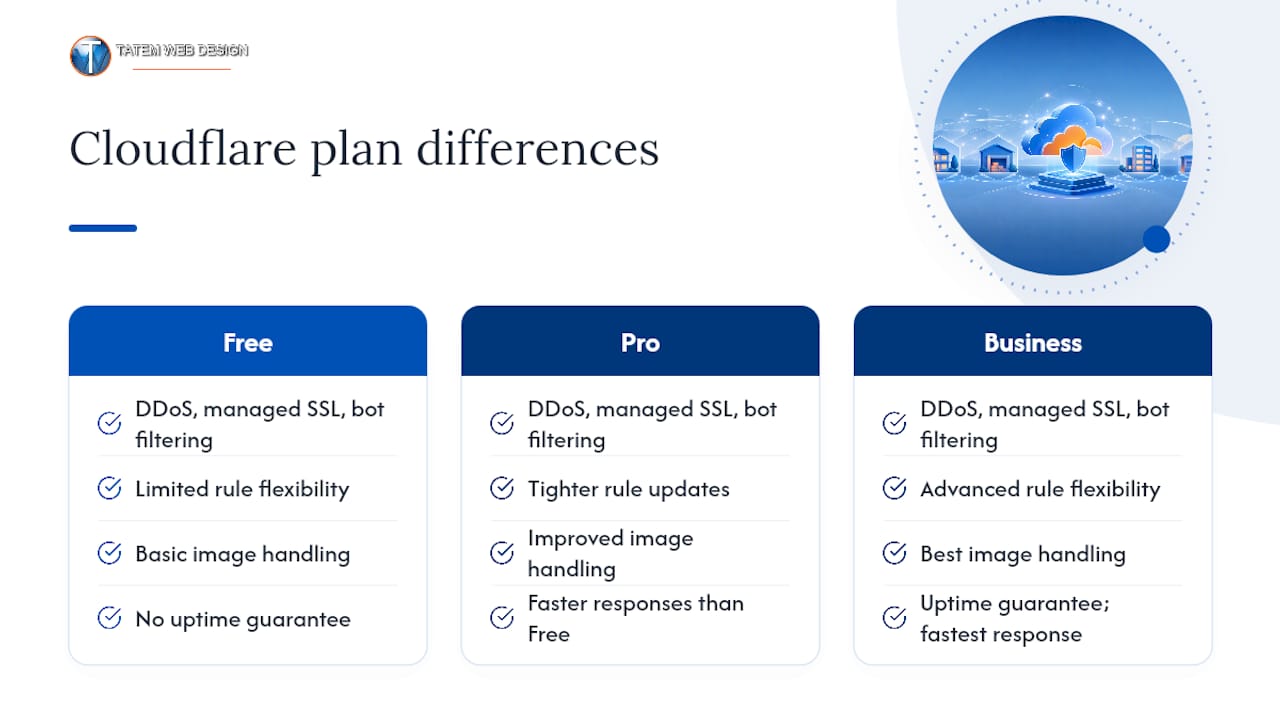
The jump between plans isn’t about basic protection. Even the Free tier includes DDoS mitigation, managed SSL, and bot filtering with no subscription required. What changes as you move up is rule flexibility, image handling, and how fast Cloudflare responds when something goes wrong.
If you run a five-page brochure site for a local plumbing company, Free is genuinely enough. A boutique selling products online should budget for Pro, since checkout pages attract more bot traffic and benefit from tighter rule updates. If your website is the business, such as a booking platform or client portal where an hour of downtime means lost revenue, the Business plan’s uptime guarantee pays for itself.
What Security Features Does Cloudflare Actually Include?
Every Cloudflare plan, even Free, ships with the Free Managed Ruleset, a set of pre-built rules that block common exploit attempts without you writing a single line of configuration. It’s not a full Web Application Firewall in the enterprise sense, but it stops a lot of automated noise before it reaches your server.
Upgrading unlocks more. Paid plans get the broader Cloudflare Managed Ruleset, WAF attack score visibility (a way to see how confident Cloudflare is that a request is malicious), and full Bot Management instead of the more basic Bot Fight Mode. DDoS mitigation runs on all tiers, absorbing traffic floods at the network edge so your origin server never has to fight them off alone.
For a first pass at securing your site, focus on three things:
- Enable HTTPS in “Full (strict)” mode so traffic is encrypted end to end, not just between visitors and Cloudflare.
- Turn on Bot Fight Mode to slow down scrapers and credential-stuffing attempts.
- Check your security dashboard weekly for blocked-request patterns; a sudden spike often signals a targeted attempt, not random noise.
Pro Tip: Practitioners who work with the OWASP Core Ruleset warn it can throw false positives if deployed without tuning. Start with the managed defaults, watch your traffic for a week, then tighten rules based on what you actually see.
How Does Cloudflare Improve Website Speed?
Cloudflare caches your static assets, images, CSS, JavaScript, at edge servers positioned close to your visitors instead of serving everything from a single origin server. That cuts round-trip time and takes real load off your host, which matters directly for Core Web Vitals and search ranking signals.
For WordPress sites, Automatic Platform Optimization (APO) extends this caching to full HTML pages, not just images and scripts, which is often the single biggest speed win a non-technical site owner can flip on. Argo Smart Routing, an add-on that reroutes traffic around congested internet paths, is worth the extra cost mainly if your customers are spread across states or countries; a single-market local business rarely sees enough benefit to justify it.
A few practical habits keep caching from breaking things:
- Set a conservative Edge Cache TTL for HTML pages, two hours is a reasonable starting point, and leave images and scripts cached longer.
- Add cache-bypass rules for login, checkout, and account pages so customers never see stale or broken content.
- Monitor your site after any caching change; a checkout form that silently breaks is worse than a slow page.
What Does Cloudflare Cost, and When Should You Upgrade?
Cloudflare’s pricing is per domain, and the free tier removes almost all the guesswork for a first deployment. Pro is available for a typical monthly cost around twenty dollars, and Business is typically closer to two hundred dollars per month, and annual billing typically shaves a modest discount off either tier. There’s no forced trial period or hidden setup fee.
A few signals tell you it’s time to move up a tier:
- Bot traffic is climbing and Free’s basic filtering isn’t cutting it anymore.
- You need custom WAF rules beyond what the managed ruleset covers.
- Your business depends on the site staying up, and you want the 100% uptime SLA Business provides.
- You’re hitting rule quota limits on Free or Pro.
Watch for add-on costs too: rate-limiting rules and Bot Management add-ons are billed separately from the base plan on some tiers, so a “Pro plan” bill can run higher than the sticker price once you add protection for a high-traffic contact form or API endpoint.
Getting Started: Your Cloudflare Setup Checklist
Setting up Cloudflare rarely takes more than an afternoon, and most of the time is spent waiting for DNS to propagate, not configuring anything complicated.
- Sign up and add your domain; Cloudflare scans your existing DNS records automatically.
- Update your nameservers at your domain registrar to point to Cloudflare.
- Set SSL/TLS mode to “Full (strict)” and enable Always Use HTTPS plus Automatic HTTPS Rewrites.
- Turn on the Free Managed Ruleset and Bot Fight Mode.
- Set conservative cache rules, then test your login page, checkout flow, and any contact forms.
- Confirm email and third-party integrations (payment processors, booking widgets) still function correctly.
A safer variant of step two: run your domain in DNS-only mode first, confirm every record and integration still resolves, then flip on Cloudflare’s proxy and security features during a low-traffic window.
Pro Tip: Before you go live, allowlist your true origin server IP at the host level. This stops attackers from bypassing Cloudflare entirely by hitting your server’s direct address.
How Tatemweb Implements Cloudflare for Florida Small Businesses
The typical setup for WordPress and ecommerce clients pairs APO with tuned cache rules and origin-level firewall restrictions, so pages load fast without breaking dynamic checkout or login flows. Cloudflare sits in front of your server as an edge layer; it does not replace secure hosting or backups, which still need proper hardening.
Signs you need professional help configuring it:
- Repeated false positives are blocking real customers, not bots.
- Your site handles complex API traffic (booking systems, custom integrations).
- You operate under compliance requirements like PCI or HIPAA that demand specific configuration documentation.
What Trade-Offs Come With Moving Your DNS to Cloudflare?
Routing your DNS through Cloudflare centralizes a lot of trust in one provider; large-scale outages are rare but not impossible. Caching can silently break dynamic pages if rules are too aggressive, and WAF rules occasionally flag legitimate visitors as threats, so someone needs to check the dashboard periodically. Cloudflare also doesn’t replace secure hosting or origin hardening; it sits in front of that work, not instead of it.
Managed Cloudflare Setup and Tuning From Tatemweb
Tatemweb is the alternative to trial-and-error Cloudflare configuration for Florida small businesses: instead of guessing at WAF rules and cache settings while your checkout page breaks, you get a configuration built by people who tune this daily for real estate offices, medical practices, and local retailers.

A typical engagement starts with a quick site audit: current DNS setup, traffic patterns, and any compliance requirements like PCI or HIPAA. From that, Tatemweb delivers a recommended plan tier, a configured security and caching setup, and documentation of what was changed and why. This pairs naturally with AI-powered website design for businesses rebuilding their site anyway, or standalone security hardening for sites that just need protection tuned correctly. Call or request a consultation to get your site audited and your Cloudflare setup handled by experienced professionals.
Primary Cloudflare Documentation and Useful Links
For readers who want to configure things themselves or hand specifics to a contractor, these official pages cover the technical details:
- Cloudflare WAF managed rules documentation: covers ruleset differences by plan and configuration options.
- Cloudflare Free plan overview: details what’s included at no cost and Cloudflare’s global network footprint.
- Cloudflare WAF get started guide: step-by-step first-time setup instructions.
- Cloudflare Business plan SLA: uptime guarantee terms and service credit details.
FAQ
Is Cloudflare Free for Small Businesses?
Yes. The Free plan includes DDoS mitigation, managed SSL, and basic bot filtering with no subscription required, making it a realistic starting point for most simple business websites.
What Are the Downsides of Using Cloudflare?
Misconfigured caching can break dynamic pages like checkout flows, and WAF rules occasionally flag legitimate visitors as threats. Cloudflare also centralizes your DNS with one provider and doesn’t replace secure hosting or backups.
How Much Does Cloudflare Cost per Month?
The Free plan costs nothing, Pro runs around $20 per month, and Business runs around $200 per month, with a modest discount typically available on annual billing.
Is Cloudflare Totally Free, or Are There Hidden Costs?
The core Free plan has no hidden fees, but rate-limiting rules and Bot Management add-ons can carry separate charges on some tiers, so review your dashboard before assuming your bill will match the base plan price.
Recommended
Tatem Web Design
26+ YearsWeb Design & SEO Specialist · Tatem Web Design
Matt Tatem has been designing websites professionally since 1999, making Tatem Web Design one of Florida's longest-running web agencies. Based in Stuart, FL, he specializes in WordPress, local SEO, Shopify e-commerce, and cybersecurity consulting for small businesses.

CMMC Level 2 vs Level 1: Which One Applies to You?
CMMC Level 1 vs Level 2 compared: data types, 15 vs 110 requirements, self-assessment vs third-party audits, POA&M rules and how to pick your level.

Phishing Awareness Training for Small Business: A Practical Guide
How to build phishing awareness training for a small business: what to teach, how to run simulations, which numbers to track, and what to pair it with.

AI Content Pricing: What Florida Businesses Really Pay in 2026
What AI content costs in 2026: per-post ranges, tool subscriptions, editing time and agency retainers, plus how to budget and avoid hidden costs.