
The Role of Cybersecurity in Websites for SMBs
Cybersecurity in websites is the practice of defending your digital systems, data, and user access against unauthorized intrusions and cyberattacks. For small to medium business owners, this is not a technical luxury. The role of cybersecurity in websites directly determines whether your business stays operational, keeps customer trust, and avoids financial ruin. Microsoft reports approximately 600 million global cyber attacks daily as of 2026. That number means automated threats are scanning your website right now, regardless of your industry or size.
What are the key functions of cybersecurity in protecting a website?
Website security, the industry term for applied cybersecurity at the site level, operates across three core functions: prevention, detection, and access control. Cybersecurity integrates people, processes, and technology across cloud, endpoints, networks, and supply chains to deliver protection at every layer. No single tool covers all three functions. You need a coordinated defense.
Prevention: stopping threats before they enter
Prevention is your first line of defense. Firewalls filter malicious traffic before it reaches your server. HTTPS encryption protects data in transit between your site and your visitors. Software patching closes known vulnerabilities before attackers exploit them. Input validation stops attackers from injecting malicious code through contact forms, search fields, or login pages.
- Firewalls: Block unauthorized traffic at the network and application level
- HTTPS/TLS encryption: Protects all data exchanged between your site and visitors
- Software patching: Closes known security gaps in your CMS, plugins, and server software
- Input validation: Prevents SQL injection and cross-site scripting attacks at the form level
Detection: knowing when something goes wrong
Prevention alone is not enough. Threats that bypass your perimeter defenses need to be caught fast. Security logs record every access attempt, file change, and login event on your site. Intrusion detection systems (IDS) analyze those logs in real time and flag unusual patterns. Security professionals advise a layered defense strategy to detect and contain threats that bypass perimeter defenses. Without detection, a breach can go unnoticed for weeks.
Access control: limiting who can do what
Access control determines who gets into your site’s backend and what they can change. Multi-factor authentication (MFA) adds a second verification step beyond a password. The least-privilege principle means each user account only has access to the specific areas it needs. Zero Trust architecture takes this further by requiring authentication for every request, regardless of whether the user is inside or outside your network. Zero Trust is now the security standard for businesses that take website protection seriously.

Pro Tip: Enable MFA on every admin account immediately. It is the single highest-impact change you can make today, and it costs nothing on most platforms.
Why is website security vital for small to medium businesses?
The financial and reputational stakes for SMBs are higher than most owners realize. A single breach does not just cost you money to fix. It costs you customers, search rankings, and sometimes your entire operation.
The financial reality of a data breach
The average cost of a data breach reached $4.44 million in 2026, factoring in recovery, legal fees, and lost business. For an SMB, even a fraction of that figure is catastrophic. Regulatory penalties under frameworks like HIPAA and PCI DSS add another layer of financial exposure. A healthcare practice that loses patient records faces both breach recovery costs and federal fines simultaneously.
Customer trust and brand reputation
Customers notice when a website feels unsafe. A browser warning that your site is “not secure” sends visitors away instantly. Beyond that immediate bounce, a publicized breach destroys the trust you spent years building. Businesses with strong digital security see 12% lower customer churn and 22% faster B2B sales cycles. That data point reveals something counterintuitive: security is not just a cost center. It is a revenue driver.
| Business Impact Area | Effect of Strong Security | Effect of Poor Security |
|---|---|---|
| Customer churn | 12% lower | Higher abandonment rates |
| B2B sales cycles | 22% faster | Slower due to trust concerns |
| Customer data sharing | 83% more willing | Reluctance and opt-outs |
| SEO rankings | Maintained or improved | Penalized or blacklisted |
| Regulatory compliance | Penalties avoided | Fines and legal exposure |
SEO consequences you cannot afford to ignore
Google actively penalizes hacked websites. If your site gets flagged for malware, Google Search Console will display a warning to every visitor. Your organic traffic drops to near zero while the issue is active. Recovery takes weeks, even after the malware is removed. For a local Florida business that depends on search visibility, that kind of interruption is devastating.
83% of customers are more willing to share data with businesses they trust to protect it. That willingness translates directly into better lead capture, more complete contact forms, and higher email list quality.
What are best practices and practical steps to secure your website?
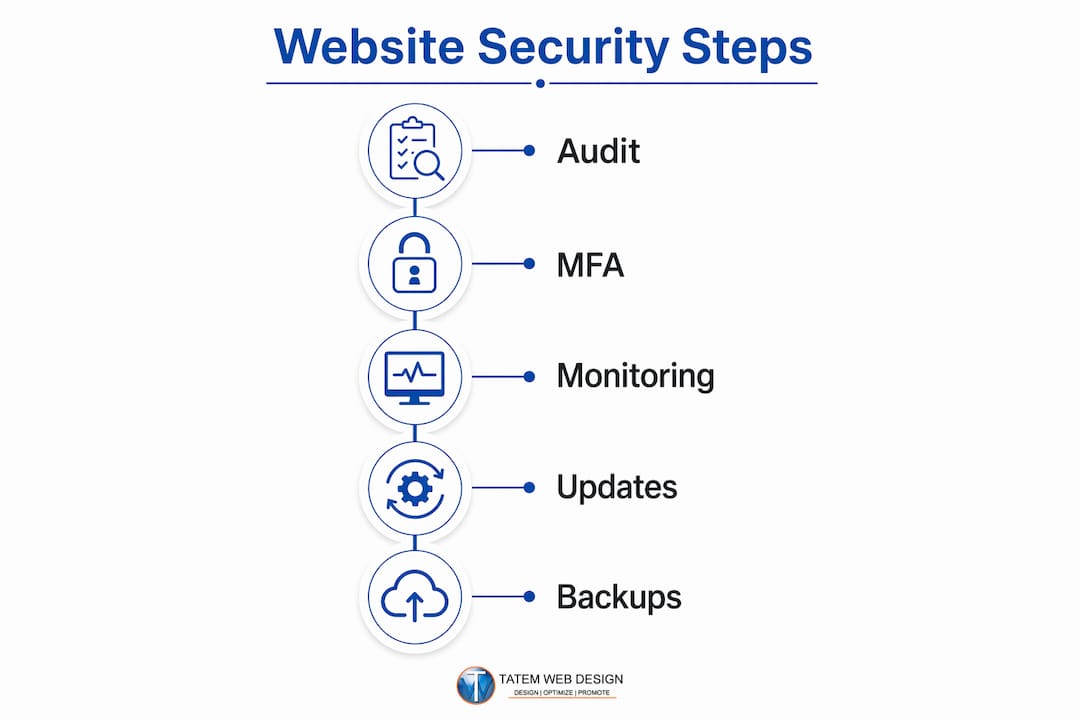
Securing your website is not a one-time project. It is an ongoing operational discipline. The businesses that stay secure treat protection as a process, not a checkbox.
-
Adopt a defense-in-depth approach. Layer multiple security controls so that if one fails, others catch the threat. Combine firewalls, MFA, encryption, and monitoring rather than relying on any single tool.
-
Patch everything on a fixed schedule. Outdated plugins, themes, and CMS versions are the most common entry points for attackers. Set a weekly or biweekly patching schedule and stick to it without exception.
-
Enforce multi-factor authentication across all accounts. MFA blocks over 99% of automated account compromise attacks. Apply it to your CMS admin, hosting control panel, domain registrar, and email accounts.
-
Use a password manager and enforce strong credentials. Weak or reused passwords remain a leading cause of breaches. A password manager like Bitwarden or 1Password generates and stores unique credentials for every account.
-
Train your team on phishing and social engineering. Most breaches start with a human error, not a technical failure. Regular phishing simulations and company cybersecurity training teach your staff to recognize and report suspicious emails before they cause damage.
-
Deploy AI-powered threat detection. AI tools monitor traffic patterns, flag anomalies, and respond to threats faster than any human team. Tatemweb’s AI security enhancements apply this technology specifically to business websites, giving SMBs enterprise-grade detection without the enterprise price tag.
-
Back up your site daily and test your restores. Backups are your recovery plan when everything else fails. Store them offsite, and verify that you can actually restore from them at least once per quarter.
Pro Tip: Schedule a quarterly security audit. Review user accounts, remove old admin logins, check for outdated software, and confirm your backups are working. Thirty minutes every three months prevents months of recovery work.
How does cybersecurity integrate with website design and development?
Security built into a website from the start costs far less than security added after a breach. Retrofitting security after a breach is 3–5 times more costly than building it in from the first line of code. That gap makes the case for treating security as a design requirement, not an afterthought.
Hardened hosting and secure configurations
Your hosting environment is the foundation of your website’s security. A hardened hosting setup disables unnecessary services, restricts file permissions, and isolates your site from other accounts on the server. Shared hosting environments carry inherent risk because one compromised neighbor can affect your site. Managed cloud hosting with security-focused configurations eliminates most of that exposure.
- Server hardening: Disable unused ports, services, and default admin accounts
- File permission controls: Restrict write access to directories that do not need it
- Web application firewall (WAF): Filter malicious requests before they reach your application
- SSL/TLS certificates: Enforce HTTPS sitewide, not just on checkout or login pages
Input validation and injection prevention
Every form on your website is a potential entry point. SQL injection attacks insert malicious database commands through unvalidated form fields. Cross-site scripting (XSS) attacks inject malicious scripts that run in your visitors’ browsers. Secure design requires input validation embedded from the start, not added later as a patch. Validating and sanitizing every user input at the server level closes these attack vectors before they can be exploited.
Ongoing monitoring and vulnerability testing
A website is not static. New plugins, theme updates, and code changes introduce new vulnerabilities regularly. Ongoing monitoring through tools that scan for known vulnerabilities keeps your defense current. Penetration testing, where a security professional actively tries to breach your site, reveals weaknesses that automated scanners miss. For SMBs working with a partner like CloudSprout, regular vulnerability assessments are a practical way to maintain security without building an in-house security team.
Building a secure website for SMBs means making security decisions at every stage of development: choosing a hardened host, writing validated code, configuring least-privilege access, and scheduling ongoing testing. The cost of doing this right upfront is a fraction of the cost of recovering from a breach.
Key Takeaways
Website cybersecurity is a direct business function: it protects revenue, preserves customer trust, and keeps your operations running when threats are constant and automated.
| Point | Details |
|---|---|
| Breaches are expensive | The average data breach costs $4.44 million; SMBs rarely survive that scale of loss. |
| MFA is non-negotiable | Multi-factor authentication blocks over 99% of automated account attacks at no extra cost. |
| Security drives growth | Strong security reduces customer churn by 12% and accelerates B2B sales cycles by 22%. |
| Build security in early | Retrofitting security after a breach costs 3–5 times more than building it in from the start. |
| No SMB is too small | Automated bots scan all websites indiscriminately, making every business a target. |
Why SMBs get website security wrong, and what actually fixes it
The most persistent myth I encounter is that small businesses are too small to be targeted. That belief is the single most dangerous assumption a business owner can hold. Automated bots scan all websites indiscriminately, looking for known vulnerabilities without any regard for your company’s size or revenue. Your dental practice in Stuart, Florida gets the same automated probing as a Fortune 500 company. The difference is that the Fortune 500 has a security team and you probably do not.
What I have seen work consistently is the shift from thinking about security as a product to thinking about it as a practice. Business owners who buy one security plugin and consider themselves protected are the ones who call me after a breach. The owners who schedule quarterly audits, enforce MFA, train their staff, and work with a partner who monitors their site continuously are the ones who never have that conversation.
The other thing I push back on is the idea that security and growth are separate concerns. The data is clear: customers share more data, buy faster, and stay longer with businesses they trust. Your website’s security posture is visible to your customers, even if they cannot articulate exactly what they are sensing. A site that loads over HTTPS, has no browser warnings, and handles their data carefully signals professionalism. That signal converts.
My honest advice: stop treating cybersecurity as an IT problem and start treating it as a business strategy. The investment is modest compared to the cost of a breach, and the growth benefits are real and measurable.
— Matt
Tatemweb’s approach to website security for Florida businesses
Florida businesses face the same global threat volume as any other market, and they deserve protection built specifically for their scale and budget. Tatemweb has spent over 26 years building websites that are secure by design, not just by policy.

Tatemweb’s AI cybersecurity services apply real-time threat detection, hardened hosting configurations, and compliance-ready frameworks to your business website. Whether you run a healthcare practice, a law firm, or an e-commerce store, the team builds protection into your site from day one. You get enterprise-grade security without the enterprise overhead. Call Tatemweb directly at 772-224-8118 to schedule a consultation and find out exactly where your website stands today.
FAQ
What is the role of cybersecurity in websites?
Cybersecurity in websites prevents unauthorized access, detects threats in real time, and controls who can access sensitive systems and data. It protects both business operations and customer information from attackers.
How does a website breach affect a small business financially?
The average data breach costs $4.44 million when factoring in recovery, legal fees, and lost business. For an SMB, even a partial breach can trigger regulatory fines, customer loss, and months of recovery work.
Does multi-factor authentication really make a difference?
MFA blocks over 99% of automated account compromise attacks, according to Microsoft internal data. It is the highest-impact, lowest-cost security change any business owner can implement today.
Are small business websites actually targeted by hackers?
Automated bots scan all websites indiscriminately, regardless of size or industry. No SMB is too small to be targeted, which makes up-to-date software and active monitoring non-negotiable for every business.
How does website security affect SEO rankings?
Google penalizes hacked websites by flagging them with malware warnings, which collapses organic traffic immediately. Maintaining a clean, secure site protects your search visibility and keeps your lead pipeline intact.
Recommended
Tatem Web Design
26+ YearsWeb Design & SEO Specialist · Tatem Web Design
Matt Tatem has been designing websites professionally since 1999, making Tatem Web Design one of Florida's longest-running web agencies. Based in Stuart, FL, he specializes in WordPress, local SEO, Shopify e-commerce, and cybersecurity consulting for small businesses.

Rank in ChatGPT in 90 Days With a Practitioner Led Checklist
Follow a practitioner led 90 day plan to get cited by ChatGPT: allow OAI-SearchBot, publish short answer capsules with schema, and track Bing AI Performance.

AI SEO Content Playbook: 16 GEO Signals for Agencies & Teams
A practical playbook mapping the GEO-16 signals to hands-on editorial workflows, review controls, and metrics. For agencies and in-house teams scaling AI...

Copy Ready Local Schema Markup for SMBs + Google Validation
Copy ready JSON-LD examples and Google validation steps for SMBs' local schema markup. Audit, implement, and verify each location page with confidence.