
Stop Most DDoS Attacks in 10 Minutes: Edge First Protection for SMBs
The fastest, most reliable way to protect a website from a DDoS attack is to route traffic through a CDN or reverse proxy that terminates connections and runs a Web Application Firewall, while hiding your origin server’s real IP address. That single move stops most volumetric floods before they reach your server and gives you the tools to filter application-layer attacks. It’s not the whole job, though. You still need host-level hardening and a written incident plan for the day your edge defenses get tested.
TL;DR:
- Routing traffic through a CDN with a Web Application Firewall effectively stops most volumetric DDoS attacks and filters application-layer threats, but requires proper configuration.
- Edge scrubbing with automated detection is crucial, as human-dependent response delays can leave sites vulnerable during fast, large-scale floods.
- Locking your origin server to only accept traffic from CDN IP ranges and auditing DNS records prevent attackers from bypassing edge defenses.
- Application-layer attacks can be mitigated with WAF rules, rate limiting, and bot management techniques that adapt to suspicious behaviors without harming legitimate visitors.
- Regular testing, updating rate limits, and reviewing configurations are necessary to keep protection effective as traffic patterns evolve and new threats emerge.
Table of Contents
- Types of DDoS Protection for Websites You Need to Know
- Why Edge Protection Should Be Your First Line of Defense
- Stopping Layer 7 Attacks: WAF, Rate Limiting, and Bot Management
- Locking Down Your Origin Server and Network
- How to Detect an Attack and Respond in the First Ten Minutes
- Choosing the Right Level of Protection and What It Costs
- Tatemweb’s Priority Checklist for Locking Down a Website Fast
- Best Practices for Recovering and Hardening After an Attack
- Legal Considerations and Reporting a DDoS Attack
- Fitting DDoS Protection Into Your Existing Website Infrastructure
- Regular Testing Keeps DDoS Protection From Becoming Stale
- When DDoS Protection Moves From Optional to Mandatory
- Get a DDoS Protection Audit From a Professional Web Security Provider
- Sources
- FAQ
Types of DDoS Protection for Websites You Need to Know
DDoS attacks fall into two broad camps, and confusing them is why so many site owners buy the wrong protection. Layer 3/4 attacks (volumetric and protocol) try to drown your bandwidth or exhaust connection tables. Think UDP floods, SYN floods, and DNS amplification, where attackers reflect traffic off third-party servers to multiply their punch. Layer 7 attacks target your application directly. HTTP GET/POST floods, slowloris (which holds connections open with slow, partial requests), and API abuse all look like real visitors until your server buckles under the volume.
The damage pattern differs too. L3/4 attacks saturate your pipe or fill connection tables before your app even notices. L7 attacks chew through CPU, database queries, and memory while bandwidth graphs look almost normal.
A quick diagnostic checklist when something feels off:
- Sudden spike in requests per second from a narrow range of user agents or IPs
- Connection counts climbing without matching page views in analytics
- CPU or database load rising while cache-hit ratio drops
- 5xx errors clustering around one endpoint (often login or search)
Why Edge Protection Should Be Your First Line of Defense
A CDN built on anycast routing spreads incoming traffic across dozens or hundreds of global points of presence, so a flood aimed at your site gets divided among a network’s aggregate capacity instead of slamming one server. That’s the core reason CISA’s Capacity Enhancement Guide recommends CDNs and upstream providers as the primary mitigation for volumetric attacks, especially for internet-facing assets that can’t afford downtime.
Scrubbing centers add a second layer. Traffic gets rerouted through facilities designed to separate malicious packets from legitimate ones, then forward only the clean stream to your origin. This is the same logic AWS applies when it pairs CloudFront and Global Accelerator with Shield and WAF: absorb at the edge, terminate TLS there too, and let caching soak up repeat requests before they ever reach your server.
Pro Tip: Always-on protection filters every request continuously. On-demand (or “on-ramp”) models only kick in once an attack is detected, which introduces a lag of minutes that can matter during a fast-ramping flood.
What to verify with any edge provider:
- Network-wide scrubbing capacity, not just the capacity of one region
- Automatic detection and response, not manual on-call mitigation
- TLS termination at the edge to offload encryption overhead from your origin
- Caching depth, since a high cache-hit ratio starves attackers of origin resources
Vendors love citing capacity in terabits per second as a trust signal. That number matters less than whether detection is automated. A network with massive scrubbing capacity but a human who has to notice the attack and flip a switch can still leave your site down for the critical opening minutes of an assault.
Stopping Layer 7 Attacks: WAF, Rate Limiting, and Bot Management
Edge scrubbing handles the flood at the network level, but application-layer attacks slip through because they look like normal browsing. This is where a Web Application Firewall earns its place. A managed ruleset catches known attack signatures, while custom rules let you protect specific heavy endpoints, like a search bar or checkout flow, that attackers love to target because they’re expensive to compute.
Rate limiting is your second lever. Effective configurations combine:
- Per-IP limits for basic abuse (a single source hammering one endpoint)
- Token-based quotas for authenticated users, so one compromised account can’t flood your API
- Per-endpoint thresholds, since a login page and a static image should never share the same limit
Set limits too aggressively and you’ll block real customers during a traffic spike. That’s why gradual, tiered thresholds beat a single hard cutoff.
Bot management goes further by profiling behavior. Real browsers execute JavaScript, move a mouse, and load resources in a predictable order. Bots often skip steps or fire requests at inhuman speed. Layering in JS challenges, CAPTCHAs, or proof-of-work puzzles lets you apply friction only to suspicious traffic instead of every visitor. AWS documentation on layered network and application controls backs this selective approach, pairing gateway-level rate limiting with WAF rules for API-specific protection.
Pro Tip: Reserve CAPTCHAs and JS challenges for traffic that already looks abnormal. Slapping a challenge screen on every visitor tanks conversion rates and does little against attackers who script around it anyway.
Locking Down Your Origin Server and Network
Edge protection only works if attackers can’t route around it and hit your origin server directly. That happens more often than most site owners realize, usually because of a stray DNS record nobody remembered to clean up.
- Lock your origin firewall to your CDN or proxy’s IP ranges. Reject any connection that doesn’t come from your edge provider’s published address list.
- Audit your DNS for leaks. Check A records, old subdomains, staging environments, and even email headers (which sometimes reveal the real server IP through bounce messages or mail routing).
- Harden the kernel and web server. Enable SYN cookies, size your connection tracking table appropriately, tighten timeouts, and cap header and body sizes to prevent slow-request attacks like slowloris from tying up worker threads.
- Separate your admin plane. Put login and dashboard access on a distinct subdomain, restrict it with an IP allowlist, and require multi-factor authentication.
A single forgotten A record pointing to your origin’s real IP undoes every dollar spent on edge scrubbing. This is a frequent gap in secure website architecture for growing businesses, and it’s worth a dedicated audit rather than a quick glance.
How to Detect an Attack and Respond in the First Ten Minutes
Speed of recognition determines how much downtime you eat. Watch these signals continuously, not just when something feels wrong:
- Requests per second climbing well above your normal baseline
- Open connection counts rising faster than page views justify
- p95 latency stretching, meaning even the median request is slowing down
- Cache-hit ratio dropping, a sign attackers are hitting uncached or dynamic paths
- 5xx error rate spiking on specific endpoints
Once you confirm an attack, act in this order: enable challenge mode at the edge, tighten rate limits on the affected endpoints, and if things are severe, swap your homepage for a lightweight static page to keep the site technically reachable while you triage.
If your CDN’s automated response isn’t enough, call your host or ISP for upstream scrubbing. Have your account ID, the attack’s start time, affected endpoints, and any log samples ready. That speeds up their response considerably. The SEI CMU guidance on DDoS response stresses documenting these roles in advance, since fumbling for contact info during an active attack costs you the minutes that matter most.
Choosing the Right Level of Protection and What It Costs
Matching protection to actual risk keeps you from either overspending or leaving payment flows exposed. Run through this checklist with any provider you’re evaluating:
- Published mitigation capacity and whether detection is automated or manual
- Service-level agreement covering response time, not just uptime
- Built-in WAF and bot management, versus needing to bolt one on separately
- Origin-hiding features baked into onboarding, not left to you to configure alone
Budget bands break down roughly like this. A free-tier CDN with basic WAF rules covers low-risk brochure sites and blogs. Expect to spend somewhere in the $0 to $100 per month range for small business sites handling contact forms or light e-commerce. Sites processing payments, high-traffic media, or regulated data (healthcare, legal, financial) typically require more advanced protections with managed scrubbing and dedicated support, often involving significantly higher costs. Enterprise-scale or high-value targets escalate beyond that, often with custom SLAs.
Ask any provider directly: what’s your capacity guarantee during a large event, how do you handle false positives that block real customers, and do you run scheduled attack drills? For most small sites, disciplined configuration covers the majority of everyday risk without enterprise pricing.
Tatemweb’s Priority Checklist for Locking Down a Website Fast
After reviewing site configurations for years, a handful of gaps show up again and again. Here’s the priority order Tatemweb recommends when a client asks where to start:
- Audit DNS records for any A record or subdomain still pointing at the real origin IP
- Enable a CDN and hide the origin behind it, no exceptions for staging or admin subdomains
- Turn on managed WAF rulesets before writing custom rules
- Set rate limits on login, search, checkout, and any other computationally heavy endpoint
- Lock the origin firewall to accept traffic only from CDN IP ranges
- Stand up monitoring and alerts for RPS, latency, and error rate baselines
| Common misconfiguration | Quick fix |
|---|---|
| Old subdomain still resolving to origin IP | Remove or repoint the DNS record immediately |
| WAF installed but running in “log only” mode | Switch to blocking mode after a short observation window |
| No rate limit on the login or search endpoint | Add per-IP and per-account thresholds |
| Admin panel reachable from any IP | Restrict to an allowlist and add MFA |
These fixes are cheap and configuration-driven, which is exactly why they get skipped. Nobody budgets time for a DNS audit until an attack forces the question. For a deeper walkthrough, Tatemweb’s Website Security Checklist for SMBs covers the full remediation sequence step by step.
Best Practices for Recovering and Hardening After an Attack
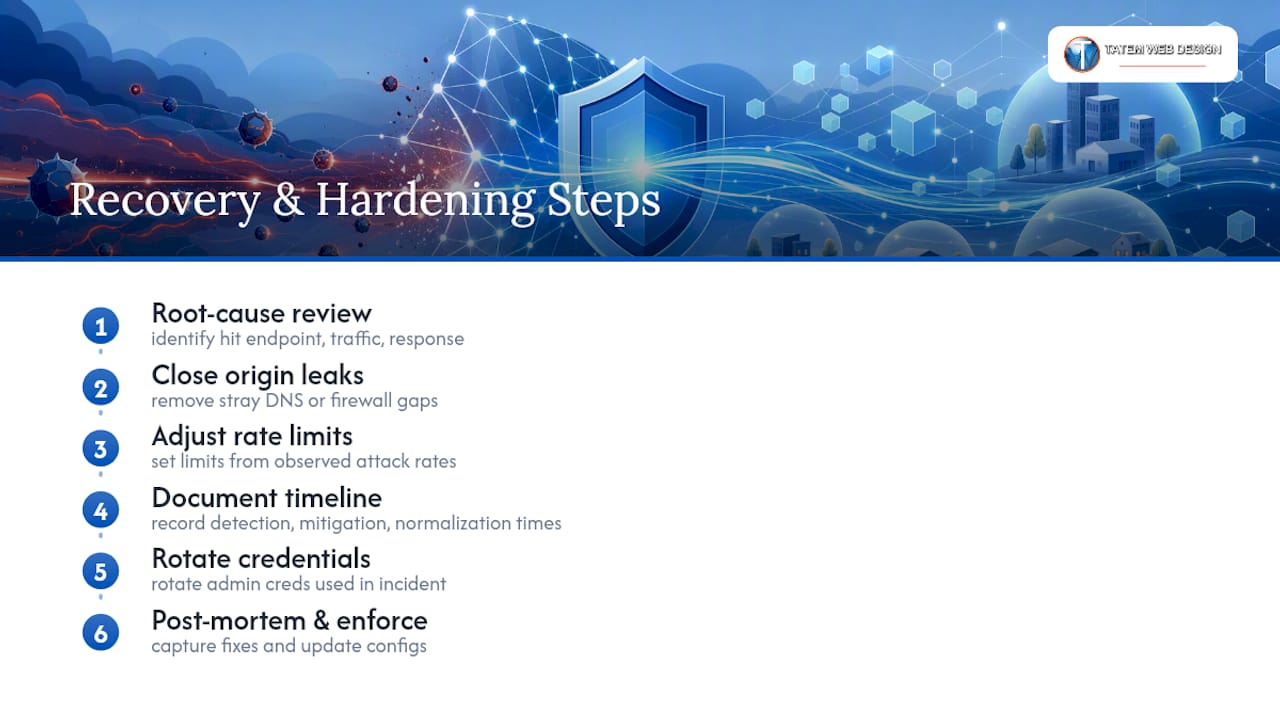
The attack ending isn’t the finish line. The first task afterward is a root-cause review: which endpoint took the hit, what type of traffic hit it, and whether your edge provider’s automated response engaged fast enough or left a gap you patched manually.
Close any origin leak you find during the review immediately, whether that’s a stray DNS record or a firewall rule that let unfiltered traffic through. Update your rate limits based on what actually happened rather than guessing. If the attack targeted your search endpoint at 4,000 requests per second and your limit was set for 10,000, tighten it to reflect real-world abuse patterns you just observed.
Document the timeline while it’s fresh: when signals first appeared, when you noticed, when mitigation kicked in, and when traffic normalized. This becomes the backbone of your incident playbook for next time, and it’s the difference between a ten-minute response and a two-hour scramble during a repeat attempt.
Rotate any credentials that touched the admin plane during the incident, even if you don’t see evidence of compromise. Attackers sometimes use a DDoS flood as cover for a separate intrusion attempt, and a clean credential rotation costs little compared to the risk of missing something.
Finally, schedule a post-mortem with whoever handled the response, including your hosting provider or ISP if they were involved. Capture what worked, what took too long, and what configuration change would have shortened the outage. Feed that directly into updated firewall rules, WAF settings, and monitoring thresholds. Recovery that doesn’t produce a concrete configuration change is just downtime with extra paperwork.
Legal Considerations and Reporting a DDoS Attack
A DDoS attack against your website is a crime in the United States under the Computer Fraud and Abuse Act, regardless of the attacker’s motive or whether they demanded a ransom. That gives you standing to report it, and you should, even if you don’t expect an arrest.
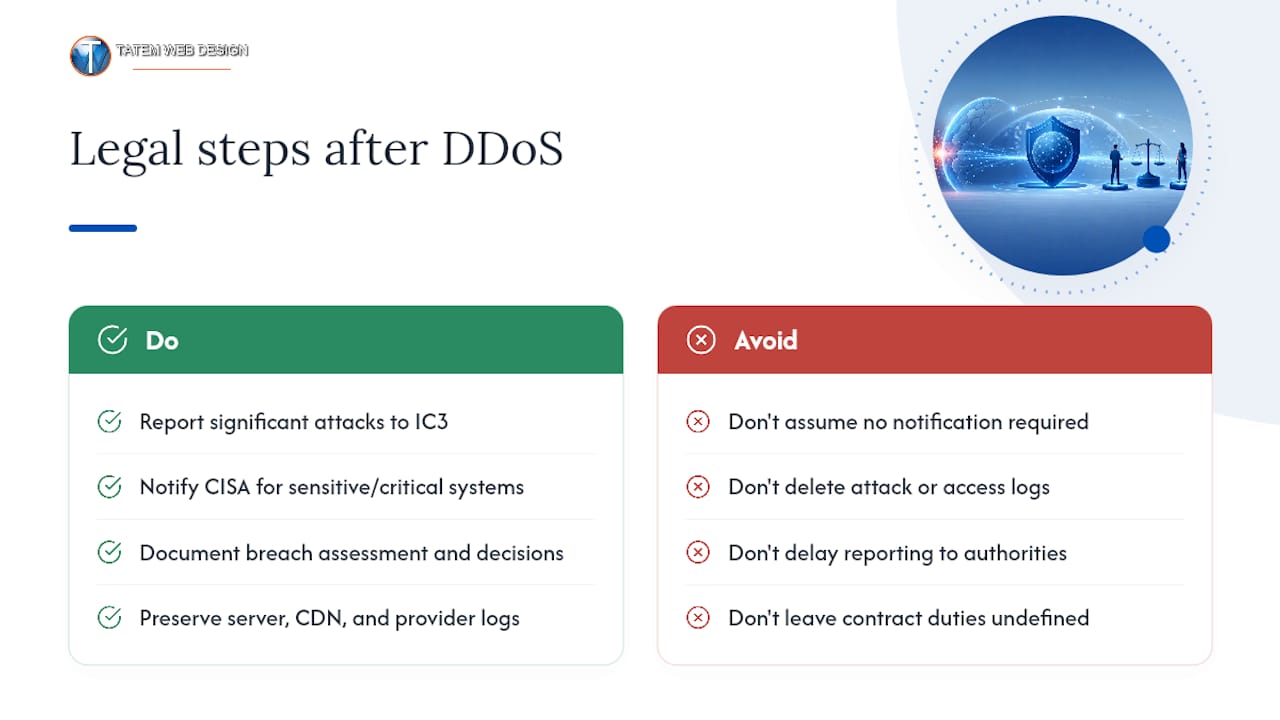
Report significant attacks to the FBI’s Internet Crime Complaint Center (IC3), and loop in CISA if your site handles sensitive data or serves critical infrastructure functions. These reports feed threat intelligence that helps providers and law enforcement track attack patterns across victims, and a paper trail matters if the attack escalates or recurs.
If your business operates in a regulated sector, healthcare under HIPAA, financial services, or anywhere handling payment card data under PCI standards, a DDoS incident may trigger separate notification obligations depending on whether the attack exposed or risked exposing protected data. A pure availability attack that didn’t breach data typically doesn’t trigger the same notification rules as a data breach, but document your assessment either way. Regulators want to see that you evaluated the incident, not just that nothing leaked.
Keep your logs. Server logs, CDN logs, and any communication with your hosting provider during the attack become evidence if you pursue a civil claim or if law enforcement investigates. Many attacks trace back to rented “attack-for-hire” services, and takedowns of those services depend on aggregated victim reports rather than any single company’s complaint.
Contracts matter here too. If you’re working with an agency or managed service provider, confirm in writing who’s responsible for incident response and reporting obligations before an attack happens, not during one.
Fitting DDoS Protection Into Your Existing Website Infrastructure
Most site owners worry that adding a CDN and WAF means rebuilding their stack. In practice, the integration is usually simpler than migrating hosting providers, but a few compatibility checks matter.
If your site runs on WordPress, Joomla, or Drupal, confirm your CDN’s caching rules respect dynamic content like shopping carts, logged-in sessions, and admin pages. Caching a logged-in user’s dashboard is a fast way to leak one customer’s data to another. Most modern CDNs handle this through cookie-based cache bypass rules, but it needs to be configured, not assumed.
SSL/TLS certificates need attention during the switch. Moving TLS termination to the edge means your origin no longer needs a public-facing certificate for that traffic, but you’ll want origin-to-edge encryption still in place so the connection between your CDN and your server stays encrypted end to end.
API integrations deserve a second look too. If your site calls third-party payment processors, shipping calculators, or CRM webhooks, verify those services can reach your origin through the new edge configuration, and that your rate limits don’t accidentally throttle legitimate server-to-server traffic alongside malicious requests.
For sites already running behind professional hosting with upstream network protections, adding a CDN layer often overlaps with what your host already provides. Check for redundant protections before paying twice for the same coverage, and confirm your host’s own DDoS mitigations don’t conflict with edge-level rules by, for example, both trying to rate limit the same traffic differently.
Regular Testing Keeps DDoS Protection From Becoming Stale
Protection you configure once and never revisit degrades quietly. Traffic patterns change, new endpoints get added, and rate limits calibrated for last year’s traffic volume may be wildly wrong for this year’s growth.
Run a quarterly review of your rate-limiting thresholds against actual traffic logs. An endpoint that gets ten times more legitimate traffic than it did six months ago needs its limits recalculated, or you’ll start blocking real customers during normal peak hours.
Simulation exercises, sometimes called “attack drills,” test whether your team actually knows what to do when alerts fire. This means walking through the response sequence: who gets notified, who has access to flip challenge mode on, and who calls the hosting provider if upstream scrubbing becomes necessary. The SEI CMU best practices specifically recommend rehearsing this sequence so response time measures in minutes rather than hours when a real event hits.
Audit your DNS records on the same schedule. New subdomains for marketing campaigns, staging environments, or third-party integrations have a habit of accidentally pointing straight at your origin IP, quietly undoing your origin-concealment work.
Test your WAF rules against known attack patterns periodically, not just when you first configure them. Rulesets get updated by providers, your application changes, and a rule that worked against last year’s attack signatures might miss this year’s variant entirely. Treat DDoS protection as a maintenance item on your calendar, not a one-time setup task you check off and forget.
When DDoS Protection Moves From Optional to Mandatory
Here’s where I’ll push back on the industry’s one-size-fits-all framing: not every small business needs enterprise-grade scrubbing. If you’re running a low-traffic brochure site with no payment processing, a free-tier CDN and basic WAF probably covers your real exposure.
That changes fast once you add payment flows, handle regulated data, or start seeing traffic volumes that make an outage expensive. Payment processing, healthcare data, legal client portals, and anything with real revenue riding on uptime move protection from nice-to-have to mandatory. The mistake I see most often isn’t skipping protection entirely. It’s setting it up once and never running a drill or revisiting rate limits as traffic grows. Configuration without monitoring is a false sense of security.
— Matt
Get a DDoS Protection Audit From a Professional Web Security Provider
Reading through the checklist above and wondering how many of those boxes your current site actually checks? That’s the gap Tatemweb closes. Beyond building AI-powered websites, some agencies run security audits that catch the origin leaks, misconfigured WAF rules, and missing rate limits covered in this guide, then implement managed protections tailored to local businesses rather than a generic template.

If your site handles payments, client intake forms, or patient data, the compliance side matters as much as the technical side, and cybersecurity consulting services may cover both under one engagement. Whether you need a full AI-powered website security buildout or just a second set of eyes on your current CDN and WAF setup, the fastest path forward is a direct conversation about what your site is actually exposed to. Call 772-224-8118 to schedule an audit, or start with a look at Tatemweb’s AI website design services to see how security gets built into the foundation instead of bolted on afterward.
Sources
- DDoS Mitigations guidance (CISA Capacity Enhancement Guide)
- AWS best practices for DDoS resiliency
- Basic DDoS protection for small sites: Practical steps - Unihost blog
FAQ
What Is the Best DDoS Protection for a Small Business Website?
A CDN with an integrated WAF and automatic origin-hiding, paired with sensible rate limits, covers most small business risk without enterprise pricing. CISA recommends this edge-first approach for internet-facing assets of any size.
How Much Does DDoS Protection Cost for a Website?
Basic protection through a free-tier CDN and WAF costs nothing, while small business sites with payment processing typically spend $0 to $100 per month, and higher-risk or regulated sites often require more advanced protections involving significantly higher costs.
Can a Website Recover on Its Own From a DDoS Attack?
Most attacks end on their own once the attacker loses interest or the botnet moves to another target, but recovery without hardening leaves the same vulnerabilities open for the next attempt.
Is Cloudflare DDoS Protection Enough on Its Own?
Cloudflare’s DDoS protection and similar CDN-based services handle the volumetric layer effectively, but they still need proper WAF rule configuration, rate limits, and origin-hiding setup to close the application-layer and origin-leak gaps this guide covers.
Do I Need to Report a DDoS Attack to Anyone?
Report significant attacks to the FBI’s Internet Crime Complaint Center, and involve CISA if your site handles sensitive data or critical infrastructure functions, since these reports feed the threat intelligence that leads to takedowns of attack-for-hire services.
Recommended
Tatem Web Design
26+ YearsWeb Design & SEO Specialist · Tatem Web Design
Matt Tatem has been designing websites professionally since 1999, making Tatem Web Design one of Florida's longest-running web agencies. Based in Stuart, FL, he specializes in WordPress, local SEO, Shopify e-commerce, and cybersecurity consulting for small businesses.

Rank in ChatGPT in 90 Days With a Practitioner Led Checklist
Follow a practitioner led 90 day plan to get cited by ChatGPT: allow OAI-SearchBot, publish short answer capsules with schema, and track Bing AI Performance.

AI SEO Content Playbook: 16 GEO Signals for Agencies & Teams
A practical playbook mapping the GEO-16 signals to hands-on editorial workflows, review controls, and metrics. For agencies and in-house teams scaling AI...

Copy Ready Local Schema Markup for SMBs + Google Validation
Copy ready JSON-LD examples and Google validation steps for SMBs' local schema markup. Audit, implement, and verify each location page with confidence.