
How to Build a Secure Website for SMBs in 2026
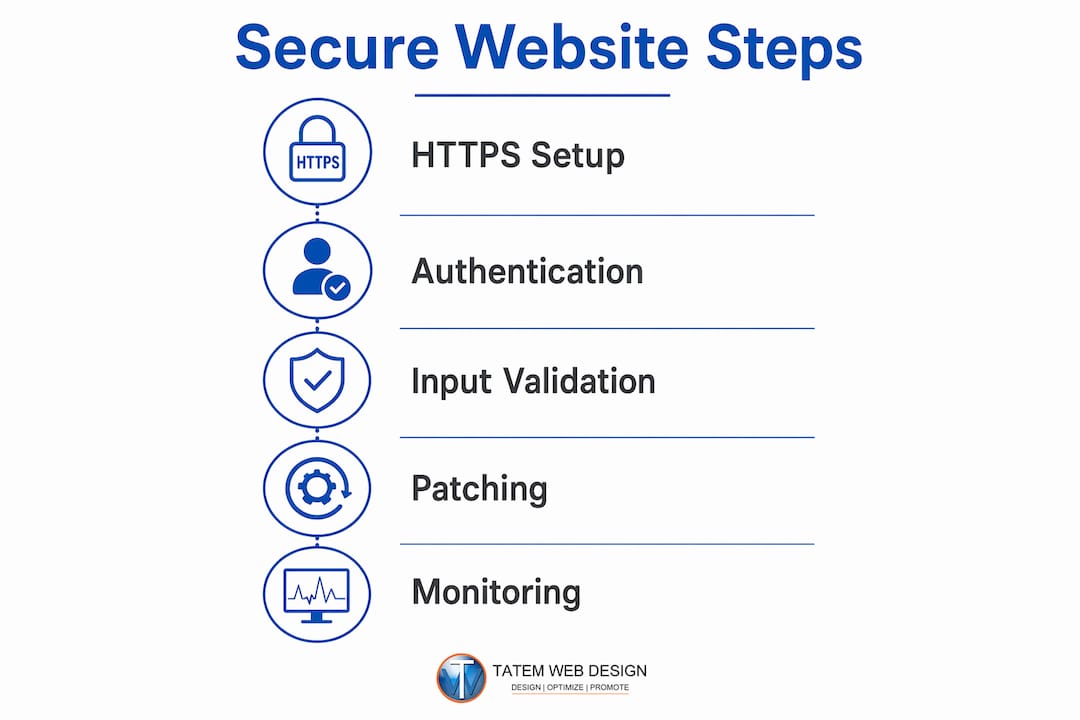
A secure website is defined as one that protects user data, server resources, and business operations from unauthorized access, data breaches, and malicious attacks. Knowing how to build a secure website is no longer optional for small and medium-sized business owners. A single breach can expose customer payment data, destroy your reputation, and trigger costly compliance penalties under HIPAA, PCI, or state privacy laws. The good news is that website security is not a single switch you flip. It is a layered system built on HTTPS encryption, strong authentication, input validation, patch management, and continuous monitoring. This guide walks you through each layer in plain language so you can protect your customers and your business starting today.
What tools do you need to build a secure website?
Website security requires protecting site components across app code, server configuration, password policies, and client-side code. No single setting suffices. That means you need a stack of tools working together, not just one plugin or one setting in your hosting dashboard.
HTTPS and ssl/tls certificates
HTTPS is the foundation of any secure site. It encrypts all data traveling between your server and your visitors’ browsers, so attackers cannot intercept passwords, form submissions, or payment details. The Canadian Centre for Cyber Security and MDN both recommend enforcing HTTPS and HSTS by default. HTTP Strict Transport Security (HSTS) tells browsers to refuse insecure connections entirely, even if a user types “http://” by mistake. SSL/TLS certificates are available free through Let’s Encrypt or included with reputable hosting plans.
Hosting, CMS, and security plugins
Your hosting provider is your first line of defense. Reputable hosting providers offer secure DNS, automated backups, firewall features, and software update support as standard features. For CMS platforms like WordPress, Joomla, and Drupal, security plugins add another layer. WordPress users can deploy Wordfence or Sucuri Security for firewall rules, malware scanning, and login protection. Joomla and Drupal have their own security extension ecosystems.

Password managers and 2fa apps
Weak passwords are the most common entry point for attackers. Password managers like 1Password and Bitwarden generate and store long, unique passwords for every account your team uses. Two-factor authentication (2FA) apps like Google Authenticator and Authy add a second verification step so a stolen password alone cannot unlock your admin panel.
Pro Tip: Use Bitwarden’s free tier for your team if budget is tight. It supports unlimited passwords and works across all devices, so there is no excuse for reusing passwords across your hosting, CMS, and email accounts.
Here is a quick comparison of the core tools every SMB site needs:
| Tool Category | Example Tools | Core Security Function |
|---|---|---|
| SSL/TLS Certificate | Let’s Encrypt, Comodo | Encrypts data in transit |
| Password Manager | 1Password, Bitwarden | Generates and stores unique passwords |
| 2FA App | Google Authenticator, Authy | Adds second login verification step |
| Security Plugin | Wordfence, Sucuri Security | Firewall, malware scanning, login protection |
| Hosting Security | SiteGround, WP Engine | Backups, secure DNS, patch support |
| Web Application Firewall | Cloudflare WAF, Sucuri WAF | Blocks malicious traffic before it hits your server |
How do you implement strong authentication and access controls?
Strong passwords combined with 2FA are the most direct way to reduce unauthorized admin access. Most automated attacks target weak or reused credentials. Layering authentication controls stops the majority of these attacks before they reach your site’s core.
Setting password policies that actually work
A password policy is only useful if it is enforced, not just suggested. Require passwords of at least 16 characters with a mix of letters, numbers, and symbols. Mandate password manager use for all team members with admin or editor access. Prohibit password reuse across accounts. These rules sound basic, but most SMB breaches trace back to a team member reusing a simple password from another service.
Enabling multi-factor authentication across all services
Enable 2FA on your hosting account, CMS admin panel, domain registrar, and any third-party service connected to your site. Most platforms support 2FA through apps like Google Authenticator or Authy, and some support hardware keys like YubiKey for even stronger protection. Do not skip 2FA on your email account. Email is often the recovery path for every other account, so it is the highest-value target for attackers.
Role-based access and limiting admin rights
Not every team member needs full admin access. Role-based access control (RBAC) means you assign each user only the permissions they need to do their job. A blog editor does not need database access. A customer service rep does not need plugin management rights. Limiting admin roles reduces the damage any single compromised account can cause.
Here are the best practices for access management every SMB should follow:
- Audit all user accounts every 90 days and remove accounts that are no longer active.
- Assign the lowest permission level that still allows each user to do their work.
- Enable 2FA for every account with admin or editor access, without exception.
- Monitor login attempts and set up alerts for repeated failures or logins from unusual locations.
- Change all admin passwords immediately when a team member leaves the company.
Pro Tip: Most WordPress and Joomla installations accumulate unused admin accounts over time. Run a user audit right now. Delete every account that does not belong to a current, active team member.
Why does input validation matter for website security?
Sanitizing and validating all user input is not optional. It is a core security control. Web applications cannot trust any data that arrives from a browser, because attackers can manipulate that data to exploit your site.
Understanding XSS and SQL injection
Cross-site scripting (XSS) and SQL injection are the two most common input-based attacks. In an XSS attack, a malicious actor injects a script into a form field or URL parameter. Your server then displays that script to other users, potentially stealing their session cookies or redirecting them to a phishing page. In a SQL injection attack, an attacker enters database commands into a form field. If your server processes that input without checking it first, the attacker can read, modify, or delete your entire database.
Think of your contact form as a door. You want customers to walk through it. But without validation, anyone can walk through carrying anything, including a weapon. Validation is the security check at the door.
Server-side validation techniques
Client-side validation (the kind built into HTML forms) is easy to bypass. Any attacker can disable JavaScript in their browser and submit raw data directly to your server. Server-side validation is the only reliable check. Your server must inspect every piece of incoming data before it touches your database or gets displayed to another user.
Specific techniques include whitelisting acceptable input formats (for example, only allowing digits in a phone number field), using parameterized queries for all database interactions, and escaping output before rendering it in HTML. Frameworks like Django, Laravel, and Ruby on Rails include built-in protections for many of these scenarios.
Pro Tip: Never build raw SQL queries by concatenating user input strings. Use your framework’s parameterized query or ORM tools instead. This single habit eliminates the most common class of SQL injection attacks.
Default protections in server-side frameworks help significantly, but they do not replace careful server configuration and rigorous input validation on every form and API endpoint your site exposes.
How do you maintain security through patching and monitoring?
Effective security combines preventive controls like HTTPS and secure coding with operational monitoring and patching. Building a secure site is not a one-time project. It is an ongoing operation.
Patch management for your entire web stack
The Canadian Centre for Cyber Security recommends patch management covering your entire website stack, including the operating system, CMS, plugins, themes, and any third-party apps. That means you need an inventory of every component your site runs on. Without an inventory, you cannot know what needs updating.
The workflow is straightforward: acquire the update, test it in a staging environment if possible, then install it on your live site. For SMBs using WordPress, Joomla, or Drupal, this means checking for updates at least weekly and applying security patches within 24–48 hours of release. Many hosting providers offer automated update services that handle this for you.
Automated monitoring and threat detection
Continuous monitoring for anomalous activities such as credential-stuffing attacks, repeated login failures, and injection attempts is necessary to protect site integrity. Monitoring tools like Sucuri SiteCheck, Cloudflare Analytics, and your hosting provider’s security dashboard can flag unusual patterns in real time. Set up email or SMS alerts so you know immediately when something looks wrong.
Security.txt files and incident response
A security.txt file is a standardized plain-text file placed at the root of your website (yourdomain.com/.well-known/security.txt). It tells security researchers how to report vulnerabilities they find on your site. The Canadian Centre for Cyber Security recommends including a security.txt file as a best practice for vulnerability disclosure. It speeds up the time between discovery and fix.
Incident response planning means deciding in advance what you will do if your site is breached. Who gets notified? Who takes the site offline? Who contacts affected customers? Having a written plan before you need it cuts response time dramatically.
Here is a maintenance and monitoring schedule every SMB site should follow:
| Task | Recommended Frequency |
|---|---|
| Apply CMS and plugin security patches | Within 24–48 hours of release |
| Review login attempt logs | Weekly |
| Run malware and vulnerability scans | Weekly |
| Test and verify site backups | Monthly |
| Audit user accounts and permissions | Every 90 days |
| Review and update incident response plan | Annually |
Pro Tip: Set your CMS to send you an email notification the moment a plugin or theme update is available. Treat security patches like fire alarms. You do not wait until morning to respond.
What are the most common website security mistakes?
Most automated attacks target common vulnerabilities. Layering defenses significantly increases protection, but only if you avoid the mistakes that leave gaps in those layers. Here are the errors SMB owners make most often, along with practical fixes.
- Skipping HTTPS or ignoring mixed content warnings. If your site serves any resource (images, scripts, fonts) over HTTP while the page itself uses HTTPS, browsers flag it as insecure. Fix: audit all resource URLs and force HTTPS site-wide through your CMS settings or .htaccess file.
- Relying on framework defaults without configuring your server. Frameworks like WordPress provide a secure starting point, but your server configuration still needs hardening. Disable directory listing, restrict file permissions, and remove default admin usernames.
- Using weak passwords or skipping 2FA on admin accounts. This is the single most preventable cause of SMB site breaches. Fix: enforce 1Password or Bitwarden for all team members and require 2FA on every admin account today.
- Delaying or skipping updates. Attackers scan for known vulnerabilities in outdated plugins and CMS versions within hours of a public disclosure. A plugin left unpatched for two weeks is an open invitation.
- No monitoring and no incident response plan. Many SMB owners only discover a breach when a customer reports it or Google flags the site. Fix: install a monitoring tool and write a one-page incident response checklist before you need it.
“Security is not a product, but a process.” This principle from security researcher Bruce Schneier applies directly to SMB websites. The tools matter, but the habits and processes you build around them matter more.
For a deeper look at SMB website security strategies tailored to professional service businesses, the Tatemweb resource library covers industry-specific scenarios for healthcare, legal, and real estate sites.
Key takeaways
Building a secure website requires layering HTTPS encryption, strong authentication, input validation, continuous patching, and active monitoring to protect customer data and business operations.
| Point | Details |
|---|---|
| HTTPS is non-negotiable | Install an SSL/TLS certificate and enable HSTS to encrypt all data in transit. |
| Authentication stops most breaches | Enforce unique passwords via 1Password or Bitwarden and require 2FA on every admin account. |
| Validate all user input server-side | Use parameterized queries and output escaping to block XSS and SQL injection attacks. |
| Patch your entire web stack regularly | Apply CMS, plugin, and OS security patches within 24–48 hours of release to close known vulnerabilities. |
| Monitor continuously and plan for incidents | Set up automated alerts, run weekly scans, and maintain a written incident response plan. |
What i have learned after 26 years of building secure sites
Most SMB owners I talk to assume website security is a technical problem that only developers need to worry about. That assumption is the most dangerous one you can hold. After more than two decades of building and securing websites for businesses across Florida, I can tell you that the breaches I have seen were almost never caused by sophisticated hacking. They were caused by an outdated plugin nobody noticed, a reused password on a shared admin account, or a contact form that passed raw input straight to a database.
The security practices in this guide are not theoretical. They are the exact steps I have watched prevent real attacks on real businesses. The ones who got hurt were the ones who treated security as a setup task rather than an ongoing discipline. They installed an SSL certificate, checked the box, and moved on. Six months later, an unpatched plugin opened a door.
Here is what I tell every client: start with the basics and do them consistently. HTTPS, 2FA, weekly updates, and a monitoring tool will stop the overwhelming majority of attacks targeting SMB sites. You do not need a dedicated security team. You need good habits and the right tools. The step-by-step maintenance process matters far more than any single security product you buy.
One more thing worth saying directly: the threat environment changes. New vulnerabilities appear in popular plugins every week. That is not a reason to panic. It is a reason to stay subscribed to security update notifications and to treat patching as a routine business task, not an emergency response. The businesses that treat security as a process rather than a project are the ones that stay protected.
— Matt
How Tatemweb helps florida smbs build and maintain secure websites
Tatemweb has spent over 26 years helping Florida businesses build websites that are fast, visible, and protected. If the steps in this guide feel like a lot to manage alongside running your business, that is exactly the problem Tatemweb solves.

From SSL configuration and 2FA setup to automated patch management and AI-powered threat monitoring, Tatemweb handles the technical security layer so you can focus on your customers. Their AI website security services combine advanced monitoring tools with hands-on configuration to keep your site protected around the clock. For businesses starting from scratch or rebuilding, their AI website design process builds security in from day one. Call Tatemweb directly at 772-224-8118 to schedule a consultation and find out how they can protect your business online.
FAQ
What is the first step to secure a website?
Install an SSL/TLS certificate to enable HTTPS on every page of your site. This encrypts all data between your server and your visitors and is required by Google for search ranking.
How does 2fa protect my website admin account?
Two-factor authentication requires a second verification step beyond your password, such as a code from Google Authenticator. Even if an attacker steals your password, they cannot log in without that second factor.
What is input validation and why does it matter?
Input validation means checking all data submitted through forms or URLs before your server processes it. Without it, attackers can inject malicious code through SQL injection or XSS attacks to steal data or take control of your site.
How often should i update my CMS and plugins?
Apply security patches within 24–48 hours of release. The Canadian Centre for Cyber Security recommends a structured patch management workflow covering your entire web stack, including the OS, CMS, plugins, and third-party apps.
What is a security.txt file?
A security.txt file is a plain-text file placed at your domain’s root that tells security researchers how to report vulnerabilities they find on your site. The Canadian Centre for Cyber Security recommends it as a best practice for faster vulnerability disclosure and resolution.
Recommended
Tatem Web Design
26+ YearsWeb Design & SEO Specialist · Tatem Web Design
Matt Tatem has been designing websites professionally since 1999, making Tatem Web Design one of Florida's longest-running web agencies. Based in Stuart, FL, he specializes in WordPress, local SEO, Shopify e-commerce, and cybersecurity consulting for small businesses.

CMMC Level 2 vs Level 1: Which One Applies to You?
CMMC Level 1 vs Level 2 compared: data types, 15 vs 110 requirements, self-assessment vs third-party audits, POA&M rules and how to pick your level.

Phishing Awareness Training for Small Business: A Practical Guide
How to build phishing awareness training for a small business: what to teach, how to run simulations, which numbers to track, and what to pair it with.

AI Content Pricing: What Florida Businesses Really Pay in 2026
What AI content costs in 2026: per-post ranges, tool subscriptions, editing time and agency retainers, plus how to budget and avoid hidden costs.