
Improve user experience in web design for business growth
Imagine you run a boutique real estate agency in Stuart, Florida. Your website looks polished, your photos are stunning, and your listings are current. Yet your phone stays quiet and your contact form collects dust. The problem is not your photography or your pricing. It is the way visitors experience your site. They land on your homepage, feel confused by the menu, cannot find the search tool, and leave within seconds. That scenario plays out for hundreds of Florida small businesses every single day. This guide explains what user experience (UX) actually means in web design, how AI is reshaping it, what the business stakes really are, and exactly what steps you can take to fix it before more customers walk away.
Table of Contents
- What user experience means in modern web design
- How AI changes the user experience in web design
- The business impact of good and bad user experience
- Practical steps to improve user experience on your website
- A fresh perspective on user experience for Florida businesses
- Take your Florida business website further with expert help
- Frequently asked questions
Key Takeaways
| Point | Details |
|---|---|
| User experience defined | User experience focuses on usability and satisfaction, not just appearance. |
| AI’s double-edged impact | While AI streamlines design, it requires human oversight to avoid usability gaps. |
| Business results from UX | Improved UX directly boosts conversions, customer loyalty, and trust. |
| Practical improvement steps | Audit navigation, test for accessibility, and balance automation with personalization. |
What user experience means in modern web design
User experience, commonly called UX, is the total impression a person has when they interact with your website. It goes far beyond how a site looks. UX covers how easy it is to find information, how fast pages load, how clearly buttons and menus communicate their purpose, and whether a visitor with a disability can use the site at all. A beautiful homepage with confusing navigation delivers a terrible user experience. A plain site that answers every question in three clicks delivers an excellent one.
The core components of UX in web design include:
- Usability: Can visitors complete their intended tasks without frustration? Booking an appointment, finding your address, or buying a product should feel effortless.
- Accessibility: Can people with visual impairments, motor limitations, or cognitive differences use your site? Accessibility is both a legal consideration and a business advantage.
- Navigation: Is your menu structure logical? Can a first-time visitor find your most important pages within two clicks?
- Visual clarity: Do fonts, colors, spacing, and imagery guide the eye naturally, or do they compete for attention and create confusion?
- Cognitive load: This term refers to the mental effort a visitor must spend to understand and use your site. Lower cognitive load means less friction and more conversions.
“A website that requires visitors to think too hard about where to go next is a website that loses business. Every extra click, every confusing label, every missing call-to-action is a small tax on your customer’s patience.”
User flows are another critical UX concept. A user flow is the path a visitor takes from their first landing on your site to completing a goal, such as calling you, filling out a form, or making a purchase. When that path is clear and logical, conversions rise. When it is tangled or interrupted, visitors abandon the site.
UX design principles cover the full range of these considerations, and understanding them gives you a significant edge over competitors who treat web design as purely a visual exercise.
The business impact of poor UX is immediate and measurable. Studies on digital behavior consistently show that visitors form an opinion about a website within milliseconds. If that first impression signals confusion or disorder, they leave. For a Florida plumbing company, a dental practice, or a marine services business, every lost visitor is a lost lead. Usability cliffs and icon overload cause real friction and real revenue losses, and most business owners never connect those losses to their website’s UX.
Poor UX also damages your search engine rankings. Google’s Core Web Vitals, which are performance metrics that measure loading speed, visual stability, and interactivity, factor directly into how your site ranks in search results. A site that frustrates visitors will see higher bounce rates, shorter session times, and lower rankings. That means fewer people even find you in the first place. Fixing UX is not just a design decision. It is a business strategy.
How AI changes the user experience in web design
Once we know the basics of user experience, we see technology, especially AI, changing how websites are built and experienced. AI tools are now embedded in nearly every stage of the web design process, from generating layouts and writing copy to personalizing content and powering chatbots. For Florida small business owners, this creates exciting opportunities and some real risks worth understanding.
Here is how AI is actively reshaping web UX today:
- AI chatbots and virtual assistants: Tools like AI-powered chatbots can answer visitor questions 24 hours a day, guide users to the right page, and capture leads while you sleep. For a Florida law firm or medical practice, this means no more missed inquiries after business hours.
- Personalization engines: AI can analyze visitor behavior and serve different content to different users. A returning visitor who previously viewed your marine services page might see a targeted offer the next time they arrive.
- Automated layout generation: AI tools can generate page layouts based on your content and goals, dramatically reducing design time.
- Predictive search and navigation: AI can anticipate what a visitor is looking for and surface relevant content before they finish typing.
- Heatmap and behavior analysis: AI-powered analytics tools track where visitors click, scroll, and drop off, giving you actionable data to improve UX without guessing.
| AI Tool Type | UX Benefit | Potential Risk |
|---|---|---|
| AI chatbot | 24/7 lead capture and support | Poorly scripted bots frustrate users |
| Personalization engine | Relevant content increases engagement | Over-personalization feels intrusive |
| Layout generator | Faster design production | May miss accessibility requirements |
| Behavior analytics | Data-driven UX improvements | Misread data leads to wrong fixes |
| Predictive search | Faster navigation for users | Inaccurate predictions create confusion |
The risks are real. AI-generated designs often miss key edge cases and accessibility needs. An AI layout tool might produce a visually appealing page that fails completely for a screen reader user or someone navigating by keyboard alone. It might generate a mobile layout that looks fine on a modern iPhone but breaks on older Android devices common among Florida’s diverse population.
When using AI in web design, human oversight is not optional. It is essential. AI accelerates the work, but a skilled designer or developer must review every output for accessibility compliance, logical navigation, and real-world usability across different devices and user types.
Pro Tip: Before deploying any AI-generated page or chatbot script on your live site, test it with at least five real people who represent your actual customer base. Watch them interact with it without coaching them. What confuses them will surprise you, and fixing those issues before launch saves you significant lost business.
The best approach for Florida SMBs is to treat AI as a powerful assistant, not a replacement for human judgment. Use AI to speed up content creation, automate repetitive tasks, and gather behavioral data. Then apply core UX strategies grounded in human understanding to interpret that data and make design decisions that genuinely serve your customers.
The business impact of good and bad user experience
Understanding how technology changes UX, it is critical to see how these choices directly impact business outcomes. The connection between UX quality and business performance is not theoretical. It shows up in your revenue, your customer retention, and your reputation.
Consider two Florida dental practices with similar services and pricing. Practice A has a website with clear navigation, a visible “Book Appointment” button on every page, fast loading times, and a mobile-friendly layout. Practice B has a site that looks impressive on a desktop but loads slowly on phones, buries the appointment form three clicks deep, and uses small text that is hard to read. Practice A will consistently outperform Practice B in online lead generation, even if Practice B invests more in advertising.

The numbers back this up. A 32% reduction in cognitive friction from a focused UX audit improved user experience measurably in documented case studies. Cognitive friction, the mental effort required to use a site, is one of the single biggest conversion killers in web design. Reducing it directly increases the percentage of visitors who take action.
Here is how good and bad UX compare across key business metrics:
| Metric | Good UX | Poor UX |
|---|---|---|
| Bounce rate | Lower, visitors stay and explore | Higher, visitors leave immediately |
| Conversion rate | Higher, clear paths to action | Lower, confused visitors do not convert |
| Customer trust | Stronger, professional feel builds confidence | Weaker, confusing design signals unreliability |
| Return visits | More frequent, positive experience encourages return | Rare, bad experiences are not repeated |
| SEO performance | Better, Google rewards engagement signals | Worse, high bounce rates hurt rankings |
The trust factor deserves special attention. When a visitor lands on a site that feels disorganized or outdated, they make an instant judgment about the business behind it. For industries where trust is paramount, such as healthcare, legal services, and financial advising, a poor website UX can cost you clients before you ever speak to them.
For user-friendly design in healthcare, the stakes are especially high. Patients searching for a doctor or specialist are often anxious and time-pressed. If your site makes it hard to find your specialties, your location, or your appointment booking process, they will simply choose a competitor whose site makes it easy.
The same logic applies to user experience for accountants and other professional service providers. Clients choosing an accountant want to feel confident and reassured. A site that is hard to navigate signals disorganization, which is the last thing you want associated with someone who will manage your finances.
Key business benefits of investing in strong UX include:
- Higher lead volume from the same amount of traffic, because more visitors convert
- Lower advertising costs because you get more results from each dollar spent on traffic
- Stronger brand reputation built through consistent, positive digital interactions
- Better customer retention because satisfied users return and refer others
- Improved SEO rankings driven by better engagement metrics that Google rewards
The bottom line is simple. Every dollar you invest in improving your website’s user experience has a measurable return. Businesses that treat UX as a luxury or an afterthought are leaving real money on the table.
Practical steps to improve user experience on your website
Having seen the business impact, let us focus on what you can actually do to improve user experience. You do not need to rebuild your entire site to see meaningful gains. Targeted, strategic improvements can produce significant results quickly.
Follow this step-by-step approach to audit and improve your current UX:
- Run a navigation audit. Open your site as if you are a first-time visitor. Can you find your most important pages within two clicks from the homepage? If not, simplify your menu structure. Remove items that do not serve a clear customer need.
- Check your mobile experience. Pull up your site on your phone and on a tablet. Does it load quickly? Are buttons large enough to tap easily? Is text readable without zooming? More than half of all web traffic now comes from mobile devices, and Florida’s tourism-heavy market makes this even more critical.
- Test your page load speed. Use Google’s PageSpeed Insights tool to check how fast your pages load. Aim for a score above 90 on mobile. Slow pages kill conversions and hurt your search rankings.
- Review your calls-to-action. Every page should have a clear, visible next step for the visitor. Whether it is “Call Now,” “Book a Free Consultation,” or “Get a Quote,” make sure the action is obvious and easy to complete.
- Evaluate your accessibility. Check that your site uses sufficient color contrast, descriptive alt text on images, and logical heading structure. A web accessibility guide can walk you through the full checklist of requirements.
- Gather real user feedback. Ask five to ten current customers to visit your site and try to complete a specific task. Watch or record their experience. Their confusion points are your highest-priority fixes.
- Audit your forms. Every extra field in a contact form reduces completion rates. Ask only for the information you truly need at the first point of contact. You can gather additional details later.
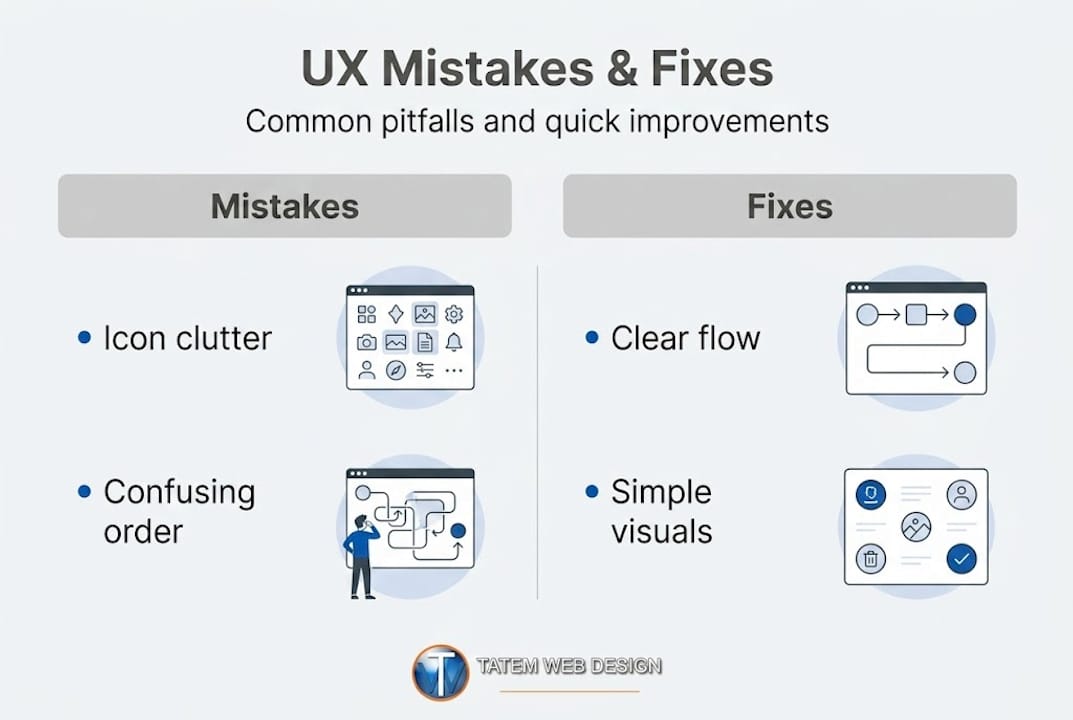
Focus order mismatches and icon overload are among the most common pitfalls that businesses overlook. Focus order refers to the sequence in which keyboard users and screen readers move through a page. When that order does not match the visual layout, it creates a broken experience for a significant portion of your audience.
Pro Tip: Install Microsoft Clarity or Google Analytics 4 on your site and review heatmaps and session recordings monthly. These free tools show you exactly where visitors click, where they scroll, and where they abandon your pages. The data removes guesswork and tells you precisely where to focus your UX improvements.
Balancing AI automation with a human touch is also essential. AI tools can help you generate content, run A/B tests, and analyze behavior patterns. But they cannot replace the empathy required to understand why a specific customer segment struggles with a specific page. Use responsive design practices as your technical foundation, then layer AI-powered tools on top to optimize and personalize the experience over time.
Common UX mistakes to fix immediately include cluttered homepages with too many competing messages, stock photos that feel generic and untrustworthy, phone numbers buried in the footer, and contact forms that ask for too much information upfront. Each of these issues is fixable without a full redesign and each one, once corrected, moves the needle on your conversion rate.
A fresh perspective on user experience for Florida businesses
We have covered practical upgrades, but here is what most guides overlook about user experience in real Florida businesses. After more than 26 years working with businesses across the Treasure Coast and beyond, we have seen a consistent pattern. Most web redesigns fail not because the new design is bad, but because the team focused on how the site looks rather than how it works for the actual customer.
Business owners often come to us with inspiration from competitor sites or national brands. They want that clean, modern aesthetic. That is a reasonable starting point. But the mistake is assuming that if the design looks right, the experience will feel right. Those are two completely different things. A site can be visually stunning and still send customers running.
The Florida market adds specific layers of complexity. You are often serving a mix of year-round residents, seasonal visitors, and retirees who may be less comfortable with complex digital interfaces. A real estate site that works perfectly for a tech-savvy Miami buyer might completely alienate a retiree in Port St. Lucie who just wants to see listings and call an agent. Your UX has to serve your actual audience, not an idealized version of it.
The most common mistake we see is businesses adopting AI tools without first fixing their foundational UX problems. AI can amplify what is already working on your site. It cannot fix broken navigation, unclear messaging, or inaccessible design. If you layer a sophisticated AI chatbot onto a site that already confuses visitors, you will just have a confused visitor talking to a bot. That is not progress.
The smarter path, which we have seen work consistently for Florida businesses, is to fix the human fundamentals first. Get your navigation right, your messaging clear, and your mobile experience solid. Then bring in Florida AI web design pitfalls awareness to guide how you layer AI tools on top of that strong foundation. The result is a site that works for real people and scales intelligently with technology.
Take your Florida business website further with expert help
Ready to transform your own site? See how Florida businesses achieve more with a UX-focused, AI-enhanced web presence.
At Tatem Web Design, we have spent over 26 years helping Florida businesses build websites that do not just look good but actually convert visitors into customers. We combine deep UX expertise with the latest AI technologies to create sites that are fast, accessible, and built around how your specific customers think and behave.

Whether you need a complete overhaul or targeted improvements to your existing site, our team brings both the technical skill and the local market knowledge to get results. From AI-powered site design that automates content and personalization, to a full suite of complete website services built for Florida’s diverse industries, we have the tools and experience to move your business forward. Explore our AI enhancements for business and see what is possible when great UX and smart AI work together. Call us at 772-224-8118 to schedule your consultation today.
Frequently asked questions
What is the first step to improve user experience on my website?
Start by auditing your site’s navigation and checking for any confusing elements that can slow users down. Usability cliffs and focus order mismatches are among the most common issues that hurt user experience and are often the quickest to fix.
How does accessibility influence user experience?
Accessible websites are easier for all users to navigate, which improves satisfaction and reduces bounce rates. AI-generated designs can miss accessibility nuances that affect a significant portion of your real-world visitors, making human review essential.
Can AI fully automate great user experience design?
While AI can speed up design significantly, it often misses edge cases, so human input remains crucial for excellent UX. AI-generated designs miss nuances like edge cases and accessibility requirements that only a trained human reviewer will catch.
Does user experience affect conversions for Florida businesses?
Yes, sites with better user experience see higher conversion rates and stronger customer trust across every industry. A documented 32% reduction in friction from targeted user experience improvements shows how directly UX quality translates into measurable business results.
Recommended
Tatem Web Design
26+ YearsWeb Design & SEO Specialist · Tatem Web Design
Matt Tatem has been designing websites professionally since 1999, making Tatem Web Design one of Florida's longest-running web agencies. Based in Stuart, FL, he specializes in WordPress, local SEO, Shopify e-commerce, and cybersecurity consulting for small businesses.

Rank in ChatGPT in 90 Days With a Practitioner Led Checklist
Follow a practitioner led 90 day plan to get cited by ChatGPT: allow OAI-SearchBot, publish short answer capsules with schema, and track Bing AI Performance.

AI SEO Content Playbook: 16 GEO Signals for Agencies & Teams
A practical playbook mapping the GEO-16 signals to hands-on editorial workflows, review controls, and metrics. For agencies and in-house teams scaling AI...

Copy Ready Local Schema Markup for SMBs + Google Validation
Copy ready JSON-LD examples and Google validation steps for SMBs' local schema markup. Audit, implement, and verify each location page with confidence.