
What Is Website Security? A 2026 Business Guide
Website security is the practice of protecting websites from unauthorized access, modification, data theft, and service disruption. For business owners and IT professionals, understanding web security is not optional. Microsoft reports 600 million daily cyberattacks, making every unprotected website a target. The core tools of website security include SSL/TLS encryption, web application firewalls, two-factor authentication, and automated patch management. Agencies like CISA and organizations like Mozilla have established baseline standards that define what responsible web security looks like in 2026. This guide breaks down those standards into practical steps you can act on today.
What is website security and why does it matter?
Website security is defined as the set of policies, technologies, and processes used to protect a website and its data from cyberattacks, unauthorized access, and service failures. The industry term is “web security,” and it covers everything from the server your site runs on to the form fields your visitors fill out.
Three threat categories drive most incidents. First, hacking involves attackers exploiting software weaknesses to gain unauthorized control of your site. Second, malware infections plant malicious code that steals visitor data or redirects traffic. Third, data breaches expose sensitive customer records, payment information, or confidential business data. Each of these threats carries real financial and reputational consequences.

Security experts at Sectigo define website security as a strategic foundation of digital trust, requiring layered, proactive defenses applied consistently across every user interaction. That framing matters. Security is not a product you buy once. It is a discipline you maintain continuously.
For Florida businesses serving healthcare patients, legal clients, or financial customers, this distinction is critical. A single breach can trigger regulatory penalties, client lawsuits, and lasting damage to your professional reputation.
What are the key components of website security?
The technical foundation of web security rests on six core components. Each one addresses a different attack surface, and removing any one of them weakens the entire system.
SSL/TLS encryption and HTTPS are the baseline. SSL (Secure Sockets Layer) and its successor TLS (Transport Layer Security) encrypt data moving between your visitor’s browser and your server. Without SSL, data travels in plain text and is vulnerable to interception by anyone on the same network. Google Chrome and Firefox now flag non-HTTPS sites with a “Not Secure” warning, which kills conversions before a visitor reads a single word.
Web Application Firewalls (WAF) filter malicious traffic before it reaches your server. Tools like Cloudflare WAF, Sucuri Firewall, and AWS WAF analyze incoming requests and block known attack patterns including SQL injection attempts and bot traffic. A WAF is the difference between a targeted attack reaching your database and being stopped at the door.
Strong authentication means requiring more than a password. Two-factor authentication (2FA) through apps like Google Authenticator or Authy adds a second verification step that stops credential-stuffing attacks cold. Most CMS platforms including WordPress, Joomla, and Drupal support 2FA through plugins or built-in settings.
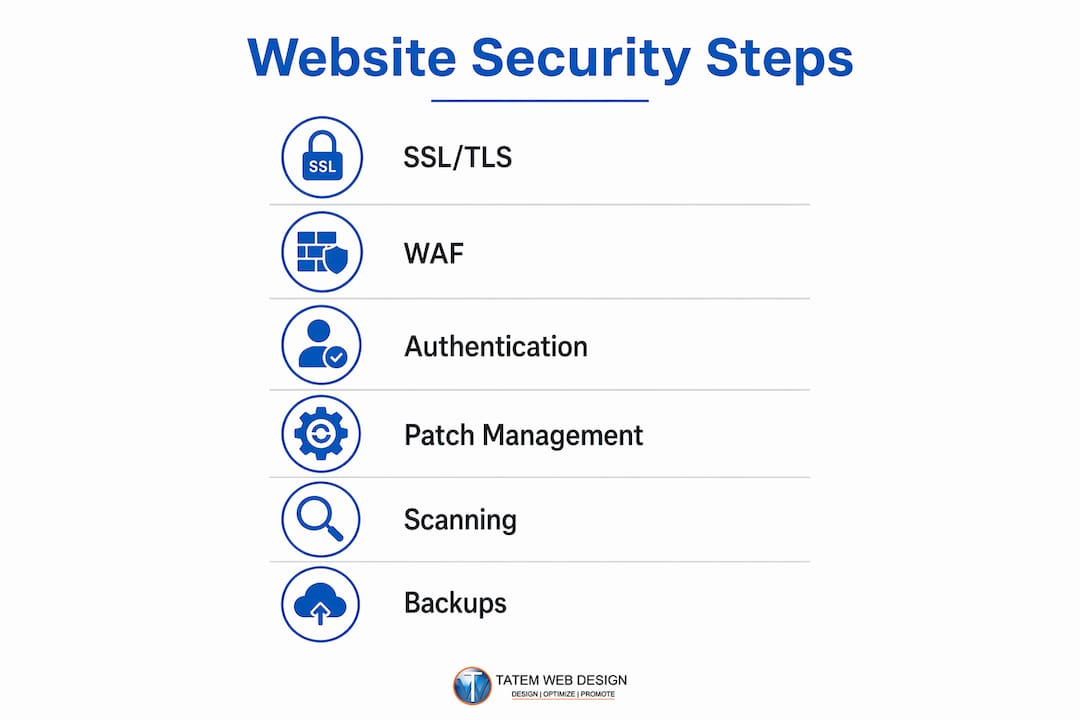
Patch management is the discipline of applying software updates promptly. Regular updates and patches are non-negotiable because vulnerabilities in outdated CMS versions, plugins, and themes are the most common entry points for attackers. Automated patching tools reduce the window between a vulnerability being discovered and being fixed.
Security scanning and malware detection tools like Sucuri SiteCheck, Wordfence, and SiteLock scan your site regularly for injected code, blacklist status, and known malware signatures. Catching an infection early limits damage significantly.
Backups and disaster recovery complete the picture. Backups are only useful if tested. Off-site backups stored separately from your primary server protect you from ransomware attacks that encrypt everything on a single system simultaneously.
| Technology | Function | Typical use case |
|---|---|---|
| SSL/TLS certificate | Encrypts data in transit | All websites handling any user data |
| Web Application Firewall | Blocks malicious traffic | E-commerce, healthcare, legal sites |
| Two-factor authentication | Prevents unauthorized logins | Admin panels, client portals |
| Automated patch management | Closes known vulnerabilities | WordPress, Joomla, Drupal sites |
| Malware scanner | Detects injected code | Any site with user-facing forms |
| Off-site backup | Enables disaster recovery | All business websites |
Pro Tip: Start with SSL and automated patching before adding anything else. These two controls eliminate the majority of successful attacks against small business websites.
Why is website security crucial for business growth?
The financial case for web security is straightforward. Small-to-medium businesses spend about $25,000 on breach aftermath on average annually, while proactive security costs as little as $1–2 per day. That math alone should end the debate about whether security is worth the investment.
The growth case is equally compelling. Businesses prioritizing digital trust report up to 10% higher growth rates because secure sites convert visitors more effectively and collect better customer data. Visitors who see HTTPS, trust badges, and professional security signals are more likely to complete a purchase, submit a contact form, or share personal information.
Search engine rankings are also directly affected. Google uses HTTPS as a ranking signal. Sites without SSL certificates rank lower in search results, which means fewer visitors and fewer leads. For a Florida law firm or medical practice competing for local search traffic, losing even a few ranking positions translates to thousands of dollars in lost business monthly.
The risks of neglecting security fall into three clear categories:
- Financial loss: Breach recovery costs, regulatory fines, and lost revenue during downtime
- Data exposure: Customer records, payment details, and confidential communications compromised
- Reputation damage: A breach shatters customer trust in ways that take years to rebuild, far longer than it takes to lose it
Strong website security signals professionalism and reliability. For industries where trust is the product, such as legal services, healthcare, and financial advising, that signal is not a marketing nicety. It is a business requirement.
Pro Tip: Position security investments to clients and stakeholders as a competitive advantage, not an IT expense. Secure businesses win more contracts, retain more customers, and face fewer liability claims.
What are common website vulnerabilities and how do you fix them?
Most successful attacks exploit a small set of well-documented weaknesses. Understanding them is the first step toward closing them.
SQL injection occurs when an attacker inserts malicious database commands into a form field or URL parameter. If your site processes that input without checking it first, the attacker can read, modify, or delete your entire database. A healthcare site storing patient records or a law firm storing client documents faces catastrophic exposure from a single unprotected input field.
Cross-site scripting (XSS) works differently. The attacker injects malicious JavaScript into your site, which then runs in your visitors’ browsers. This can steal session cookies, redirect users to phishing pages, or silently capture form data. Failing to sanitize user input is the root cause of both SQL injection and XSS. Every piece of data submitted through a browser must be treated as potentially malicious before your server processes or displays it.
Brute force attacks use automated tools to guess passwords by trying thousands of combinations per minute. Weak passwords and unlimited login attempts make this trivially easy. Rate limiting, account lockouts, and 2FA stop brute force attacks before they succeed.
Outdated CMS components are the most common vulnerability in practice. A WordPress site running an unpatched plugin from six months ago is an open door. Attackers actively scan the web for sites running known vulnerable versions of popular plugins like WooCommerce, Elementor, and Contact Form 7.
Here are the mitigation steps every business owner and IT professional must implement:
- Sanitize all user input on the server side before processing or displaying it, without exception
- Update your CMS, plugins, and themes within 48 hours of a security patch release
- Enforce strong password policies and require 2FA for all admin accounts
- Limit user permissions so each account can only access what it needs to do its job
- Install a WAF to filter malicious requests before they reach your application layer
- Monitor access logs weekly for unusual login attempts, unexpected file changes, or traffic spikes
- Test your backups monthly by actually restoring from them to a staging environment
Pro Tip: Store backups off-site in a separate cloud account, not just on the same server or hosting account. Ransomware attacks encrypt everything they can reach, and an on-server backup is no backup at all.
For WordPress-specific guidance, Tatemweb has published a detailed breakdown of WordPress security practices that covers plugin hardening, login protection, and server-level controls.
What legal and ethical responsibilities come with website security?
Website security is both an ethical obligation and a legal requirement for any business that collects, stores, or transmits personal data. This is especially true for healthcare providers, attorneys, accountants, and financial advisors operating in Florida and across the United States.
Security is an ethical and legal obligation for professionals handling sensitive data. Non-compliance with standards like GDPR, HIPAA, and PCI DSS can result in regulatory fines, malpractice claims, and loss of professional licenses. These are not theoretical risks. Enforcement actions against small businesses and professional practices have increased steadily over the past three years.
The table below summarizes the major compliance frameworks and the baseline security controls each requires:
| Regulation | Who it applies to | Core security requirements |
|---|---|---|
| HIPAA | Healthcare providers, medical websites | Encrypted data storage and transmission, access controls, audit logs |
| PCI DSS | Any site accepting card payments | SSL/TLS, network segmentation, vulnerability scanning |
| GDPR | Sites with EU visitors or customers | Data minimization, breach notification, consent management |
| CMMC Level 2 | Defense contractors and suppliers | Multi-factor authentication, incident response, system monitoring |
| Florida DPPA | Florida businesses handling personal data | Data protection policies, breach notification within 30 days |
Compliance is not a one-time checkbox. Website security requires continuous lifecycle management including regular updates, patches, and tested backups. Regulators expect ongoing evidence of security practices, not just a certificate from three years ago.
For healthcare and medical practice websites, Tatemweb covers the intersection of compliance and website design in depth, including HIPAA-specific controls that apply to patient-facing web properties.
Pro Tip: Build compliance requirements into your website design and hosting decisions from day one. Retrofitting security controls onto an existing site costs three to five times more than designing them in from the start.
Key takeaways
Website security is a continuous, layered discipline that protects business assets, maintains customer trust, and satisfies legal compliance requirements across every industry.
| Point | Details |
|---|---|
| SSL is the baseline, not the finish line | Every site needs HTTPS, but SSL alone does not stop SQL injection, XSS, or brute force attacks. |
| Prevention costs far less than recovery | Proactive security runs $1–2 per day; breach recovery averages $25,000 for small businesses. |
| Compliance is legally mandatory | HIPAA, PCI DSS, GDPR, and Florida data laws impose real penalties for inadequate security controls. |
| Sanitize all user input | Every form field and URL parameter is a potential attack vector if data is not validated server-side. |
| Test your backups regularly | An untested backup is not a recovery plan. Verify restoration monthly from an off-site copy. |
What I’ve learned after 26 years of building secure websites
Most business owners I talk to believe their website is secure because their hosting company told them so. That assumption is the single most dangerous misconception in web security today.
Hosting providers secure the server infrastructure. They do not secure your application. Your CMS configuration, your plugins, your form handling, your admin passwords, and your user permissions are your responsibility. A site can run on the most secure server in the world and still be compromised through a single outdated plugin or a weak admin password.
The second pattern I see constantly is treating security as a project with a completion date. Business owners invest in a security audit, fix the findings, and then move on. Six months later, three new plugin vulnerabilities have been published and none of them have been patched. Security is a maintenance discipline, not a project.
The third mistake is underestimating the value of layered defense. No single tool stops everything. SSL stops eavesdropping. A WAF stops known attack patterns. 2FA stops credential theft. Malware scanning catches what slips through. Each layer compensates for the gaps in the others. Remove one layer and the system weakens at exactly the point an attacker will probe.
What actually works is treating security the same way you treat accounting. You do not do your books once and assume they are correct forever. You maintain them consistently, review them regularly, and bring in a professional when something looks wrong. Apply that same discipline to your website and you will be ahead of 90% of your competitors.
— Matt
Protect your Florida business with Tatemweb’s AI security services
If you manage a business website in Florida and want security that works without requiring a full-time IT team, Tatemweb builds and maintains websites with security built in from the ground up.

Tatemweb’s AI security enhancements include automated threat monitoring, managed patching, WAF configuration, and off-site backup management. For businesses in regulated industries, Tatemweb also provides cybersecurity services covering HIPAA, PCI DSS, and CMMC Level 2 compliance consulting. Every solution is tailored to your industry, your risk profile, and your budget. Call Tatemweb directly at 772-224-8118 to schedule a consultation and find out exactly where your website stands today.
FAQ
What is the difference between web security and website security?
Web security is the broader term covering all internet-based security practices, while website security refers specifically to protecting a single website’s code, data, and infrastructure from attacks and unauthorized access.
How do I know if my website has been hacked?
Common signs include unexpected redirects, new admin accounts you did not create, Google blacklist warnings in search results, and unusual spikes in server traffic. Tools like Sucuri SiteCheck scan your site for these indicators at no cost.
Does SSL make my website fully secure?
SSL encrypts data in transit but does not protect against SQL injection, XSS, malware infections, or brute force attacks. SSL is the starting point, not a complete security solution.
What is legal website security for law firms?
Legal website security refers to the specific controls attorneys must implement to protect confidential client data, including encrypted communications, access-controlled client portals, and compliance with state bar data protection guidelines.
How often should I update my website’s security?
Software updates and patches should be applied within 48 hours of release. Security scans should run weekly, backups should be tested monthly, and a full security audit should be conducted at least once per year.
Recommended
Tatem Web Design
26+ YearsWeb Design & SEO Specialist · Tatem Web Design
Matt Tatem has been designing websites professionally since 1999, making Tatem Web Design one of Florida's longest-running web agencies. Based in Stuart, FL, he specializes in WordPress, local SEO, Shopify e-commerce, and cybersecurity consulting for small businesses.

CMMC Level 2 vs Level 1: Which One Applies to You?
CMMC Level 1 vs Level 2 compared: data types, 15 vs 110 requirements, self-assessment vs third-party audits, POA&M rules and how to pick your level.

Phishing Awareness Training for Small Business: A Practical Guide
How to build phishing awareness training for a small business: what to teach, how to run simulations, which numbers to track, and what to pair it with.

AI Content Pricing: What Florida Businesses Really Pay in 2026
What AI content costs in 2026: per-post ranges, tool subscriptions, editing time and agency retainers, plus how to budget and avoid hidden costs.