
Why Upgrade Your Business Website: 2026 Guide
A business website upgrade is the process of improving your site’s technical foundation, design, and content to meet current performance, security, and user experience standards. For small and medium-sized businesses, this is not a cosmetic exercise. It is a direct driver of revenue, search visibility, and customer trust. If you are asking why upgrade your business website, the answer is grounded in data: 88% of visitors will not return after a single poor experience. Your website is your most active salesperson, and it either closes deals or loses them.
What are the main benefits of upgrading your business website?
A well-executed website upgrade delivers measurable returns across multiple business functions. The industry term for this type of work is website redesign or website modernization, and it covers everything from page speed and mobile layout to security certificates and conversion architecture.
Faster load times and mobile performance
Page speed is a direct revenue factor. Website speed affects bounce rates, time on site, and ultimately how many visitors convert into leads. Google has used mobile-first indexing since 2021, meaning it evaluates your mobile version before your desktop version when ranking your site. A slow or poorly formatted mobile experience does not just frustrate visitors. It actively suppresses your search rankings.

SEO, security, and conversion gains
Google rewards sites that load quickly, work well on mobile, and use secure HTTPS connections. Failing on any of these signals causes ranking drops and erodes visitor trust. Beyond rankings, the conversion impact of a modernized site is significant. Redesigns can raise conversion rates by 20–40%, reduce customer acquisition costs by 10–25%, and increase sales-qualified leads by 15–30%. Those are not marginal improvements. They represent a fundamental shift in how effectively your site turns traffic into revenue.
Here are the core benefits of upgrading your business website:
- Improved mobile responsiveness that meets Google’s mobile-first ranking requirements and serves the majority of users who browse on phones
- Faster page load speeds that reduce bounce rates and keep visitors engaged long enough to convert
- Stronger SEO performance through clean code, proper heading structure, schema markup, and compliance with current algorithm signals
- Enhanced security via HTTPS, updated CMS versions, and patched vulnerabilities that protect both your business and your customers
- Higher conversion rates through clear calls to action, logical user flow, and trust signals like reviews, certifications, and contact options
- AI search compatibility, since AI-driven search tools prioritize fast, structured, and technically clean websites when surfacing results to buyers
Pro Tip: Even a 1% increase in your conversion rate can produce significant revenue gains over a full year. Before upgrading, set a baseline conversion rate in Google Analytics so you can measure the exact impact of your improvements.
How do you know when it’s time to upgrade your business website?
Recognizing the right moment to modernize your website saves you from years of lost leads and compounding technical problems. These are the clearest signals that your site needs attention now, not later.
-
Your bounce rate is climbing. A high bounce rate tells you visitors are landing on your site and leaving immediately. This usually points to slow load times, confusing navigation, or a design that no longer matches what users expect from a credible business.
-
You cannot make simple updates without a developer. When content updates require developer intervention, your site has an architecture problem. This engineering dependency signals a system that lacks scalability. You are paying for maintenance instead of growth.
-
Your design looks dated or inconsistent with your brand. Users form an opinion about a site’s credibility within 0.05 seconds. If your site looks like it was built in 2015, that first impression is working against you before a single word is read.
-
Your site is not optimized for mobile. If your layout breaks on a phone or tablet, you are losing the majority of your potential visitors. Mobile responsive design is not optional for Florida businesses competing in local search.
-
You cannot integrate modern tools. If your site cannot connect to a CRM like HubSpot or Salesforce, an AI chatbot, or an email automation platform, it is limiting your ability to capture and nurture leads. Modern websites are built to plug into the tools that run your business.
Pro Tip: Run your site through Google PageSpeed Insights and GTmetrix before any upgrade conversation. These free tools give you a performance baseline and highlight the specific issues costing you the most in speed and ranking.
Upgrade vs. full redesign: what is the difference?
Business owners often use “upgrade” and “redesign” interchangeably, but they describe different scopes of work with different costs, timelines, and risks. Choosing the wrong path wastes money and time.
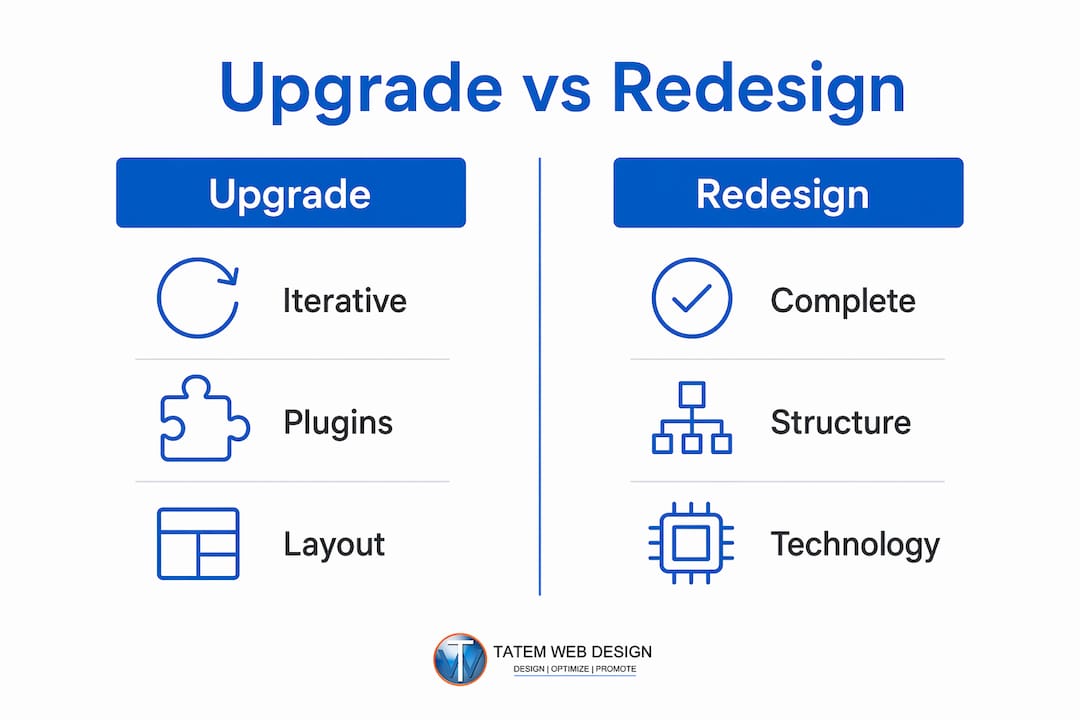
A website upgrade is an iterative improvement to an existing site. You might update plugins, refresh page layouts, improve load speed, or add new content sections. Upgrades work well when your core architecture is sound and your brand identity is stable. They are lower cost, faster to deploy, and carry less risk of disrupting your SEO rankings.
A full website redesign replaces the site’s structure, design system, and often its underlying technology. This is the right choice when your current platform cannot support the features you need, when patchwork quick fixes have accumulated enough technical debt that a new build is more cost-effective than continued repairs, or when your brand has fundamentally changed.
| Scenario | Upgrade | Full Redesign |
|---|---|---|
| Design feels slightly dated | Yes | No |
| CMS is outdated or unsupported | No | Yes |
| Brand identity has changed significantly | No | Yes |
| Adding new features to existing pages | Yes | No |
| Engineering dependency for basic edits | No | Yes |
| SEO rankings are stable | Yes | Caution required |
| Site cannot integrate modern tools | No | Yes |
The SEO consideration is critical. A full redesign, if executed without proper URL mapping, redirect strategies, and content preservation, can cause significant ranking drops. A strategic website redesign aligns user experience, search performance, and analytics to enable automated tracking and personalization. That alignment requires planning, not just a new design file handed to a developer.
For most small and medium-sized businesses, the answer sits somewhere in the middle. You may need a redesign of your core service pages and navigation while keeping your blog content and URL structure intact. A professional web agency will audit your current site before recommending a path, not after.
How to plan and execute an effective website upgrade
A website upgrade without a plan produces a prettier site that performs no better than the old one. The goal is not a new look. The goal is a site that converts more visitors, ranks higher, and runs without constant maintenance.
Start with a performance and goals audit
Before touching a single page, document your current metrics. Pull your average page load time, mobile usability score, organic traffic by page, and conversion rate from Google Analytics and Google Search Console. These numbers tell you where the real problems are, not where you assume they are. Align your upgrade priorities with specific business goals, whether that is generating more service inquiries, reducing phone support by improving your FAQ, or capturing email leads through an AI-powered form.
Prioritize technical and UX improvements
Not all improvements deliver equal returns. Prioritize in this order:
- Core Web Vitals: Fix Largest Contentful Paint (LCP), Cumulative Layout Shift (CLS), and Interaction to Next Paint (INP) first. These are Google’s primary performance signals.
- Mobile layout and navigation: Ensure every page renders correctly on iOS and Android devices without horizontal scrolling or overlapping elements.
- Conversion pathways: User-friendly websites guide visitors through clear journeys from understanding your offer to taking action. Map each page to a single desired outcome and remove anything that distracts from it.
- Security and compliance: Update your SSL certificate, patch your CMS and plugins, and if your business handles health or financial data, verify HIPAA or PCI compliance requirements are met.
- CRM and tool integration: Connect your site to your lead management system. Whether you use HubSpot, Salesforce, or a simpler CRM, your website should feed leads directly into your pipeline without manual data entry.
Involve the right people and test before launch
Bring in your marketing lead, sales team, and a technical web professional before finalizing any upgrade scope. Your sales team knows which questions prospects ask most. That insight shapes your content. Your marketing lead knows which pages drive the most qualified traffic. That insight shapes your priorities. A technical partner like Tatemweb handles the architecture, speed optimization, and security configuration so you do not inherit new problems while solving old ones.
Test every change before it goes live. Use staging environments to preview updates without affecting your live site. After launch, monitor your Core Web Vitals, bounce rate, and conversion rate weekly for the first 30 days. Data from that window tells you whether the upgrade achieved its goals or whether a second iteration is needed.
Viewing your website as strategic growth infrastructure rather than a one-time project is the mindset shift that separates businesses that grow online from those that stagnate. A well-executed upgrade lifts funnel throughput without proportional increases in marketing spend. That is the real return on investment.
Key takeaways
A business website upgrade is the single highest-leverage digital investment most small and medium-sized businesses can make, directly improving search rankings, conversion rates, and customer trust.
| Point | Details |
|---|---|
| User experience drives revenue | 88% of visitors will not return after one poor experience, making performance non-negotiable. |
| Mobile-first is a ranking requirement | Google indexes your mobile site first, so poor mobile design directly suppresses your search visibility. |
| Upgrades and redesigns serve different needs | Use iterative upgrades for stable sites; choose a full redesign when architecture limits growth or tool integration. |
| Plan before you build | Audit current metrics in Google Analytics and Search Console before setting upgrade priorities. |
| Treat your site as infrastructure | Ongoing improvements outperform one-time launches by compounding SEO and conversion gains over time. |
What i have learned after 26 years of website projects
After more than two decades of building and upgrading websites for businesses across Florida, the pattern I see most often is this: business owners treat their website like a business card. They build it, print it, and file it away. Then they wonder why their competitors are getting the calls.
The uncomfortable truth is that a website built in 2020 is already working against you in 2026. Not because it looks old, though it probably does. Because the technical standards that determine whether Google shows your site to potential customers have changed dramatically. Core Web Vitals, AI search indexing, mobile-first ranking, structured data requirements. These are not trends. They are the current rules of the game.
What I have also seen is that most business owners overestimate the cost of upgrading and underestimate the cost of not upgrading. A law firm in Stuart that has not touched its website in four years is not just missing leads. It is actively handing them to the competitor whose site loads in under two seconds and has a clear “Schedule a Consultation” button above the fold.
The businesses that grow fastest online are not the ones with the biggest budgets. They are the ones that treat their website as a living system, review it quarterly, fix what the data tells them to fix, and integrate new tools as they become available. AI chatbots, automated lead capture, CRM connections. These are not luxuries for enterprise companies. They are accessible to any SMB willing to invest in the right partner.
My advice: stop asking whether you can afford to upgrade your website. Start asking what it is costing you every month to leave it as it is.
— Matt
Ready to upgrade your florida business website?
Tatemweb has spent over 26 years helping Florida businesses build websites that work as hard as they do. Whether you need a targeted performance upgrade or a complete rebuild powered by AI, the team at Tatemweb delivers fast, secure, and search-optimized results tailored to your industry and goals.

From AI-powered website design to mobile optimization, cybersecurity compliance, and AI chatbot integration, Tatemweb builds digital infrastructure that generates leads and supports business growth. Real estate firms, healthcare providers, legal practices, and professional services businesses across Stuart and South Florida trust Tatemweb to keep their online presence competitive. Call 772-224-8118 today to schedule a consultation and find out exactly what your current site is costing you.
FAQ
Why upgrade your business website if it still looks fine?
Appearance is only one factor. A site can look acceptable while failing on page speed, mobile performance, and security, all of which directly affect your Google rankings and conversion rates.
How often should a business website be upgraded?
Most businesses benefit from a technical audit and targeted improvements every 12–18 months. A full redesign is typically warranted every 3–5 years or when your platform can no longer support the tools your business needs.
Does a website upgrade improve SEO?
Yes. Upgrades that improve Core Web Vitals, mobile responsiveness, HTTPS security, and page structure directly align with Google’s core ranking signals, which typically produces measurable ranking improvements within 60–90 days.
What is the difference between a website upgrade and a redesign?
An upgrade improves specific elements of an existing site, such as speed, layout, or integrations. A redesign replaces the site’s structure and technology, which is necessary when technical debt makes ongoing fixes more expensive than building new.
How do i measure the ROI of a website upgrade?
Track your conversion rate, organic traffic, and bounce rate before and after the upgrade using Google Analytics and Google Search Console. Even a 1% improvement in conversion rate produces significant revenue impact over a full year.
Recommended
Tatem Web Design
26+ YearsWeb Design & SEO Specialist · Tatem Web Design
Matt Tatem has been designing websites professionally since 1999, making Tatem Web Design one of Florida's longest-running web agencies. Based in Stuart, FL, he specializes in WordPress, local SEO, Shopify e-commerce, and cybersecurity consulting for small businesses.

CMMC Level 2 vs Level 1: Which One Applies to You?
CMMC Level 1 vs Level 2 compared: data types, 15 vs 110 requirements, self-assessment vs third-party audits, POA&M rules and how to pick your level.

Phishing Awareness Training for Small Business: A Practical Guide
How to build phishing awareness training for a small business: what to teach, how to run simulations, which numbers to track, and what to pair it with.

AI Content Pricing: What Florida Businesses Really Pay in 2026
What AI content costs in 2026: per-post ranges, tool subscriptions, editing time and agency retainers, plus how to budget and avoid hidden costs.