
Stop Google AI Rewriting Your Business Profile: 9 Point Plan for SMBs
Google now pulls Business Profile data directly into Gemini, Ask Maps, and AI Overviews, which means your profile is no longer just a map pin. It’s raw material for AI answers customers never click through your website to verify. The single priority move: audit your core facts (name, category, hours, website) and human-approve any AI-suggested description before it goes live. Get that right, and you raise your odds of being recommended when someone asks an AI tool where to go.
TL;DR:
- Accurate core facts, including business name, hours, and contact details, are essential, as inconsistencies can cause your profile to be overlooked by AI answers.
- Regularly review and update the AI-generated description to ensure it reflects current, factual information about your business offerings.
- Enhancing your profile with specific categories, detailed services, and fresh photos improves your AI citation strength and likelihood of being recommended.
- Establish an approval process for AI-suggested changes to avoid errors in sensitive fields like hours or contact info that could trigger reverification delays.
- Consistently align your profile content with your website and other marketing channels to improve AI understanding and avoid conflicting information that undermines visibility.
Table of Contents
- Why AI Makes Your Google Business Profile More Important Than Ever
- How Gemini, Business Notebook, and Collected Info Work With Your Profile
- Priority Checklist to Improve Your AI Citation Odds
- Set Up an Approval Process Before You Let AI Touch Your Profile
- What to Track After You Optimize Your Profile
- Why Reviews and Photos Carry More Weight Than Ever
- The Ethical Blind Spots in AI-Generated Business Profiles
- How Google’s AI Rollouts Are Reshaping Local SEO Strategy
- Connecting Your Profile Work to the Rest of Your Marketing Stack
- An Agency View on Getting This Right
- How Tatem Web Design Handles This for You
- Sources
- FAQ
Why AI Makes Your Google Business Profile More Important Than Ever
Traditional local ranking rewarded proximity, relevance, and prominence, then handed the searcher a list of ten options to compare. AI-driven discovery skips that step. Ask Maps, Google’s Gemini-powered feature for finding businesses conversationally, can read a profile, its reviews, and its photos, then decide on the spot whether that business fits the request the customer typed or spoke.
That’s a fundamentally different bar to clear. AI Overviews and Gemini responses treat your profile fields, review text, photo captions, and even linked website content as grounding signals, the raw facts an AI model cites to build its answer. A vague category or a stale hours listing doesn’t just rank you lower anymore. It can knock you out of the answer entirely, because the model has nothing specific to point to.
The practical fallout is twofold: visibility now depends on machine-readable completeness, not just star ratings, and reputation management matters more, since AI systems often summarize review sentiment directly into their recommendations.
How Gemini, Business Notebook, and Collected Info Work With Your Profile
Google lets eligible business owners connect their Business Profile to the Gemini web app, which turns profile management into a conversation instead of a form. Once connected, you can ask Gemini to update your hours, draft a reply to a review, or summarize recent customer feedback. The connection also creates a business notebook, a workspace where Gemini keeps context about your business so its suggestions stay consistent over time.
Eligibility isn’t universal. Google is rolling this out gradually, and availability depends on your account type, business category, and region, so don’t be surprised if the option isn’t visible yet in your dashboard.
Separately, Google has introduced a Collected info tab that shows details its automated systems gathered about your business from the web, then lets you review and delete anything inaccurate. This matters more than it sounds: if Google’s assistant scraped an old phone number or a discontinued service from a directory listing, that error can quietly feed into AI answers until you catch and correct it. Check this tab the same way you’d check a credit report, periodically and skeptically.
Priority Checklist to Improve Your AI Citation Odds
Work through this in order. Each step compounds on the last, and skipping the early ones undermines the rest.
- Audit your core facts. Confirm your business name, address or service area, phone number, website URL, and hours match exactly across your profile, your website footer, and any directory listing you control. Inconsistency is the fastest way to get flagged as unreliable data.
- Review the AI-suggested description. Google can generate a business description automatically, but you must edit it for accuracy before publishing. Make the first sentence a plain identity statement (what you do, where, for whom) and strip out marketing language an AI model has no use for.
- Sharpen your categories. Choose the most specific primary category available, not the closest generic one, and add every relevant secondary category. “Family dentist” beats “dentist” when it’s true.
- List every service with a one-line description. Each service entry is an independent AI citation opportunity, so write descriptions using the exact phrases customers type when asking an AI tool for help.
- Pre-seed your Q&A section. Post likely customer questions from a personal account, then answer them from your business account so accurate information sits there before someone else guesses wrong.
- Publish Google Posts weekly, ideally in a question-and-answer format with a clear call to action.
- Keep photos current. Add fresh images at least monthly. AI systems treat photos as evidence, not decoration.
- Respond to every review with factual, specific language, naming the service or product involved rather than a generic thank-you.
- Check the Collected info tab before making major edits, and document your evidence (an invoice, a license, a utility bill) for any change that might trigger reverification.
A few of these deserve extra care:
- Reviews with detailed, specific language tend to get pulled into AI summaries more often than short, generic praise.
- Fresh Google Posts and prompt review responses signal an engaged, real business, and that engagement pattern feeds Google’s confidence in the data.
- Photos should include your storefront, your team, and your product or service in action, not just a logo.
Pro Tip: Write your service descriptions the way you’d answer a customer’s text message, not the way you’d write ad copy. AI models reward specificity over polish every time.
Set Up an Approval Process Before You Let AI Touch Your Profile
Assign one person as the approval owner for any AI-suggested change, and treat name, address, phone number, and primary URL as high-sensitivity fields that never go live without a second look. Google’s own guidance on generative AI use reinforces this: AI-powered suggestions are a starting draft, not a finished edit.
Build a simple rhythm around it:
- Weekly: scan new reviews, Q&A submissions, and posts for anything needing a response.
- Monthly: reconcile core facts across your profile, website, and directories.
- Quarterly: refresh your photo set and revisit category accuracy.
Stage anything AI-suggested (descriptions, posts, replies) in a private draft or shared doc first, and run it against a short checklist: identity, services, hours, and any factual claim. For changes that touch sensitive fields, keep the supporting document (a lease, a license renewal, a utility bill) on hand, since Google may require reverification when those fields change.
Pro Tip: Never let an AI suggestion touch your business hours during a holiday week without a human checking it first. That’s the fastest way to show “closed” when you’re actually open.
What to Track After You Optimize Your Profile
Open your Business Profile performance dashboard and watch five numbers: search impressions, the actual search queries triggering your listing, phone calls, direction requests, and bookings. A rise in impressions paired with flat calls often means you’re showing up in AI Overviews or Ask Maps responses without generating a click, since the AI already answered the question for the searcher.
- Track review volume and the specific language reviewers use; a jump in detailed, service-specific reviews is a strong secondary signal.
- Compare booking or call volume month over month rather than day to day, since AI-driven visibility shifts gradually.
- Give changes 2 to 8 weeks before judging results, and re-audit anything that hasn’t moved.
Tools like the Gemini Ranking Tool can help you test how your profile data maps to actual Gemini visibility, which is worth checking after a major update rather than guessing from insights alone.
Why Reviews and Photos Carry More Weight Than Ever
Reviews and photos aren’t reputation garnish anymore. They’re primary evidence an AI system uses to decide whether your business matches what someone asked for. Ask Maps reads review text for specifics, not just star counts, so a review mentioning “same-day appointment” or “wheelchair-accessible entrance” gives the model concrete language to cite back to a searcher.
Photos work the same way. A generic stock-style storefront photo tells an AI model nothing useful, while a recent image showing your actual dining room, waiting area, or product display gives it something to match against a query like “quiet place to work” or “family-friendly patio.” Businesses that upload photos irregularly, or rely entirely on customer-submitted images, provide Google with less usable data and may lose some control over how their business is described.
The compounding effect matters most here. A business with many detailed reviews and fresh photos builds a thicker layer of AI-readable evidence than a competitor with the same star rating but thinner, more generic feedback and an outdated photo gallery. When Ask Maps or an AI Overview has to choose which business to surface first, that thickness of evidence often breaks the tie.
The Ethical Blind Spots in AI-Generated Business Profiles
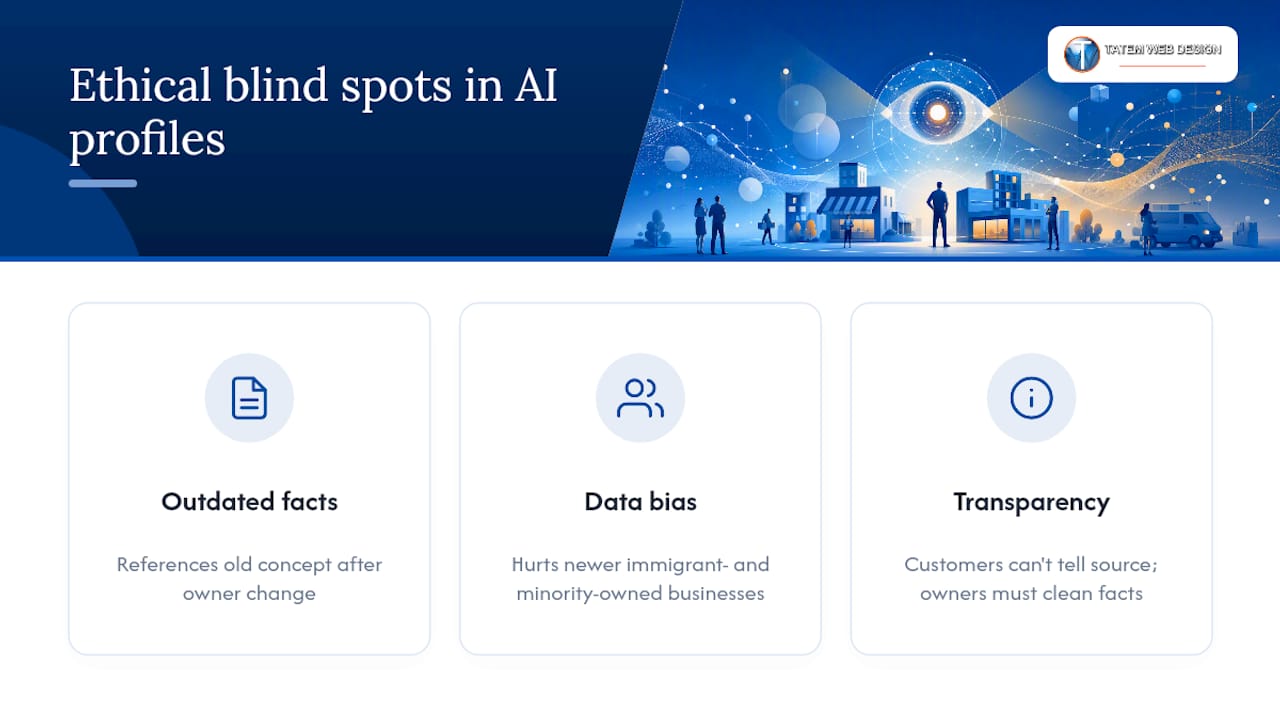
AI-suggested descriptions and summaries are trained on patterns, not verified facts about your specific business, which means they can flatten nuance or repeat outdated information scraped from elsewhere. A restaurant that changed owners two years ago might still get an AI-generated description referencing the old concept if that’s what dominated the web data Google’s systems found.
Bias shows up in subtler ways too. Businesses with sparse review histories, common in newer immigrant-owned or minority-owned businesses that haven’t built up a long review trail, may get thinner or less specific AI-generated summaries simply because there’s less text for the model to draw from. That’s not a judgment on the business. It’s a data gap, and it disadvantages exactly the businesses that could use visibility most.
There’s also a transparency question worth sitting with: customers reading an AI Overview or hearing an Ask Maps recommendation often don’t know whether they’re seeing information the business wrote, a review excerpt, or a model’s own synthesis. That blur puts more responsibility on you as the owner to keep the underlying facts clean, since you can’t control how the AI phrases its summary, only what raw material it has to summarize.
How Google’s AI Rollouts Are Reshaping Local SEO Strategy
Local SEO used to reward keyword-stuffed descriptions and citation volume across directories. AI-driven discovery rewards something closer to journalism: specific, verifiable, current facts stated plainly. That shift changes what “optimization” even means.
Instead of chasing backlinks to your profile, the work now centers on making sure every fact Google’s AI can find about you, on your profile, your website, and third-party mentions, agrees with every other fact. Consistent, machine-readable data across your profile and website increases the odds an AI system cites you correctly instead of skipping you or, worse, citing outdated information about you.
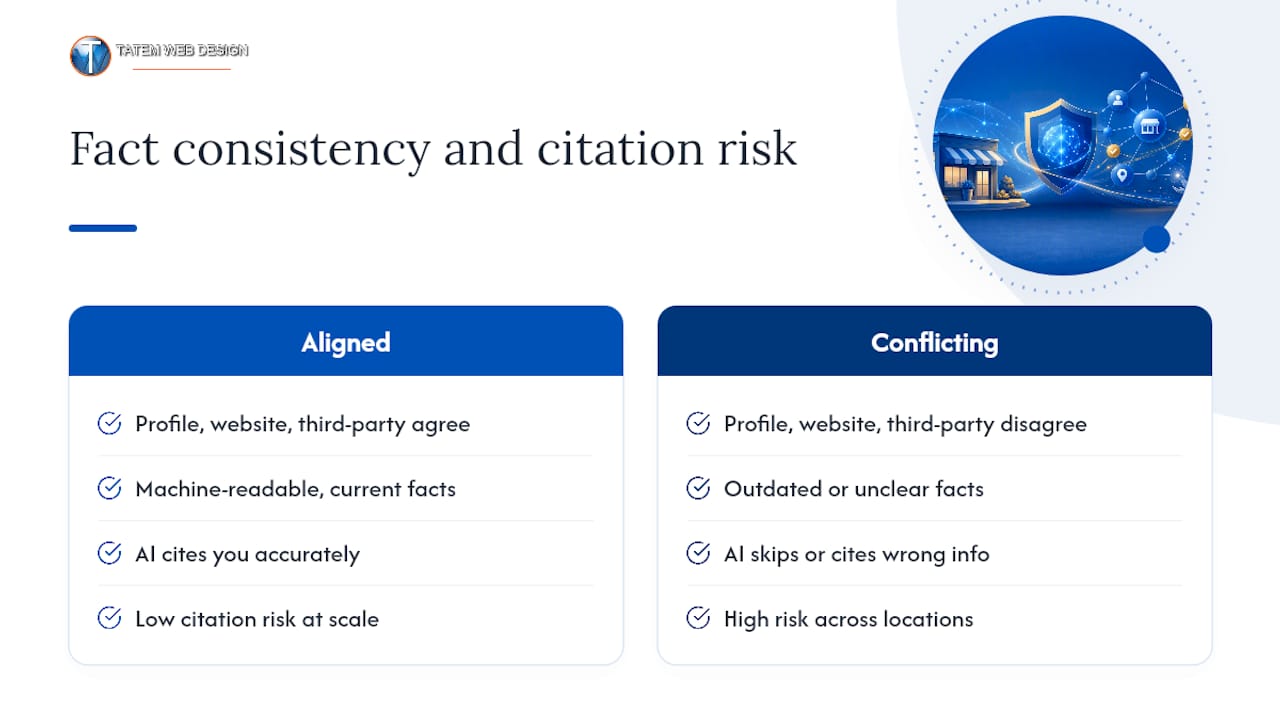
This also means local SEO strategy can’t live in the Business Profile dashboard alone anymore. If your website’s service pages don’t mention the same services listed on your profile, in similar language, you’re giving the AI two conflicting versions of your business to reconcile. Google’s own AI Overviews often pull from whichever source states a fact more clearly and more recently, so a profile update that isn’t mirrored on your website is only half the job.
For businesses managing multiple locations, this gets more complicated fast, since inconsistency at scale multiplies the risk of an AI citing the wrong hours or service for the wrong branch. A structured, location-by-location approach keeps that risk contained rather than letting one bad data point spread across every listing.
Connecting Your Profile Work to the Rest of Your Marketing Stack
A Business Profile doesn’t operate in isolation, and treating it that way is the most common mistake SMB owners make. The services, hours, and descriptions you finalize on your profile should mirror the language on your website’s service pages, since AI systems cross-reference both when building an answer. If your profile says “emergency plumbing repair” but your website only says “plumbing services,” you’ve created a gap an AI model has to guess across.
Review responses and Google Posts should also echo the terms your email campaigns and social posts use for the same services. Consistency across channels does double duty: it reinforces the facts AI systems are grounding on, and it keeps your brand voice recognizable to human customers scanning multiple platforms.
For service businesses with published landing pages, a practical local SEO playbook built around this kind of cross-channel consistency tends to outperform isolated profile tweaks, because it gives AI systems more corroborating text to draw from rather than a single, unverified claim on one page.
An Agency View on Getting This Right
The workflow that actually works starts with an audit, not a rewrite: check the profile against the website, fix structured data and service pages first, then update the profile itself. Skipping straight to profile edits without fixing the website leaves AI systems pulling from mismatched sources. Most SMB clients see measurable movement in insights within 4 to 8 weeks, not overnight, and the gains compound as review volume and photo freshness build up over subsequent months.
— Matt
How Tatem Web Design Handles This for You
Auditing core facts, rewriting AI-suggested descriptions, staging Gemini connections, and reconciling website structured data with your profile is a real project, not a weekend task, and getting one field wrong can trigger a reverification delay you didn’t see coming. This process can be managed as a comprehensive service including profile audits, category and service optimization, connection support, and website-side structured data fixes to provide AI systems with consistent facts to cite.

That combination matters because a clean profile paired with a mismatched website undercuts itself. Our AI SEO and content services tie profile updates directly to your service pages, so the same facts appear everywhere Google’s AI looks, and our team handles the approval-first review so nothing goes live without a human checking it first. If your website’s service pages need work to match, our local SEO and web design services cover that side too. Scheduling an audit of your current profile and website alignment can be done through the appropriate contact channels.
Sources
- Manage your Business Profile description
- Manage your Business Profile on Google with the Gemini web app - Computer - Google Business Profile Help
- Google Maps Has a New Brain. Is Your Business Profile Ready? (PowerChord)
- Google Business Profiles rolls out ‘collected info’ tab (Search Engine Land)
FAQ
Is a Google Business Profile Free?
Yes. Google states that creating and managing a Business Profile is free, including photos, posts, booking features, and performance insights. There’s no cost to claim, verify, or update your listing.
How Do I Turn On AI Features Like Gemini for My Profile?
Eligible owners can connect their Business Profile to the Gemini web app directly from their account settings, which unlocks conversational editing and a business notebook. Availability rolls out gradually by account type, category, and region, so the option may not appear for every business yet.
Do I Need an LLC to Have a Google Business Profile?
No. Google Business Profile doesn’t require a formal business entity like an LLC; sole proprietors and individual service providers can create and verify a profile using their legal operating name. What matters for verification is proof of a real business address or service area, not a specific legal structure.
Is There a Difference Between Google My Business and Google Business Profile?
They’re the same product under a different name. Google rebranded Google My Business to Google Business Profile, folding profile management directly into Search and Maps instead of a separate app, and all current AI features (Gemini, Ask Maps, AI Overviews) operate under the Business Profile name.
What Does Tatem Web Design Charge for Profile and AI SEO Work?
Pricing for services like AI SEO optimization and Business Profile audits isn’t published and depends on the scope of work. Current details are available by calling the phone number listed on the contact page or visiting the AI services page.
Recommended
Tatem Web Design
26+ YearsWeb Design & SEO Specialist · Tatem Web Design
Matt Tatem has been designing websites professionally since 1999, making Tatem Web Design one of Florida's longest-running web agencies. Based in Stuart, FL, he specializes in WordPress, local SEO, Shopify e-commerce, and cybersecurity consulting for small businesses.

CMMC Level 2 vs Level 1: Which One Applies to You?
CMMC Level 1 vs Level 2 compared: data types, 15 vs 110 requirements, self-assessment vs third-party audits, POA&M rules and how to pick your level.

Phishing Awareness Training for Small Business: A Practical Guide
How to build phishing awareness training for a small business: what to teach, how to run simulations, which numbers to track, and what to pair it with.

AI Content Pricing: What Florida Businesses Really Pay in 2026
What AI content costs in 2026: per-post ranges, tool subscriptions, editing time and agency retainers, plus how to budget and avoid hidden costs.