
Technical SEO: A Practical Guide for Beginners

Technical SEO is the practice of optimizing your website’s infrastructure so search engines can crawl, render, and index your pages correctly. Without it, even the best content stays invisible. The process follows a three-stage chain: crawling (Google discovers your pages via sitemaps, internal links, and robots.txt), rendering (Google executes JavaScript and builds the page as a browser would), and indexing (Google analyzes and stores the page for serving in search results). A failure at any stage blocks visibility, regardless of content quality. According to Google’s own documentation on how search works, problems at any point in this chain can prevent a page from appearing in search entirely.
The core areas to check in a technical SEO review are:
- Crawlability: robots.txt, XML sitemaps, internal linking, and crawl budget
- Indexing controls: noindex tags, canonical tags, and duplicate content handling
- Rendering: JavaScript execution and what the crawler actually sees
- Site speed and Core Web Vitals: load time, interactivity, and visual stability
- Mobile experience: responsive design and mobile-first indexing readiness
- HTTPS and security: valid TLS certificates and secure server configuration
- Structured data: Schema.org markup for eligibility for rich results
- URL structure and architecture: crawl depth, pagination, and faceted navigation
Key Takeaways
Technical SEO is the infrastructure layer that determines whether search engines can crawl, render, and index your pages, and fixing it is the highest-leverage SEO investment most sites can make.
| Point | Details |
|---|---|
| Crawl → render → index chain | Failure at any stage blocks visibility; diagnose in order before fixing content or links. |
| Core Web Vitals and speed | LCP, CLS, and INP scores directly affect rankings; use Lighthouse to identify and prioritize fixes. |
| HTTPS is a baseline | Let’s Encrypt provides free TLS certificates; mixed content errors undermine even a valid certificate. |
| Structured data eligibility | Schema.org markup matching your content type makes pages eligible for rich results and AI citations. |
| Tatemweb’s approach | Tatemweb audits, remediates, and monitors technical SEO for Florida businesses, with AI-built sites designed technically sound from launch. |
Table of Contents
- Why does technical SEO matter for your business?
- How search engines actually process your site
- What are the core elements of technical SEO?
- How do you audit technical SEO step by step?
- What are the most common technical SEO problems and how do you fix them?
- Quick wins you can implement today
- How does a technical SEO agency run an audit project?
- Why technical SEO is the foundation, not an afterthought
- Tatemweb handles technical SEO so you can focus on your business
- Sources
- FAQ
Why does technical SEO matter for your business?
Good content cannot rank if search engines cannot reach it. A page blocked by a misconfigured robots.txt, served without HTTPS, or rendered entirely in client-side JavaScript may never appear in search results, no matter how well it is written. Search Engine Land frames technical SEO as the infrastructure layer that makes everything else work: crawlability, indexability, site architecture, and canonicalization are the pillars that support every other SEO effort.
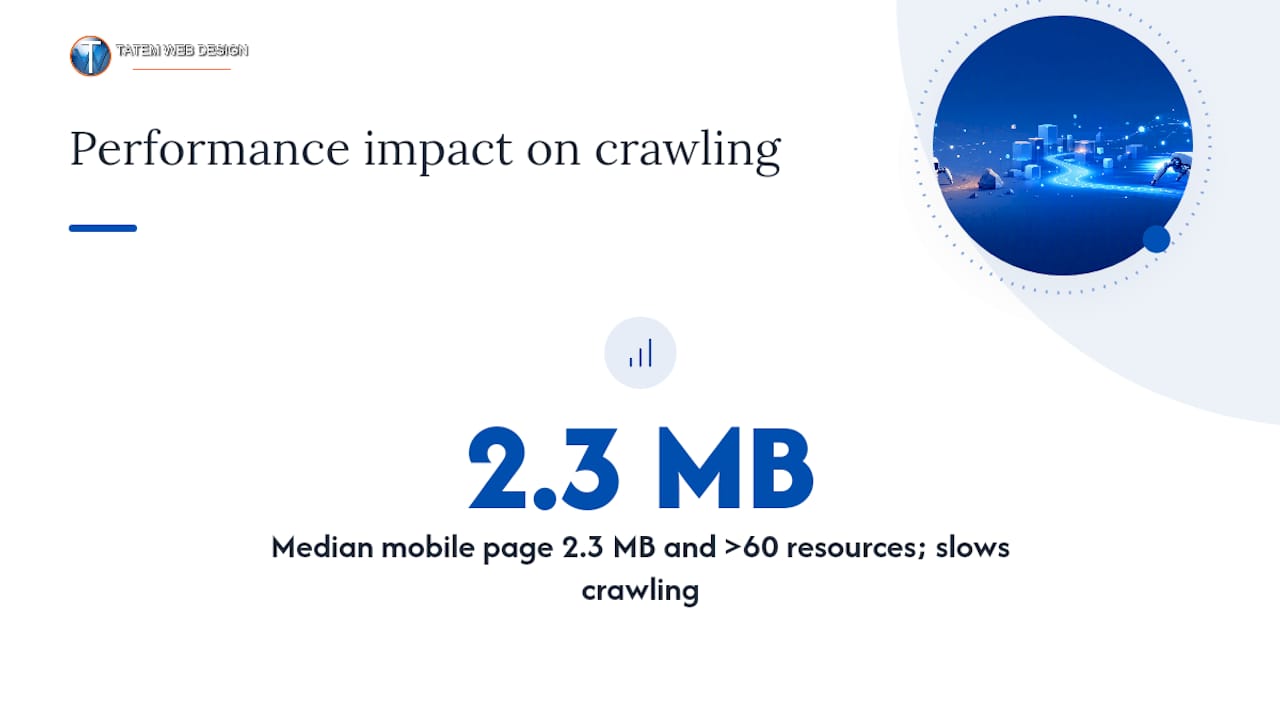
The performance stakes are real. Google’s crawling documentation notes that the median mobile page has grown from roughly 816 KB to approximately 2.3 MB and now loads more than 60 separate resource files. That complexity increases rendering cost and slows Googlebot’s ability to process your site efficiently, which directly affects how often your pages get crawled and how quickly new content gets indexed.
Beyond search visibility, technical health affects user experience and business outcomes. Slow pages lose visitors before they convert. Sites without HTTPS display browser warnings that erode trust. Duplicate content dilutes ranking signals across multiple URLs. For Florida businesses competing locally, these issues compound: a technically broken site hands visibility to competitors who have done the basics right. Semrush’s technical SEO guide reinforces that the starting point is always crawlability, HTTPS, and mobile experience, because those three factors determine whether you are even in the game.
Technical health also affects eligibility for AI-generated answers. Search engines and AI systems that synthesize content from the web rely on clean, well-structured, indexable pages. A site that cannot be indexed reliably will not be cited.
How search engines actually process your site
Understanding the crawl → render → index sequence tells you exactly where to look when a page is not performing.
Crawling: how Google finds your pages
Googlebot discovers pages by following links and reading your XML sitemap. Your robots.txt file tells crawlers which paths are off-limits. A well-structured sitemap submitted through Google Search Console accelerates discovery of new and updated pages. Internal linking matters too: pages with no inbound internal links (orphan pages) are often missed entirely. Crawl budget, the number of pages Google will crawl on your site within a given period, is finite. Large sites with thin or duplicate pages waste it.
Rendering: what Google actually sees
After fetching a page, Google renders it, executing JavaScript and loading resources the way a browser would. This is where many sites fail silently. Google’s JavaScript SEO documentation warns that client-side JavaScript can prevent crawlers from seeing critical content if the page depends on JavaScript to load its main text, navigation, or structured data. The rendered HTML, what Google sees after execution, can differ significantly from the initial server response. You can check this directly in Google Search Console’s URL Inspection tool by comparing the “HTML” tab (initial response) with the “Screenshot” and “More info” tabs (rendered output).
Indexing: what gets stored and served
Not every crawled page gets indexed. Google evaluates quality, canonicalization, and signals like noindex tags before deciding what to store. If two URLs serve identical content, Google picks one as the canonical and may ignore the others. A page with a rel=canonical pointing to a different URL tells Google to index the target, not the current page. A noindex meta tag instructs Google to skip the page entirely. Common symptom: a page returns a 200 OK status but never appears in search. The likely causes are a noindex tag, a canonical pointing elsewhere, thin content, or a crawl budget issue that means the page was fetched but deprioritized.
What are the core elements of technical SEO?
The table below covers each major technical area, what to check, the symptom when it fails, and the primary tool for diagnosing it. For a deeper breakdown of these fundamentals, Tatemweb’s technical SEO foundation guide walks through each element with implementation context.
| Element | What to check | Common symptom when broken | Primary diagnostic tool |
|---|---|---|---|
| Robots.txt | No critical paths blocked; correct syntax | Pages not indexed despite good content | Google Search Console (robots.txt tester) |
| XML sitemap | All indexable URLs listed; no noindex URLs included | Slow discovery of new pages | Search Console > Sitemaps |
| Crawlability | No orphan pages; crawl depth under 3–4 clicks | Key pages not indexed | Screaming Frog, Sitebulb |
| Indexing controls | Correct noindex/index tags; no accidental blocks | Pages missing from search | Search Console > URL Inspection |
| Canonical tags | Self-referencing or correct cross-page canonicals | Duplicate content diluting rankings | Screaming Frog, manual review |
| JavaScript rendering | Critical content in initial HTML, not JS-only | Content visible to users but not indexed | Search Console URL Inspection (rendered HTML) |
| Site speed / Core Web Vitals | LCP, CLS, INP within Google’s thresholds | High bounce rate, ranking suppression | Lighthouse, PageSpeed Insights |
| Mobile experience | Responsive design; no mobile-only errors | Lower rankings on mobile-first index | Search Console > Mobile Usability |
| HTTPS | Valid TLS certificate; no mixed content | Browser warnings, ranking disadvantage | Browser address bar, SSL Labs |
| Structured data | Schema.org markup matching content type | No rich results (stars, FAQs, breadcrumbs) | Rich Results Test, Schema.org validator |
| Hreflang | Correct language/region tags for multilingual pages | Wrong language version served to users | Search Console > International Targeting |
| URL structure | Short, descriptive, lowercase URLs; no parameters where avoidable | Poor crawl efficiency, duplicate URLs | Screaming Frog |
| Server response codes | 200 for live pages; 301 for permanent moves; 410 for deleted | Crawl errors, wasted crawl budget | Search Console > Coverage, server logs |
| Crawl budget | No thin/duplicate pages consuming budget | New pages slow to index on large sites | Log file analysis, Search Console |
| Pagination / faceted nav | rel=next/prev or canonical strategy for paginated sets | Duplicate or near-duplicate pages indexed | Screaming Frog, manual review |
Structured data and Schema.org deserve a specific note. Marking up your content with Schema that match your content type (Article, LocalBusiness, Product, FAQ) makes you eligible for rich results: star ratings, FAQ dropdowns, breadcrumbs, and knowledge panel data. These features increase click-through rates and help AI systems understand your content’s context. Use the Rich Results Test at search.google.com/test/rich-results to validate your markup before publishing.
HTTPS is a baseline requirement. Let’s Encrypt provides free, automatically renewing TLS certificates that work for most hosting environments, removing the cost barrier entirely. After installing a certificate, check for mixed content (HTTP resources loaded on HTTPS pages) using browser developer tools or a crawler, because mixed content triggers browser warnings even on technically “secure” pages.
Hreflang tags tell Google which language and regional version of a page to serve to which audience. A Florida law firm with a Spanish-language version of its site needs hreflang="en-US" and hreflang="es" tags on the respective pages, along with a reciprocal tag on each. Missing or mismatched hreflang is one of the most common causes of the wrong language version ranking in a given market.
A robots.txt example that blocks a staging directory while allowing everything else:
User-agent: *
Disallow: /staging/
Allow: /
Sitemap: https://www.example.com/sitemap.xml
A canonical tag example for a product page with URL parameters:
<link rel="canonical" href="https://www.example.com/products/widget/" />
How do you audit technical SEO step by step?
A structured audit prevents you from chasing symptoms instead of root causes. Web and Ahrefs’ beginner technical SEO guide both recommend starting with crawlability before moving to performance, because a page that cannot be crawled cannot benefit from speed improvements. For a fuller breakdown of audit types and what each delivers, Tatemweb’s website audit guide is a practical companion resource.
- Submit your XML sitemap in Google Search Console and check for errors or excluded URLs.
- Run a crawl with Screaming Frog or Sitebulb to map all URLs, response codes, redirect chains, missing titles, and duplicate content.
- Check robots.txt using Search Console’s robots.txt tester to confirm no critical pages are blocked.
- Inspect key pages with Search Console’s URL Inspection tool, comparing the initial HTML response with the rendered output to catch JavaScript rendering gaps.
- Audit indexing coverage in Search Console’s Index Coverage report: identify pages with “Excluded,” “Crawled but not indexed,” or “Submitted but blocked” statuses.
- Run Lighthouse on your most important pages (homepage, key service pages, top landing pages) to score Core Web Vitals: Largest Contentful Paint (LCP), Cumulative Layout Shift (CLS), and Interaction to Next Paint (INP).
- Test mobile usability in Search Console’s Mobile Usability report and with Google’s Mobile-Friendly Test.
- Validate structured data with the Rich Results Test and the Schema.org validator.
- Check HTTPS status and scan for mixed content using a crawler or browser developer tools.
- Analyze server logs (if accessible) to see which pages Googlebot actually visits, how often, and which return errors. Log analysis reveals crawl budget waste that no other tool surfaces.
Pro Tip: Prioritize fixes using an impact × effort matrix. A broken canonical on your homepage (high impact, 10-minute fix) beats a missing hreflang on a low-traffic page (lower impact, multi-hour implementation). List every issue from your crawl report, score each on a 1–3 scale for both impact and effort, and tackle the high-impact, low-effort items first.
Pro Tip: In Search Console’s URL Inspection tool, click “View Tested Page” after running a live test, then open the “Screenshot” tab. If the screenshot shows a blank or partially loaded page, your site is relying on JavaScript to render content that Google cannot see. That is the single fastest way to confirm a JS rendering problem without reading code.
When to use each tool: Screaming Frog and Sitebulb are best for site-wide crawl analysis and bulk issue detection. Search Console is best for Google-specific indexing data, coverage errors, and performance metrics. Lighthouse is best for per-page performance scoring and Core Web Vitals. Server log analysis is best for large sites where crawl budget is a real constraint, typically sites with more than 10,000 pages.
What are the most common technical SEO problems and how do you fix them?
404 errors and broken links
A 404 means the page does not exist. For pages that have moved permanently, return a 301 redirect to the new URL. For pages that are intentionally gone with no replacement, return a 410 Gone status rather than a 404, which signals to Google that the page is deleted and should be removed from the index faster. Fix broken internal links by updating them to point to the correct live URL.
Redirect chains and loops
A redirect chain occurs when URL A redirects to URL B, which redirects to URL C. Each hop wastes crawl budget and dilutes link equity. Flatten chains so every redirect points directly to the final destination URL. A redirect loop (A → B → A) causes crawlers and browsers to fail entirely. Screaming Frog’s redirect chain report identifies both problems in one pass.
Duplicate content
Duplicate content splits ranking signals across multiple URLs. The fix depends on the cause:
- URL parameters (e.g.,
/page?sort=price): add a canonical tag pointing to the clean URL, or configure your server to consolidate parameters. - WWW vs. non-WWW or HTTP vs. HTTPS duplicates: set up a 301 redirect to the preferred version and set the preferred domain in Search Console.
- Paginated content: use a canonical on each paginated page pointing to the first page, or implement a
noindexon pages beyond page 2 if they add no unique value.
JavaScript rendering failures
If your site uses a framework like React, Vue, or Angular to render content client-side, critical text, navigation, and structured data may not appear in Google’s initial HTML fetch. The fix is server-side rendering (SSR) or static site generation (SSG) for content that needs to be indexed. At minimum, use Search Console’s URL Inspection to confirm what Google sees, and move any content that must be indexed into the server-rendered HTML.
Slow page speed
Core Web Vitals failures (LCP above 2.5 seconds, CLS above 0.1, INP above 200ms) suppress rankings and increase bounce rates. Common fixes: compress and properly size images (use WebP format), defer non-critical JavaScript, enable browser caching, use a content delivery network (CDN), and eliminate render-blocking resources. Lighthouse provides a prioritized list of fixes with estimated impact for each.
Server errors: 500 and 503
A 500 Internal Server Error means the server failed to process the request. Googlebot will retry, but repeated 500s cause pages to drop from the index. Fix the underlying server or application error immediately. A 503 Service Unavailable is the correct status to return during planned maintenance. Pair it with a Retry-After header so Googlebot knows when to return, and keep the maintenance window as short as possible. For professional hosting environments, uptime monitoring and automatic failover prevent most 500-series errors from affecting crawl coverage.
Incorrect canonicalization
A canonical tag pointing to the wrong URL tells Google to index a page you did not intend. Check every canonical tag in your crawl report and confirm each points to the correct, indexable, live URL. Self-referencing canonicals (a page pointing to itself) are correct and recommended on all indexable pages.
Quick wins you can implement today
These fixes are high-impact and require minimal technical skill. Time estimates assume a basic familiarity with your CMS or hosting dashboard.
- Submit your XML sitemap to Google Search Console (10 minutes, no developer needed)
- Fix broken internal links identified by a free Screaming Frog crawl of up to 500 URLs (30–60 minutes, no developer needed)
- Install HTTPS via Let’s Encrypt through your hosting control panel if not already active (15–30 minutes, may need hosting support)
- Add self-referencing canonical tags to all key pages using a WordPress plugin like Yoast SEO or Rank Math (30 minutes, no developer needed)
- Set a noindex tag on thin, duplicate, or private pages (tag manager or CMS settings, 20–30 minutes)
- Compress and convert images to WebP using a plugin or image optimization tool to improve LCP (1–2 hours, no developer needed)
- Add basic LocalBusiness structured data to your homepage and contact page using a Schema.org generator (1–2 hours, basic HTML knowledge helpful)
- Fix redirect chains by updating internal links to point directly to final URLs (1–4 hours depending on site size, no developer needed)
- Add or correct hreflang tags for any multilingual or multiregional pages (1–4 hours, developer recommended for large implementations)
- Check and correct your robots.txt to confirm no critical directories are accidentally blocked (10 minutes, developer recommended for complex rules)
Fixes marked “no developer needed” are generally manageable through your CMS admin panel or a plugin. Hreflang implementation at scale, server-side rendering changes, and redirect logic on custom-built sites typically require a developer or agency.
How does a technical SEO agency run an audit project?
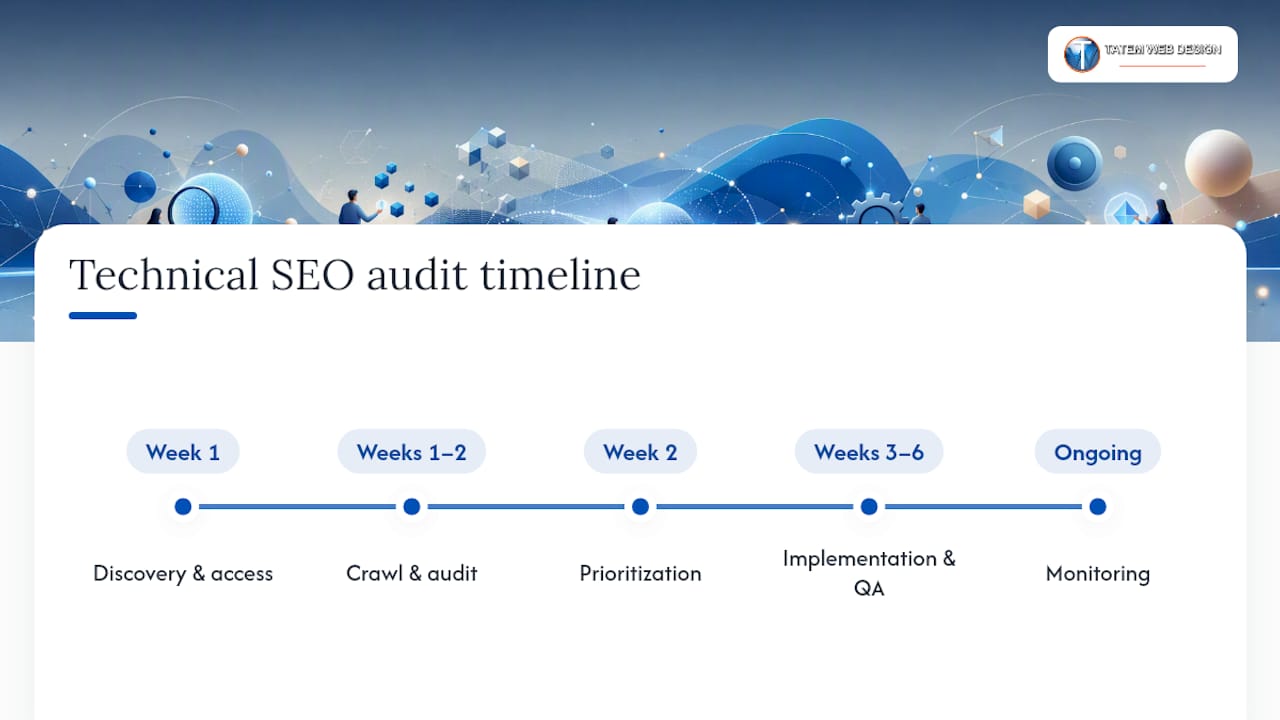
A professional technical SEO engagement follows a defined workflow, not a one-time checklist. Here is a typical timeline for a small-to-medium site (under 5,000 pages):
Week 1: Discovery and access setup. The agency gains access to Google Search Console, Google Analytics, and hosting or server logs. They document the site’s tech stack, CMS, hosting environment, and any known issues.
Weeks 1–2: Crawl and audit. A full site crawl with Screaming Frog or Sitebulb produces a raw issue list. The agency cross-references crawl data with Search Console coverage reports, log file analysis, and Lighthouse scores to build a complete picture.
Week 2: Prioritization. Issues are scored by impact and implementation effort. The deliverable is a prioritized action list with clear ownership (developer vs. CMS admin vs. content team) and estimated time for each fix.
Weeks 3–6: Implementation and QA. Fixes are staged, implemented, and verified. Each fix is re-tested with Search Console’s URL Inspection or a re-crawl to confirm resolution.
Ongoing: Monitoring. A monthly crawl and Search Console review catches regressions, new errors introduced by site updates, and crawl budget changes as the site grows.
Typical deliverables include a crawl report, a prioritized issue list with fix instructions, a QA checklist, and a monitoring plan. For larger sites, a dedicated log analysis report is added.
When to hire an agency: If your site is built on a JavaScript framework and content is not appearing in Search Console’s rendered HTML, that is a developer-level fix that benefits from agency oversight. Large crawl budget issues (tens of thousands of pages, many thin or duplicate), multilingual hreflang implementations across multiple domains, and security or compliance concerns (HIPAA, PCI) are all scenarios where a specialist saves significant time and avoids costly mistakes. Understanding when a digital agency adds value is a useful read for business owners weighing the decision.
Why technical SEO is the foundation, not an afterthought
Technical SEO is not a one-time project. Every site update, new page, plugin change, or hosting migration is an opportunity to introduce a crawl error, a broken redirect, or a rendering failure. The sites that maintain strong search visibility treat technical health as an ongoing discipline, not a launch checklist.
What most guides understate is how quickly technical debt compounds. A single misconfigured canonical on a category page can suppress dozens of product pages. A JavaScript rendering failure introduced by a theme update can quietly remove hundreds of pages from Google’s index over weeks before anyone notices. The symptom (traffic drop) appears long after the cause (the update), which makes diagnosis harder without a monitoring baseline.
After working across industries including healthcare, legal, real estate, and marine services for over 26 years, the pattern is consistent: businesses that invest in technical foundations early spend far less time recovering from visibility losses later. The audit workflow described here is the same one applied to every new client engagement, because the fundamentals do not change regardless of industry or site size.
Tatemweb handles technical SEO so you can focus on your business
Technical SEO audits, remediation, and ongoing monitoring are core services at Tatemweb, a Stuart, Florida digital agency with over 26 years of experience serving professional services firms, healthcare practices, legal offices, and small-to-medium businesses across Florida. The difference from a generic agency: Tatemweb pairs technical SEO work with AI-powered website builds and local SEO, so fixes are implemented on a technically sound foundation from day one, not retrofitted onto a problem site.

Whether you need a full technical audit, help resolving a specific crawl or indexing issue, or a new AI-built website designed with technical SEO baked in from the start, Tatemweb delivers clear deliverables and measurable outcomes. Call 772-224-8118 or visit Tatemweb’s website services page to schedule a technical SEO consultation and get a prioritized action plan for your site.
Sources
- In-Depth Guide to How Google Search Works | Google Search Central | Documentation | Google for Developers
- Schema
- Letsencrypt
- How search works
FAQ
What is technical SEO in simple terms?
Technical SEO is the process of optimizing your website’s infrastructure so search engines can crawl, render, and index your pages correctly. It covers site speed, HTTPS, mobile design, structured data, and crawlability controls like robots.txt and sitemaps.
What is the difference between technical SEO and regular SEO?
Regular SEO covers content quality, keyword targeting, and backlinks. Technical SEO focuses on the underlying site infrastructure: how search engines access, render, and index your pages. Both are necessary; technical SEO is the foundation that makes content SEO effective.
What is technical content in SEO?
Technical content in SEO typically refers to pages or documentation that explain complex processes, tools, or systems. From a technical SEO standpoint, any content must be crawlable, indexable, and rendered correctly to rank, regardless of its subject matter.
How much do technical SEO specialists earn?
Salaries for technical SEO roles vary widely by experience, location, and employer. Entry-level positions typically start lower, while senior technical SEO specialists at agencies or large companies earn significantly more. Freelance rates vary further based on project scope.
Is technical SEO something a small business can handle without an agency?
Many quick wins, such as submitting a sitemap, installing HTTPS, and fixing broken links, are manageable without a developer. Complex issues like JavaScript rendering failures, large-scale hreflang implementations, or crawl budget problems on sites with thousands of pages are best handled by a specialist or agency.
Recommended
Tatem Web Design
26+ YearsWeb Design & SEO Specialist · Tatem Web Design
Matt Tatem has been designing websites professionally since 1999, making Tatem Web Design one of Florida's longest-running web agencies. Based in Stuart, FL, he specializes in WordPress, local SEO, Shopify e-commerce, and cybersecurity consulting for small businesses.
What a CMMC Level 2 Assessment Requires and How to Prepare
Prepare for your CMMC Level 2 assessment by understanding requirements, assessment paths, and mapping your Controlled Unclassified Information.

A Data Retention Policy Is Your Rulebook for Keeping and Deleting Data
Establishing a clear data retention policy helps manage data risk, ensuring compliance and effective data management for your organization.

Law Firm Local SEO: A Practical Playbook for More Local Clients
Unlock more local clients for your law firm with effective local SEO strategies. Optimize your Google Business Profile and boost your visibility!