
Improving website user experience: A Florida business owner’s guide
Your website has roughly three seconds to earn a visitor’s trust before they leave and never come back. For Florida small and medium-sized businesses competing in crowded local markets, improving website user experience is not a design preference — it is a revenue decision. Poor load times, confusing navigation, and inaccessible layouts silently kill conversions every single day. This guide walks you through the exact steps to evaluate, fix, and sustain a better website experience using proven standards, practical tools, and AI-powered approaches tailored for your business.
Table of Contents
- Understanding the website user experience landscape
- Preparing your website for improvement: tools, metrics, and user feedback
- Executing targeted UX improvements for speed, navigation, and accessibility
- Incorporating AI to enhance user experience without sacrificing human judgment
- Verifying improvements and sustaining excellent user experience over time
- Why human-centered UX combined with AI is the future for Florida small businesses
- Explore AI-integrated web design and marketing solutions with Tatem Web Design
- Frequently asked questions
Key Takeaways
| Point | Details |
|---|---|
| UX impacts business success | Website user experience directly affects customer retention, brand reputation, and online visibility. |
| Measure before improving | Use tools like Google Search Console and real user feedback to identify key website UX issues. |
| Speed, navigation, accessibility | Focusing on these three areas delivers the most impactful user experience improvements. |
| Balance AI with human judgment | AI can accelerate research, but strategic UX design requires human insight and decision-making. |
| Continuous optimization | Monitoring metrics and performing regular A/B testing ensures sustained website UX excellence. |
Understanding the website user experience landscape
To improve your website’s user experience effectively, start by understanding its fundamental components and standards.

Website user experience (UX) covers far more than how your site looks. It describes how a visitor feels when they use your site — whether pages load quickly, whether content shifts unexpectedly, whether they can find what they need without frustration. Think of UX as the sum of every micro-interaction from the moment someone clicks your link to the moment they call your office or abandon the page.
Google formalizes this through Core Web Vitals, a set of measurable performance standards covering three dimensions: LCP (Largest Contentful Paint) for loading speed, INP (Interaction to Next Paint) for responsiveness, and CLS (Cumulative Layout Shift) for visual stability. The “Good” thresholds are LCP at or under 2.5 seconds, INP at or under 200 milliseconds, and CLS at or under 0.1. Miss these benchmarks and Google takes notice — which directly affects how well you rank in search results.
Accessibility is the other non-negotiable standard. WCAG 2.2 Level AA is the mainstream compliance target for most organizations, covering everything from color contrast and keyboard navigation to visible focus states. For Florida businesses serving healthcare patients, legal clients, or government contracts, accessibility compliance is not just good practice — it is often a procurement requirement.
Here is why UX standards matter beyond compliance:
- Search rankings: Google’s Page Experience signals include Core Web Vitals, meaning a faster, more stable site ranks higher.
- Bounce rates: Slow or confusing pages increase bounce rates, reducing the number of visitors who convert into leads.
- Brand perception: A polished, accessible site signals professionalism, particularly important in competitive sectors like real estate, law, and healthcare.
- Customer retention: Visitors who have a good experience return. Those who struggle rarely do.
Investing in professional website design that accounts for all these factors positions your business for long-term growth rather than short-term traffic spikes. Explore modern web design strategies that align technical performance with business goals to understand what a full-spectrum approach looks like in practice.
Preparing your website for improvement: tools, metrics, and user feedback
With foundational UX concepts clear, let’s prepare to analyze your site’s current user experience in detail.
You cannot fix what you cannot measure. Before making a single design change, you need a clear picture of where your site stands today. The good news is that the most important diagnostic tools are free and available right now.
Start with these five preparation steps:
- Set up Google Search Console. Navigate to the Experience section and open the Core Web Vitals report. This report uses real user data collected from Chrome browsers (called CrUX data) and segments performance by mobile and desktop separately. This matters because your desktop site might score well while your mobile experience is failing visitors.
- Install a behavior analytics tool. Heatmaps and session recordings show you exactly where users click, scroll, and stop. Tools in this category reveal navigation dead ends you would never spot by just browsing your own site.
- Audit your bounce rate and session duration. Pull these figures from your analytics dashboard. A bounce rate above 70% on key service pages is a red flag. Pair this with average session duration to understand whether people are actually reading your content.
- Map your conversion paths. Which pages lead visitors toward a phone call, form submission, or purchase? Identify where visitors drop off in those paths — that dropout point is usually your biggest UX problem.
- Gather direct user feedback. Collect feedback from users through short on-site surveys, follow-up emails after service interactions, Google Reviews responses, and informal usability tests with a few real customers. Ask them what confused them, what they could not find, and what made them hesitant.
Here are the key metrics to track before and after changes:
- LCP, INP, and CLS scores from Search Console
- Bounce rate by page (not just sitewide)
- Mobile vs. desktop conversion rate
- Top exit pages (pages where visitors leave most often)
- Average page load time from your analytics or a performance testing tool
Pro Tip: Run your most important page through a free performance tester and screenshot the results. This becomes your baseline. When you make improvements, run it again and compare. Without a baseline, you are guessing at progress.
Once you have your data, document specific UX goals before touching a single design element. For example: “Reduce mobile LCP from 4.8 seconds to under 2.5 seconds” or “Increase contact form completions by 20% within 90 days.” Clear goals make your improvement efforts measurable and accountable. Learn more about improving user experience systematically before your next site update.
Executing targeted UX improvements for speed, navigation, and accessibility
Now that you know your site’s UX state, let’s implement effective, measurable improvements across key areas.
This is where the real work begins. Enhancing web usability requires working through three interconnected areas: performance, navigation design, and accessibility. Address all three and you will see compounding improvements in both user satisfaction and search rankings.
Speed and loading performance
To improve LCP, focus on these actions in order of impact:
- Reduce server response time. Upgrade to faster hosting, enable server-side caching, or use a Content Delivery Network (CDN) to serve files from servers geographically closer to your Florida visitors.
- Optimize images. Convert images to modern formats like WebP or AVIF. Compress file sizes without visible quality loss. Lazy-load images that appear below the fold so the browser prioritizes what the user sees first.
- Remove render-blocking resources. JavaScript and CSS files that load before your page content delay what users see. Defer non-critical scripts and inline critical CSS so the browser can paint the page faster.
- Preload your hero image. The largest image on your page, usually a banner or header photo, is typically the LCP element. Adding a preload tag for that image alone can cut your LCP by half a second or more.
Mobile navigation and user interface improvements
Mobile-first navigation should follow these principles to keep visitors engaged:
- Limit primary menus to 5 to 7 options at most. Every extra item forces a decision and increases cognitive load.
- Use consistent, descriptive labels. “Services” means nothing. “Dental Implants” or “Business Tax Filing” tells visitors exactly where they are going.
- Place your primary call to action (phone number, “Get a Quote,” “Schedule Appointment”) visibly above the fold on mobile — not buried in a footer.
- Make tap targets at least 44 by 44 pixels so users with average thumbs can tap buttons without misfiring.
- Test your navigation with real users on actual phones, not just by resizing a browser window.
Pro Tip: Ask three people who have never seen your website to find a specific piece of information, then watch silently. Where they hesitate or click wrong is exactly where your navigation needs work. This five-minute test beats hours of guesswork.
Accessibility using WCAG 2.2
WCAG 2.2 Level AA criteria give you a concrete checklist. Priority items include:
| Accessibility Area | What to fix | Why it matters |
|---|---|---|
| Focus visibility | Style keyboard focus indicators so they are clearly visible | Users who cannot use a mouse need to see where they are on the page |
| Color contrast | Ensure text-to-background contrast ratio is at least 4.5:1 | Low contrast fails users with visual impairments and fails on bright Florida sunlight screens |
| Target size | Interactive elements should be at least 24×24 pixels (Level AA) | Reduces accidental taps on mobile |
| Keyboard navigation | All functions reachable by keyboard alone | Critical for users with motor disabilities |
| Alt text | Descriptive alt text on every meaningful image | Screen readers read this aloud to visually impaired users |
Improving site accessibility and optimizing mobile user experience together covers the majority of user interface improvements that move the needle fastest. Explore how responsive web design intersects with these accessibility standards, and consider whether a website redesign with AI could implement these improvements more efficiently than piecemeal fixes.
Incorporating AI to enhance user experience without sacrificing human judgment
Beyond fundamentals and manual optimizations, AI technology offers powerful ways to elevate website UX when used thoughtfully.
AI changes how quickly you can gather insight and act on it. A task that once required hiring a research firm — analyzing thousands of user session recordings, identifying click patterns, predicting where visitors will drop off — can now be processed in hours. That speed is genuinely useful for Florida SMBs that do not have large in-house marketing teams.
Here is where AI adds real UX value:
- Behavior analysis at scale. AI tools can scan session recordings and heatmap data to surface patterns you would miss manually — like the fact that 60% of your mobile visitors are tapping an unlinked image expecting it to be clickable.
- A/B testing acceleration. AI can identify statistically significant results faster and suggest which variant to test next based on prior outcomes.
- Personalization. AI can show different page content to a returning visitor versus a first-time visitor, or tailor content based on the visitor’s location — a Florida dentist’s website, for example, could surface hurricane season appointment reminders for returning local patients.
- AI chatbots for real-time support. A well-configured AI chatbot reduces friction for visitors who have questions at 11 PM when your office is closed. It captures leads, answers FAQs, and guides users to the right page — all without a human on call.
- Predictive navigation. AI can analyze which pages users visit in sequence and suggest the most likely next step, reducing the number of clicks needed to reach a conversion.
However, AI-integrated UX workflows accelerate analysis and support user research but do not replace human judgment and research-informed design. This matters more than most people realize. AI can tell you what users are doing. Only a skilled human can understand why — and the “why” is what drives meaningful design decisions.
NN/g’s research makes this clear: the competitive advantage in UX is shifting to research-informed judgment precisely because AI makes it easier to generate interfaces. Any business can push a button and create a visually acceptable website. The businesses that win are the ones whose sites reflect a deep understanding of what their specific customers actually need.
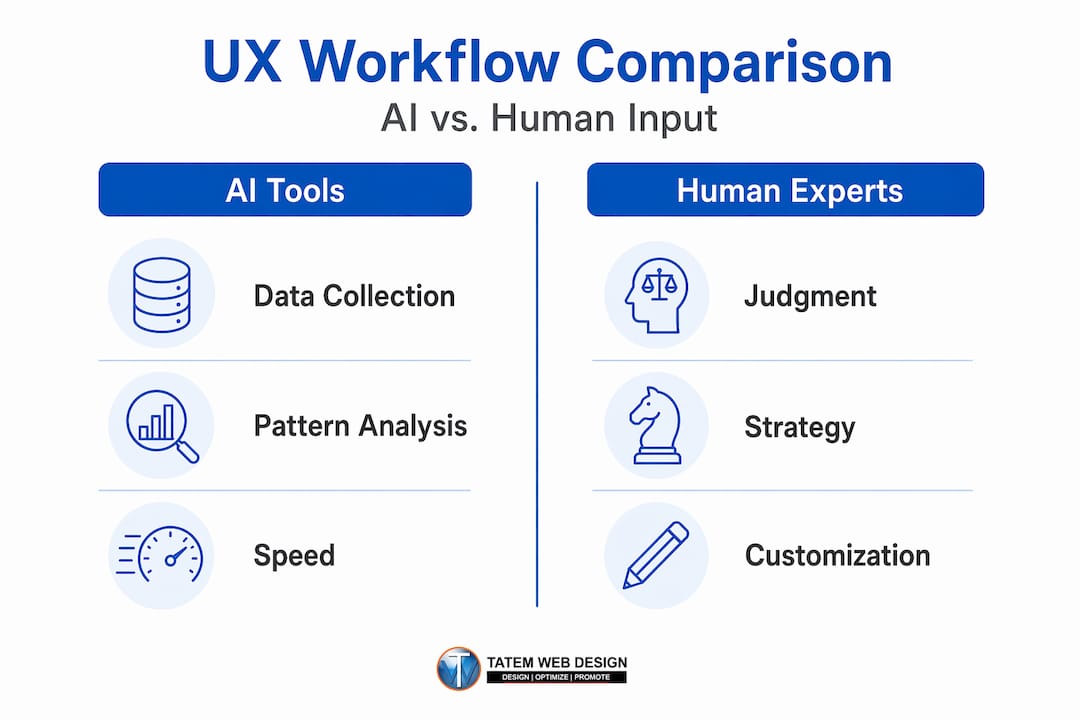
Pro Tip: Use AI tools to handle the data collection and pattern recognition, then bring a human strategist in to interpret the findings and make design decisions. This division of labor gets you the best of both: speed and accuracy.
Explore top AI tools for web design and understand how using AI in website building works in practice for Florida businesses like yours.
Verifying improvements and sustaining excellent user experience over time
After applying improvements, reliable verification and continuous optimization keep your website UX competitive and compliant.
Making UX changes without monitoring their effect is like renovating a restaurant without watching whether more customers come back. The verification phase is not optional — it is where you confirm that your investment actually worked.
Follow this verification sequence:
- Return to Google Search Console. After 28 days (the minimum data window for Core Web Vitals), check your updated scores in the Experience section. Look for shifts in the ratio of “Good,” “Needs Improvement,” and “Poor” URLs.
- Segment by device. Your mobile and desktop visitors have very different experiences. Reviewing aggregate data alone can hide a mobile crisis behind strong desktop numbers.
- Compare before-and-after analytics. Pull bounce rate, session duration, and conversion rate for the pages you changed. Compare the 30 days before and after the change.
- Run another accessibility audit. Tools like browser-based accessibility checkers can quickly flag any regressions introduced during redesign work.
- Collect fresh user feedback. A short survey or a new round of informal usability testing confirms whether visitors actually notice the improvement — or whether more work is needed.
Here is a practical monitoring schedule to maintain UX quality:
| Frequency | Task |
|---|---|
| Weekly | Check Search Console for new “Poor” URL flags |
| Monthly | Review bounce rate and conversion rate by page |
| Quarterly | Run full accessibility audit against WCAG 2.2 Level AA |
| Quarterly | Conduct user feedback collection (survey or usability test) |
| Bi-annually | Full Core Web Vitals performance review and competitive benchmarking |
A/B testing key design elements including copy, visuals, and calls to action should be continuous, not a one-time event. Test one variable at a time — a headline change, a button color, a form length — so you know exactly what drove a shift in results.
Pro Tip: Create a shared Google Sheet or project doc where your team logs every UX change by date. When you review metrics three months later, you need to know which change happened when. Without a change log, attribution becomes a guessing game.
Broken links, outdated content, and slow new images added without optimization will quietly erode UX gains over time. Build a monthly maintenance checklist into your operations and treat it like bookkeeping — not optional, not skippable. Revisit your ongoing website redesign and AI integration strategy regularly to stay ahead of changing user expectations and algorithm updates.
Why human-centered UX combined with AI is the future for Florida small businesses
Here is an uncomfortable truth most agencies will not say out loud: a lot of AI-generated websites look fine, and that is exactly the problem.
When everyone uses the same AI tools to generate layouts, color schemes, and copy, the result is a flattening of digital identity. Your Florida law firm’s website starts to look like a dental practice’s website, which starts to look like a landscaping company’s website. Visitors feel it even if they cannot name it — a vague sense that nothing about your site feels yours. That feeling erodes trust faster than a slow load time.
NN/g’s 2026 State of UX frames this precisely: UI is becoming easier to generate, so the competitive advantage shifts to research-informed understanding and careful judgment about user problems and business goals. In other words, the businesses that invest in truly understanding their customers — their anxieties, their decision-making patterns, their specific needs in the Florida market — will build sites that AI alone cannot replicate.
For a Martin County real estate firm, that means understanding that buyers relocating from the Northeast want to see flood zone information before they ask for a showing, not buried in a PDF after they call. For a Stuart-based medical practice, it means recognizing that patients checking in on mobile at 7 AM want the appointment booking flow to take three taps, not twelve. These insights do not come from an algorithm. They come from conversations, observation, and strategic thinking.
AI accelerates the research, the testing, and the iteration. It gives you time back so you can focus on the thinking that actually differentiates your business. The Florida SMBs that will lead their markets in the next five years are the ones building human-centered AI workflows right now — using AI to move fast while investing human judgment to move smart.
Your expert guide to professional website design is the foundation. The AI tools are the accelerator. Your customer understanding is the engine.
Explore AI-integrated web design and marketing solutions with Tatem Web Design
If you are ready to move from reading about UX improvements to actually implementing them, the right partner makes all the difference. Tatem Web Design, based in Stuart, Florida, has spent over 26 years helping small and medium-sized businesses across the state build websites that perform, convert, and grow.
Our AI website design services are built specifically for Florida SMBs that need fast, secure, SEO-ready websites without sacrificing the human judgment that makes a site genuinely useful to real customers. From AI chatbot integration and lead capture tools to comprehensive AI services covering local SEO, content writing, and cybersecurity compliance, we handle the technical complexity so you can focus on running your business. Explore our full range of professional website services and call us directly at 772-224-8118 to schedule a consultation and see exactly how AI-enhanced UX can work for your business.
Frequently asked questions
What are Core Web Vitals and why do they matter?
Core Web Vitals are Google’s performance benchmarks measuring LCP (loading speed), INP (responsiveness), and CLS (visual stability) — three factors that directly affect both user satisfaction and your search rankings.
How does WCAG 2.2 help improve website accessibility?
WCAG 2.2 provides testable, tiered criteria — with Level AA as the standard target — covering keyboard navigation, visible focus, color contrast, and target size to make your site usable for everyone, including users with disabilities.
Can AI replace the need for UX experts in website design?
AI-integrated workflows speed up data collection and pattern analysis, but human experts remain essential for interpreting context, understanding user motivations, and making the strategic design decisions that actually differentiate a business.
What is a practical first step for small businesses to improve website user experience?
Set up Google Search Console to access your Core Web Vitals data and simultaneously collect direct user feedback — together, these two inputs reveal your biggest UX bottlenecks faster than any other method.
How often should businesses test and update their website UX?
Continuous A/B testing and monthly monitoring are the baseline, with quarterly accessibility audits and bi-annual full performance reviews keeping your site competitive and compliant over time.
Recommended
- Improve user experience in web design for business growth | Tatem Web Design
- Professional website design: An expert guide for Florida businesses | Tatem Web Design
- Website redesign guide: boost visibility and add AI | Tatem Web Design
- Mobile responsive design to boost your Florida business | Tatem Web Design
Tatem Web Design
26+ YearsWeb Design & SEO Specialist · Tatem Web Design
Matt Tatem has been designing websites professionally since 1999, making Tatem Web Design one of Florida's longest-running web agencies. Based in Stuart, FL, he specializes in WordPress, local SEO, Shopify e-commerce, and cybersecurity consulting for small businesses.
What a CMMC Level 2 Assessment Requires and How to Prepare
Prepare for your CMMC Level 2 assessment by understanding requirements, assessment paths, and mapping your Controlled Unclassified Information.

A Data Retention Policy Is Your Rulebook for Keeping and Deleting Data
Establishing a clear data retention policy helps manage data risk, ensuring compliance and effective data management for your organization.

Law Firm Local SEO: A Practical Playbook for More Local Clients
Unlock more local clients for your law firm with effective local SEO strategies. Optimize your Google Business Profile and boost your visibility!