
What is web accessibility? A guide for Florida businesses
Web accessibility is one of those topics that most business owners think they understand until they realize they don’t. At its core, web accessibility means designing and developing web content so that people with disabilities can perceive, understand, navigate, and interact with it, including through assistive technologies. But here’s what surprises most Florida business owners: accessibility improvements benefit every single visitor to your site, not just those with disabilities. This guide breaks down what web accessibility is, why it matters for your bottom line, what standards govern it, and exactly how to start improving your site today.
Table of Contents
- Understanding web accessibility: What it is and why it matters
- The standards behind accessibility: WCAG, WAI, and the law
- The POUR model: Four core principles of accessible web design
- How accessibility helps SEO, user experience, and business growth
- Getting started: Practical steps to make your website accessible
- Web accessibility: What most business owners get wrong
- Connect with Florida’s web accessibility and AI experts
- Frequently asked questions
Key Takeaways
| Point | Details |
|---|---|
| Accessibility benefits everyone | Accessible websites improve experiences for all users, not just those with disabilities. |
| Legal standards matter | Complying with ADA, WCAG, and Section 508 reduces legal risk for US businesses. |
| POUR principles guide design | Perceivable, Operable, Understandable, Robust—these principles ensure usable, accessible sites. |
| Accessibility boosts SEO | Improvements often enhance SEO, user experience, and engagement. |
| Start with simple steps | Business owners can check and improve accessibility with basic tools and guidance. |
Understanding web accessibility: What it is and why it matters
The web accessibility definition most people encounter is narrow. They picture screen readers for blind users and not much else. The reality is far broader. Web accessibility means your site works for someone using a keyboard instead of a mouse, someone watching your video in a noisy waiting room without sound, someone with a slow mobile connection in rural Florida, and yes, someone using a screen reader or voice control software.
“Web accessibility is not a feature. It is the foundation of a usable website for every kind of visitor you want to reach.”
Think about the numbers. One in four adults in the United States lives with some form of disability. That is a massive portion of your potential customer base. If your website cannot be used by those individuals, you are not just missing sales. You are potentially violating federal law.
Why web accessibility matters for Florida businesses:
- Legal exposure: US businesses face real legal risk under the Americans with Disabilities Act (ADA) and Section 508. ADA web guidance explicitly references WCAG as a helpful technical standard for compliance. Florida businesses, including restaurants, law firms, medical practices, and retailers, have all faced ADA-related web complaints.
- Broader audience reach: Accessible sites work better for older users, mobile users, and anyone in a challenging environment. That covers a large share of Florida’s population, including retirees and tourists browsing on phones.
- SEO benefits: Many accessibility practices, like clear page structure, descriptive image alt text, and logical heading hierarchies, also help search engines understand your content. More on this shortly.
- User experience: An ADA website compliance approach forces you to think about clarity, navigation, and readability, which makes your site better for everyone.
Common misconceptions that cost business owners:
- “My customers don’t have disabilities.” You don’t know that, and even if true today, situational limitations (bright sunlight, broken hand, loud environment) affect everyone.
- “Accessibility is too expensive.” Many fixes are free or low-cost. Skipping them is far more expensive when a legal complaint arrives.
- “My site is fine because it looks good.” Visual design and accessibility are not the same thing. A beautiful site can be completely inaccessible to someone using a keyboard or screen reader.
For a thorough breakdown of what accessibility compliance involves, the complete web accessibility guide covers the full picture in practical terms.
The standards behind accessibility: WCAG, WAI, and the law
Once you accept that web accessibility matters for your business, the next question is: what are the actual rules? Three names come up constantly: WCAG, WAI, and the ADA.
The W3C Web Accessibility Initiative (WAI) develops the standards and supporting resources used to make the web accessible. WAI is the body that created and maintains WCAG, the Web Content Accessibility Guidelines. Think of WAI as the organization and WCAG as the rulebook they publish.
WCAG comes in levels: A (minimum), AA (the standard most businesses target), and AAA (the highest, rarely required in full). Most legal guidance and best practices point to WCAG 2.1 Level AA as the target for businesses. ADA web guidance explicitly references WCAG as the technical benchmark for web compliance in the US.
Comparison of the three main frameworks:
| Framework | What it is | Who it applies to | Legal force |
|---|---|---|---|
| WCAG 2.1 | Technical guidelines for accessible web content | Any website globally | Not law itself, but referenced by law |
| ADA | Federal civil rights law covering disability access | Private businesses open to the public | Yes, federal law |
| Section 508 | Federal accessibility standard for IT | Federal agencies and their contractors | Yes, for covered entities |
How to determine which standard matters for your Florida business:
- Are you a private business serving the public? The ADA almost certainly applies to you. This covers retail, healthcare, legal, real estate, hospitality, and most service businesses.
- Do you contract with the federal government? Section 508 applies to your digital products and services.
- What technical target should you aim for? WCAG 2.1 Level AA is the practical standard that satisfies both ADA and Section 508 expectations.
- Are you in a regulated industry? Healthcare and financial services have additional requirements layered on top of general accessibility law.
- Do you have an existing site? Start with an ADA and WCAG overview audit to find your current gaps before prioritizing fixes.
If you are unsure where your business falls, an IT support consultation can help clarify your obligations before you invest in changes. For Florida businesses building or redesigning sites, the expert web design guide addresses how these standards fit into the design process from day one.
The POUR model: Four core principles of accessible web design
WCAG is built on four principles that every accessible website must satisfy. They form the POUR model: Perceivable, Operable, Understandable, and Robust. These are not abstract ideals. Each one translates directly into specific features on your website.

1. Perceivable Every piece of content on your site must be available to users through at least one of their senses. If someone cannot see your images, they need text descriptions. If someone cannot hear your video, they need captions. A Florida dental practice that posts video testimonials without captions is failing this principle for deaf visitors and anyone watching on mute in a waiting room.
2. Operable Every function on your site must work without a mouse. Keyboard-only navigation, no time limits that trap users, and no flashing content that could trigger seizures. A real estate site with a property search tool that only works with a mouse is operability failure.
3. Understandable Your content and interface must be clear. This means plain language, consistent navigation, helpful error messages in forms, and labels on every input field. A legal firm’s contact form that shows a red border on an error but no explanation of what went wrong fails this principle.
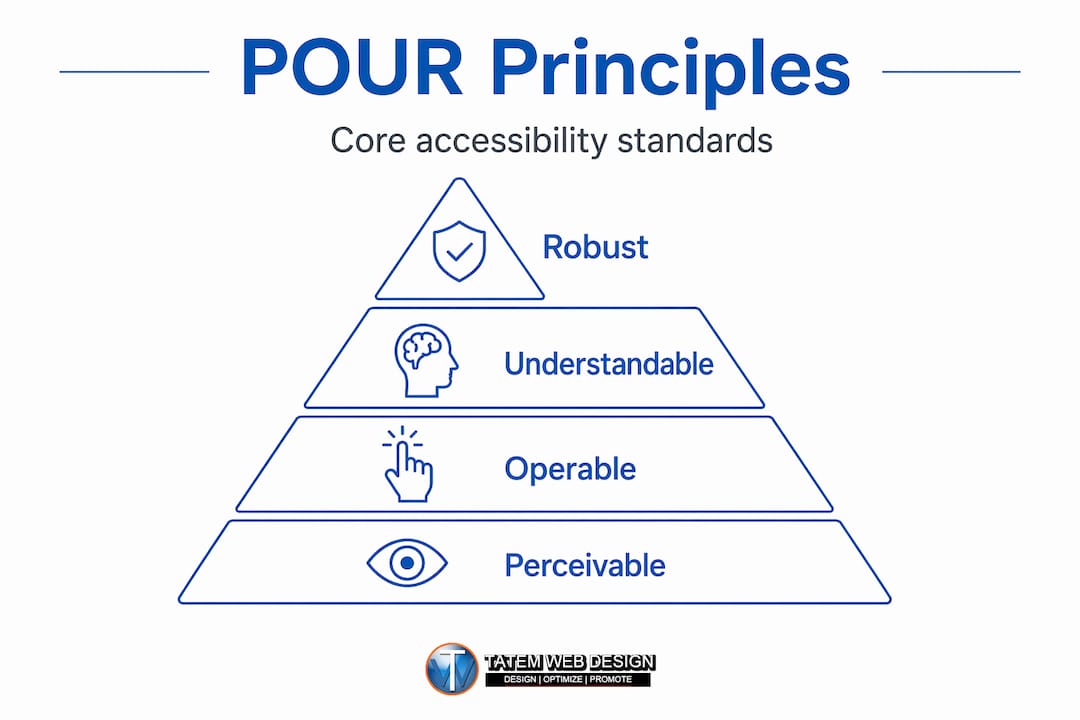
4. Robust Your site must work reliably across different browsers, devices, and assistive technologies. Code quality matters here. A site built on outdated or broken HTML may display fine in Chrome but fall apart for a screen reader user.
POUR principles mapped to real website features:
| POUR principle | Real-world example | Common failure |
|---|---|---|
| Perceivable | Alt text on product images | Images with no description |
| Operable | Keyboard-accessible menus | Dropdown menus that need a mouse hover |
| Understandable | Clear form error messages | “Invalid input” with no context |
| Robust | Clean, validated HTML | Broken code that confuses screen readers |
For a deeper look at how these principles apply to your specific site type, the web accessibility guide walks through industry-specific scenarios. Pairing POUR with responsive web design best practices gives you a site that works for every user on every device.
Pro Tip: Don’t assume POUR only matters for users with permanent disabilities. A construction worker with a broken wrist needs keyboard navigation. A senior reading on a tablet in bright Florida sunlight needs strong color contrast. POUR principles solve real problems for real customers every day.
How accessibility helps SEO, user experience, and business growth
Here is the insight most web guides skip: accessibility and SEO share a significant amount of DNA. When you improve your site for a screen reader user, you are often improving it for a search engine crawler at the same time.
“Because WCAG is often treated as a de facto benchmark for accessibility conformance, improving accessibility can overlap with usability improvements that affect SEO and user experience, even though search engines don’t ‘rank by accessibility’ alone.”
Consider what happens when you add descriptive alt text to every image on your site. Screen reader users can now understand those images. And Google can now index that content, potentially ranking your pages for image-related searches. The same logic applies to heading structure, link descriptions, page titles, and readable font sizes.
Specific ways accessibility improvements support business growth:
- Lower bounce rates: Clear navigation and readable content keep visitors on your site longer, which signals quality to search engines.
- Better mobile performance: Accessible design principles overlap heavily with mobile-friendly design. Florida has a high rate of mobile-first browsing, especially among tourists and younger demographics.
- Stronger brand trust: A site that works for everyone signals professionalism. Healthcare providers, law firms, and financial advisors in Florida benefit enormously from this perception.
- Wider reach: Accessible sites reach users who would otherwise leave immediately, including older adults, a major demographic in Florida’s market.
- Reduced legal risk: Every accessibility improvement reduces your exposure to ADA complaints, which have increased significantly year over year.
For healthcare providers in Florida, healthcare website accessibility is both a compliance issue and a patient trust issue. A site that works for an elderly patient with low vision is a site that earns their business. The responsive design benefits that come from accessibility-focused builds extend to every visitor, not just those with disabilities.
Pro Tip: Automated accessibility scanners catch roughly 30 to 40 percent of real issues. They are a useful starting point, but they cannot tell you whether your content is actually understandable or whether your navigation makes sense to a first-time visitor. Always combine automated tools with real user testing.
Getting started: Practical steps to make your website accessible
You do not need to overhaul your entire site overnight. Accessibility improvements follow a logical priority order, and many of the highest-impact fixes take less than an hour to implement.
Step-by-step starting roadmap:
- Run an automated scan. Tools like WAVE or Axe give you a free baseline report. They flag missing alt text, low color contrast, missing form labels, and other common errors. This is your starting inventory.
- Fix the quick wins first. Add alt text to images, fix color contrast issues, add labels to all form fields, and ensure every page has a unique, descriptive title tag. These changes are fast and have immediate impact.
- Test keyboard navigation. Open your site and put your mouse aside. Use only the Tab key to move through your pages. Can you reach every link, button, and form? If not, you have operability failures that need developer attention.
- Check your headings. Your page should use headings in logical order (H1, then H2, then H3). Skipping levels or using headings just for visual size confuses screen readers and hurts SEO.
- Review video and audio content. Every video needs captions. Every audio clip needs a transcript. This is one of the most commonly missed requirements for Florida businesses that use video marketing.
- Test on mobile. Use your site on a phone with the text size increased. Can you still read and navigate everything? Accessible design and mobile-friendly design overlap significantly here.
- Bring in human review. Accessibility testing works best when it mixes automated checks with human evaluation. Ask someone unfamiliar with your site to complete a key task, like filling out a contact form or finding your hours.
Ongoing maintenance checklist:
- Review accessibility after every major site update or content addition
- Test new forms, popups, and interactive features before publishing
- Keep your CMS, plugins, and themes updated (outdated code is a common source of accessibility failures)
- Document your accessibility efforts in a public accessibility statement on your site
The comprehensive accessibility guide provides a more detailed checklist with specific WCAG criteria mapped to each action item, which is useful when working with a developer or agency.
Web accessibility: What most business owners get wrong
After more than 26 years of building websites for Florida businesses, we have seen the same mistake repeat itself across industries: business owners treat accessibility as a one-time checkbox. They get an audit done, fix the flagged issues, and consider the job complete. Then they add a new contact form, update their homepage banner, or install a new plugin, and the accessibility problems come right back.
Accessibility is not a project. It is a practice. Every content update, every new page, every new feature is an opportunity to introduce new barriers. The businesses that truly protect themselves legally and serve their customers best are the ones that build accessibility into their workflow, not bolt it on at the end.
Here is the part that surprises most clients: the biggest risks are invisible. You will never see the customer who landed on your site, couldn’t navigate your menu with their keyboard, and left without contacting you. You will never know about the ADA complaint that was filed quietly before you received a demand letter. You will never measure the search rankings you lost because your page structure was confusing to crawlers. These are silent losses, and they add up.
The flip side is equally true. Businesses that invest in accessibility often see measurable gains in organic search performance, time-on-site, and conversion rates, even before accounting for the expanded audience they now reach. A Florida law firm we worked with added proper heading structure, improved color contrast, and added alt text across their site as part of an accessibility update. Within three months, their organic traffic had increased noticeably, and their contact form submissions followed.
The uncomfortable truth is that most business owners know their site has accessibility issues and choose to address them only after a complaint arrives. That is the most expensive way to handle it. Proactive accessibility investment costs a fraction of reactive legal defense. The expert design perspective we apply to every project starts with accessibility as a foundation, not an afterthought.
Connect with Florida’s web accessibility and AI experts
If this article made you realize your website has gaps, you are already ahead of most business owners in Florida. The next step is getting a clear picture of where you stand and what it will take to fix it.
At Tatem Web Design, we build AI website design solutions that are accessibility-ready from the ground up, combining WCAG compliance with AI-powered SEO, speed, and security. Whether you need a full site rebuild, an e-commerce web design solution that meets ADA standards, or a review of your existing site’s compliance posture, our team brings over 26 years of Florida-specific expertise to every project. Explore our full range of AI web services or call us directly at 772-224-8118 to schedule a consultation. Accessibility is not just a legal requirement. It is a competitive advantage, and we help you use it as one.
Frequently asked questions
What is the difference between ADA and WCAG?
The ADA is the US federal law that requires businesses to provide accessible experiences, while WCAG provides the technical standards that define what “accessible” means in practice for websites. Think of ADA as the law and WCAG as the rulebook used to satisfy it.
Does making a website accessible improve SEO?
Yes, in many practical ways. Accessibility improvements like clear heading structure, descriptive alt text, and readable content also help search engines understand and rank your pages, even though accessibility alone is not a direct ranking factor.
What’s a quick way to check if my site is accessible?
Start with a free automated tool like WAVE or Axe for an initial scan, but remember that effective accessibility testing always combines automated checks with real human evaluation to catch issues that tools cannot detect.
Who benefits most from web accessibility improvements?
Everyone benefits. Accessible web content helps people with permanent disabilities, but it also improves the experience for mobile users, older adults, people in noisy or bright environments, and anyone using an older device or slow connection.
Are there legal penalties for inaccessible websites?
Yes. US businesses can face lawsuits, demand letters, and settlements under the ADA if their websites are not accessible. ADA web guidance makes clear that the law applies to websites, and complaints against Florida businesses have increased significantly in recent years.
Recommended
Tatem Web Design
26+ YearsWeb Design & SEO Specialist · Tatem Web Design
Matt Tatem has been designing websites professionally since 1999, making Tatem Web Design one of Florida's longest-running web agencies. Based in Stuart, FL, he specializes in WordPress, local SEO, Shopify e-commerce, and cybersecurity consulting for small businesses.
What a CMMC Level 2 Assessment Requires and How to Prepare
Prepare for your CMMC Level 2 assessment by understanding requirements, assessment paths, and mapping your Controlled Unclassified Information.
A Data Retention Policy Is Your Rulebook for Keeping and Deleting Data
Establishing a clear data retention policy helps manage data risk, ensuring compliance and effective data management for your organization.
Law Firm Local SEO: A Practical Playbook for More Local Clients
Unlock more local clients for your law firm with effective local SEO strategies. Optimize your Google Business Profile and boost your visibility!